
Bee Collections
Usability
Bee uses composite types to declare ...
- new data types
- structured variables
- structured constants
New Types
A new type is defined from a super-type using symbol "<:"
-- type declaration
type new_type: descriptor <: super_type;
Legend:
- new_type ::= identifier name usually start with capital letter
- descriptor ::= depending on super-type
- super_type ::= primitive type or composite type
Note:
- The type descriptor is usually enclosed in parenthesis: (), [] or {}
- The super_type is optional. It can be inferred from type descriptor
Check for Membership
We can check if an element is included in a collection using "∈". That is the same operator we use to define a collection. The operator has double meaning.
type  MapName: {A:U} <: Map;

rule main:
   new map  := {a:"first", b:"second"} ∈ MapName;
   when ('a' ∈ map) do
     print("a is found");
   else
     print("not found");
   done;
return;
Core Collections
Bee predefined collections are implemented in the language kernel. While these collections cover most use-cases, they also represent the base for inheritance. Core collections are so called "battery included" features.
1-Based Indexing & the $ End Anchor
Every indexed collection (List, Array, Matrix, String, Slice) is 1-based: the first element is [1] and indices run from 1 to the collection length. Index 0 is not a valid element position — it raises E1006 ZeroBasedIndexAttempt.
The $ token is the dynamic end anchor: it yields the collection length ($[L] = |L|), so it addresses the last element. Combined with arithmetic it becomes position-relative to the end:
new list := (10, 20, 30, 40);

print list[1];     -- First element: 10
print list[$];     -- Last element: 40
print list[$ - 1]; -- Second-to-last element: 30 (relative to the end)
$ also composes with the range operators to slice from a dynamic endpoint:
new slice := list[2..$ - 1]; -- view of elements 2..3: <20, 30>
Slicing — Views, Not Copies
A slice expression collection[a..b] creates a view (a reference window) into the original collection, not an extraction. No elements are copied; the slice aliases the source storage, so mutations through the view are visible in the original collection and vice versa:
new list  := (10, 20, 30, 40);
new slice := list[2..$ - 1]; -- view of elements 2..3

let slice[1] := 99;          -- writes through the view
print list[2];               -- 99 (original collection is affected)
Reference Assignment vs. Clone Assignment ::
Assigning a collection (or slice) with := binds a reference; both names share the same storage. To obtain an independent collection, use the clone-assignment operator ::, which performs a deep copy at binding time:
new alias := list;           -- reference: alias and list share elements
new clone :: list;           -- deep copy: clone is independent
new frozen :: list[2..3];    -- materialize a view into a real sub-collection

let clone[1] := 0;           -- does not affect list
:: is a binding operator (parallel to :=), not a prefix expression; it appears where := would appear in new and let statements.
Ordinal Type
Ordinal is an ordered small set of identifiers. Each identifier represents an integer value starting from a specified number with interval of one. It can be used for ranking, selection or codification.
The set of elements is enclosed in curly brackets, separated by comma. Usually the first element has value 1, but this can be specified using (n) in front of the curly bracket: (n){elements}.
Declaration Pattern:
type OrdinalName: (1){name1, name2, name3} <: Ordinal;
rule main:
  new a, b, c ∈ Type; -- a, b, c will have same type

  let a := OrdinalName.name1; -- 1
  let b := OrdinalName.name2; -- 2
  let c := OrdinalName.name3; -- 3
return;
Public elements: When element name start with "." no need to use qualifiers for the individual values. This is because values starting with "." are public by default and known in the scope where ordinal is defined (or loaded).
-- using public elements in ordinal
type Type: (0){.name0, .name1} <: Ordinal;
rule main()
   new a, b ∈ Type;

   let a := name0; -- a = 0
   let b := name1; -- b = 1
return;
Lists
A list is a dynamic collection of elements connected by two references:
- prior: element reference
- next: element reference
A list has two very important elements:
- head: first element, you can find it with [1]
- tail: last element, you can find it with [$]
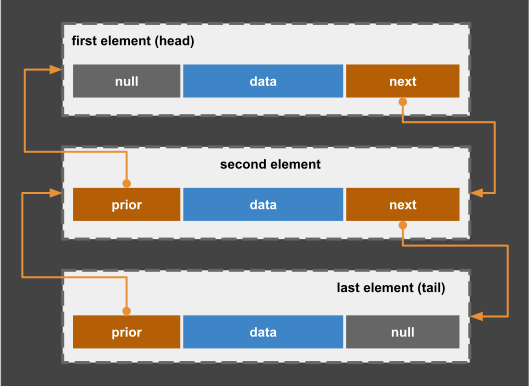
Chained List
list type
You can define a list type using empty list: ()
type Type_name: (element_type) <: List;
variable declaration You can use one of three forms of declarations:
-- declare empty list without type
new name1: ();  -- element type will be established later

-- declare empty list
new name1: ();

-- declare populated lists using type inference
new name2 := (e1,e2...); -- implicit declaration

-- add declaration of type of elements in the list for stronger typing
new name3 := (e1,e2...) ∈ Type_name; -- full declaration
properties
- a list has unlimited capacity,
- a list can be initially empty (),
- all elements in a list have the same type,
- elements in a list are ordered,
- accessing elements in a list by index is slow.
Example1:
-- define a diverse list
new two:(Z) <: List;  -- empty list of integers = ()
new one:(0);       -- initialize list using type inference
new two:(1,2);     -- initialize list with two elements
Example2:
-- list traversal demo
rule main:
  -- define a list variable of defined type Lou
  new myList := (0, 1, 2, 3, 4, 5);
  -- list traversal
  cycle: for ∀ x ∈ myList do
    write x;
    write "," if (x ¬ myList.head);
  done;
  print; -- 0,1,2,3,4,5
rule;
Arrays
Bee define Arrays using notation: [type](c), where [type] is the data type of elements and (c) is the capacity (total number of elements). Arrays are automatically initialized. However, if the array contains composite types all elements are null until initialized.
Syntax:
-- diverse array variables
new array_name1: [element_type]  ;    -- single element array
new array_name3: [element_type](c);   -- capacity c
new array_name4: [element_type](n,m); -- capacity c = n * m

-- define new sub-type of array
type AType:[element_type] < Array;

-- use previous defined sub-type
new array_name5 := AType(c);
Example:
In next example we declare an array and use index "i" to access each element of the array by position. Later we will learn smarter ways to initialize an arrays and access its elements by using a visitor pattern.
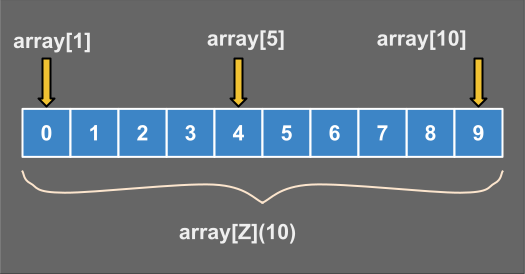
Array Index
Lets implement previous array: numbers[] and print its elements using a cycle. For initialization we use an explicit array literal that contains all the elements.
-- define array
new numbers[Z](10) := [0,1,2,3,4,5,6,7,8,9];

-- access .numbers elements one by one
rule main:
    write "numbers = [";
    cycle: for ∀ i ∈ (1..10) do
        write numbers[i];
        write ',' if i < 10;
    done;
    write "]";
    print; -- flush the buffer
return;
Expected Output
numbers = [0,1,2,3,4,5,6,7,8,9]
Notes:
- Array index start from 1 so we use range (1..10);
- Array capacity (10) is immutable after array initialization;
- Array element is accessed by the index: numbers[i];
initialize elements
Initial value for elements can be set during declaration or later:
-- you can use a single value to initialize all vector elements
rule main:
    new zum:[Z](10) ∈ Vector;
    -- explicit initialization using single value
    let zum[*]  := 0;
    print zum; -- expect [0,0,0,0,0,0,0,0,0,0]

    -- modify two special elements:
    let zum.first  := 1;
    let zum.last   := 10;
    print zum; -- expect [1,0,0,0,0,0,0,0,0,10]
return;
Deferred initialization: We can define an empty array and initialize its elements later. Empty arrays have capacity zero until array is initialized.
-- array without capacity
rule main:
    new vec:[A]();
    new nec:[N]();

    -- arrays are empty
    print vec = []; -- True
    print nec = []; -- True

    -- smart initializer with operator "++"
    let vec ++ 10; -- add 10 elements;
    print vec; -- expect ['','','','','','','','','','']

    -- smart initializer with 0 values
    let nec ++ 10;
    print nec; -- expect [0,0,0,0,0,0,0,0,0,0];
return;
Matrix
A matrix is an array with 2 or more dimensions. In next diagram we have a matrix with 4 rows and 4 columns. Total 16 elements. Observe, matrix index start from [1,1] as in Mathematics.
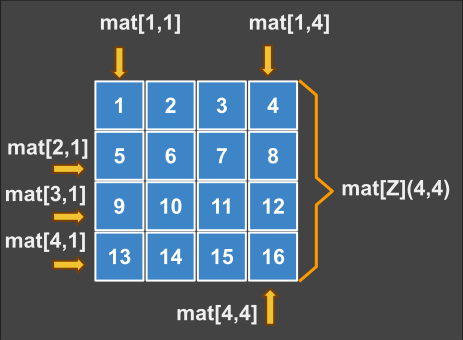
Matrix Index
Example:
In next example we demonstrate a curious notation for matrix. You have maybe not seen this before in any other language because is ridiculous to parse. But from an esthetic point of view we think this is the way a matrix literal should look like:
-- define a subtype of Matrix
type Mat:[R](4,4) ∈ Matrix

rule main()
    new mat ∈ Mat -- define matrix variable

    -- modify matrix using ":=" operator
    let mat := [[1,2,3,4],[5,6,7,8],[9,10,11,12],[13,14,15,16]]
    print mat[1,1]; -- 1  = first element
    print mat[4,4]; -- 16 = last element

    -- support for 2D matrix literals
    pass if mat =  ⎡ 1,  2 , 3,  4 ⎤
                   ⎢ 5,  6 , 7,  8 ⎥
                   ⎢ 9, 10 ,11, 12 ⎥
                   ⎣13, 14 ,15, 16 ⎦;

    -- nice output using array print method
    apply mat.print;
return;
Expected output:
⎡ 1,  2 , 3,  4 ⎤
⎢ 5,  6 , 7,  8 ⎥
⎢ 9, 10 ,11, 12 ⎥
⎣13, 14 ,15, 16 ⎦
Internal Order
Memory is linear, so we fake a matrix. In reality elements are organized in row-major order. That means first row, then second row...last row. We can access the entire matrix like it would be a longer array. So next program can initialize a matrix in a normal cycle, not nested!
-- initialize matrix elements
rule main:
  new mat: [Z](3,3) <: Matrix;
  -- initialize matrix elements
  cycle:
    new i   := 1;
    new x   := mat.length;
  while (i < x) do
    let mat[i] := i;
    let i += 1;
  done;
  apply mat.print; -- nice output
return;
Output:
⎡ 1  2  3 ⎤
⎢ 4  5  6 ⎥
⎣ 7  8  9 ⎦
Tensor
A tensor is an extended matrix with N dimensions. A matrix is a 2-dimensional tensor; a 3-value dim list shapes a 3D cube, a 4-value list a 4D block, and so on. Elements are kept in row-major order and are read or written with one 1-based coordinate per dimension.
-- 3D cube 4×4×4 = 64 cells
new cube ∈ [Z](4,4,4);
let cube[1,1,1] := 1;
let cube[2,3,2] := 26;
let cube[4,4,4] := 64;

-- 4D tensor 2×2×2×2 = 16 cells
new block ∈ [Z](2,2,2,2);
let block[2,2,2,2] := 22;
Data sets
A data set is a sorted collection of unique values. Elements of a data set can be accessed sequential. There is no index associated with elements like we have in Arrays so the access to an element is slow.
-- user defined set
type NS:{N} <: Set -- define a set of natural numbers

rule main:
   new uds ∈ NS;     -- define a shared variable of type set
   -- define shared sets s1, s2 of 3 elements each
   new s1 := {1,2,3} ∈ {N};
   new s2 := {2,3,4} ∈ {N};
   -- specific operations
   new u  := s1 ∪ s2; -- {1,2,3,4,5}:union
   new i  := s1 ∩ s2; -- {2,3}  :intersection
   new d1 := s1 - s2; -- {1}        :difference 1
   new d2 := s2 - s1; -- {4}        :difference 2
   new d  := s2 Δ s1; -- {1,4}      :symmetric difference

   -- sum all members of a collection
   new sum := Σ (1, 2, 3, 4); -- 10

   -- verify expectation
   expect d = d1 ∪ d2;

   -- belonging check
   print s1 ⊂ s;  -- True
   print s  ⊃ s2; -- True

   -- declare a new set
   new a := {1,2,3};

   -- using operator +/- to add/remove elements
   let a += 4;  -- {1,2,3,4}
   let a -= 3;  -- {1,2,4}
return;
Notes:
- Elements in a set have the same data type;
- Set are internally sorted not indexed;
- Set elements must be sortable types;
Hash Map
A hash map is a set of (key:value) pairs sorted by key.
Syntax:
-- declare a new empty hash map
new new_map ∈ {key_type: value_type};
Example:
In next example we show a map that has 3 elements. Each element contains a key a value and a reference to next element. References to next elements are not visible to you. The Map functions will take chare to maintain this data for you internally. You will use just key and value from each element.
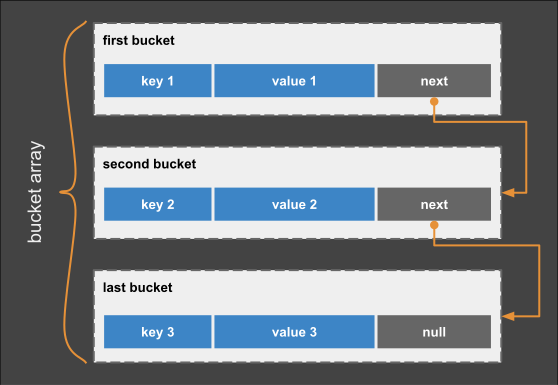
Hash-Map Anatomy
-- initial value of map
rule main:
   new map := {key1:"value1", key2:"value2"};

   -- create new element
   let map['key3'] := "value3";

   -- finding elements by key
   print map['key1']; -- "value1"
   print map['key2']; -- "value2"
   print map['key3']; -- "value3"

   -- remove an element by key
   cut map['key1'];   -- remove "first" element
   apply map.print;   -- expected: {'key2':"value2", 'key3':"value3"};
return;
Notes:
- Hash operators are working like for a set of keys,
- Hash key type can be numeric or: {A, U, S, Date, Time},
- Hash keys are not ordered but sorted by hash function,
- Hash keys have limited length of 32 code points,
Collections of Symbols
Bee has support for 3 kind of symbols: ASCII and Unicode.
- A: ASCII code point,
- U: Unicode code point,
Notes:
- "A" and "U" represent primitive data types, they are single symbols and immutable
- [A] and [U] can be used as boxed primitive types (mutable), these are not strings.
Examples
| quote | used for |
|---|---|
| '_' | Byte / ASCII single symbol or ASCII string literal |
| "_" | Double quoted UTF32 Unicode string or string template |
Text
For large text literals (X) we can use a markup tag:
- <text>...</text> : Text block
- <sql>...</sql> : SQL text block
- <html>...</html> : HTML template
- <xml>...</xml> : XML template
Example:
<text>
  Bee language has support for large text literal.
  A text can be SQL, XML, HTML or report template.
</text>;
Example:
<sql>
select name, age
  from persons
 where age < 24;
</sql>;
Example:
<html>
   <p>Hello World</p>
   <p>Bee is a great language.</p>
</html>;
Array of symbols
Single quoted or back quoted literals can contain a single symbol.
-- fixed capacity vector of ASCII symbols
type A128: [A](128) <: Vector;
rule main()
  -- declare a string of type A128
  new str ∈ A128;

  -- populate vector using spreading operator (*)
  let *str := 'test'; -- spreading the ASCII literal
  print str;   -- ['t','e','s','t']

  -- fixed capacity vector of symbols UTF32
  new  uco: [U](128);
  let *uco := "∈≡≤≥÷¬"; -- spreading a Unicode literal
  print  uco; -- ["∈","≡","≤","≥","÷","¬"];
return;
String literals
Double quoted string literals are Unicode strings.
Example:
rule main:
   -- variable capacity string UTF32
   new uco ∈ S; -- Unicode string unknown capacity
   let uco := "∈ ≡ ≤ ≥ ÷ ¬ × ! ↑ ↓ ∧ ∨";
return;
Escape You can use this literal with escape sequence: \n to break a line
print("this represents \n new line in string");
output:
this represents
new line in string
Notes:
- Double quoted string can be "rope" or "radix tree";
- Single quoted strings are ASCII literals: 'like this';
- Back quoted strings are regular expressions `...`;
Examples:
Next example demonstrate working with strings. We use "+" operator to make several concatenations and "*" operator to replicate a character and create a longer string.
rule main:
   new (c, s) ∈ S; -- default length is 128 octets = 1024 bit

   -- string concatenation
   let c := "This is
             a large unicode string";
   -- automatic conversion to string
   let s := 'This is an ASCII string';
return;
See also:
Diagnostic error codes
Diagnostic codes raised by the Collections module (spec/10 §5):
| Code | Violation | Mitigation / diagnostic action |
|---|---|---|
| E1001 | IndexOutOfBounds: Index less than 1 or greater than the collection length $. | Use 1-based indexing; $-k for end-relative. |
| E1002 | DuplicateSetKey: Insertion of a duplicate key/element into Set/Map. | Check membership or allow overwrite. |
| E1003 | MatrixDimensionMismatch: Incompatible row/column dimension during assignment. | Align matrix dimensions. |
| E1004 | TypeIncompatibleCollection: Value type does not match the declared collection element type. | Cast the value or change the element type. |
| E1005 | InvalidSetAlgebra: Set operator (∩, ∪) applied to a non-set type. | Use set operators only on sets. |
| E1006 | ZeroBasedIndexAttempt: Use of index 0 (Bee is 1-based, Decision 1). | Rewrite the index starting from 1. |