
Control Flow
Page bookmarks
These are all block statements in Bee language:
| Name | Description |
|---|---|
| start | named block |
| with | anonymous block |
| if-else | decision fork |
| ladder | decision ladder |
| cycle | repetitive unconditional block |
| for | repetitive block with local scope |
| match | enumerable symbol selector |
| trial | exception handler block |
Scope Blocks
We define local scope blocks. This enable strict control of memory allocation and reduce naming space cluttering. In Bee, all control statements have a local scope.
Start
We use occasionally a block of code that has a local scope by using "start" keyword follow by a label. The label is optional and can be numeric or alphanumeric.
Syntax:
In this example we use "start" to create a local scope and a new variable (a) inside this scope. Then we use nested do statement and we end with "done" keyword follow by optional label.
start [label]:
  -- local variables
  ...
do
  -- executable block
  ...
done [label];
with
Start a "qualifier suppression block". This is a block that eliminate the need for qualifiers into an anonymous local scope. You can use "with" to suppress module names or aliases.
Example:
For this example first we create a simple module:
module test_module:
rule .inc(x:0) => (r: 0):
  let r := x + 1;
return;
We load a secondary module and use a qualifier for it:
-- using qualifier suppressor
use lib_folder/test_module as test;

rule main:
  -- define locals
  new x := 2;
  with test do
    -- call external routine .test
    expect x = 3;
    print inc(x);
  done;
return;
- before "with" you can use "start"
- you can use "with" for any "do" block
- any "do" block has a local scope
Block Scoping & Shadowing
Every do ... done block — an if / cycle / for body, or a start/with block — opens a lexical scope. A new declaration inside a block binds a local name that shadows any outer binding of the same name: the outer value is left untouched and is restored as soon as the block exits. Inside the block, let assigns to the innermost (shadowed) variable.
new x ∈ Z;
let x := 1;
if true do
  new x ∈ Z;
  let x := 2;
  expect x = 2;   // the block-local x shadows the outer x
done;
expect x = 1;     // outer x unchanged once the block scope exits
Conditional Selector
In Bee, decision statements can be used to create code branches. Selection of one branch or other is controlled by a logic condition. Bee has tow ways to employ a conditional: at the beginning of a code branch or at the end of a statement.
if-else
Using "if" and "do" keywords you can create a branch that is executed or not depending of a condition. When the condition is false the block statement is ignored and next branch or statement is executed. This statement is sometimes called decision fork.
Simple conditional branch
Using "if" keyword we can create a conditional fork:
if condition do
  -- statements
  ...
done;
Example:
In this example we use "start" to create a local scope and a new variable (a) inside this scope. Then we use nested anonymous if statement. After start, a do or an if ... do is expected. If you start a scope and another control is found it will not accept.
start test:
  new a := random();
if a < 0 do
  print ("|a| =", a);
else
  print ("|a| =", -a);
done test;
Two-ways conditional
Keyword "start" is optional. By using "else" keyword we can split the conditional branch into two branches:
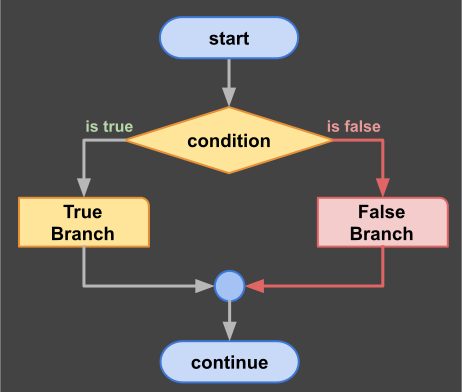
decision diagram
if condition do
  -- true branch
  ...
else
  -- false branch
  ...
done;
Decision Ladder
By using keywords "if" and "else" you can create a cascade of branches called "decision ladder". It has several conditional branches plus one optional branch that is executed when no other condition is fulfilled.
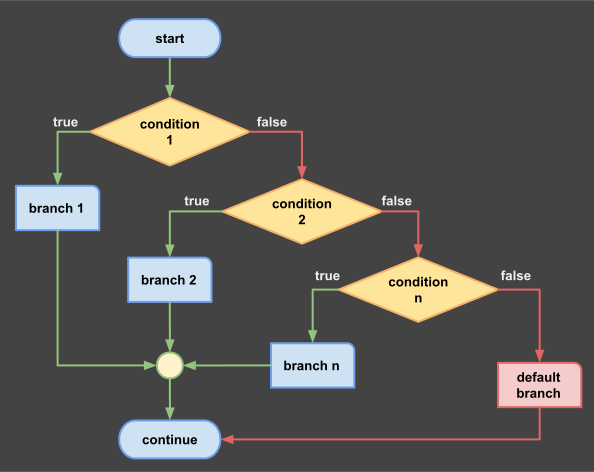
decision ladder
Example:
#decision ladder
start test:
  -- local scope
  new a ∈ Z; -- control variable
  read("a = ", a);   -- expressions in declaration area
if a = 0 do        -- first decision
  print "a = 0";
else if a > 0 do  -- second decision
  print "a > 0";
else if a < 0 do  -- third decision
  print "a < 1";
else
  -- default block
  print "unexpected:" + a;
done test;
Conditional expression selector (ternary)
If the decision picks between two values (rather than two statement blocks), use the conditional expression selector — also called the ternary. It is an expression, so it can appear wherever a value is expected (assignment, argument, return).
new value := (expr_true if condition else expr_false);
The parenthesised form is required: the test is the if clause between ( and else, and the do/else/done block keywords are not used here — this is an expression, not a fork. done; is not required because the selector does not open a block.
Example:
new sign := ("positive" if x > 0 else "non-positive");
print sign;

-- usable inside a statement, e.g. a write directive
write ("yes" if flag = true else "no");
Repetitive Statements
You can use "cycle" to start a repetitive block. The header admits two independent options — an optional label and an optional colon: cycle [label] [:]. The colon is the scope marker: whenever it is present, with a label (cycle name:) or without (cycle:), it opens a local-declaration prologue (stable outer scope) before the loop body. An anonymous cycle without colon (cycle do, cycle while … do) has no prologue — the body header follows immediately. The label alone creates no scope; it only names the cycle as a jump target. "do" will repeat all statements in the block until a condition ends the cycle. If no condition exists, the cycle is infinite.
Infinite cycle
Next example show a repetitive "do" block that runs forever. It is not very practical but will be terminated when reaches maxim limit of iteration establish by $iteration variable.
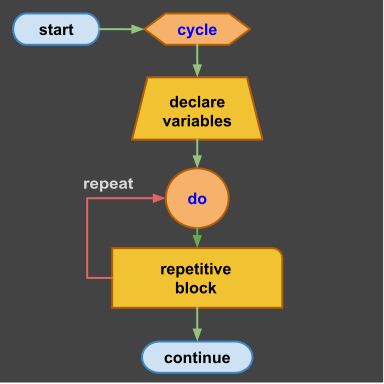
infinite cycle
#infinite cycle (optional label, optional scope)
cycle [label] [:]
  -- local variables (declared in prologue scope; colon required)
do
  -- repetitive block
  ...
done [label];
Stop condition
Next block will execute multiple times until stop condition is true.
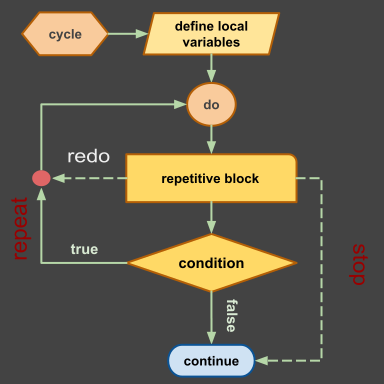
stop condition
#conditional run cycle (anonymous: no colon, no prologue)
cycle do
  -- repetitive block
  ...
  [redo if condition1];
  ...
  [stop if condition2];
  ...
done;
While condition
Keyword "while" can be used to evaluate a condition and start or continue a repetitive block. The number of repetitions is controlled by condition. If the start condition is not fulfilled the loop exits immediately. The optional "then" epilogue block runs exactly once after the loop exits (via "stop" or condition exhaustion), before the prologue scope is cleaned up.
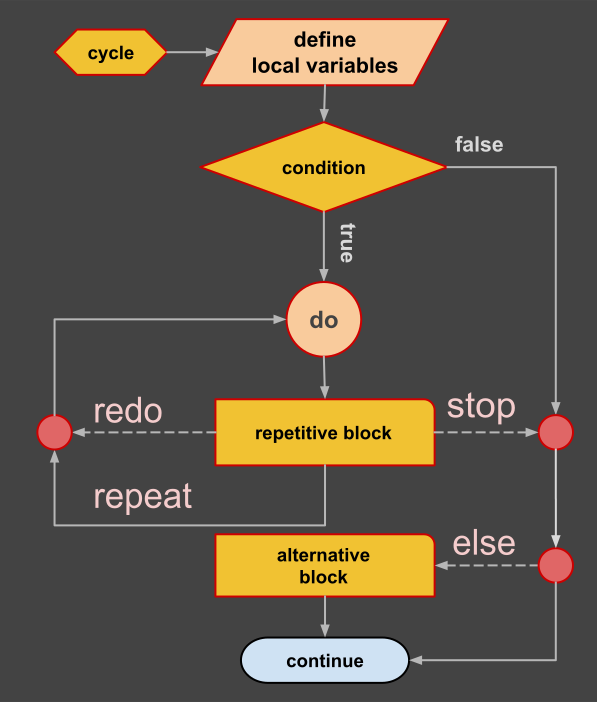
start-condition cycle
#conditional start cycle (optional label, optional scope)
cycle [label] [:]
    -- define local variables (declared in prologue scope; colon required)
    ...
while start_condition do
    -- first repetitive block
    ...
    [stop if condition]; -- break the cycle
    ...
    [redo if condition]; -- restart the cycle
    ...
then
    -- epilogue: runs once after loop exit
    ...
done [label];
Note 1: The "then" epilogue block runs one single time, that is when the loop exits normally (condition becomes false or "stop" is executed). It does NOT execute between iterations — it is a post-loop epilogue, not a per-iteration block.
Note 2: Keyword: "stop" is similar to "break" in Java and "next" similar to "continue" — it is an inline jump statement that skips to the next iteration (next [label] [if condition];). "redo" restarts the cycle from the beginning. These are optional interruption statements. Occasional you can use these statements to improve code performance or readability. (Legacy keyword "repeat" is a deprecated synonym of "next".)
Nested cycles
Next syntax pattern show how to use a nested cycles with labels.
-- nested blocks
cycle 42:
    -- local variables
    ...
do
    ...
    cycle 10:
    do
        ...
        next 42 if condition1; -- jump to next iteration of block 42
        ...
        stop 42 if condition2; -- exit block 42
        ...
    done;
    ...
done 42;
...
Notes:
- Block names can be numeric and are optional; a label alone creates no scope,
- The colon opens the declaration scope — cycle [label] [:] — on labeled cycles (cycle name:) and on anonymous cycles alike (cycle:),
- Cycles without colon (cycle do, cycle name do) have no stable outer scope; the body header follows immediately,
- Keywords "next", "redo" and "stop" can be used with labels,
- Flat code is better. Do not nest too deep.
For Cycle
You can start an iterative cycle by using keyword "for". This statement create a cycle that is controlled by a set of values. We use a control variable generated from a domain or visit elements of a collection.
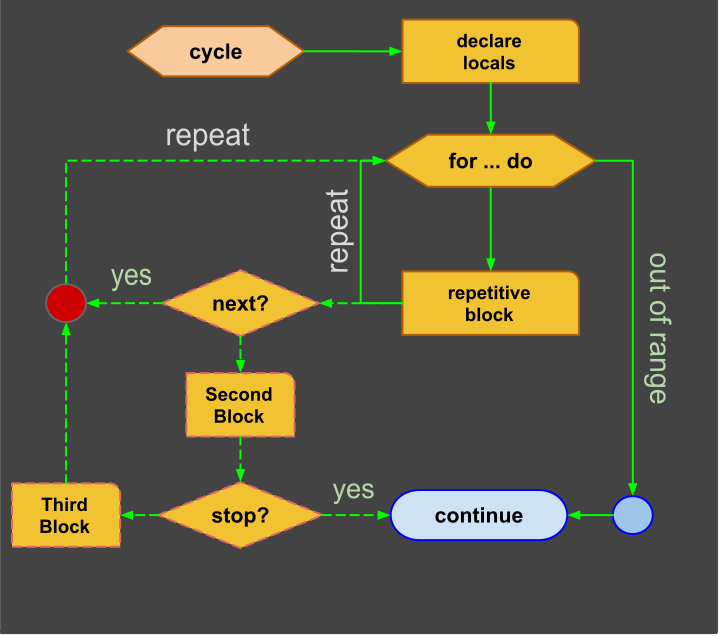
for cycle
#iterative cycle (optional label, optional scope)
cycle [label] [:]
  -- local variables (declared in prologue scope; colon required)
  new i ∈ N;
for ∀ i ∈ (min..max:rate) do
  -- repetitive block
  ...
  [next if condition]; -- skip to next iteration
  ...
  [stop if condition]; -- early transfer
  ...
[then]
  -- epilogue: runs once after loop exit
  ...
done [label];
Notes:
- Cycle blocks can be named using a label identifier (optional);
- The colon is independent of the label: cycle [label] [:] — with colon, a prologue scope is created;
- If used, the colon (not the label) enables creation of local variables in the prologue scope;
- Control variable: "i" is in local scope, even if label or colon are missing;
- Interruptions (next, stop) are optional and most of the time not needed;
- By using "next", control variable is incremented automatically and the iteration restarts;
- Only one iterable variable is permitted in given scope;
Example 1:
#range iteration with rate 1
new i ∈ N;
for ∀ i ∈ (1..10) do
  if i % 2 = 0 do
    next;      -- skip to next iteration
  else
    write i; -- odd numbers
  done;
  write ',' if (i < 10);
done;
1,3,5,7,9
Example 2:
Ratio: Using domain ratio the example above can be simplified:
#range iteration with rate 2
new i ∈ N;
for ∀ i ∈ (1..9:2) do
    write(i); -- odd numbers
    write(',') if (i < 9);
done;
print;
Notes:
- Don''t use "make" inside a repetitive block,
- Don''t use "set" inside a repetitive block,
- Avoid "new" inside a repetitive block: the do scope is volatile, so every iteration creates fresh variables. Carried state belongs in the stable prologue scope of a colon cycle (cycle: or cycle name:), or in the enclosing scope,
- Bee has a limit on how many repetitions before give up: $max_iterations.
By using keywords "if" and "else" you can create a cascade of branches called "decision ladder" that has several conditional branches plus one optional branch that is executed when no other condition is fulfilled.
Workflow Control
Be has two advanced control block statements designed to improve workflow. These two blocks are optional features of the compiler. One simple compiler can skip them or implement them in advanced versions.
Jump Table
This is a multi-path non conditional value based selector. A selector is based on a series of branches. One or more branches can be executed depending on specific value. In other languages a selector is created using "switch" statement. In Bee we use "match" keyword for this statement.
A match has two variants: "all" or "one". If used, ALL will evaluate all values it may execute multiple blocks. If "one" is used, only first block that match value will be executed!
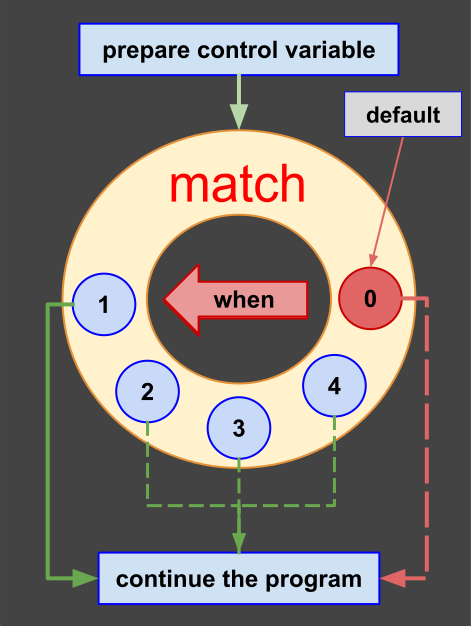
Match Diagram
Pattern:
-- enumerable selector
type Selector: {v1,v2,v3,v4} <: E;

rule main:
  new select := Selector.random()
  match select [all] | [one]:
    -- declare locals
    ...
  when v1 do
    -- first path
    ...
  when v1, v2 do
    -- second path
    ...
  other
    -- v3 or v4 found
    ...
  done;
return;
Error Handling
The try statement is the error-protection control statement of Bee. It protects one processing region, hands any recoverable error to specific case handlers or a categorical error catch-all, and may run a final cleanup region. Like the cycle statement, a try may optionally open a labelled declaration scope with trial identifier : — used only when the trial needs its own scope. A trial is an error protection control statement similar to "try" in other languages, with the difference that it can carry its own data scope and a label, and that its variables do not leak outside their block.
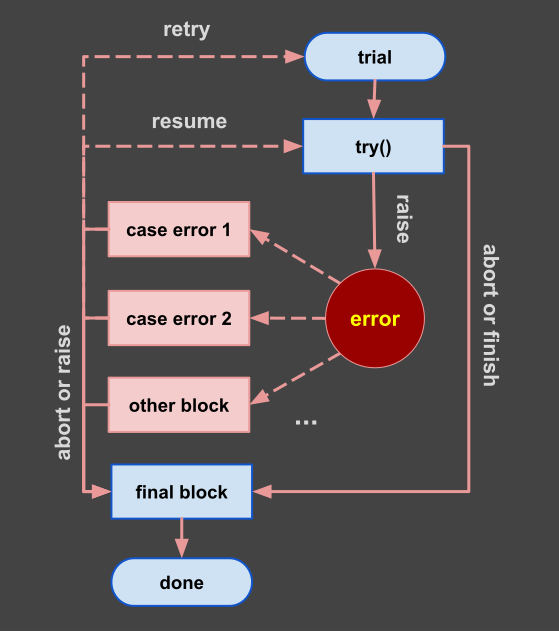
Trial Diagram
Notes:
- Trial and error is a fundamental method used for problem solving,
- It consist of repeated attempts until a solution is found,
- A trial executes a single protected try block; errors it raises are handled by specific case clauses or the categorical error catch-all,
- A trial optionally runs a final block before it ends,
- A trial can be terminated early by an interruption statement.
Keywords:
Next keywords are used to create a full trial block:
| word | description |
|---|---|
| trial | optional labelled "trial identifier :" scope, used only when a scope is needed |
| try | dry keyword: ends the declaration region and opens the protected block |
| case | specific error handler, a guard on $error (zero or more, first match runs) |
| error | categorical catch-all, required when no case clause is present |
| final | optional finalization region, executed before trial end (required when no case and no error) |
| done | closes the trial statement |
Pattern:
-- trial with a declaration scope
trial [identifier]:
    -- initial or default statements
    ....
    -- preconditions: recoverable error
    expect condition else "message";
    ...
try
    -- protected block starts here
    ...
    -- create recoverable error
    raise {code, message} if condition;
    ...
case $error.code = 101 do
    -- specific case handler; zero or more, first match runs
    ...
    -- choose a transfer: retry, resume, abort, exit, raise
    retry; -- repeat only the try region (prologue is not re-run)
error
    -- categorical catch-all (required when no case is present)
    ...
final
    -- finalization statement (executed before leaving)
    print "final error:" + $error.code if $error.code > 0;
done [identifier];
Note:
- Trial blocks cannot be nested;
- The trial region ends with the "done" keyword;
- The declaration scope is optional: it is opened by "trial identifier :" only when a scope is needed,
- A try without a "trial :" prologue has no local scope beyond its own block;
- A try holds specific case clauses and an optional categorical error catch-all; the error block is required when no case clause is present,
- A final block is required only when the trial has neither a case nor an error block; otherwise it is optional;
- Variables declared inside try are local to try and are NOT visible in case, error or final;
- A trial can be repeated several times if errors are raised;
- A trial can stop execution of a rule with error if an error is raised;
- Errors raised before keyword "try" are not analyzed by case or error and propagate immediately.
Exceptions
Exceptions are objects of type Error. Can be defined in your program or can be system predefined exceptions. Exceptions are recoverable errors when handled by a case or error block. Exception can propagate from inner rules to outer rules. You can predefine exceptions/errors and issue them with raise. Keyword expect and assert can only create system standard exceptions not customized exceptions.
-- define error
new exception := {code,"message"} ∈ Error;
Recoverable errors with code and message can be issued using "raise" keyword.
-- "raise" can create a customized error or message
raise {code,"message"} [if condition];
Using "expect" you create recoverable exceptions with a specific error code and standard message
-- next statement create an "unexpected" exception if condition is true
expect condition; -- Unexpected error in line <n>
Using "assert" you create soft exceptions, (warnings) with a specific error code and standard message
Note: The standard module will define standard Error objects as system constants. Code 100, 101, 102 are user errors, created by raise, expect or assert keywords.
trial keyword
The trial keyword opens an optional declaration (scope) region, like the cycle statement. It is always followed by an identifier and a ":" — the scope begins with "trial identifier :". You use trial only when the trial needs its own scope. If no scope is needed you simply start with "try". A trial that opens no scope cannot declare state shared between try, case, error and final. The trial data scope, when present, ends with keyword "done".
try keyword
A trial has exactly one protected try region that performs the main work. The try keyword is dry: it takes no arguments, no label, and no code or message. Like the do keyword, a bare try ends the declaration region opened by trial identifier : and opens the protected block. Error code and message come from the raise (or expect/assert) that fires inside that block, not from try itself.
The declaration region is optional: when it is absent the statement begins directly with try and opens no local declaration scope. There is no bare trial try form — trial is always followed by an identifier and a colon. Neither try nor do takes a trailing colon — try: and do: are invalid.
You can use raise or abort inside a try block. A raise creates a recoverable error with its own code and message; an abort ends the trial without an exception and transfers control to the final block.
case keyword
The case clauses are specific error handlers. Each case expression do is a guard evaluated against the current $error; the first case whose expression is true runs its block, exactly as the clauses of a match. A trial carries zero or more case clauses. Inside a case you inspect $error and choose one of the transfer statements: "abort", "retry", "resume", "exit" or "raise". If you issue none of them, the error is considered handled and the trial proceeds to final; the error catch-all is not reached because a case already matched.
error keyword
The error block is the categorical catch-all of a trial. It runs when the try block raised an error and no case clause matched. The error block is required when the trial has no case clause; it is optional once at least one case is present. Inside it you inspect $error and choose one of the transfer statements: "abort", "retry", "resume", "exit" or "raise". If you issue "raise", the error propagates to the outer scope.
Variables declared inside the try block are not visible here: try is a closed block scope when the declaration prologue is absent.
Transfer Statements
Next statements are transfer statements used in trial block:
| word | description |
|---|---|
| abort | stop the trial without exception and transfer execution to final block |
| raise | interrupt current trial and create a recoverable error |
| exit | stop current trial and do not execute the final block, return control to calling rule |
| retry | repeat only the protected try region; the declaration prologue is never re-run |
| resume | exception handler, jump to next statement after the one that failed |
pass keyword
pass is the null statement. It performs no operation and is valid anywhere a statement is expected, such as an empty else branch: pass;. It does not select a step; it simply does nothing.
error region
This region handles any error raised by the try block when no case matches — or every error when the trial has no case clause. You can inspect the exception by code inside the region, or you can report the error, log it, and stop the trial.
final region
This region is executed just before trial is done, regardless of error status. Even if there is no error to propagate this region is yet executed. This region is mandatory execute even if the trial is aborted but not if the "exit" statement is issued. Exit bypass the final region. When a trial has neither a case nor an error block, the final block is required — a pure finalization trial.
In the "final" region there is an opportunity to report all messages recorded in $trial object, including assert, raise, expect exceptions. You can use $trial.messages that is a hash-map created by the system automatically. On exit, the $trial.messages collection is zap automatically and you loose access to messages.
In final block:
- you close files
- close connection to databases
- close locked resources
- create log, report $trial.messages
Example:
-- simple trial block
trial t:
    new x ∈ Q;
    new y ∈ Q;
try
    let x := 1/0;
error
    print "error " + $error.code;
final
    print "x = " + x;
    print $error.message if $error.code ¬ 0;
    print $trial.messages;
done;
raise example
In this example we use "raise" statement to create an error on purpose:
-- define a custom error
trial e:
  new my_error:{200, "custom error"} <: Error;
try
  raise my_error; -- issue user error
case $error.code = 200 do
  -- we catch the error and do something
  print $error.message;
  print $error.line;
error
  raise; -- any other error propagates
final
  print "trial done";
done;
Notes:
- Keywords {abort, raise, retry, resume, exit} can resolve an error;
- In this example the error 200 is resolved by the case handler;
- If you issue raise inside error, the error propagates to the outer scope.
retry keyword:
By using "retry" you repeat only the protected try region; the trial declaration prologue is never re-run. You can issue "retry" from the error handler to repeat the try several times until other ending conditions are encountered. There is a danger if the error is the same, the trial can repeat infinitely. In this case system maximum loop protection can be in place for compiler protection.
Input example
-- example of repeating trial
-- try maximum 3 times
trial name:
    new count ∈ (1..3);
    new a ∈ (0..9);
try
    let count += 1;
    write "enter a number:"; read a;
    if  a < 0 do -- trigger a retry
      raise;
    else if a < 9 do
      write "correct";
    else if  a > 9 do
      write "incorrect";
    else
      pass; -- does nothing
    done;
error
    if count < 3 do
      write "wrong try again:"
      retry; -- repeat only the try region (declarations not re-run)
    else
      write "wrong 3 times!";
      raise $error;
    done;
final
    print "trial is resolved";
    print $trial.messages;
done [name];
Note:
- When you retry the error code is erased,
- You can not use retry in final region,
- There may be several errors recorded in a $trial.messages,
- It is up to you to log the messages in the final block,
- Trials can be on single level, can't be nested.
Statement diagnostics
Diagnostic codes raised by the statement/control-flow module (spec/02 §7):
| Code | Violation | Condition / resolution |
|---|---|---|
| E0201 | IndentationMismatch | Statement is not aligned to a 2-space offset boundary |
| E0202 | UnboundVariable | Attempt to mutate a variable without a prior new declaration |
| E0203 | UnterminatedBlock | Missing done or return terminator |
| E0204 | InvalidCloneOperation | Using :: clone on a non-clonable primitive |
| E0205 | LabelMismatch | Closing label on done does not match the opening header label |
| E0206 | InvalidJumpContext | next, stop, or redo used outside a loop body |
| E0010 | DeprecatedKeyword repeat | Legacy loop-jump keyword; canonical is next (Decision 15). Non-fatal; still maps to NEXT |
| E0011 | DeprecatedKeyword using | Legacy using postfix; canonical is curried (name: …) (Decision 6). Non-fatal |
The assertion/expectation and curried-argument codes raised inside a block whose canonical home is the rules module (W0301, E0303, E0307, W0308, E0309) are listed in the rules page.