
Eve Collections
Ordinal
Ordinal is an generic class representing a set of unique ordered symbols. Each symbol represents an integer value starting from N to capacity C. Element values start with 1, or with a specific number, and grow with one for each element: class Color = {Red, Green} <: Ordinal; is short for class Color = {Red:1, Green:2} <: Ordinal;. The type Logic starts with 0: {False:0, True} gives False = 0 and True = 1.
A brace literal with plain names is normally a DataSet. In a class declaration, {Red, Green} is the exception: it declares the elements of an ordinal. Every class names its superclass after <:.
Pattern:
# Define a Ordinal subtype
primary aspect test_ordinal is

  class TypeName = {name1:0, name2, name3} <: Ordinal;

  process main is
    new a := TypeName.name1; ** a=0
    new b := TypeName.name2; ** b=1
    new c := TypeName.name3; ** c=2
  return;
end test_ordinal;
Note: When an element name start with capital letter there is no need to use qualifiers for the individual values. This is a language rule: capitalized names become part of the scope where the ordinal is visible. When a module exports the ordinal, the script that imports it with Color(*) gets Red and Green as constants of its own scope: it writes Red, not Color.Red, and the names are reserved there. The superclass <: Ordinal is always written.
## Declare public elements in enumeration
primary aspect constant_ordinals is

  class TypeName = {Name1:10, Name2} <: Ordinal;

  process main is
    new a := Name1; ** a = 10
    new b := Name2; ** b = 11
    ** verify values
    expect a == 10;
    expect b == 11;
  return;
end constant_ordinals;
List
A list is a sequence of elements having a dynamic capacity. Elements are stored in the order you have create them. The order can change if you sort the list or add/remove elements. However you can't insert elements in the middle.
Syntax:
#declare two lists
** empty list
  new list1 : ()Type;

** type inference
  new list2 := (value1, value2, ...);

** using constructor
  new list3 := List(value1,value2,...);
Notes:
- The elements of a list have the same type;
- Access to all or each element is sequential;
- The constructor
List(...)is optional: the literal(1,2,3)is already a list, not a tuple; - A list with one element ends with a comma:
(x,). For examplelet A := (5,);is a list of length 1. Without the comma,(x)is only a group:(2 + 3) * 4is 20 andlet B := (5);is the number 5, not a list; ()is the empty list.{}is the empty set and{:}is the empty map.
Examples:
# empty list declaration (no element type)
  new e_list := ();
  new x_list :List;

# explicit declarations
  new n_list = (1,2,3) :()Integer;
  new c_list = ('a','b','b') :()Rune;
  new s_list = ("a","b","c") :()String;
  new o_list = ({a:1},{b:2},{c:3}) :()Object;
list literals
- Lists are enclosed in round brackets ();
- Elements are separated by comma,
- All elements are having the same type.
Examples:
Literals can be used for initialization of variables:
# initialized list with type inference
  new c_list := ('a', 'b', 'c');
  new n_list := (1, 2, 3);
Literals can be used in assign expressions:
# Defer initialization
primary aspect begin_initial is
  ** define empty list
  set c_list :List;
  process main is
    ** initialize the list with integers
    let c_list := (1,2,3);
  return;
end begin_initial;
List operations
There are many things you can do with a list. You can add/remove elements at both ends. You can deconstruct a list and you can concatenate lists together. Most important features are implemented as built-in functions or special operators:
List builder
You can populate a list from a range using a function or expression. List builder are similar to Array builders. Also you can append in bulk new elements into an existing list.
#list builder demo
primary aspect list_builder is
  process main is
    ** initialize list from range
    new a := (a   | a in ('A'..'F'));
    print a;

    ** initialize list from another list
    new b := (x^2 | x in (1, 2, 3, 4));
    print b;

    ** exclude the first value with a range open at start
    new c := (x | x in (2>..6));
    print c;
  return;
end list_builder;
'A' 'B' 'C' 'D' 'E' 'F'
 1 4 9 16
 3 4 5 6
Note: The first generator must be a range or a collection. It can be followed by a condition, which is optional, joined with and. The range (2>..6) excludes 2.
** keep only the even numbers
new evens := (x | x in (1..10) and x % 2 == 0);
expect evens == (2,4,6,8,10);
List deconstruct
The deconstruct is basically the inverse of a builder. You create individual variables from a list. This is useful to clone or borrow specific parts of a list.
#list deconstruct demo
primary aspect list_deconstruct is
  set a : List;
  process main is
    ** initialize list from Range
    let a := (1..10);

    ** create new variables using clone deconstruct
    new x, y, _, *rest, _ :: a;

    ** check new variables
    expect x == 1;
    expect y == 2;

    ** anonymous variable vanish the value
    expect _ == null;

    ** check the rest
    print rest;
    print a;
  return;
end list_deconstruct;
(4,5,6,7,8,9)
(1,2,3,4,5,6,7,8,9,10)
Note: variable "_" is special. It can consume one single element and is always null. It can be re-declared several times in the same block. It can be written, but it stays null: whatever value you put inside is forgotten. The star "*" alone is the same, but it consumes many elements. Use "*name" to collect them.
Append to list
List is using operator +> or <+ to grow. This operator represent insert or append. You can insert an element or many elements into a list at the beginning or you can add element or list of elements at the end but you can not insert elements in the middle of the list.
In a statement, let a <+ b; appends b to the list a, and let x +> a; puts x in front of it. With new, new a <+ b; creates a new list a that holds b; it is an error when a already exists. The arrow shows the direction: the list stays after +> (x +> list, the element goes in front) and before <+ (list <+ x, the element goes at the end).
#list demo concatenation
primary aspect list_concat is
  process main is
    ** initialized list
    new a := ('a','b');
    new b := ('1','3');

    ** concatenate two lists
    new c := a <+ b;
    expect c ==  ('a','b','1','3');

    ** concatenate two lists
    new d := b <+ a;
    expect d ==  ('1','3','a','b');
  return;
end list_concat;
Alter a list
To grow a list use <+ (append at the end) or +> (put in front). To shrink it use the arrows <- or -> (remove the first or the last element) or the method delete() (remove every element equal to a value). The operators +=, -=, *=, /=, %= and ^= do not grow or shrink a list: with a scalar on the right they update every element (see Bulk operations).
#altering a list
primary aspect list_alter is
  new lst :()Rune;
  process main is
    ** initialized list
    let lst := ('a','b','c','b');

    ** append a new element at the end of list
    let lst <+ 'z';
    expect lst ==  ('a','b','c','b','z');

    ** remove all "b" elements from list
    lst.delete('b');
    expect lst ==  ('a','c','z');

    ** append several elements at the end
    let lst <+ ('a','z','x');
    expect lst ==  ('a','c','z','a','z','x');

    ** remove the last element and drop it
    let lst -> _;
    expect lst ==  ('a','c','z','a','z');

    ** delete every element equal to 'z'
    lst.delete('z');
    expect lst ==  ('a','c','a');

    ** remove all elements equal to the first element
    lst.delete(lst[1]);
    expect lst ==  ('c',);
  return;
end list_alter;
Note: To remove the first element use <- and to remove the last element use ->: the arrow points to the side the element leaves from, and the element goes into the name on the other side. let x <- lst; removes the first element and puts it in x; let lst -> y; removes the last element and puts it in y. When x or y does not exist yet, let creates it, with the type of the elements; in a loop it is created on the first pass and assigned again on the next ones. The explicit forms new x <- lst; and let lst -> new y; are also valid. To drop the element, write _, which swallows the result: let _ <- lst; removes the first element, let lst -> _; the last one. An arrow never removes by value: lst.delete(v) removes every element equal to v (on a DataMap, delete(k) removes the key k).
Note: There is no protection about using a List as stack or queue. Is developer responsibility to append and remove correctly using one of the operators: {<+, +>} {<-, ->}.
Queue (FIFO)
FIFO = First In First Out
For queue, two operations are possible
- enqueue, - append to the end of the List:
let queue <+ x; - dequeue, - extract the first element from the List:
new e <- queue;. The arrow points to the side the element leaves from.
#using a list as a queue
primary aspect list_remove is
  ** initialized queue
  set queue :()Rune;
  process main is
    ** enqueue one element (at end)
    let queue <+ "x";
    expect queue ==  ('x');

    ** enqueue several elements
    let queue <+ ('z','y');
    expect queue ==  ('x', 'z', 'y');

    ** dequeue one element: the first one is the oldest
    new e <- queue;
    expect queue ==  ('z', 'y');
    expect e == 'x';
  return;
end list_remove;
Stack
LIFO = Last In First Out
For stack, two operations are possible
- push - can append elements at end of List
- pop - can extract the last element of the List
Note: we do not implement push and pop, instead user can define it's own stack based on a list and implement methods push and pop. Maybe standard library can implement Stack class.
#remove elements from list
primary aspect list_remove is
  ** initialized stack
  set stack := ('a','b','c');
  process main is
    ** append element at the end
    let stack <+ 'x';
    expect stack ==  ('a','b','c','x');

    ** extract element from the end
    let stack -> e;
    expect stack ==  ('a','b','c');
    expect e == 'x';
  return;
end list_remove;
List methods
A List is a class, so it has all required methods and properties to be used in algorithms and expressions. We do not yet foresee all methods but maybe these would be useful. Here is a minimalist suggestion for some methods.
List.empty;  ** true/false
List.full;   ** true/false
List.capacity; ** list with capacity
join() method
The join method receive a list and convert elements into a string separated be specified character.
#call List.join() demo
process main is
  new str := (1,2,3).join(',');
  expect str == "1,2,3";
return;
split() method The split method is actually a method of a String, that create a List of strings by splitting a long string into parts. Usually you split by comma, but any symbol can be used. The separator is removed and will not be part of the resulting list.
** string split demo
process main is
  ** split creates a list of strings
  new lst := "1,2,3".split(',');
  expect lst == ("1","2","3");
return;
Bulk operations
When the left operand is a List or an Array and the right operand is a scalar (a number, a boolean, a symbol or a string), the operator applies to every element. An expression returns a new collection of the same kind and leaves the operand unchanged; a modifier updates the elements in place.
Arithmetic operations
The operators + - * / % ^ apply the operation to each element. The expression (1, 2, 3) * 2 is (2, 4, 6). It is not an append and not a removal: to add an element use <+, to remove one use delete().
#a scalar applies to every element
primary aspect bulk_arithmetic is
  process main is
    new b := [1, 2, 3];
    expect b * 10 == [10, 20, 30];
    expect (b + 1) == [2, 3, 4];
    expect (b ^ 2) == [1, 4, 9];
    expect b == [1, 2, 3];       ** the operand does not change
  return;
end bulk_arithmetic;
Note: Strings are not bulk. Arithmetic with a string element or a string scalar is an error, because it would build strings: ("a", "b") + "x" raises an error. Create a new collection, or use a string builder, in a loop. A DataSet and a DataMap are not bulk either: their += and -= add and remove, because a bulk update could merge two elements into one.
Comparison with modifiers
The modifiers +=, -=, *=, /=, %= and ^= are a bulk update of the list in place: let a += 5; adds 5 to every element. The comparisons < > <= >= and the match =~ give a collection of booleans, one per element. == and <> still compare the whole collections.
#bulk update and bulk tests
primary aspect bulk_modifiers is
  process main is
    new a := (1, 2, 3, 4);
    let a += 5;                  ** a bulk update, not an append
    expect a == (6, 7, 8, 9);
    let a -= 1;
    expect a == (5, 6, 7, 8);
    let a *= 2;
    expect a == (10, 12, 14, 16);

    ** comparisons return one boolean per element
    expect (a > 12) == (False, False, True, True);

    ** a regular expression is tested on every string
    new w := ("cat", "dog", "cow");
    expect (w =~ "/^c/") == (True, False, True);
  return;
end bulk_modifiers;
Collection iteration
We can use a for loop that is executed for each element belonging to a collection. All collections are iterable. To be iterable a class must adopt the library trait Iterable.
Example:
#iteration process
primary aspect test_iteration is
  set collection := ('a','b','c');
  process main is
    loop
      new element: Rune;
    for element in collection do
       write element;
       write ',' if element is not collection[-1];
    done;
    print;
  return;
end test_iteration;
Example:
List traversal with break.
# list iteration with early termination
primary aspect list_iteration is
  set my_list: ()Rune; **  this list is empty
  process main is
    let my_list := ('a','b','c','d','e');
    loop
      new e: Rune;
    for e in my_list do
      write e;
      if e == 'd' do
        break; **  early termination;
      else
        write(',');
      done;
    done;
    print; ** a,b,c,d
  return;
end list_iteration;
Array
An array is a collection of elements ordered by one or more index numbers. Eve count elements in range (1..n), where n is the number of elements. First element is array[1]. We count starting from 1 while other languages start from 0. The array types are: Array (one dimension), Matrix (two dimensions) and Tensor (three or more dimensions).
Example:
Eve define Arrays using notation: [c]Type, where [c] is the capacity and Type is the type of elements. Arrays are automatically initialized. However, all elements will have default zero values.
** diverse array variables
primary aspect test_array is
  set n = 2, m = 3  :Natural;
  set (x, y, z) = 2 :Natural;

  ** define Array sub-types
  class AType = []Integer <: Array;

  ** define a global array with user define type
  set array = [1,2,3,4,5,6,7,8,9,10]: AType;

  process main is
    ** define local arrays of various capacities
    new array_name1: [10]Real;  ** Array of 10 large numbers
    new array_name3: [2^8]Rune; ** Array of 256 Runes
    new array_name4: [n,m]Type;   ** 2d matrix, capacity: 6
    new array_name5: [x,y,z]Type; ** 3d tensor, capacity: 8
  return;
end test_array;
Inference:
In next example we declare an array and use index "i" to access each element of the array by position. Later we will learn smarter ways to initialize an arrays and access its elements by using a visitor pattern.
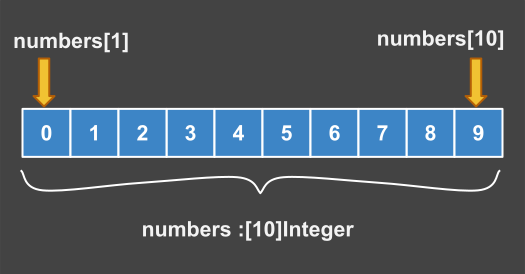
Eve Array
Lets implement previous array: numbers[] and print its elements using a loop. For initialization we use type inference with symbol ":=". Array literal contains all the elements.
# define single dimension array
process main is
  new numbers := [0,1,2,3,4,5,6,7,8,9];

** access .numbers elements one by one
  write "numbers = [";
  for i in (1..10) do
    write numbers[i];
    write ',' if i < 10;
  done;
  write "]";
  print; ** flush the buffer
return;
Expected Output
numbers = [0,1,2,3,4,5,6,7,8,9]
Notes:
- Array index start from 1 so we use range (1..10);
- Array capacity (10) is fix after array initialization;
- Array element is accessed by the index: numbers[i];
initialize elements
Initial value for elements can be set during declaration or later:
# How to initialize all elements
process main is
  new zum: [10]Integer;
  ** explicit initialization using single value
  let zum[1..-1] := 0;
  expect zum == [0,0,0,0,0,0,0,0,0,0];

  ** modify two special elements:
  let zum[1] := 1;
  let zum[-1] := 10;
  print zum; ** expect [1,0,0,0,0,0,0,0,0,10]
return;
Deferred initialization: We can define an empty array and initialize its elements later. Empty arrays have capacity zero until array is initialized.
** array without capacity
process main is
  new vec :[?]Rune;
  new nec :[?]Integer;

  ** arrays are empty
  print vec == []; ** True
  print nec == []; ** True

  ** extend symbol array;
  vec.extend(10);
  print vec; ** expect ['','','','','','','','','','']

  ** extend numeric array;
  nec.extend(10);
  print nec; ** expect [0,0,0,0,0,0,0,0,0,0];
return;
Array builder
The array builder is a syntax feature that enable you to populate an array with data in a single statement. An array builder can be based on one or more ranges. Before you can populate the array it must be declared.
Syntax:
You can declare and initialize an array in the global area using the array builder. Array total capacity must match the number of elements created by the range. A function can be used to compute the values of all elements.
** declare an Array initialized using range
   set array = [ x | x in (min..max)(step)]: []ElementType;

** declare a new Array using a map function with range
   set array = [ f(x) | x in (min..max)(step)]: []ElementType;

** declare a new 2d array that is called matrix, row by row
   set matrix = [ f(x) | x in (min..max)(step)]: [n,m]ElementType;
Example:
primary aspect test_matrix is
  set array  :[4]Integer;
  set matrix :[4,4]Integer;
  process main is
  ** init a vector Array using a range
     let array := [ x | x in (1..10)(3)];
     expect array == [1,4,7,10];
     print array;
     print "----------";
  ** init a matrix Array using cartesian product between two ranges
     let matrix := [ x * y | (x, y) in (1..4) >< (1..4)];
     print matrix;
  return;
end test_matrix;
output:
 1 4 7 10
 ----------
 1 2  3  4
 2 4  6  8
 3 6  9 12
 4 8 12 16
Array deconstruct
The deconstruct is basically the inverse of a builder. You create individual variables from an Array. This is useful for copy or borrow specific parts of an Array.
#array deconstruct demo
primary aspect array_deconstruct is
  set a :[]Integer;
  process main is
    ** initialize array from Range
    let a := [x | x in (1..10)];

    ** create new variables using deconstruct
    new x, y, *, z := a;

    ** check new variables
    expect x == 1;
    expect y == 2;
    expect z == 10;

  return;
end array_deconstruct;
Note: The spreading statement must specify what is happening with all the elements. Using * you can ignore several elements and reach the last element z. You can have only one rest operator "*" in a statement.
Array slicing
An array can be sliced using slice notation [n..m] (the form [n:m] does not exist). A negative index counts from the end: [-1] is the last element and a[-x] is a[N + 1 - x], where N is the number of elements, so a[-N] is a[1]. a[0], and any index outside -N..N, is an out-of-bounds error. A slice can mix both: a[1..-1] is the whole array. A slice is also an array and can be sliced. A slice assigned with := is a view over the existing elements of the array; a slice assigned with the clone operator :: is a new array with a copy of the elements: new view := v[2..4]; shares the elements of v, new part :: v[2..4]; copies them (a deep copy). Before you can slice an array, it must be already initialized.
Named slices
In next example we use slicing notation to create two named slices. One is a dynamic slice, the other is a static slice. When you modify the dynamic slice, also the base array is modified. If you modify the static slice, the base array is unaffected.
primary aspect test_slice is
  set slice :[]Rune;
  process main is
    new base: [20]Rune;
    let base := "this is a test array".split();

    ** create a dynamic slice
    let slice := base[11..14];

    ** check slice content
    expect slice[1] == 't';
    expect slice[-1] == 't';
    expect slice == ['t','e','s','t'];

    ** join back an array to a string
    print slice.join(); ** "test"

    ** making a static slice;
    new copy :: base[11..14];

    ** alter two characters in slice
    let slice[1] := 'b';
    let slice[2] := 'u';

    ** the copy is not modified
    expect copy.join() == "test";

    ** base array is now modified;
    print base.join(); ** "this is a bust array"
  return;
end test_slice;
Limited slices
A limited slice is a slice that starts at a particular position and goes from that position several elements. You can give the end of the slice with a negative index, counted from the last element: base[5..-4] stops 3 elements before the last one.
primary aspect test_slice is
  set slice, sreve :[?]Rune;
  process main is
    ** generate Array elements from a Range
    new base  := [x | x in (1..10)];
    new x := 5;

    ** limited slices
    let slice := base[x..x+2];
    new sreve := base[5..-4].reverse();

    ** check the results
    expect slice == [5,6,7];
    expect sreve == [7,6,5];
  return;
end test_slice;
Anonymous slices
You can use anonymous slice to modify an Array or to print a section of the array. You do not have to assign a variable to the slice. This is a shortcut, and is very useful for handling Array elements in bulk. A slice gets a single value with :=, no [*] is needed.
primary aspect ano_slicing is
  process main is
    new base:[10]Integer;

    ** using bulk assignment
    let base[1..5] := 0;
    let base[6..-1] := 2;

    ** create a dynamic slice
    expect base == [0,0,0,0,0,2,2,2,2,2];

    ** print 2 elements from the middle
    print base[5..6]; ** [0,2]
  return;
end ano_slicing;
Deconstruct with rest
You can use deconstruct with rest to create a slice in the same time extract several values. By using operator ":=" you will create a slice but using "::" you will create a new Array.
# deconstruct with slice
process main is
  ** generate Array elements from a Range
  new base  := [x | x in (1..8)];

  ** create a rest slice
  new x,y,z, *rest  := base;

  ** check the rest slice
  expect rest == [4,5,6,7,8];
  expect (x,y,z) == (1,2,3);
return;
# deconstruct with clone
process main is
  ** generate Array elements from a Range
  new base  := [x | x in (1..8)];

  ** create a clone from reversed array
  new a,b,c, *clone :: base.reverse();

  ** check the clone elements
  expect clone == [5,4,3,2,1];
  expect (a,b,c) == (8,7,6);
return;
Matrix
A matrix is an array with 2 dimensions. An array with 3 or more dimensions is a Tensor: a 3D tensor is an array of matrices and a tensor can have any number N of dimensions. In next diagram we have a matrix with 4 rows and 4 columns. Total 16 elements. Observe, matrix index start from [1,1] as in Mathematics.
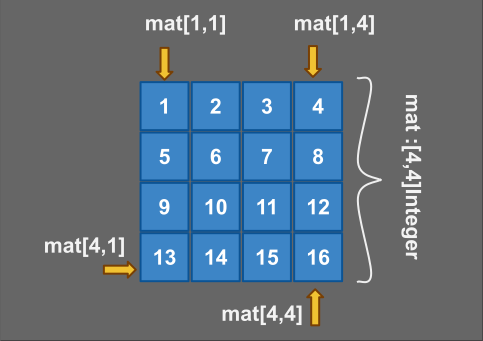
2D Array
Example:
In next example we demonstrate a matrix literal. Eve has a default output for printing a matrix using columns. You can print a matrix on rows or columns using "print" statement.
# define a subtype of Array
primary aspect test_matrix is

  class Mat4 = [4,4]Integer <: Matrix;

  process main is
    new mat: Mat4; ** define matrix variable

    ** modify matrix using ":=" operator
    let mat :=[
       [1,  2, 3, 4]
      ,[5,  6, 7, 8]
      ,[9, 10,11,12]
      ,[13,14,15,16]
    ];

    expect mat[1,1]; ** 1  = first element
    expect mat[2,1]; ** 5  = first element in second row
    expect mat[3,-1]; ** 12 = last element in third row
    expect mat[-1,1]; ** 13 = first element last row
    expect mat[-1,-1]; ** 16 = last element

    ** nice output using array print method
    mat.print;
  return;
end test_matrix;
Expected output:
 1  2  3  4
 5  6  7  8
 9 10 11 12
13 14 15 16
Matrix indexes
A matrix needs two indexes: the row and the column. They are written in one pair of brackets separated by a comma, or in one pair of brackets each: mat[x, y] and mat[x][y] are the same element. A tensor works the same way with more indexes: t[x, y, z] is t[x][y][z]. Both forms can be read and assigned.
Every index can be a range, so a chain of indexes selects a part of the matrix. The result is an array:
mat[1..5][3]reads column 3 of the first 5 rows: 5 elements;mat[3][1..5]reads row 3, the first 5 columns;mat[*][2]reads the whole column 2 (see [*] below).
primary aspect matrix_index is
  process main is
    new m := [[1,  2,  3,  4],
              [5,  6,  7,  8],
              [9, 10, 11, 12]];
    expect m[2][3] == m[2, 3];      ** 7
    let m[3][1] := 90;                  ** the same as m[3, 1] := 90
    expect m[1..2][3] == [3, 7];    ** column 3, rows 1 and 2
    expect m[2][1..3] == [5, 6, 7]; ** row 2, the first 3 columns

    new t :[2, 2, 2]Integer;
    let t[2][1][2] := 6;
    expect t[2, 1, 2] == 6;
  return;
end matrix_index;
Note: a single index on a matrix, mat[7], is the absolute index explained below. Only a second pair of brackets after it makes it a row: mat[3][*] is row 3.
All elements: [*]
The symbol [*] selects all the elements of one dimension. It is needed only for a matrix or a tensor, and can be combined with a range: mat[1..2][*] is the first two rows, mat[*][1..2] is the first two columns. We do not write [*][*]: one [*] is enough to assign every element.
process main is
  new mat: [4,4]Integer;
  let mat[*] := 0;          ** all elements
  let mat[1..2][*] := 1;    ** first two rows
  let mat[*][-1] := 9;       ** last column
return;
A matrix or a tensor can be accessed with one absolute index. Elements are counted row by row. The row and the column are calculated by dividing the index by the number of columns: for a matrix with 4 columns, mat[7] is the same element as mat[2,3].
Memory model
In memory elements are organized linear, row by row. We say that Eve matrix are in row major order like C, in contrast to Fortran where column major order is used. It is important to use the right major order when you traverse a 2d array.
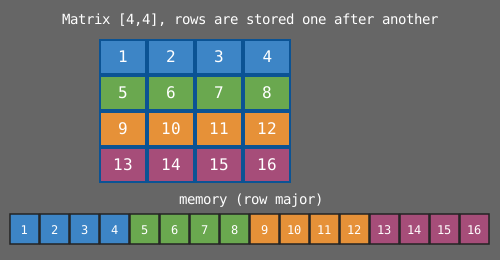
Row Major Order
Example
Memory is linear, so we fake a matrix. We can access the entire matrix with a single loop or nested loops. Next program can initialize a matrix in a flat loop. The order of elements is automatically established.
** initialize matrix elements
process main is
  new mat: [3,3]Integer <: Array;
  ** initialize matrix elements
  loop
    new i   := 1;
    new x   := mat.length;
  while (i <= x) do
    let mat[i] := i;
    let i += 1;
  done;
  print mat; ** nice output
return;
Output:
 1  2  3
 4  5  6
 7  8  9
Note: The capacity of an Array is part of data type. An array of fixed size. When you define an array with variable capacity using [?], you do not reserve any memory for its elements. This kind of Array is dynamic. It can be extended.
Example:
Nested loops can be used to access every element in the matrix. When you do this kind of loops, pay attention to order of indexes. In Eve you must use first index for outer loop and second index for inner loop. For large matrix this can improve performance. Due to better cache management.
primary aspect matrix_demo is
  set matrx :[?, ?]Integer;
  process main is
    ** give value to all elements
    matrx.extend(3,3);
    loop
      new i, j :Integer;
    for i in (1..3) do
      for j in (1..3) do
         let matrx[i,j] := i*10+j;
      done;
    done;
    ** output matrix elements
    print "{matrx % 3i4}"; ** 3 columns, each element is an integer of width 4
    print;
    print "{matrx % 9i4}"; ** 9 columns
  return;
end matrix_demo;
Output
  11  12  13
  21  22  23
  31  32  33

  11  12  13  21  22  23  31  32  33
DataSet
In mathematics a data set is an abstract data structure that can store certain values, without repeated values. In Eve a DataSet is sorted by value. Sets are fast collections for search, add update with new values. However, you have to know the element value in order to search for it. Lists, on the other hand, are not sorted unless you sort them explicitly.
Empty DataSet
An empty DataSet is represented like this: {} (the empty map is {:}) and can be assigned to a set if you wish to remove all elements of the set. A set that is not initialized is empty: {} is its zero value.
  ** Define an empty DataSet with unknown element type
  set n_name :DataSet;

  ** Define DataSet with known element type
  set t_name : {}Integer;
DataSet restrictions
- All elements of a set must have the same type;
- DataSet elements are sorted by value,
printshows them in order; - Elements are unique, You can't store duplicates;
Mutability
A set can be modified during run-time using operators. When you modify a set, keep in mind that sets are automatically sorted by value. The position of a new element is decided by its value. If you add or remove an element the position of several other elements will be shifted.
- add x in dataSet
- del x in dataSet
Note: You can refer to all elements using "*" and modify them using modifiers.
Example:
#demo for using a set
primary aspect set_demo is

  ** initialized DataSet of integers
  set my_set = {0,2,3} :DataSet;
  process main is
    ** append element 1
    add 1 in my_set;
    expect 1 in my_set;

    ** remove element 2
    del 2 in my_set;
    expect 2 not in  my_set;

    ** remove all elements
    let my_set := {};
    expect my_set == {};
  return;
end set_demo;
Union
Use union operator to combine two sets. The operators &= and |= do not exist.
# combine two sets using "||" = (two vertical bars)
primary aspect set_union_demo is
  ** element set
  set first = {0,1,2,3} :DataSet;
  set second: DataSet; ** empty DataSet
  process main is
    ** assign elements using union
    let second := first || {2, 4, 8, 10};

    ** common value 2 is not duplicate
    expect second == {0,1,2,3,4,8,10};
  return;
end set_union_demo;
Intersection
Intersect operator & find common elements:
# Create intersection using &&
primary aspect set_intersection_demo is
  set test: DataSet; ** empty set
  process main is
    let test := {1,2,3,4} && {3,4,5};
    expect test == {3,4};
  return;
end set_intersection_demo;
Difference
Difference operator "-", and modifier "-=", extract elements. With this trick you can remove one single element from a DataSet. Remember, elements in a set must be unique.
# Extract several elements;
process main is
  new test := {1,2,3,4};
  new rest := test - {3,4,5};

  ** check remaining elements
  expect (1,2) in rest;
  expect (3,4) not in rest;

  ** use modifier -=
  let test -= {1,3};
  expect test == {2,4};

  ** use modifier += to add elements
  let test += {1,3,5};
  expect test == {1,2,3,4,5}; ** we keep elements sorted
return;
Using DataSet
A DataSet is very useful for its property to hold unique elements sorted. This enable deduplication of elements in a list by converting the list to a DataSet. Operator || is overloaded to accept list arguments but will return a DataSet.
# convert a list to a dataset
process main is
  new list := (1,2,1,2,3,1,2,3,4);

  ** using operator || (union)
  new dset := {} || list;
  expect dset == {1,2,3,4};
return;
DataSet Builder
You can create elements of a DataSet from a range using builder.
/* demonstrate how to create a set from a range
   using shift operator to calculate power of two fast */
process main is
  new dset := {1 << x | x in (2..6)};

  ** check the new set
  expect dset == {4,8,16,32,64};
return;
Difference
You can extract elements out of a DataSet using a list, or another set.
# Extract several elements;
process main is
  new test := {1,2,3,4};
  new rest := test - (3,4);

  ** check remaining elements
  expect (1,2) in rest;
  expect (3,4) not in rest;

  ** use modifier -=
  let test -= (1,3);
  expect test == {2,4};
return;
Intersection
You can intersect 2 lists but the result will be a DataSet.
# Create intersection using &&
primary aspect set_intersection_demo is
  set test = {} :DataSet; ** empty set
  process main is
    let test := (1,2,3,4) && (2,3,4,5);
    expect test == {2,3,4};
  return;
end set_intersection_demo;
DataMap
A DataMap is a collection of (key:value) pairs. In Eve a DataMap is a sorted map: the elements are ordered by unique keys. This helps to find elements faster using a binary search algorithm. We use only sorted maps, so we keep the name DataMap and we do not use the shorter name Map.
- DataMaps are sets of (key:value) pairs;
- The key must be sortable: { Number, String, Ordinal};
- Value can be anything including objects.
Syntax:
class Dic = {:}(String,Object) <: DataMap;
primary aspect test is
  # empty map
  set m :Dic; ** declare empty map
  process main is
    expect type(m) == DataMap;
    expect m == {:};
  return;
end test;
Example:
# how to initialize a table
primary aspect table_init is
  set h: DataMap;
  process main is
    ** initialize table
    let h := {'a':1, 'b':2};

    ** accessing elements
    expect h['a'] == 1;
    expect h['b'] == 2;

    ** create new elements: assign to a missing key
    let h['c'] := 3;
    let h['d'] := 4;

    ** output all elements
    print h ** {'a':1, 'b':2, 'c':3, 'd':4};
  return;
end table_init;
Using DataMap
Maps are sorted in memory by key for faster search. It is more difficult to search by value because usually is not unique and not sorted. To search by value one must create a loop and verify every element. This is called full scan and is slow.
Map Initialization
Initialize a collection later than declaration.
# local map initialization
primary aspect map_init is
  set my_map :DataMap; ** uninitialized collection
  process main is
    ** initialize my_map with values
    let my_map := {1:'a',2:'b',3:'c'};

    ** check if a specific key is present in a map collection
    expect 3 in my_map; ** will pass

    ** check if a sub-set of keys is present in a map collection
    expect {1,3} in my_map;
  return;
end map_init;
Create Elements
** create new elements
process main is
  set animals: {:}(String, String); ** empty collection
  ** append several elements
  let animals += {"Rob":"dog", "Kiwi":"bird"};

  ** create single element
  let animals["Toto"] := "parrot";
  print  animals;
return;
Output:
{"Kiwi":"bird","Rob":"dog","Toto":"parrot"}
Modify Elements
Assigning to a missing key creates the element. Using a modifier like += on a missing key raises an error.
#update a map
primary aspect map_update is
  set animals : {:}(String, Integer);
  process main is
    ** print the new collection
    print  animals;

    ** modify the collection
    let animals["dogs"]   := 1; ** new element
    let animals["birds"]  := 2; ** new element
    let animals["birds"]  += 3; ** alter element

    ** print the new collection
    print  animals;
  return;
end map_update;
Output:
{}
{"birds":5,"dogs":1}
Iteration of Map items
Collections have common methods that enable traversal using for loop.
{List, Map, Set}
built-in:
- count() - retrieve the number of elements
- capacity() - retrieve the maximum capacity
- next - position next element
- first - position to first element
- last - position to last element
- this - reference to current element
set iteration Map and Set are iterable. We can visit all elements using for loop:
Example:
# DataMap iteration
primary aspect map_iteration is
  process main is
    new my_map := {'a':1,'b':2,'c':3};
    loop
      new key: Rune;
      new value: Integer;
    for (key: value) in my_map do
      ** print pairs (key:value)
      print "({key}:{value})";
    done;
  return;
end map_iteration;
Output:
('a':1)
('b':2)
('c':3)
Generate Elements
You can generate elements for a DataMap using a collection builder. This is similar to a List builder, except you generate pair of values instead of a single value. You can use a function to calculate the value, or you can search values from another collection.
Example:
# DataMap iteration
primary aspect map_generator is
  set my_map = { ((x + y): 1 << y) | x in ('a'..'c') and y in (1..3)}: DataMap;
  process main is
    loop
      new key  :String;
      new value:Integer;
    for (key: value) in my_map do
      ** print pairs (key:value)
      print "({key}:{value})";
    done;
  return;
end map_generator;
Output:
('a1':2)
('b1':2)
('c1':2)
('a2':4)
('b2':4)
('c2':4)
('a3':8)
('b3':8)
('c3':8)
Objects
Objects are collections of attributes of different types. The most simple object is an instance of type Object. The Object is the fundamental class in EVE, that is why it starts with uppercase. An object literal has unquoted fields: {x:1.5, y:2}. A map literal has quoted or numeric keys: {'a':1, 'b':2}.
Pattern:
Initialize an object by using an object literal with initialization values:
# define global object instances
primary aspect test is
  ** empty object
  set object_name = {attribute:value, ...}: Object;

  process main is
    ** accessing attributes
    print object_name.attribute;
    ...
  return;
end test;
Example:
Define a local object that has two attributes:
# define global object instances
process main is
  ** simple object with two fields
  new point = {x:1.5, y:1.5}: Object;

  ** accessing attributes
  print point.x;
  print point.y;
return;
Empty object:
Define a local empty object {}
# define global object instances
process main is
  ** simple object with two fields
  new object = {} :Object;

  ** create new attributes by assignment
  let object.x := 1;
  let object.y := 2;
  ...
  print object.x; ** 1
  print object.y; ** 2
return;
Note: Objects and DataMap are very similar. The difference is, object attributes can have diverse types. In a DataMap all elements have the same type. Also in DataMap the key can be numeric, symbol or string. Quoted fields represent characters (strings), unquoted fields are symbols, also called identifiers: in an Object the attribute names are always identifiers.
Read next: Scripts