
Eve Processing
Page bookmarks:
Keywords of this phase
The keywords that phase 5, Enterprise & System Features, adds to the core language (the core keywords are in Syntax). Each one is explained on the page in the last column.
| Keyword | Meaning | Explained in |
|---|---|---|
job | a labeled block of a process: name: job … do … done name; | Control |
stop | ends a job without an error | Processing |
raise | creates an error: raise "message";; the process jumps to recover | Exceptions |
recover | error region of a process: decides retry, resume or abort | Processing |
retry | in recover: runs the failed job again | Processing |
resume | in recover: goes on after the failed job | Processing |
abort | in recover: ends the process, runs finalize, passes the error on | Processing |
async | marks a function or a procedure that runs as a task: async procedure load(…) is | Multitasking |
spawn | in a job: starts an asynchronous procedure as a task and goes on at once | Multitasking |
await | runs an asynchronous subprogram and waits for it at once, in serial mode | Multitasking |
wait | suspends the task for a time and gives the turn away: wait 10ms; | Multitasking |
exclusive, concurrent | in front of aspect: whether the aspect runs alone or may run beside others | Concurrency |
parallel | a group of aspects that run at the same time: [name:] parallel … do … done [name]; | Concurrency |
start | in a parallel group: starts a concurrent aspect as a task (tasks of a job are started with spawn) | Concurrency |
within | option of a parallel group: a deadline, parallel within 30s | Concurrency |
Process Structure
A process can do one or more jobs. Jobs are sequential. A job has no error handlers: it passes or it fails. When an error is raised, in a job or anywhere else in the process, the process is interrupted and the workflow jumps into the recover region.
In the recover region you use normal control statements on the $error variable to decide what to do: retry the failed job, resume the process after it, or abort the process. Then the finalize region runs. An aborted error propagates to the calling process.
Jobs can be dependent. If the first job fails, it may not make sense to continue with the next job. In the recover region, $error.job is the label of the job that failed, so you can handle errors differently for each job or group of jobs.
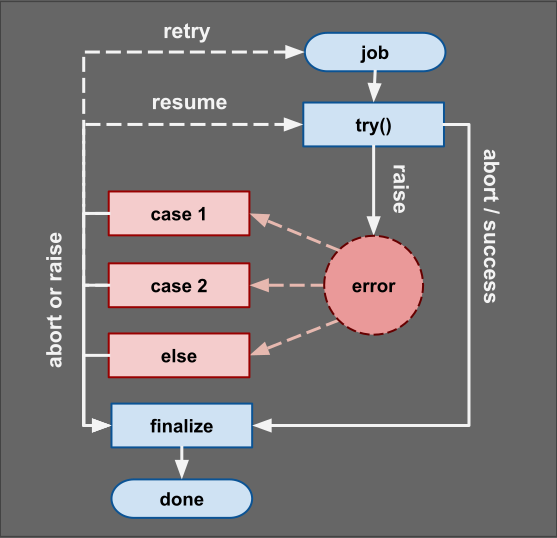
job ... recover
Pattern:
The next design pattern shows how to create several jobs in a process. A process with jobs handles errors in one place and keeps each job simple.
# define process with jobs
process main is
  ** local declarations
  new tries := 0;
  ...
  ** preconditions: end the process prematurely
  ** over skips the recover region and runs finalize; panic skips both
  panic if condition;

  ** description of c1 job
  c1: job
  do
    ...
  done c1;

  ** description of c2 job
  c2: job
  do
    ...
  done c2;

  ** description of c3 job
  c3: job
  do
    ...
  done c3;

  ** other statements after jobs are succesfully executed
  ** post condition checks for the entire process
  expect condition, "error message";
  ....

recover
  ** decide what to do next in case of error
  if $error.job == "c1" and tries < 3 do
    let tries := tries + 1;
    retry;  ** run job c1 again
  else if $error.job == "c2" do
    print $error.message;
    resume; ** c2 failed, continue with c3
  else
    abort;  ** end the process with this error
  done;
finalize
    ** close resources or channels
    ...
    ** print debug messages
    ...
    ** report the errors (or not)
    ...
return;
Notes:For this design pattern we have demonstrate a sequential process that is more likely used by an aspect. This process structure separates the work from the error handling. It allows for:
- Simple jobs, written so that they do not fail
- Error handling in one place: the recover region decides per job
- Guaranteed execution of cleanup code
- Clear separation of concerns between different jobs in the process
Process Keywords
Notes
- Every aspect must implement the process
main, its entry point, and may have private processes; - A process create a local scope, but also has access to a global context;
- Before first job there is a region for preparation/preconditions
- Preconditions can end the process with
over, which skips the recover region; the finalize region still runs - Jobs can't be nested, they are all on same level with the process
- All jobs of a single process are execute sequential from top down;
- When the project finish the local variables are released from memory;
- You can create local variables, lambda expressions and new objects;
- You can't define local functions, classes or methods in processes;
Run log
Every run of a primary aspect writes a run log in the output folder ($EVE_OUT, out by default). The file name is run_<driver>_<datetime>.log, for example run_sales_load_20261005_143012.log: the date and time of the start of the run, so a new run never overwrites an older log. Every job and every apply writes one line when it starts and one when it ends. A line is a JSON object with these fields:
| Field | Meaning |
|---|---|
| time | date and time of the event, ISO 8601 with milliseconds, UTC: "2026-10-05T14:30:12.405Z" |
| driver | name of the primary aspect of the run |
| process | the script that runs the process: the primary aspect, or the aspect that was applied or started |
| job | label of the job or of the parallel group; empty for an apply outside a job |
| kind | "job", "apply", "start" or "parallel" |
| event | "start" or "end" |
| status | at the end: "pass" or "fail"; for a retried job, one end line per attempt |
| attempt | 1 for the first run of a job, 2 after the first retry, and so on |
| duration | at the end: milliseconds since the start event |
| line | line of the job label or of the apply statement |
| code, message | at the end of a failed job: the code and the message of the error |
{"time":"2026-10-05T14:30:12.405Z","driver":"sales_load","process":"sales_load","job":"extract","kind":"job","event":"start","attempt":1,"line":12}
{"time":"2026-10-05T14:30:13.910Z","driver":"sales_load","process":"sales_load","job":"extract","kind":"job","event":"end","status":"pass","attempt":1,"duration":1505,"line":12}
The finalize region still reads the jobs map of its own process; the run log is the trace of the whole run, for ETL lineage and, later, for the server.
Aspect execution
An aspect is executed using the "apply" command: apply aspect_name(arguments); runs the process main of the aspect and the caller waits. The parentheses are always written, also when there is no argument. Every aspect has a process main, its only entry point; nothing else of the aspect can be reached from outside, and the dot is never used with an aspect. The other processes of an aspect are private: its own processes call them by their bare names, apply prepare(10);. Any aspect may apply another aspect, at most three levels deep; an aspect can't apply itself and no chain of calls comes back to an aspect already in it.
Examples:
#these are all valid process calls
apply aspect_name();                          ** apply without arguments
apply aspect_name(argument_value);            ** apply with single argument
apply aspect_name(value, value, ...);         ** apply with a list of arguments
apply aspect_name(param:value,...);           ** apply with a argument by name
apply aspect_name(value, value, param:value); ** mix position with names
apply aspect_name(value, *list_args);         ** use spreading operator
apply aspect_name(param:value, *map_args);    ** mix names with hashmap
Process interruption
A process normal ends with keyword return. When the process of an aspect is terminated, program execution continues with the statement after apply, in the process of the primary aspect. Interruption keywords (exit, over, abort, panic) can be used to interrupt a process. Every way out of a process runs the finalization region, except panic and an unexpected stop: a clean exit never skips cleanup.
| Interruption | Exit code | Recover region | Finalize region |
|---|---|---|---|
return | 0 | no | runs |
exit; in the process | 0 | no | runs |
over;, also from a function the process called | 0 | no | runs |
panic; | 1 | no, ends the whole application | skipped |
failed expect, not recovered | 2 | runs | runs |
failed assert, not recovered | 3 | runs | runs |
raise or run-time error, not recovered | 4 | runs | runs |
abort in recover | 2, 3 or 4, as the error | - | runs |
unexpected stop: Ctrl+C or stop at a halt breakpoint (debug mode), recursion too deep, out of memory, hard time-out | 5 | no | skipped |
The exit code of a process is a small number, 0 to 5 (table above). The code of an exception is a different thing: it identifies the error, $error.code, and is never used as an exit code. An exception is an object of a class derived from Error, with a code and a message. The standard classes and codes are listed in Exceptions.
Errors of an aspect
- An error that the aspect does not recover ends the aspect and is raised again in the primary aspect, at the
applyline. The recover region of the primary aspect reads it in$error, an exception object withcode,messageandline. Whenmainof the aspect returns normally the code is 0: no error; over;in an aspect ends the aspect, and the primary aspect goes on with the statement afterapply;exit;in the main process of an aspect does the same.over;andexit;in the primary aspect end the program. The difference:exit;only leaves the subprogram or process it is written in (an early return),over;ends the whole process from any depth;panic;in an aspect ends the whole application: the primary aspect panics too, the memory is released and the exit code is 1.
A failed expect and a failed assert are both run-time errors: the process stops and goes to recover. When the error is not recovered, the exit code is 2 for expect and 3 for assert.
Example:
# simple aspect with one parameter, applied by the primary aspect
exclusive aspect print_this is
  process main(p:String) is
    print p;
  return;
end print_this;
# main process with parameters
primary aspect process_call is
  process main(*args ()String) is
    ** number of arguments received:
    loop
      new arg: String;
    for arg in args do
      apply print_this(arg);
    done;
  return;
end process_call;
Aspect Execution:
An aspect is not instantiated: apply executes its process main. Processes can not be recursive, but methods can be recursive.
Aspects can be executed in serial mode one after another. Let's consider we have 3 aspects: {one, two, three}. Main process can execute each aspect using keyword: "apply" and can block the main process waiting for each aspect to finish. This will interrupt the primary aspect main process and will execute aspect process one by one:
primary aspect test_apply is
  process main is
    ** apply each aspect: synchronous calls
    apply [folder/]aspect_one(arguments);
    apply [folder/]aspect_two(arguments);
    apply [folder/]aspect_three(arguments);
    ...
  return;
end test_apply;
Note: An aspect is not imported with import. The machine searches it by name, without the file extension:
- if the aspect is written with a folder,
apply folder/aspect_one(), in that folder; - otherwise in the aspect folder
aspof the project, if there is one; - otherwise in the root folder of the project, then in the library folder
lib.
The primary aspect can set another place for aspects, and for libraries, with the system variable $EVE_ASP: set $EVE_ASP = "my_folder";. A project without asp or lib folders keeps aspects and libraries in its root folder.
Aspect Scope
An aspect is a stateless blueprint: it defines its process main, methods, functions and signatures, and holds no data between two calls. Each apply creates the state of the call, the variables of the aspect included, and the state is dropped when main returns. A second apply sees nothing of the first. All the members of an aspect are private: data goes in by the parameters of main and comes out by its output parameters.
Aspect file (stateless blueprint)
  └── defines: process main, methods, functions, signatures
        └── main   (state allocated on apply → cleaned on return)
In the aspect, declarations come in this order: imports, constants, variables, methods, then the process. The order does not matter for the machine because the declarations are hoisted.
Command-line Parameters
The parameters of main are given on the command line by name: -p value when the name of the parameter is short and --param value when it is long. A parameter can be any Eve literal: it is parsed and converted to data. The comment lines above main describe the parameters:
** @param x: "description of parameter x"
process main(x: Integer) is
The command eve test.eve -h shows a help generated from these comments. Without comments, the help lists the parameters.
Parallel execution
apply runs an aspect in serial mode and the caller waits for it to finish. Parallel work is done by aspects too: a process starts them in a parallel group (parallel … do … start … done), and they run on several cores. Methods and functions always run in serial mode. Parallel groups are allowed in the first two levels of aspects. The parallel model, the data rules, Bulk Synchronous Parallel and channels are explained in one place: Multitasking.
Note: a parallel group brings the primary aspect back in synchronous mode at its closing done. A parallel group behaves like a job and can have a label. If a started aspect raises an error, the other aspects go on; done waits for all of them, then raises the error in the primary aspect, so its recover region handles the errors of all the started aspects; it can retry the group or resume after it. The primary aspect runs one parallel group at a time.
Exception Handlers
An exception is an object that has methods. The EVE system defines several system variables and system objects used to handle exceptions. In Eve, all exceptions are considered errors. We can monitor jobs using a log and record exceptions in this log. Exceptions from one aspect process can propagate to the main process.
The "$error" is a variable of type Exception.Error that is created when an exception is raised. It always points to the last error of a process. The system variable $trace contains several elements that are errors. These are filled in by the Eve program when an exception is raised. If an error is raised from a recover region it will propagate in the main process.
Error handling in Eve is done at process level, in the recover region. A process can be interrupted by a system exception or it can create user-defined exceptions. We use special keywords to signal an exception from inside a job: {raise, expect}.
The Exception module is part of the standard library. It is written in Eve. Its class Error, the system variables, the signatures and the table of standard exceptions with their codes and message patterns are in Exceptions. An exception is an object {code: x, message: y}: its code identifies the error. When nobody handles it, the application ends with the exit code 4 (see the table of interruptions).
Runtime Errors
Runtime errors can be system exceptions or user defined exceptions. System exceptions are predefined in the Exception package. Every system module can define system errors. User errors can be defined in project library.
Raising exception
Error instances are created during the process execution when a process can not continue. An error can be raised by application modules, aspects or by the system modules. Developer can create errors. These are called "runtime errors" because they are not "syntax errors".
There are two alternative statements to create user defined exceptions: {raise, expect}. These are public/static methods defined in Exception module. You can raise exception from jobs, methods, methods and functions.
Syntax:
** a constructor creates an exception: ExceptionType is a class
raise ExceptionType("message");

** $ExceptionType is the constant code of the exception
raise ($ExceptionType, "message");

** code and message
raise (23, "message") if condition;

** an exception object
raise {code: 23, message: "error"};

** message only: the code is 4
raise "error" if condition;
All these forms are valid: raise is an overloaded method. When the code is not given, the code is 4.
Using expect
The "expect" statement can check a condition and raise an error if condition is false. Error message is default: "Unexpected error in line: N". Optional you can define a custom message.
Pattern:
** runtime expectations
expect condition1;
expect condition2, "user defined message";
Notes:
- can be used as inside any block statement including jobs, loops or decision blocks
- can be used as post-condition after jobs before the recover region in any process
- A failed
expectraises anExpectError(code 2); a failedassertraises anAssertError(code 3)
Recover from exception
Jobs do not handle exceptions. An error raised in a process, inside a job, in a method it calls, or between jobs, interrupts the process, and the workflow jumps into the recover region.
In the recover region the developer uses normal control statements (if, match) and the $error system variable to decide what to do next, and ends with one of these statements:
| Statement | Effect |
|---|---|
retry | run the failed job again, from the start of its declarations |
resume | the error is handled: the job stays failed and the process continues after its done |
abort | end the process: the finalize region runs, then the error propagates to the calling process |
- If the recover region ends without one of these, the error is handled: the finalize region runs and the process ends normally. An aspect in a parallel group that fails does not stop the others: the closing
donewaits for all of them, then raises one error that lists every failed aspect in$error.errors(see Multitasking), and the recover region runs, or the finalize region when there is no recover region. retryandresumeneed a failed job. An error raised outside any job can only be aborted.- Raising another error in the recover region aborts with the new error.
- A process without a recover region aborts on every error. If the primary aspect aborts, the application ends with an error exit code.
retrycan repeat forever: count the attempts in a local variable.
Aspect processes should handle as much as possible to keep the concerns local. Main process can handle the general case just in case but can also just not have a recover or finalize region.
Retry with a pause and a limit
At level 5 retry after 2s; waits before it runs the job again, and $error.attempt is the number of the run (1 for the first). The field $error.transient is True for an error that a new try can cure, such as a lost connection or a deadlock:
recover
  retry after 2s if $error.transient and $error.attempt < 5;
  abort;
Two errors are fatal: retry and resume are refused for a MappingError and for a CommitError, and the process aborts with exit code 4. See Databases.
A job is a transaction
When a job uses a database connection, the job is a transaction: done writes and commits, an error rolls back before recover runs; the records in memory keep their values and are detached. Two statements are allowed in a job: commit; commits what was done and begins a new transaction (for a long load, in batches), and rollback; undoes the job on purpose (for a dry run, rollback if dry_run;). The job then has the status "rolled back" in jobs["name"].status, it is not an error, and the process continues after done. In the declarations of a job, set $isolation = "serializable";, set $lock_timeout = 10s; and set $read_only = True; change its transaction.
Example:
#using recover
primary aspect recover_demo is
  set a = 0.00;
  process main is
    let a := 1/0;
  recover
    print $error.message;
  return;
end recover_demo;
Output:
error: numeric division by zero.
Finalize
The finalize region is optional. It runs once, when the process ends, by any path: return, exit, over, abort, or the normal end of the recover region. Only panic and an unexpected stop skip it. After retry or resume the process continues, so finalize runs later, when the process ends.
In finalization region developer can close resources, tear down data of test cases, archive the logs, send signals, prepare output parameters or just print debug messages. Whatever is required after all code is execute just before process termination.
Defer
The statement defer registers a statement that runs when the enclosing method, function or process ends, by any path: return, over, an error, abort. Several defer statements run in reverse order: the last registered runs first. They do not run after panic. A defer keeps the release of a resource next to the line that acquires it, so it is never forgotten:
procedure load(path: String) is
  new f := fs.open(path);
  defer f.close();          ** runs at the end, also after an error
  ...
return;
The finalize region is for the whole process; defer is for one resource of one subprogram.
Read next: Exceptions