
Ada: Syntax
Ada's syntax is explicit and regular: every unit follows the same skeleton, every block has a keyword-bounded end, and the compiler checks structure that other languages leave to convention. This page covers the lexical rules and the unit skeleton that all later lessons build on.
Lexical Rules
Identifiers
An identifier starts with a letter, continues with letters, digits, and underscores. Identifiers are case-insensitive — Count, COUNT, and count are the same name. The community style (and GNAT's default checkers) is Mixed_Case_With_Underscores for identifiers, because the casing still aids human readers while the compiler ignores it.
Comments
A comment starts with two hyphens -- and runs to the end of the line. There are no block comments; that restriction keeps every line visibly owned:
Elapsed : Natural := 0;   -- seconds since start, never negative
--  Comments above the code they explain are the dominant Ada style.
--  The two extra dashes after -- are a formatting convention of many teams.
Literals
Numeric literals allow underscores as digit separators, which matters when you first meet hardware registers and bit patterns:
Million  : constant Integer := 1_000_000;       -- separators, no digit-count limit
Byte_255 : constant Integer := 16#FF#;          -- 16#digits# selects a base
Half     : constant Float   := 3.14159_26;      -- works for reals too
String literals use double quotes (a quote inside is doubled: """" is a one-character string); character literals use single quotes: 'A'.
The Unit Skeleton
Every Ada unit — a main procedure, a package body, a task body, or a nested block — has the same three regions. The diagram below is the map for the whole language:
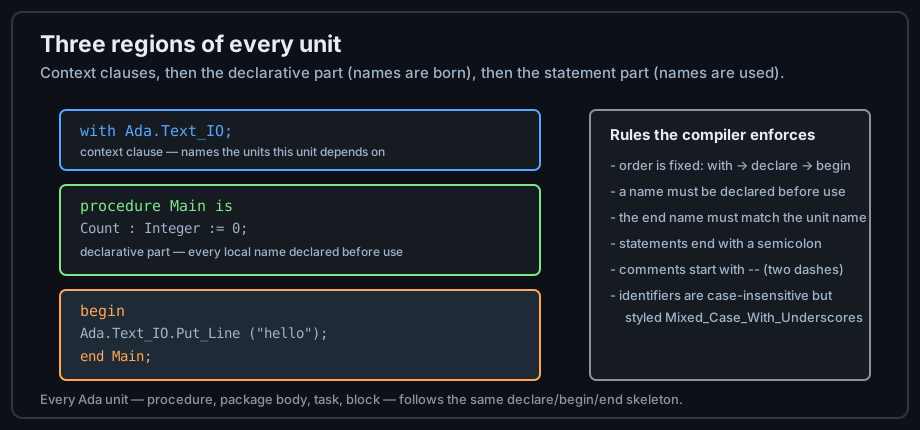
begin; statements run in order.with Ada.Text_IO; -- 1. context clause: what this unit needs
procedure Syntax_Tour is -- 2. declarative part starts at "is"
Done : Boolean := False; -- every name has a type, always
Count : Natural := 0; -- Natural: the subtype 0 .. Integer'Last
begin -- 3. statement part
Count := Count + 1;
Done := Count > 0;
Ada.Text_IO.Put_Line ("done: " & Boolean'Image (Done));
end Syntax_Tour; -- the end name must match — the compiler checks it
Run it with alr run (or gnatmake syntax_tour.adb) and the output is done: TRUE. The & operator concatenates strings; Boolean'Image converts a value to its printable form — an attribute, always written with a tick.
Declarations Before Use
Ada reads top to bottom and requires a name to be declared before it is used. There is no implicit hoisting. This sounds like a restriction; in practice it means the declaration order is the documentation order — the reader knows exactly where every name comes from:
procedure Order_Matters is
   Width  : constant Float := 4.0;
   Height : constant Float := 3.0;
   Area   : constant Float := Width * Height;  -- OK: Width, Height above
begin
   null;  -- "null;" is the empty statement where a statement is required
end Order_Matters;
Two details in this example recur constantly:
constantdeclares a name that can never be assigned again — used far more often than variables in idiomatic Ada.null;exists because Ada has no empty statement; every syntactic slot is explicit.
Statements and Terminators
Statements end with semicolons, and Ada has no expression-statements: a computation nobody uses is a compile error. Blocks nest and every level closes with a keyword pair:
procedure Nesting is
begin
   if True then
      declare            -- an inline block with its own declarations
         Msg : constant String := "inner";
      begin
         Ada.Text_IO.Put_Line (Msg);
      end;               -- ends the declare block
   end if;               -- ends the if
end Nesting;
The end X; discipline means a missing end is caught at the exact nesting level that broke, not pages later. Editors and pretty-printers lean on this structure too.
Free Formatting and Style
Ada is free-form: indentation and line breaks carry no meaning. The community style guides (GNAT Style Guide, AdaCore coding standards) exist because uniformity matters more than any single choice. The conventions used throughout this track:
| Element | Convention | Example |
|---|---|---|
| Identifiers | Mixed case with underscores | Packet_Size |
| Constants | Same as identifiers — the type system replaces naming tricks | Max_Retries |
| Keywords | Lowercase | if, loop, begin |
| Indentation | 3 spaces per level (GNAT default) | — |
| Comments | --, aligned with the code they explain | -- why, not what |
Next: Data Types — where Ada's strongest idea begins.