
Environment & Startup Files
Startup Files
Which configuration files Bash reads depends on how it was started. Getting this wrong is the classic "it works in my terminal but not in cron" problem.
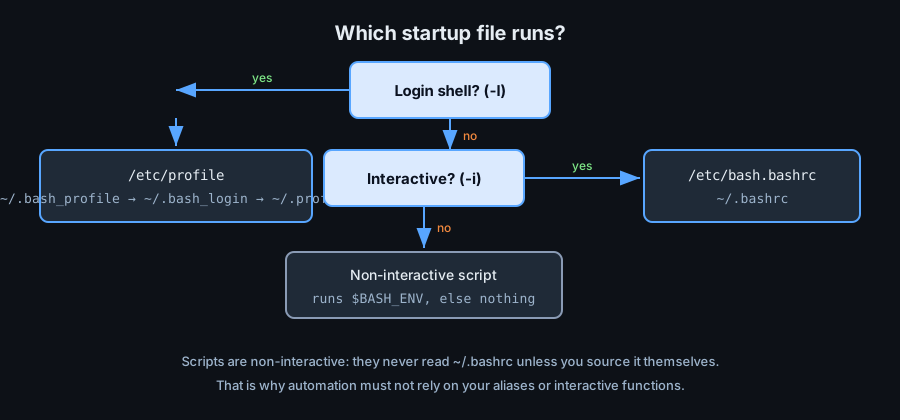
Login Shell
A login shell is one you authenticate into: an SSH session, a console login, or bash -l / bash --login. It reads:
/etc/profile— system-wide settings- the first existing of
~/.bash_profile,~/.bash_login,~/.profile
Interactive Non-Login Shell
Opening a new tab or terminal window after logging in usually gives an interactive non-login shell. It reads /etc/bash.bashrc (on Debian/Ubuntu) and ~/.bashrc.
Non-Interactive (Scripts)
A script is non-interactive. It reads none of the above. It only honours the file named by $BASH_ENV, which is normally unset. This is why aliases and interactive functions are invisible to your scripts.
bash -l            # force a login shell
bash -i            # force an interactive shell
bash --noprofile --norc -c 'echo hi'   # skip all startup files (useful for tests)
profile vs bashrc
Put environment settings in ~/.profile/~/.bash_profile (PATH, EDITOR, locale) and interactive settings in ~/.bashrc (aliases, prompt, completion). Then let one source the other so a login shell gets both.
# ~/.bash_profile
[[ -f ~/.bashrc ]] && source ~/.bashrc
export PATH="$HOME/.local/bin:$PATH"
# ~/.bashrc
export PS1='\[\e[32m\]\u@\h\[\e[0m\]:\w\$ '
alias ll='ls -alF'
alias gs='git status'
shopt -s checkwinsize histappend
source ~/.bashrc to apply it to the current shell, or open a new terminal.
Environment Variables
Common Variables
| Variable | Purpose |
|---|---|
PATH | Directories searched for commands |
HOME | Your home directory |
USER | Current username |
PWD / OLDPWD | Current and previous directory |
SHELL | Login shell path |
LANG / LC_* | Locale and character set |
EDITOR | Preferred text editor |
Shell-Maintained Variables
echo "$BASH_VERSION"     # 5.2.21(1)-release
echo "$BASH_SOURCE"      # current sourced file path
echo "$LINENO"           # current line number (useful in errors)
echo "$SECONDS"          # seconds since the shell started
echo "$RANDOM"           # pseudo-random integer 0..32767
echo "$PWD"              # logical current directory
$RANDOM is fine for games and temp names but is not cryptographically secure. Use openssl rand or /dev/urandom for secrets.
Shell Options
set Options
set -e            # exit on any command failure
set -u            # error on unset variables
set -o pipefail   # a pipeline fails if any stage fails
set -x            # print commands as they run (debug)
set +x            # stop tracing
shopt Options
shopt -s nullglob      # unmatched globs expand to nothing
shopt -s globstar      # '**' matches across directories
shopt -s nocaseglob    # case-insensitive globbing
shopt -s extglob       # extended pattern operators
shopt -u nullglob      # turn an option off
Pitfalls
- Scripts never read
~/.bashrc: do not depend on aliases inside scripts. PATHin cron is minimal — set it explicitly or use absolute paths.- Exporting a variable affects only children; a child cannot change the parent's environment.
- Editing
~/.bashrccan break every new shell — test withbash --rcfilebefore committing.