
Expansion & Globbing
Expansion Order
Bash does not run your line as typed. It expands it through a fixed pipeline. Knowing the order explains almost every surprising result.
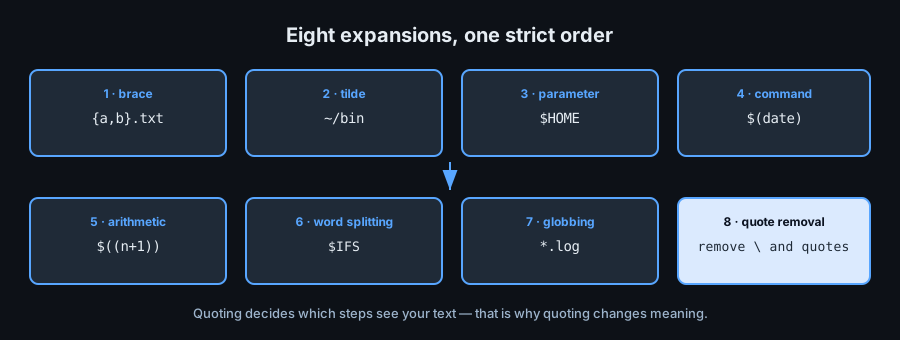
Brace Expansion
Brace expansion happens first, before variables exist as text. It generates strings.
Sequences and Lists
echo file{1..3}.txt        # file1.txt file2.txt file3.txt
echo {a,b,c}               # a b c
echo {01..05}              # 01 02 03 04 05
mkdir -p project/{src,test,doc}
echo {a..e..2}             # a c e  (step 2)
Cartesian Products
echo {a,b}{1,2}            # a1 a2 b1 b2
cp report.{csv,bak}        # expands to: cp report.csv report.bak
Braces do not expand inside quotes: echo "{a,b}" prints the literal {a,b}.
Tilde Expansion
echo ~            # your home directory
echo ~user        # another user's home directory
cd ~/projects
echo "~"          # quoted: literal tilde, not expanded
Parameter Expansion
Variables are replaced by their values. The rich operators (:-, #, // …) were covered in the variables lesson.
echo "$HOME/bin"     # /home/me/bin
echo "${HOME}bin"    # braces delimit the name clearly
Command Substitution
$( ) — prefer this
today="$(date +%F)"
files="$(ls | wc -l)"
echo "there are $files files"
lines="$(grep -c error app.log)"
Command substitution strips trailing newlines. Use $(...) rather than backticks — it nests cleanly and reads better.
`` ` ` `` — legacy
old=`date +%F` # works, but cannot nest without escaping
Arithmetic Expansion
echo $((2 + 3 * 4))     # 14
n=5
echo $((n * n))         # 25
echo $((n++))           # prints 5, then n becomes 6
echo $((16#ff))         # 255 — base-16 input
Filename Expansion (Globbing)
Glob Patterns
| Pattern | Matches |
|---|---|
* | Any string, including none |
? | Exactly one character |
[abc] | One of a, b, c |
[0-9] | One digit |
[!abc] | Any character except a, b, c |
ls *.txt            # every .txt in the current directory
ls file?.log        # file1.log, fileA.log
ls [a-c]*           # names starting with a, b or c
Globbing only applies to paths that exist. If nothing matches, Bash leaves the pattern literal — which then gets passed to your command as a stray asterisk.
nullglob & failglob
shopt -s nullglob     # no match -> expand to nothing
for f in *.log; do echo "found $f"; done

shopt -s failglob     # no match -> error, script stops (good for strict scripts)
Extended Globbing
shopt -s extglob
ls !(*.tmp)           # everything except .tmp files
ls +(a|b)             # one or more of a or b
Word Splitting & Quote Removal
After substitutions, unquoted results are split on IFS, then globbed, then quote characters are removed. Quoting protects the value from splitting and globbing; the quotes themselves disappear last.
IFS=: read -r a b c <<<"x:y:z" # choose the separator deliberately
Pitfalls
- Unquoted
$varsplits on spaces — quote it. - Unquoted
*expands to files — quote it when you mean a literal. - Brace expansion runs before variable expansion, so
{$a,$b}does not do what you expect; use a loop instead. - Command substitution drops trailing newlines — do not rely on them for data.