
Redirection & Pipelines
The Three Standard Streams
Every process starts with three open file descriptors. Redirection rewires them; the program never notices.
| fd | Name | Default |
|---|---|---|
| 0 | stdin | your keyboard |
| 1 | stdout | your terminal |
| 2 | stderr | your terminal (for errors) |
Output Redirection
ls -l > listing.txt        # create/overwrite stdout
ls -l >> listing.txt       # append stdout
ls /nope 2> errors.txt     # redirect only stderr
cmd > out.txt 2>&1         # stdout and stderr to the same file
cmd &> both.txt            # Bash shorthand for the line above
cmd >> log 2>&1            # append both
Order matters in
2>&1: it means "point fd 2 at wherever fd 1 points right now". Writing 2>&1 > out sends stderr to the old stdout, then moves stdout. Put the redirection of stdout first.
Discarding Output
cmd >/dev/null 2>&1        # silence everything
quiet=$(cmd 2>/dev/null)    # capture stdout, drop stderr
Input Redirection
sort < names.txt            # read stdin from a file
while IFS= read -r line; do
  echo "$line"
done < data.txt             # feed the whole loop from a file
Reading a Specific Descriptor
exec 3< config.txt         # open fd 3 for reading
read -r line <&3
exec 3<&-                  # close it again
Pipelines
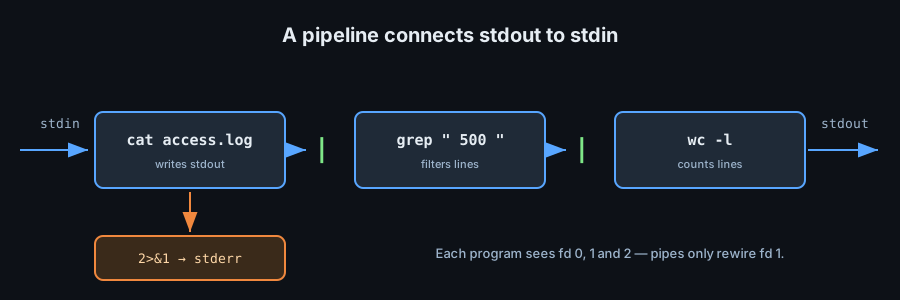
An unquoted | connects the stdout of the left command to the stdin of the right.
cat access.log | grep " 500 " | wc -l
ps aux | sort -k3 -nr | head -5      # top five by CPU
cut -d: -f1 /etc/passwd | sort -u
pipefail
By default a pipeline's status is the status of its last command, so a failure upstream can vanish.
set -o pipefail
grep "x" missing.txt | wc -l   # now the whole pipeline fails if grep fails
tee — Split a Stream
cmd | tee output.log            # write to file AND stdout
cmd 2>&1 | tee -a run.log       # append, capture errors too
Process Substitution
<(cmd) turns a command's output into a filename. It lets programs that only accept files consume a stream.
diff <(sort a.txt) <(sort b.txt)      # compare two sorted streams
while read -r u; do
  echo "user: $u"
done < <(cut -d: -f1 /etc/passwd)
noclobber & Beware of Truncation
set -o noclobber     # '>' now refuses to overwrite an existing file
cmd >| log           # but '>|' forces the overwrite anyway
prog > file truncates file before prog runs. If prog is reading that same file you destroy the input. Write to a temporary file, then move it into place.
Pitfalls
>truncates;>>appends. Reaching for the wrong one loses data.- A pipeline runs each stage in a subshell — variables set inside do not survive (
while … | …). 2>&1must come after the stdout redirection it copies.|&is Bash-only shorthand for2>&1 |.