
GPU Computing
Why a GPU
A GPU trades single-thread speed for throughput: it runs thousands of lightweight threads at once, each doing a small slice of a huge, uniform workload. Problems with millions of independent elements — matrix math, image filters, machine-learning inference — map naturally onto that shape; problems with long dependency chains do not.
Multicore vs Many-Core
The CPU is multicore: 4–64 fast cores optimized for latency and complex control flow. The GPU is many-core: thousands of simple cores optimized for throughput and data-parallel math. A CPU core can branch, speculate, and cache; a GPU core wins when every thread executes the same instruction on different data — the SIMT (single instruction, multiple threads) model. If your hot loop has data-dependent branches everywhere, it belongs on the CPU; if it is a uniform transform, it belongs on the GPU.
The Host + Device Model
Every GPU program is a heterogeneous program: the CPU (host) runs ordinary C, owns the data, and the GPU (device) runs kernels. The two have separate memories — a key difference from the shared-memory tools of the multicore lab — so data must be copied across an explicit boundary before and after each kernel.
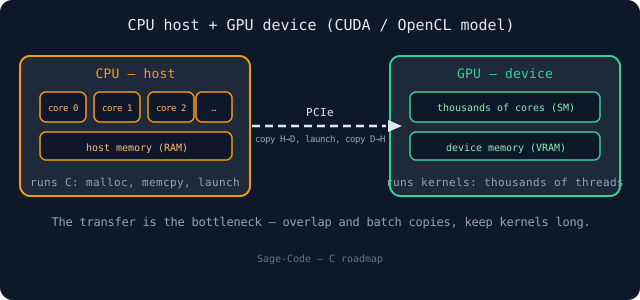
Figure 1 — multicore CPU (host) plus GPU (device): kernels run on the GPU, data crosses the PCIe link as explicit copies.
Kernel Execution
A kernel is a function that runs on the device. When you launch it, the hardware instantiates it as a grid of blocks, each block a group of threads; every thread runs the same code on its own element index. The launch syntax kernel<<<blocks, threads>>>(...) is CUDA's way of saying "make blocks × threads copies". Inside the kernel, the thread asks the runtime who it is (blockIdx, blockDim, threadIdx) and indexes its private slice of the work.
Memory Transfers — The Bottleneck
Host and device memory are different address spaces: cudaMemcpy(..., cudaMemcpyHostToDevice) ships the input over the PCIe bus, the kernel runs, then cudaMemcpy(..., cudaMemcpyDeviceToHost) brings results back. That copy is the classic bottleneck — a fast kernel can be starved by a slow transfer. The rules: copy once, batch small transfers, overlap transfers with kernel execution (streams), and keep kernels long enough to amortize the cost.
Frameworks
Three frameworks dominate, and all three treat C/C++ as the host language. The choice is mostly about vendor support and portability:
CUDA — NVIDIA's Native Framework
CUDA extends C with kernel syntax (__global__ functions, the <<<grid, block>>> launch operator) and the cudaMemcpy API. It is the fastest path to NVIDIA hardware, the best tooling, and the most documentation — but it is NVIDIA-only. Kernels are compiled ahead of time by nvcc.
OpenCL — The Portable Standard
OpenCL is an open standard that runs on GPUs, CPUs, FPGAs, and DSPs from every vendor. The model is the same (host + kernels), but kernels are written as source strings compiled at runtime, and the host code is a verbose API (clCreateContext, clBuildProgram...). Portability comes at the cost of boilerplate and runtime compilation.
SYCL — Single-Source, C++-Based
SYCL keeps the host and kernel in one C++ source file, describing device work as command groups; an implementation (e.g. Intel's oneAPI DPC++) compiles for CPU, GPU, and FPGA from the same code. It is the modern choice when you want CUDA-like productivity without locking onto one vendor.
A First Kernel
Every GPU program is the same skeleton: allocate device memory, copy in, launch a kernel whose threads each own one element, copy the result back. The vector-add below is that skeleton in its smallest correct form — study the shape, not the arithmetic.
Vector Add (CUDA)
// kernel.cu — CUDA kernel + host code (C-like; built with nvcc).
#include <stdio.h>

#define N 1024

// __global__ marks a function that runs ON the device, in every thread
__global__ void add_kernel(int *c, const int *a, const int *b, int n) {
    int i = blockIdx.x * blockDim.x + threadIdx.x;   // global thread id
    if (i < n) {
        c[i] = a[i] + b[i];   // each thread owns one element — no races
    }
}

int main(void) {
    int a[N], b[N], c[N];
    int *a_dev, *b_dev, *c_dev;
    for (int i = 0; i < N; i++) { a[i] = i; b[i] = i; }

    // 1) allocate device memory
    cudaMalloc(&a_dev, N * sizeof(int));
    cudaMalloc(&b_dev, N * sizeof(int));
    cudaMalloc(&c_dev, N * sizeof(int));

    // 2) copy inputs host -> device
    cudaMemcpy(a_dev, a, N * sizeof(int), cudaMemcpyHostToDevice);
    cudaMemcpy(b_dev, b, N * sizeof(int), cudaMemcpyHostToDevice);

    // 3) launch: 1 block x 1024 threads, all running add_kernel
    add_kernel<<<1, N>>>(c_dev, a_dev, b_dev, N);

    // 4) copy the result device -> host
    cudaMemcpy(c, c_dev, N * sizeof(int), cudaMemcpyDeviceToHost);

    // 5) verify one element and clean up
    printf("c[512] = %d (want %d)\n", c[512], 2 * 512);
    cudaFree(a_dev); cudaFree(b_dev); cudaFree(c_dev);
    return 0;
}
The guard if (i < n) matters: real grids rarely divide the work evenly, so a full-size launch must clamp the index instead of writing out of bounds. Real kernels scale the launch to e.g. <<<(N + 255) / 256, 256>>> — the ceiling division computes enough blocks to cover any N.
Building with nvcc
CUDA source compiles with NVIDIA's compiler driver, which splits host code (C) from device code (kernels):
nvcc -std=c++11 -O2 kernel.cu -o kernel   # note: host side is C++; kernels C-like
./kernel
OpenCL programs instead ship the kernel as a string (clBuildProgram compiles it when the program starts); SYCL/DPC++ again compiles ahead of time. Whichever framework you pick, the host language remains C-ish and the memory model is the one taught here.
When the GPU Wins
The GPU is not a faster CPU; it is a different shape of computer. It wins when:
- The workload has massive data-level parallelism — millions of independent elements.
- It is compute-bound math (matrix products, convolutions, simulations), not I/O or branchy logic.
- Data transfer is amortized — the kernel runs long and infrequently compared with the copies.
It loses when the problem is small (copy overhead dominates), serial (a long dependency chain), or latency-critical (the driver overhead is microseconds). The engineering rule from the multicore lab still applies: profile first, GPU second. When you do commit, the profiling tools — NVIDIA nsight, ncu — will show you exactly where the memory-transfer tax is being paid.
Next lab: ABI & assembly — the machine-level contract beneath every function call.