
Control Flow
if, switch) and the loops
(while, do-while, for) that give programs their logic.
Conditionals
An if statement runs its block only when its condition is true. The condition is any
expression that evaluates to bool (or is implicitly convertible to one).
int age = 20;
if (age >= 18) {
    std::cout << "Adult\n";
}
if / else
The else branch runs when the condition is false. Chains of else if
handle several alternatives in order — the first true branch wins.
int score = 85;
if (score >= 90) {
    std::cout << "A\n";
} else if (score >= 80) {
    std::cout << "B\n";
} else {
    std::cout << "Keep practicing\n";
}
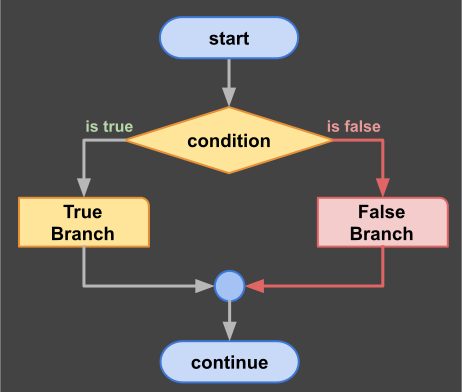
An if statement: the condition selects exactly one path.
Nesting and pitfalls
Conditions can be nested inside other conditions. Keep nesting shallow (two levels is plenty) —
deep nesting is hard to read. Remember that a condition uses ==, never a single
=; the compiler usually warns about the single form.
int age = 20;
bool hasTicket = true;

if (age >= 18) {                 // outer check
    if (hasTicket) {             // inner check
        std::cout << "Welcome\n";
    } else {
        std::cout << "Ticket required\n";
    }
} else {
    std::cout << "Too young\n";
}
Switch
A switch compares one integer-like value against several constant cases — a cleaner
alternative to a long else if chain when you compare the same variable
against many fixed values. Each case must end with break (or
return) to stop execution from falling into the next case.
char grade = 'B';
switch (grade) {
    case 'A':
        std::cout << "Excellent\n";
        break;
    case 'B':
    case 'C':
        std::cout << "Pass\n";     // B and C share this branch
        break;
    default:
        std::cout << "Retake\n";   // any other value
        break;
}
The default case handles every value you did not list — always include it. A switch
only works with integral (whole-number-like) types: char, int,
enum, but not double or std::string.
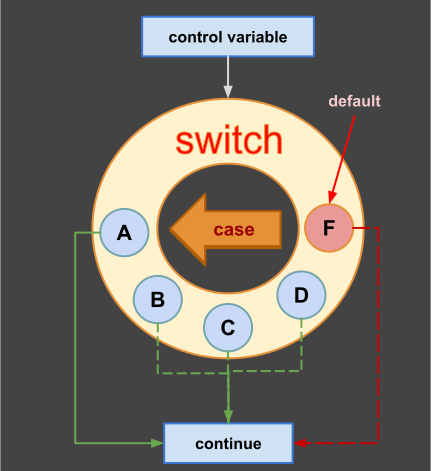
A switch dispatches one value to (possibly) shared branches.
While & Do-While
A while loop repeats its body as long as the condition stays true. It checks the
condition before each run — if the condition is false at the start, the body never runs.
Loops need a progress step, or they run forever.
int countdown = 3;
while (countdown > 0) {          // check before each attempt
    std::cout << countdown << "\n";
    countdown--;                 // progress: without this, infinite loop
}
std::cout << "Go!\n";
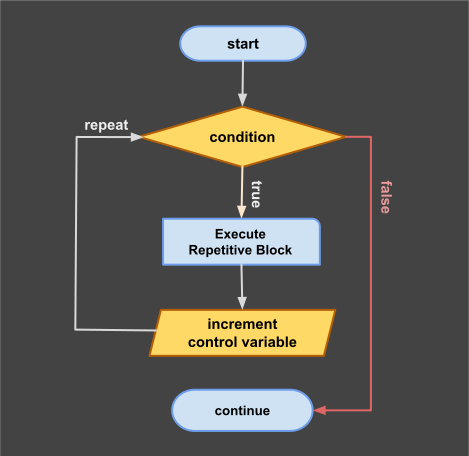
A while loop: test first, run body, repeat.
do-while
The do-while loop runs the body first and tests the condition after — so the body
always executes at least once. Use it for "ask until the answer is valid" patterns.
int choice = 0;
do {
    std::cout << "Enter 1 or 2: ";
    std::cin >> choice;              // read a number from the user
} while (choice != 1 && choice != 2);  // repeat while the answer is invalid
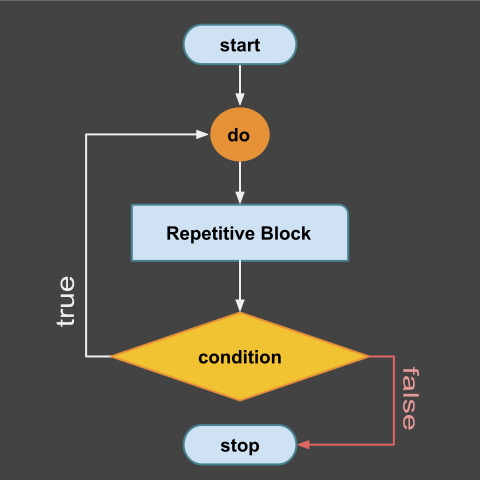
A do-while loop: body always runs at least once.
For Loops
A for loop bundles the three loop ingredients into one header: initialization,
condition, and progress step. It is the loop of choice when you know how many iterations you need.
for (int i = 0; i < 5; i++) {       // start, condition, step
    std::cout << "Round " << i << "\n";
}
The variable i lives only inside the loop. The three parts are optional — a header
like for (;;) means "forever", which pairs with break to exit when ready.
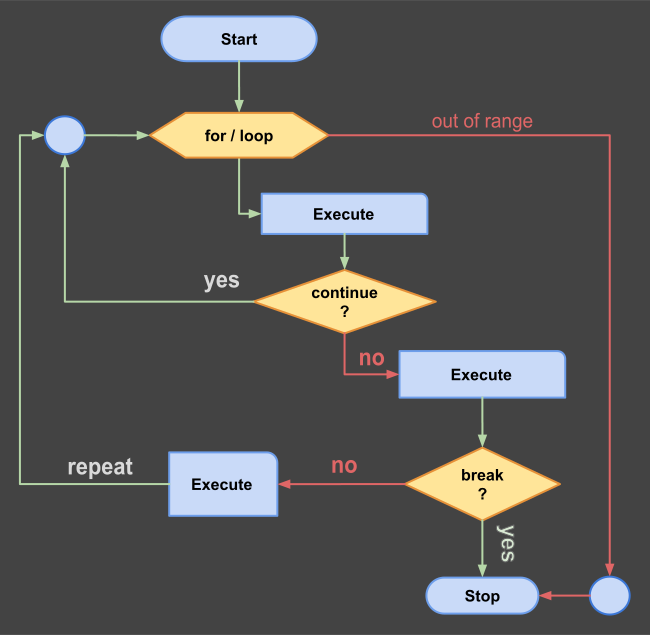
A for loop: init once, then test-body-step until the condition fails.
Range-based for
When you need every element of a collection, the range-based for (C++11) is shorter
and safer — no index to manage, no off-by-one errors:
int numbers[] = {10, 20, 30};
for (int n : numbers) {             // n takes each value in turn
    std::cout << n << "\n";
}
The range-for shines with std::vector and std::string, which you will
meet in the data type lessons.
Break & Continue
Two keywords fine-tune loops from inside the body. break exits the loop immediately;
continue skips the rest of the current round and jumps to the next test.
for (int i = 1; i <= 10; i++) {
    if (i == 3) continue;    // skip printing 3
    if (i == 7) break;       // stop the loop at 7
    std::cout << i << " ";
}
// prints: 1 2 4 5 6
Both keywords are useful but can scatter control flow; loops with many breaks often hide simpler logic. When a loop grows complex, consider a helper function instead.
Practice
Combine the pieces into programs and verify the output by hand first:
- Print the even numbers from 2 to 20 using a
forloop and% 2. - Write a
whileloop that doubles a number until it exceeds 1000; print the final value. - Use a
do-whileto keep asking for a positive number until the user enters one. - Rewrite the countdown as a
forloop:for (int i = 3; i > 0; i--). - Translate a grade from 0–100 to A/B/C using
if/else, then again usingswitchonscore / 10.