
C# High Performance Computing
Every modern computer is a parallel machine — even a phone has several cores. This chapter teaches the three tools .NET gives you to use them, and the pitfalls behind each one.
Parallel Processing
Parallel processing splits one big CPU-bound job — such as scanning a large collection — across several cores that run at the same time. The Task Parallel Library (TPL) manages the worker threads for you; in modern code you never create raw threads yourself.
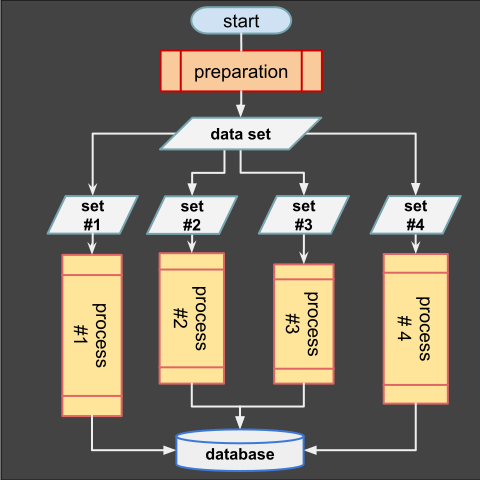
Parallel processing — one job split across cores
Task Parallel Library (TPL)
Parallel.For distributes loop iterations across threads of the thread pool. Use it only when every iteration is independent.
// Parallel.For splits the loop across worker threads automatically
Parallel.For(0, 10, i =>
{
    // each iteration runs on whatever thread the pool assigns
    Console.WriteLine($"item {i} on thread {Thread.CurrentThread.ManagedThreadId}");
});
// note: output order is NOT guaranteed — iterations finish in any order
PLINQ
LINQ gets parallelism almost for free with AsParallel(): the query partitions the source, processes chunks on several cores, then merges the results back.
int[] numbers = Enumerable.Range(1, 1_000_000).ToArray();

// AsParallel() lets the LINQ pipeline use all cores at once
var firstPrimes = numbers.AsParallel()
                         .Where(IsPrime)   // runs on several threads in parallel
                         .Take(100)        // stop early once enough primes found
                         .ToArray();

static bool IsPrime(int n)
{
    if (n < 2) return false;
    for (int d = 2; d * d <= n; d++)
        if (n % d == 0) return false;  // found a divisor — not prime
    return true;
}
Concurrency with async/await
Concurrency is about overlapping: while the program waits for a slow network or disk response, the rest of the work keeps moving. async/await keeps the calling thread free instead of blocking it.
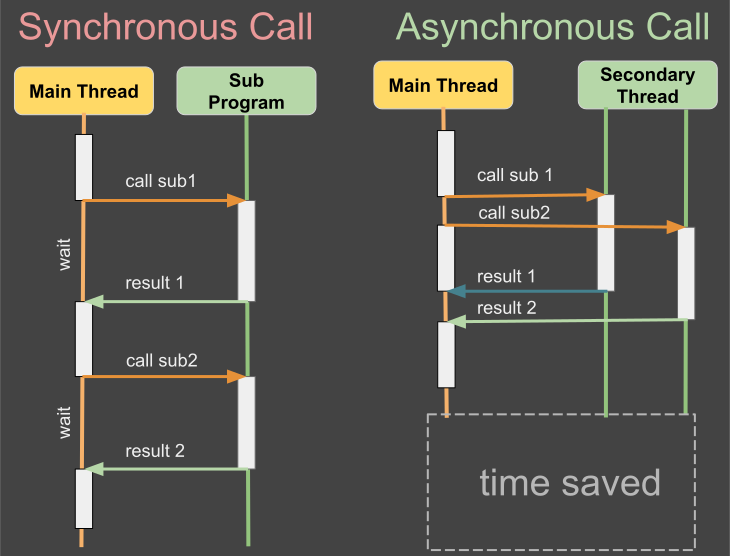
Concurrency — tasks overlap while waiting
async / await
An async method returns a Task and yields control at each await. No thread is parked on the network, and the continuation runs when the result is ready.
static async Task<string> FetchAsync(string url)
{
    using var client = new HttpClient();
    return await client.GetStringAsync(url);   // yields; caller keeps running meanwhile
}

// await restores the result when it is ready
string html = await FetchAsync("https://learn.microsoft.com");
Console.WriteLine($"downloaded {html.Length} characters");
Running Tasks Together
Task.WhenAll starts several tasks at once and waits for all of them; WhenAny waits for the first to finish. This is how you overlap independent I/O.
Task<string> docs   = FetchAsync("https://learn.microsoft.com");
Task<string> dotnet = FetchAsync("https://dotnet.microsoft.com");
// both requests are now in flight at the same time

string[] results = await Task.WhenAll(docs, dotnet);   // waits for both
Console.WriteLine(results.Length);                      // 2
Multiprocessing
A process is an isolated program with its own memory and its own .NET runtime. Processes cannot read each other's memory by accident — that isolation is exactly what you want for untrusted or crash-prone work.
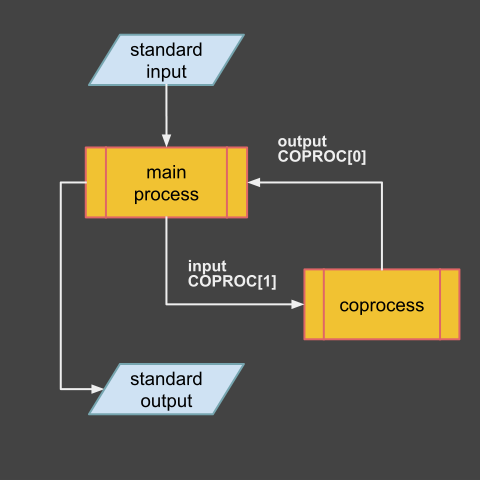
Multiprocessing — isolated processes
Starting Processes
Process.Start launches an external program. Redirect its output to capture the result, and set UseShellExecute = false so the child stays attached to your console app.
using System.Diagnostics;

var startInfo = new ProcessStartInfo("dotnet", "--version")
{
    RedirectStandardOutput = true,   // capture the child's stdout here
    UseShellExecute = false          // no shell wrapper — talk to the process directly
};

using var proc = Process.Start(startInfo)!;   // launches a separate OS process
string version = await proc.StandardOutput.ReadToEndAsync();
Console.WriteLine(version);                   // e.g. "9.0.100"
Inter-Process Communication
Processes share only what they are explicitly told to share. The simplest channels are redirected standard input/output (used above), files, named pipes (System.IO.Pipes), or a local HTTP server. Keep the payload small and the format versioned.
Pitfalls & Choosing a Model
Race Conditions
Parallel code that touches shared state breaks silently: two threads can read and write the same variable at the same instant, losing updates.
int counter = 0;
Parallel.For(0, 100_000, _ => counter++);   // BUG: racing increments lose updates
Console.WriteLine(counter);                   // often far less than 100_000
Protect the shared state with a lock — only one thread may enter the block at a time, so the result becomes deterministic.
int safe = 0;
object gate = new();   // any object can act as a lock

Parallel.For(0, 100_000, _ =>
{
    lock (gate) safe++;   // only one thread inside at a time
});

Console.WriteLine(safe);  // exactly 100_000
Which Model When
The three models solve different problems. Match the tool to the bottleneck, never to fashion.
| Scenario | Model | .NET tool |
|---|---|---|
| CPU-heavy loop over independent data | Parallel processing | Parallel.For, PLINQ |
| Slow I/O, or keeping a UI responsive | Concurrency | async/await, Task.WhenAll |
| Untrusted or crash-prone work, external tools | Multiprocessing | Process.Start, pipes |
| Shared counters or state | Protect, do not parallelize blindly | lock, Interlocked |