
C# References & Compilers
You do not need the .NET SDK on your machine to start. A browser playground compiles and runs C# in seconds, which closes the learning loop: read a lesson, try the snippet, see the output. The tables below are grouped by purpose, so you can pick the right tool in seconds.
Playgrounds & Online Compilers (no install)
The fastest way to learn C# is immediate feedback — type, run, read the output, change one line, run again. The tools below do exactly that with no account and no install, and most give you a shareable link.
Browser Playgrounds — run code instantly
Every example in this track can be pasted straight into one of these. If you are unsure where to start, pick .NET Fiddle.
| Playground | What it is | Best for |
|---|---|---|
| .NET Fiddle | The reference C# playground. Choose the compiler and .NET version, add NuGet packages, and share a link. Runs the full console template. | Any snippet; sharing; NuGet. |
| Programiz Compiler | A minimal, beginner-friendly editor with instant output and no distractions. | Absolute beginners. |
| OneCompiler | Single-page editor with run + save, standard input, and multiple C# versions. | Quick console sketches. |
| JDoodle | Lightweight and fast, no account required, permanent share URL, interactive standard input. | Slow connections; quick checks. |
| W3Schools Try It | A one-click inline editor next to each W3Schools lesson, so you edit examples in place. | Tiny examples while reading. |
| SharpLab | Compiles your code and shows the lowered form, IL, and JIT output — not a project runner, but a window into the compiler. | Understanding what the compiler does. |
Cloud IDEs — full projects, no local install
When one file is not enough — multiple classes, several files, a web API — a cloud IDE gives you a full editor and terminal in the browser, so you can run real dotnet projects without setting up a machine.
| IDE | What it is | Best for |
|---|---|---|
| Replit | Full online IDE with files, a terminal, and Git. Create a C# /.NET repl and run it immediately. | Multi-file projects; collaboration. |
| Gitpod | Ephemeral cloud workspace: open any GitHub repository and get a ready VS Code with dotnet in the terminal. |
Real projects from a repository. |
| GitHub Codespaces | Hosted VS Code from a dev container, with .NET preinstalled and free monthly hours. | Working on GitHub repositories. |
Official Documentation & Tours
Playgrounds teach you the how; the official documentation teaches you the why and the precise rules. Return to these whenever a snippet behaves unexpectedly.
| Resource | What it is |
|---|---|
| A tour of C# | Microsoft's guided overview of the language, from a first program to modern features. |
| C# programming guide | Structured reference for types, statements, and conventions. |
| .NET API browser | Searchable reference for every class and method in the .NET library. |
| C# language specification | The formal ECMA-334 standard — the exact rules behind every feature. |
Free Courses & Practice
Structured courses give you a path; practice sites turn knowledge into skill. Every link below is free to start.
| Course | What it is |
|---|---|
| W3Schools C# | Step-by-step tutorial with inline Try-It editors; pairs well with this road map. |
| Microsoft Learn — C# paths | Free, guided modules with built-in code runners and completion badges. |
| SoloLearn C# | Mobile-friendly course with an in-app compiler — learn on the go. |
| Exercism C# track | Free practice with roughly 150 exercises and community mentoring. |
| freeCodeCamp C# course (video) | A full beginner video course you can watch and follow along. |
Open-Source Samples & Challenges
Reading real code written by experienced developers consolidates everything you have learned. Browse, clone, rebuild, then modify.
| Source | What it is |
|---|---|
| dotnet/samples | Microsoft's official sample gallery — thousands of .NET examples by topic area. |
| TheAlgorithms/C-Sharp | Classic algorithms and data structures implemented in C#, ideal after the Algorithms unit. |
| Codewars | Ranked programming challenges from 8 kyu to 1 kyu; select C#, submit solutions, then study others'. |
How to Choose & Next Steps
Follow this order and you will never feel stuck. The diagram groups the tools by what you want to do right now.
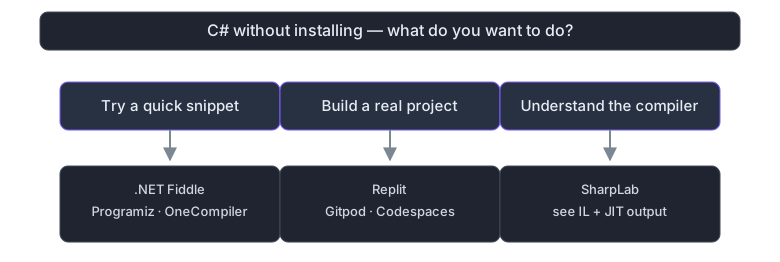
Figure 1 — choose the online C# tool by the task in front of you.
- Start with .NET Fiddle for every lesson in this track: paste, run, break, fix.
- Use Programiz when you want the fewest controls on screen while you read.
- Open SharpLab when you wonder what the compiler really did with your code.
- Move to Replit or Codespaces only when one file no longer fits — the Study Projects page is a good test.
- Whenever a rule feels unclear, open the C# language specification to settle it.