
Bash Conditionals
Conditional delimitors
Conditional expressions are enclosed in square brackets like this [...] for numeric expressions or this [[ ... ]] for string expressions that need extra processing. These expressions have distinct Logic operators that can be:
- && = and
- || = or
- ! = not
- -lt = less then
- -gt = greater then
- -eq = equal
Exit status
In Bash, any command that return exit status 0 (success) is also considered true. When exit status is not 0, usually 1 that is considered false.
In scripts you can establish exit status using command: exit. It is possible the exit command is missing. If so, the exit status is 0 even if you have send some text to error stream &2.
Decision ladder
In the example below we use conditionals to demonstrate a classic decision statement called "ladder". It consist in several exclusive branches that are executed alternative depending on several conditionals. Each conditional is controling a single branch. When do condition is true, the default branch is executed.
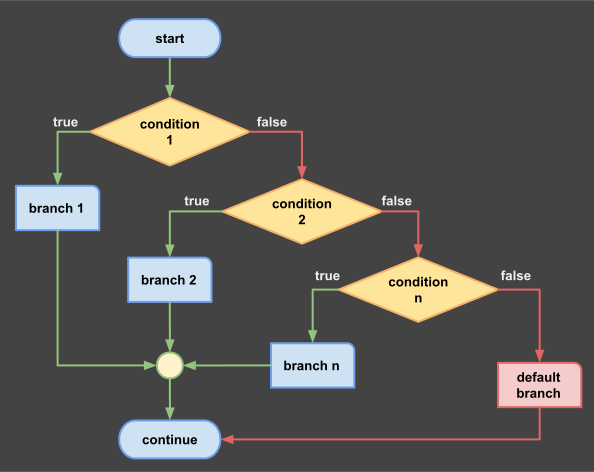
Ladder
Logic Diagram
Example
This example can be run on replit.com. Your task is to open this example and run it 3 times with deverse numbers. You can compare any number or letter with other number or letter.
# simple decision branch
read -p "a=" a
read -p "b=" b
if [[ "$a" -eq "$b" ]]
then
  echo "a = b"
elif [[  "$a" -lt "$b"  ]]
then
  echo "a < b"
elif [[  "$a" -gt "$b"  ]]
then
  echo "a > b"
else
  echo error; exit 1
fi; exit 0
~/bash-repl$ bash if.sh
a=10
b=25
a < b
~/bash-repl$ bash if.sh
a=10
b=10
a = b
~/bash-repl$ bash if.sh
a=12
b=10
a > b
~/bash-repl$
Notes:
- In this script we use [[..]] to support letters;
- With [..] the conditionals will work only with numbers;
- Math relation operators are aldo working with conditionals;
Open script: if.sh