
Dart Control Flow
Page bookmarks:
Dart has 7 control flow statements:
| 1 | if...else | decision & branching statement |
|---|---|---|
| 2 | for loop | repetitive statement with control variable |
| 3 | while loop | repetitive statement with conditional start |
| 4 | do-while loop | repetitive statement with conditional ending |
| 5 | switch and case | branch selection statement |
| 6 | assert | verification statement |
| 7 | try...catch | error handling statement |
if...else
This is by far the most useful statement in structured programming. It called the "decision" statement. It enables you to create two branches and to use a logical condition to make a decision. When condition is true one branch is executed, when false the other branch is executed.
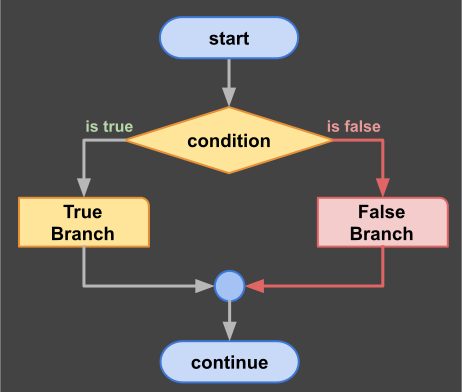
decision diagram
Pattern:
//syntax pattern
if (condition) {
    //true branch
    ...
}
else {
    //false branch
    ...
}
for loop
This is a repetitive statement. Repetition is controlled by a variable and one or several conditions. Let's analyze the conceptual diagram then the syntax:
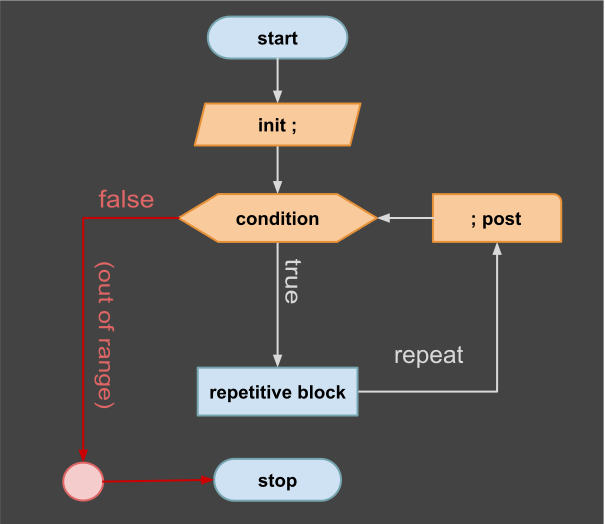
For/Loop Repetition
Pattern:
This statement starts with "for" keyword. Next, there is a set of three expressions enclosed in brackets and separated by semicolons like this: (declaration; condition; increment). Let's analyze the pattern:
//syntax pattern
for (var i = 0; i < max_limit; i++) {
    //repetitive block
    ...
}
break and continue
You can alter the normal workflow of any repetitive statement by using two transfer statements. First is: "continue", enable one jump back at the beginning of the repetitive block. Second is: "break", enable one jump out of repetitive block.
- continue: shortcut a repetitive block
- break: stop a repetitive block
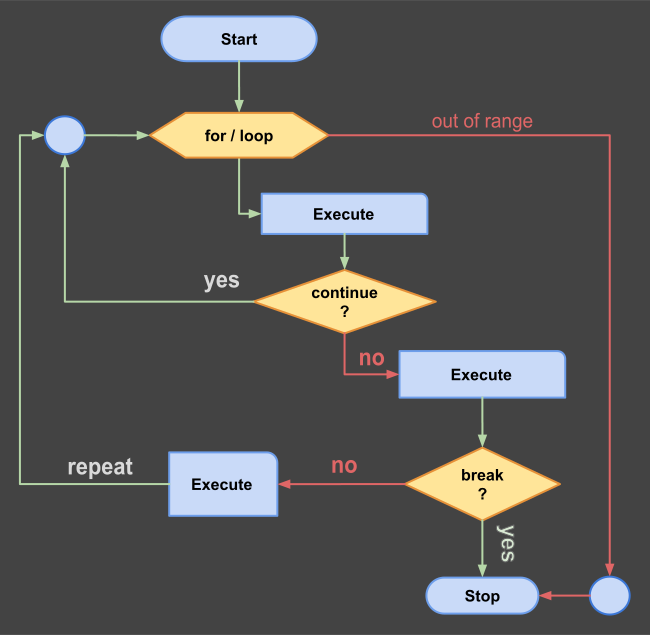
For/Loop Repetition
//syntax pattern
for (var i = 0; i < max_limit; i++) {
    //first block
    ...
    if (condition) continue;
    //second block
    ...
    if (condition) break;
    //third block
    ...
}
while loop
This statement starts with keyword "while". It uses one conditional expression to make a decision to start a repetitive block. After first execution the condition is evaluated again and enable more iterations as long as the condition is true. When the condition become false, the repetition stops.
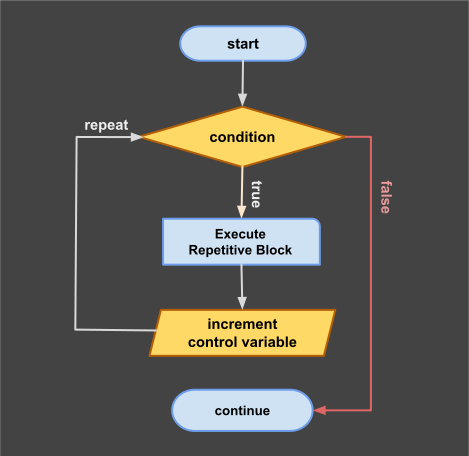
while loop diagram
Pattern:
//syntax pattern
while (condition) {
   //repetitive block
   ....
}
do-while loop
This statement start a block that will execute at least once. After first time execution a condition is evaluated. If the condition is true the block statement is repeated until the condition become false.
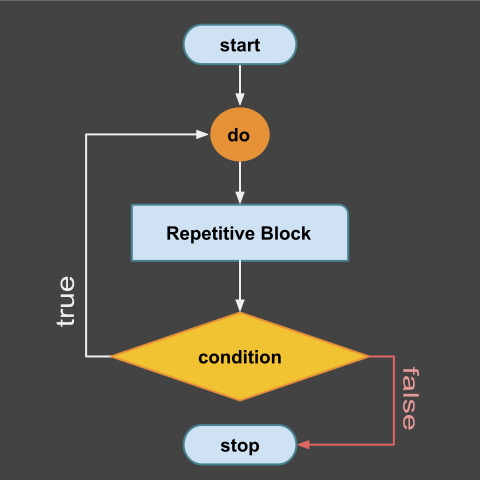
do-while diagram
Pattern:
//syntax pattern
do {
   //repetitive block
   ....
} while (condition);
switch and case
This is a selection statement that uses a control variable to make a jump table. For each value of the control variable you can create a different "case block" that is executed. If no case value matches the variable value, one final and "default case" is executed.
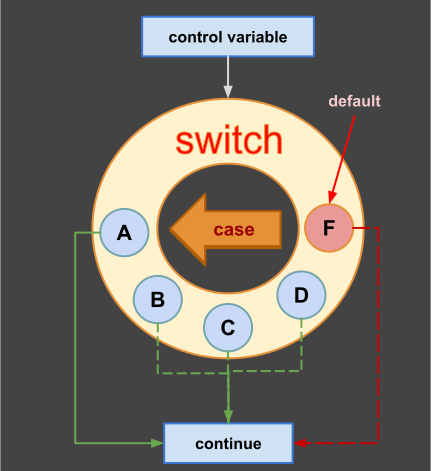
Switch Diagram
Pattern:
//syntax pattern
var v = random(5)
switch (v) {
    case 1:
        //first case
        ...
        break;
    case 2:
        //second case
        ...
        break;
    case 3:
        //third case
        ...
        break;
    case 4:
        //forth case
        ...
        break;
    default:
        //default case
        ...
}
Notes:
- At the end of each case you have to use "break" statement;
- For an empty case the break statement is optional;
- Default case is optional and do not have a break at the end of block.
Homework: Let's implement this syntax pattern into a real program. Open and execute the following code snippet on-line: dart-switch
assert
Next statement enable program interruption using a condition. The interruption can be accompanied by an optional message. This is a statement used frequent in our examples for testing post-conditions but also to document the training code.
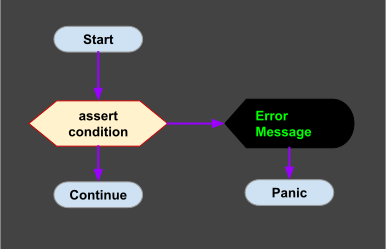
Assert Diagram
Pattern:
//syntax pattern
assert(condition, message);
Examples:
//positive test
var x = 1;
assert(x == 1);

//negative test
var test = "is working";
assert(test = "working", "error!");
Exceptions
Before we can continue with next control statement you need to learn about Exceptions. In Dart, exceptions are instances of Exception class or a class derived from it. You can create your own exceptions. Exceptions can be raised using "throw" keyword.
Pattern:
Next patterns can be used to create exceptions.
//syntax pattern
throw "message"; //create an exception from a string
throw FormatException("message");

Exception myException; //define an exception
throw myException;

Error myError; //define an error
throw myError;

// exceptions are expressions
// so next function is valid:
void f() => throw UnimplementedError();
try...catch
This statement is used to fix a block of code that may have exceptions. The exceptions can be caused by the system or can be created by you in some situations using "throw" statement inside of try block.
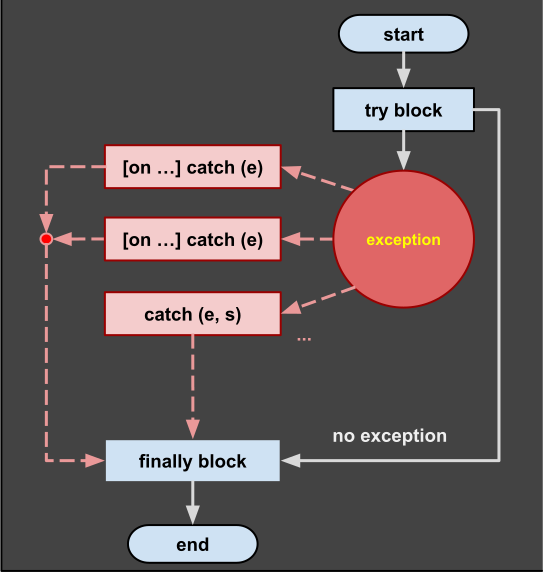
try-catch diagram
Sample pattern:
Next is the most simple form of try block with two branches:
//syntax pattern
try {
    //protected block
    ...
} catch (e) {
    //catch all exceptions
    print('${e}');
    ...
}
Full pattern:
Next you can see a more complex try block with "finally" region:
//syntax pattern
try {
    //protected block
    ...
    throw FormatException("message");
    ...
} on exceptionType1 catch (e) {
    //first exception handler
    ...
} on exceptionType2 catch (e) {
    //second exception handler
    ...
} catch (e, s) {
    //all other exceptions
    ...
    rethrow; //propagate exception
} finally {
    //finalization block
    ...
}
Notes:
- catch can use one or two parameters: e="error" and s="StackTrace",
- finally block is executed, whether or not an exception is thrown,
- you can partially handle the exceptions by using "rethrow" keyword,
- you can partially handle the exceptions by using "rethrow" keyword,
- unlike Java, a function do not declare exceptions they might throw.