
Java Arrays
An array is a container object that holds a fixed number of values of a single type. The length of an array is established when the array is created. After creation, its length is fixed but value of individual elements is mutable.
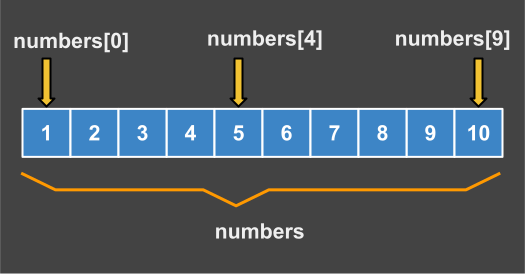
Array Elements
Declaration:
Next expression declares a variable "numbers" as an array of ten (10) integers.
int[] numbers = {1,2,3,4,5,6,7,8,9,0}Note: An array's length is part of its type, so arrays cannot be resized. However, despite this limitation we use arrays in Java for speed. There are other collections that can grow or shrink dynamically, we will introduce them later after we learn Classes and Generics.
Examples:
You can declare arrays of other types:
// non initialized arrays
byte[]    anArrayOfBytes;
short[]   anArrayOfShorts;
long[]    anArrayOfLongs;
float[]   anArrayOfFloats;
double[]  anArrayOfDoubles;
boolean[] anArrayOfBooleans;
char[]    anArrayOfChars;
String[]  anArrayOfStrings;

// this form is discouraged
float anArrayOfFloats[];
Array Creation
One way to create an array is with the "new" operator. The next statement in the ArrayDemo program allocates an array with enough memory for 10 integer elements and assigns the array to the anArray variable.
/* array creation using new */
// declares an array of integers
int[] anArray;

// create an array of integers
anArray = new int[3];

// set values to each element
anArray[0] = 100; // initialize first element
anArray[1] = 200; // initialize second element
anArray[2] = 300; // initialize third element

// access elements by index
System.out.println("Element 1 at index 0: " + anArray[0]); // 100
System.out.println("Element 2 at index 1: " + anArray[1]); // 200
System.out.println("Element 3 at index 2: " + anArray[2]); // 300
Two Dimension Arrays
A multidimensional array is an array of arrays. This is different then C or Fortran. A consequence of this is that the rows are allowed to vary in length, as shown in the following demo program:
/* demo two-dimensional array */
class MultiDimArrayDemo {
    public static void main(String[] args) {
        String[][] names = {
            {"Mr. ", "Mrs. ", "Ms. "},
            {"Smith", "Jones"}
        };
        System.out.println(names[0][0] + names[1][0]);
        System.out.println(names[0][2] + names[1][1]);
        System.out.println(anArray.length);
    }
}
Output:
Mr. Smith
Ms. Jones
5
Copying Arrays
The System class has an arraycopy() method that you can use to efficiently copy data from one array into another:
/* system.arraycopy */
public static void arraycopy(Object src, int srcPos,
                             Object dest, int destPos, int length)
Demo:
/* copy fragment of an array to another */
class ArrayCopyDemo {
    public static void main(String[] args) {
        char[] copyFrom = { 'd', 'e', 'c', 'a', 'f', 'f', 'e',
			    'i', 'n', 'a', 't', 'e', 'd' };
        char[] copyTo = new char[7];

        System.arraycopy(copyFrom, 2, copyTo, 0, 7);
        System.out.println(new String(copyTo));
    }
}
Output:
caffein
Array Manipulations
For your convenience, Java SE provides several methods for performing array manipulations in the java.util.Arrays class. For instance, using copyOfRange() method create an array from an existing array. Let's investigate an example:
/* copyOfRance demo */
class ArrayCopyOfDemo {
    public static void main(String[] args) {

        char[] copyFrom = {'d', 'e', 'c', 'a', 'f', 'f', 'e',
            'i', 'n', 'a', 't', 'e', 'd'};

        char[] copyTo = java.util.Arrays.copyOfRange(copyFrom, 2, 9);

        System.out.println(new String(copyTo));
    }
}
Output:
caffein
Other Methods:
Some other useful operations provided by methods in the java.util.Arrays class, are:
- Searching an array for a specific value to get the index at which it is placed (the binarySearch method).
- Comparing two arrays to determine if they are equal or not (the equals method).
- Filling an array to place a specific value at each index (the fill method).
- Sequential sorting is done using the sort method,
- Concurrent sorting is done using the parallelSort method.
Array Concatenation
In this example we create two initialized arrays and concatenate them with a custom created method.
public class Main {

public static void main(String[] args) {
    int[] v1 = { -4, -4, 0, -4, 2 };
    int[] v2 = { -8, -6, 0, -4, 2, 9, 15 };
    int[] v = concatenateArrays(v1, v2);
    printArray(v);  // -4 -4 0 -4 2 -8, -6, 0, -4, 2, 9, 15
    }

    public static int[] concatenateArrays(int[] a, int[] b) {
        int arrLen = a.length + b.length;
        int[] storeArray = new int[arrLen];
        for (int i = 0; i < a.length; i++) {
            storeArray[i] = a[i];
        }
        for (int i = 0; i < b.length; i++) {
            storeArray[i + a.length] = b[i];
        }
        return storeArray;
    }

    public static void printArray(int[] array) {
        for (int i = 0; i < array.length; i++)
            System.out.print(array[i] + " ");
        System.out.println();
    }
}
Output:
-4 -4 0 -4 2 -8, -6, 0, -4, 2, 9, 15
Homework: We have saved this example on-line: open on repl.it then run it. After this, add two more numbers: {24, 25} in each array and run it again. Can you see the new numbers in the final result?