
Julia Control
The decision
In the previous example we show a "if" statement also known as conditional statement. Easy to to use and simplified syntax. Julia do not use "then" keyword or ":" symbol after the condition like in other languages. Again Julia show an elegant and simple approach. It is used for one condition or multiple conditions using "elseif" compound keyword. In python this keyword is "elsif".
Syntax:
# This is the if-elseif-else-end statement
if [first-condition]
   [furst-true block]
elseif [second-condition]
   [second-true block]
...
else
   [fasle-block - no condition is true]
end
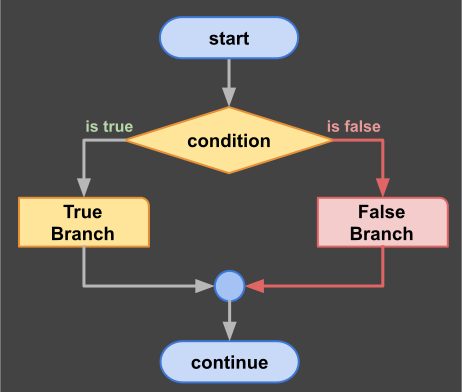
Decision Diagram
Example 1:
# Single branch conditional
if 1 == 1
   print("Of course 1==1 silly")
end
Example 2:
# Two branch conditional
print("enter any digit: a = ")
a = read(stdin, Char)

s = readline()

print("enter second digit: b = ")
b = read(stdin, Char)

s = readline()

# Two branches conditional
if a > b
   println("a > b")
else
   println("a <= b")
end

s = readline()
Homework:Open this example on-line and run it on repl.it website. Julia:decision
Ladder Statement
The if statement can have many condition and for each condition a block of code. The else statement is the alternative (optional) block that is executed when no condition is true. For each block we can also have nested if statements. This is somesing we wish to avoid if possible. It’s a good practice to not get too far from left side.
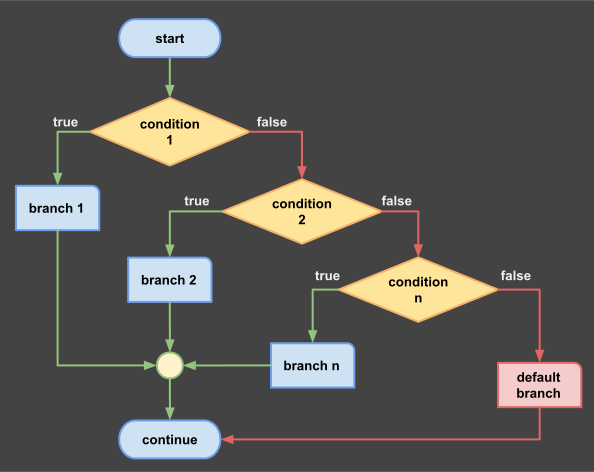
Ladder Decision
Example
# multi-branch decision ladder
print("enter any character: ")
c = read(stdin, Char)

if c in '0':'9'
   print("digit")
elseif c in  'A':'Z'
   print("uppercase letter")
elseif c in  'a':'z'
   print("lowercase letter")
else
   print("special character")
end
While Loop
While statement is used to repeat a block of code multiple times as long as one condition is true. If the condition is always true then we have an infinite loop. We can use a control variable that we increment inside the loop. In the next example we also learn two operators: "<=" and "+=" to check the value of the control variable "i". After the loop this control variable is available.
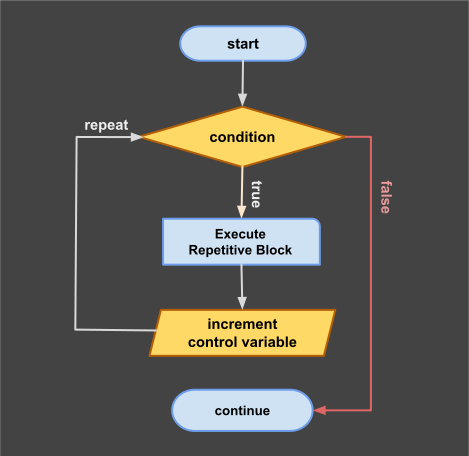
Loop Diagram
# next program will print: 1,2,3,4,5,done
i=1
while i <= 5
    print(i)
    print(",")
    i += 1
end
print("done")
For Loop
This is a repetitive statement that execute a finite number of times using a control variable. Next example is more compact:
# next program will print: 1,2,3,4,5,done
for i = 1:5
    print(i)
    print(",")
end
print("done")
Loop Control
We can early terminate a loop by using break. We can also skip execution of statements and jump back to beginning using keyword continue. Unlike while loop the control variable "i" is local inside the for loop and not available after the loop is ending.
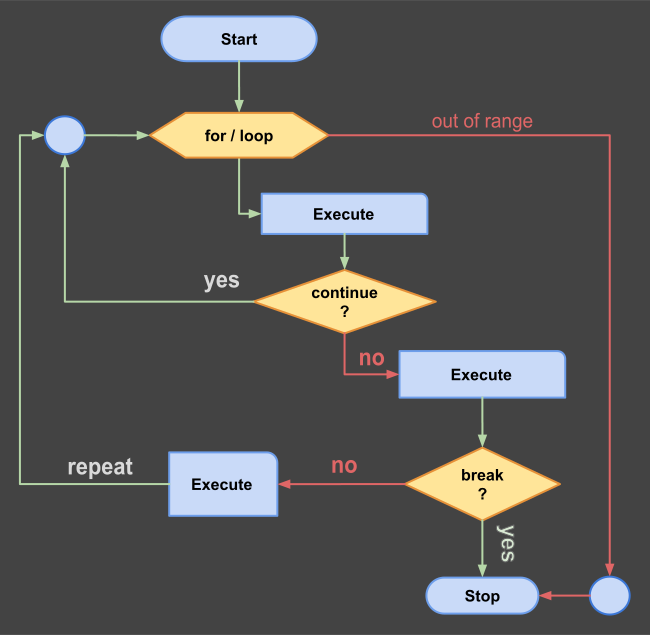
Loop Control
Example 1:
# expected output: 3 6 9
for i in 1:10
    if i % 3 != 0
        continue
    end
    println(i)
end
Example 2:
# expected output: 1 2 3 4 5
for j in 1:1000
    println(j)
    if j >= 5
        break
    end
end
Double Loop
Julia is good with matrix. So it is possible to use two control indexes in same loop. This is useful to create pairs.
# demo for double loop
for i = 1:2, j = 3:4
    println((i, j))
end
output:
(1, 3)
(1, 4)
(2, 3)
(2, 4)