
Scala Classes
If you have understood the previous paragraph, you are ready to learn about Scala classes. Otherwise we recommand you read href="../../../roadmap/csp/scala/..//paradigms/">programming paradigms article from Software Engineering tutorial, or just look at this picture to grasp the concept and move forward. You will catch up later.
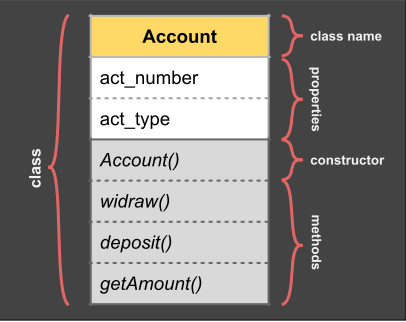
Class Anatomy
Class Constructor
In Scala a class is defined by its constructor. So when you create a class you actually define a default constructor. In this example we create a class called "Person" with 3 fields, using a single line of code:
// define a simple class
class Person(val firstName: String, val lastName: String, var age: Int = 0)

//using the simple class to create two instances
val p1 = new Person("Bill", "Gates", 65)
val p2 = new Person("Martin", "Odersky", 62)
val p2 = new Person("Steve", "Jobs")

//accessing fields of opjects
println(p1.firstName) //Bill
println(p1.lastName)  //Gates`
println(p1.age)       //65

//modify a property (next year)
p1.age = 66     // mutate field value
println(p1.age) // 66
Notes:
- Class and object constructor are one and the same;
- The class parameters automatic become fields;
- One class can be instantiated multiple times using "new";
- Fields can be declared immutable or variable using "val" or "var";
- Parameters having initial values are also optional;
- Public members of obects and classes can be accessed using dot operator (.)
Class with Methods
In the previous class, we can see property "age" is mutable. That means we can change person age. But the age can move only forward, a person can not get younger. So we need some logic to increment a person's age.
/* class with methods */
object Main {

  class Person(val firstName: String, val lastName: String){
    private var age: Int = 0
    // define 3 methods
    def setAge(age:Int) = this.age = age
    def getAge() = age
    def incAge() = age += 1
  }

  def main(args: Array[String]): Unit = {
    val p1 = new Person("Elucian","Moise")
    p1.setAge(55)
    println("age=" + p1.getAge())
    p1.incAge()
    println("age=" + p1.getAge())
  }
}
Notes:
- A class can have a "class body" that is a block of code,
- A class can have private fields, that are not visible outside of the class,
- A class can have methods. By default methods are public,
- Inside the class you can use "this" to specify current object,
- To execute a method with no parameters we use empty brackets ().
Homework:
Open this example on-line, run it then create a new person "p2" and set-up person's age. click here to open
Auxiliary Constructors
A class can have more than one constructor. Each constructor can have different parameters. The constructor is a method having name: "this". Each auxiliary constructor must call the default constructor explicit.
/* demo auxiliary constructor */
object Main {

  class Person(val firstName: String, val lastName: String){
    private var age: Int = 0
    // define 3 methods
    def setAge(age:Int) = this.age = age
    def getAge() = age
    def incAge() = age += 1
    // auxiliary constructor
    def this(firstName: String) {
      this(firstName,"") //call default constructor
      this.age = 1       //you can not be famost until your birthday
    }
  }

  def main(args: Array[String]): Unit = {
    val p1 = new Person("Madona")
    p1.setAge(62)
    println("firstName=" + p1.firstName)
    println("lastName=" + p1.lastName)
    println("age=" + p1.getAge())
  }
}
Inheritance
As expected from any OOP language, Scala has ability to extend a class. When it does, it create a new "specialization" class of an existing class. The new class is called also "subclass" and inherite all fields and methods of the "superclass".
Example:
In next example, look for keyword "extend" this define a subclass. In next example, ColorPoint is a subclass of Point. It has an additional attribute and one additional method: equal(). The old method move() is overwriden.
/* subclassing demo */
object Main {
  class Point(xc: Int, yc: Int) {
    val x: Int = xc
    val y: Int = yc
    def move(dx: Int, dy: Int): Point =
      new Point(x + dx, y + dy)
  }
  //define a subclass of superclass Point
  class ColorPoint(u: Int, v: Int, c: String="black") extends Point(u, v)
  {
    val color: String = c
    def equal(pt: ColorPoint): Boolean =
      (pt.x == x) && (pt.y == y) && (pt.color == color)
    override def move(dx: Int, dy: Int): ColorPoint =
      new ColorPoint(x + dy, y + dy, color)
  }
  def main(args: Array[String]): Unit = {
    val cp  = new ColorPoint(1,1,"red")
    val cp1 = cp.move(1,1)
    val cp2 = cp.move(1,1)
    println(s"(${cp1.x}, ${cp1.y},${cp1.color})")
    println(s"cp1==cp2 "+cp1.equal(cp2))
  }
}
Notes:
- We extend a superclass using one of superclass constructors with parameters;
- Scala has single inheritance model like Java. We extend a sinlge superclass;
- A method in a subclass can override an existing method of a superclass;
Singleton Objects
Scala is more object-oriented than Java because in Scala, the classes cannot have static members. Instead, Scala enable creation of objects that are not associated to any class. These are called singleton objects. A singleton is like a class that can have only one instance.
/* singleton object demo */
object Main {
  //singleton object Id
  object Id {
    var i: Int = 0;
    def next(): Int = { i += 1; i }
  }
  //test singleton object: Id
  def main(args: Array[String]): Unit = {
    val id1 = Id.next()
    val id2 = Id.next()
    println(s"Id1=$id1")
    println(s"Id2=$id2")
  }
}
Companion Object
An singleton object with the same name as a class is called a companion object. A companion object can access the private members of its companion class. Also, a companion class can access its companion object. We use a companion object for methods and values which are not specific to instances of the companion class.
/* companion class */
class Demo {
    private val hidden = 10
}
/* companion object */
object Demo {
    def getHidden(self: Demo) = self.hidden
}
/* driver sngleton: object Main */
object Main {
  def main(args: Array[String]): Unit = {
    val obj = new Demo
    println(Demo.getHidden(obj)) // 10
  }
}
Usability: Companion objects are useful when you want to have a regular class that also have some static members. Then you create in addition to the class a singleton object that will contain all static members you need.
Case Classes
Case classes are designed to offer better support for functional programming. This is a special class that have some advantages over the regular class. Scala compiler is doing more work to generate better code behind the scene for these kind of classes.
Features:
- Parameters get converted to public val fields;
- A companion object is automatically created;
- A companion obejct contains method: apply;
- A companion obejct contains method: unapply;
- A copy method is automatically generated;
- A default toString method is gnerated;
- Methods equals and hashCode are generated;
Example:
/* case class */
case class Person(name: String, relation: String, age: Integer)

val p1 = Person("Christa", "niece",10)
val p2 = Person("Hanka", "niece",12)

//case classes can be cloned
val p3 = p1.copy(age = 21)

//case classes can be compared
p1 == p2 // false
p1 == p3 // false
Behaviour:
Due to features implemented, the case class is behaving different than a normal class.
- You do not have to use keyword New to create an instance;
- Fields become read-only automatically (protected);
- You can clone and change some properties in the same time;
- You can compare two instances using "==" and "!=" operators;
Case Objects
A case object is like an enhanced object. It has more features than a regular object:
Features:
- It’s serializable
- It has a default hashCode implementation
- It has an improved toString implementation
Note: We will create examples for case classes and case objects at the end of this tutorial when we know more about Traits, Enumerations and Flow Control. Let's continue with Traits.