
Cascade, Specificity and Inheritance
Why conflicts need an arbiter
Three sources of styles
Every declaration comes from one of three origins: the browser's built-in defaults (user-agent), the user's preferences (user stylesheets and accessibility settings such as a minimum font size), and the author — you. All three can be loaded at once and all three can disagree. The cascade exists so the result is never ambiguous.
The cascade in one sentence
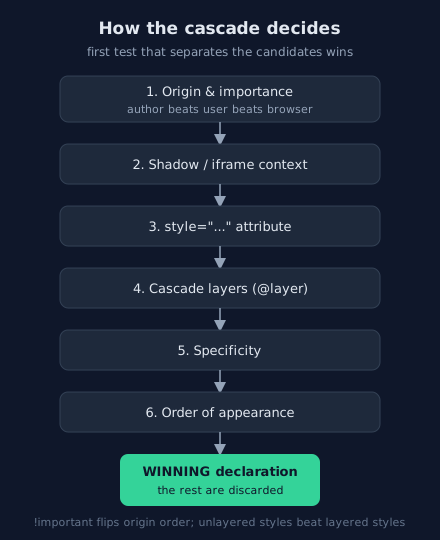
For each property on each element, the browser collects every candidate declaration and runs a fixed sequence of tie-breakers; the first test that leaves a single candidate standing wins. Only when all structural tests tie does source order decide — which is why the last rule in your file is the one that wins.
The cascade order
The tie-breakers, in order
Origin and importance, precisely
Normal declarations: author beats user beats browser. !important reverses that:
browser-!important (a legal hook for accessibility modes like forced colors) beats
user-!important beats author-!important beats normal author styles. The lesson
is not "never use !important"; it is that importance is a ladder, and the rung you jump to
is hard to come back down from.
Cascade layers change the game
@layer lets you group rules and rank the groups explicitly. Unlayered styles beat layered
styles for normal declarations, so layers are the modern way to say "resets and vendor styles may
always be overridden":
/* Declared order fixes the priority: reset < components < unlayered */
@layer reset, components;

@layer reset {
  *, *::before, *::after { box-sizing: border-box; }
}

@layer components {
  .card { padding: 1rem; }
}

/* Unlayered: wins over BOTH layers above, regardless of specificity */
.card { padding: 1.5rem; }
Specificity arithmetic
Reading the weight as id–class–type
A selector's weight is written as three numbers: IDs – classes/attributes/pseudo-classes – types/pseudo-elements. Compare them position by position; a higher left number always wins, and numbers never carry between positions (twelve type selectors still lose to one class).
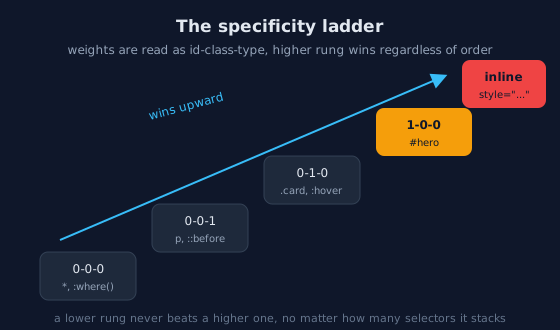
:where() and the universal selector weigh nothing, types and classes climb, IDs and inline styles sit at the top.| Selector | Weight | Why |
|---|---|---|
* {} | 0-0-0 | Universal matches everything, weighs nothing |
:where(.card) p {} | 0-0-1 | :where() contributes zero |
p {} | 0-0-1 | One type |
.card p {} | 0-1-1 | One class, one type |
.card:hover {} | 0-2-0 | Class + pseudo-class |
#nav .card {} | 1-1-0 | ID dominates everything to its right |
Zero specificity by design
/* Defaults that must be trivially overridable belong in :where() */
:where(.prose) p { margin-block: 1rem; }   /* weighs 0-0-1 total */

/* A later rule with the SAME weight now wins purely by source order: */
:where(.prose) p { margin-block: 0; }
Inheritance
Which properties inherit — and why that split makes sense
Some properties flow down the tree automatically: color, font-family,
font-size, line-height, letter-spacing, text-align,
and the other typographic properties. Everything box-related — margin,
padding, border, width, background — does not. The
split is deliberate: children inheriting your font is what you want almost every time; children
inheriting your border would be chaos.
/* Set typography ONCE, at the top of the tree */
body {
  font-family: system-ui, sans-serif;
  line-height: 1.6;
  color: #e2e8f0;
}
/* Every descendant now has it - no "reset every element" rules needed */
Controlling inheritance explicitly
| Keyword | Resolves the value to |
|---|---|
inherit | The parent's computed value — even for non-inherited properties |
initial | The property's spec default |
unset | inherit if the property inherits, initial otherwise |
revert | What the value would be with none of YOUR styles — the browser default |
/* The all: shorthand applies a keyword to EVERY property at once */
.overlay * {
  all: unset;   /* strip the component's inherited baggage before restyling */
}
!important in practice
When it is legitimate
- Utility classes meant to always win:
.visually-hidden,.text-center. - Overriding inline styles you do not control (third-party widgets).
- Accessibility overrides: respecting
prefers-reduced-motioneven against careless animation rules.
/* Utility: the whole point is that it beats context */
.visually-hidden {
  position: absolute !important;
  width: 1px !important;
  height: 1px !important;
  clip-path: inset(50%) !important;
  overflow: hidden !important;
  white-space: nowrap !important;
}
How to escape an !important war
When a codebase needs !important to fight itself, the fix is structural, not more
importance: move the competing styles into cascade layers and rank the layers, or drop the over-specific
selector. Adding !important to a second rule only moves the arms race one rung up.
Practice: debug the conflict
The task
Open demo/foundations/04_cascade_order.html and
demo/foundations/05_specificity_ladder.html from the
Lab Examples. Each renders one element under several
competing rules. Predict the winner and the reason (which tie-breaker decided), then verify in the
Styles pane — dev tools lists every candidate with the loser struck through.
The checklist
- Explain, without looking, why a later
prule beats an earlier.card prule only when the layers or weights allow it. - Recreate the layer example and confirm the unlayered rule wins despite lower specificity.
- Find one
!importantin a stylesheet you wrote and decide honestly which of the three legitimate cases it falls under.