
Elixir: Phoenix Web Framework
The Request Lifecycle
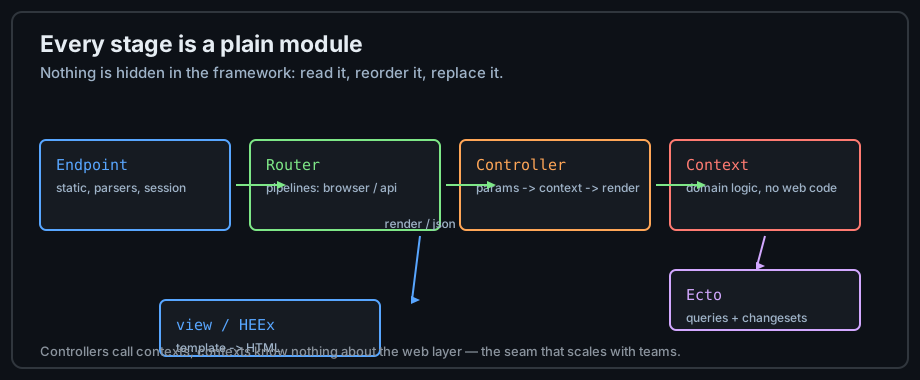
| Stage | Module | Responsibility |
|---|---|---|
| Endpoint | MyAppWeb.Endpoint | static files, body parsing, session, telemetry |
| Router pipelines | MyAppWeb.Router | :browser vs :api stacks of plugs |
| Controller | MyAppWeb.PageController | read params, call a context, render/redirect |
| Context | MyApp.Blog | domain logic — the boundary for Ecto calls |
| View/HEEx | MyAppWeb.PageHTML | render data to HTML |
The %Plug.Conn{} struct threads through it all — one immutable value carrying request
and response, transformed by every plug. That is the pattern from
Data & Immutability applied to a web framework.
Router and Controllers
defmodule MyAppWeb.Router do
  use MyAppWeb, :router

  pipeline :api do
    plug :accepts, ["json"]
  end

  scope "/api", MyAppWeb do
    pipe_through :api

    get "/health", HealthController, :show
    resources "/orders", OrderController, only: [:index, :show, :create]
  end
end

defmodule MyAppWeb.OrderController do
  use MyAppWeb, :controller

  # `conn` flows through every plug; actions return a transformed conn.
  def index(conn, params) do
    # The controller CALLS A CONTEXT — no Ecto queries here, ever.
    orders = Blog.list_orders(params["status"] || "any")
    json(conn, %{data: orders})
  end

  def create(conn, %{"order" => params}) do
    case Blog.create_order(params) do
      {:ok, order} ->
        conn |> put_status(:created) |> json(%{data: order})
      # Failed changesets render errors with proper status codes.
      {:error, %Ecto.Changeset{} = cs} ->
        conn |> put_status(:unprocessable_entity) |> json(%{errors: errors(cs)})
    end
  end
end
Contexts: the Domain Boundary
A context is a plain module (MyApp.Blog, MyApp.Billing) that exposes the
domain vocabulary and hides whether data comes from Ecto, an ETS cache, or an HTTP call. Web code
depends on contexts; contexts depend on nothing web. This is the pattern that lets a Phoenix
monolith scale to hundreds of engineers — the subject of
Designing Elixir Systems.
defmodule MyApp.Blog do
  import Ecto.Query
  alias MyApp.Repo
  alias MyApp.Blog.Post

  def list_orders(status) do
    Post |> where(status: ^status) |> Repo.all()
  end

  def create_order(attrs) do
    %Post{} |> Post.changeset(attrs) |> Repo.insert()
  end
end
When to Use What
- Plain controller + JSON — API endpoints consumed by other systems.
- LiveView — UI with state that lives on the server (see the next lesson).
- Channels — raw real-time messaging to non-HTML clients (mobile apps, services).
- Plug-only app — small APIs don't need Phoenix at all; a Plug router on Bandit is a few files.
Deploying Phoenix
A Phoenix app is an OTP application: mix release (lesson 13) plus a database URL and
clustering config. Deploy targets: a VM/container with the release, or a BEAM platform. Compile
assets (mix assets.deploy) in CI; the release contains only compiled artifacts.
Practice
- Generate an app (
mix phx.new demo), walk the endpoint file stage by stage, and name what each plug does. - Move one query out of a controller into a context and confirm the controller still compiles.
- Add a JSON endpoint that returns a changeset's errors with status 422.
Next: Phoenix LiveView