
Elixir: Mix, Dependencies & Releases
mix new to a production artifact.
Project Anatomy
# mix.exs — the single source of truth for the project.
defmodule Explorer.MixProject do
  use Mix.Project

  def project do
    [
      app: :explorer,
      version: "0.1.0",
      elixir: "~> 1.20",              # minimum Elixir version
      start_permanent: Mix.env() == :prod,
      deps: deps()
    ]
  end

  # `:extra_applications` lists OTP apps your app starts with.
  def application do
    [extra_applications: [:logger]]
  end

  defp deps do
    [
      # {package, requirement, options}
      {:req, "~> 0.5"},                        # runtime dep
      {:credo, "~> 1.7", only: [:dev, :test]}  # dev-only tool
    ]
  end
end
Key commands: mix deps.get (fetch), mix deps.update req (bump),
mix deps.tree (dependency graph), and mix xref graph (compile-time
dependencies inside your own code).
Config Layers
Configuration has two distinct moments, and Elixir 1.9+ made the split explicit. Compile-time
config lives in config/config.exs; runtime config lives in
config/runtime.exs and is evaluated when the release boots — that is where secrets and
environment-driven values belong.
# config/runtime.exs — evaluated at boot, inside the release
import Config

config :explorer,
  # System.fetch_env! CRASHES if the variable is missing — the safe
  # choice for secrets you cannot start without.
  api_key: System.fetch_env!("EXPLORER_API_KEY"),
  # get_env/2 provides a default for optional values.
  pool_size: String.to_integer(System.get_env("POOL_SIZE") || "10")
Releases
mix release packages the compiled application plus the BEAM runtime itself into
a self-contained directory. The target machine needs nothing installed — no Elixir, no Erlang, no
asdf. This is the standard deployment unit.
MIX_ENV=prod mix release          # build into _build/prod/rel/explorer
MIX_ENV=prod mix release --path /opt/explorer

# Operate the release (the script is the whole ops interface):
_build/prod/rel/explorer/bin/explorer start      # run in the foreground
_build/prod/rel/explorer/bin/explorer daemon     # background
_build/prod/rel/explorer/bin/explorer remote     # attach a shell to a LIVE node
_build/prod/rel/explorer/bin/explorer rpc "Explorer.health()"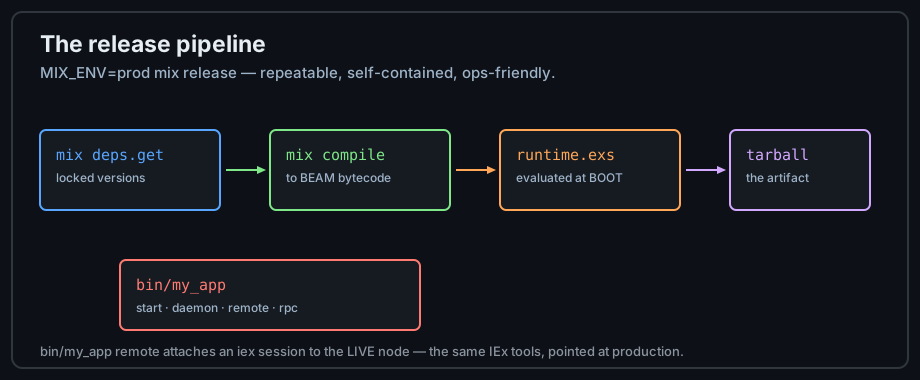
Mix Tasks and Scripts
Two other delivery shapes matter. Mix.install/2 turns a single
.exs file into a self-contained program with Hex dependencies — the mechanism the
demos in this track use. Custom mix tasks package
project tooling for teams.
# A single-file script with dependencies — no project needed:
Mix.install([{:req, "~> 0.5"}])

%{status: 200, body: body} = Req.get!("https://hex.pm/api/packages/ecto")
IO.puts("Ecto docs size: #{byte_size(body)} bytes")

# A custom mix task lives in lib/mix/tasks/hello.ex:
defmodule Mix.Tasks.Hello do
  use Mix.Task
  @shortdoc "Greets the caller"
  @impl Mix.Task
  def run(args), do: IO.puts("Hello, #{args || "world"}!")
end
# invoked as: mix hello Sage
Umbrella Projects
An umbrella project holds several apps in one repository, each with its own mix.exs and
dependency set — a middle ground between a monolith and a microservice split. Apps can depend on
each other and build in parallel. Choose it when deployment stays unified but ownership boundaries
are real; see Designing Elixir Systems for the
architecture trade-offs.
mix new store --umbrella
cd store/apps
mix new cart
mix new billing
cd .. && mix test        # runs tests across ALL child apps
Practice
- Create a project, add
req, and fetch a package's metadata from the Hex API iniex -S mix. - Add
runtime.exsconfig that fails fast when a variable is missing; observe the boot error. - Build a release and run
bin/to call a function in the live node.rpc
Next: Testing with ExUnit