
Elixir: Syntax & Expressions
Files, Scripts and Modules
Elixir source comes in two flavours. .ex files are compiled by mix into
bytecode; .exs files are scripts, executed on the fly — the extension is a promise about
how the file is used, not a different language. Module definitions can live in either.
# greet.exs — run with: elixir greet.exs
defmodule Greet do
  # @moduledoc and @doc are read by `h` in iex and by ExDoc.
  @moduledoc "Tiny greeting module used in the syntax lesson."

  @doc """
  Builds a greeting for `name`.

  ## Examples

      iex> Greet.hello("Ada")
      "Hello, Ada!"

  """
  def hello(name), do: "Hello, #{name}!"   # one-line body form
end

IO.puts(Greet.hello("Ada"))
Note the #{...} interpolation inside strings and the do: shorthand —
def hello(name), do: "Hello, #{name}!" is exactly equivalent to a
do ... end block. The doctest inside @doc is not decoration:
ExUnit can execute it as a test.
Everything Is an Expression
There are no "statements" in Elixir. Conditions return values, blocks return values, and even
case returns the value of the branch it took. This removes the split that imperative
languages have between computing a value and storing it.
# The if itself produces a value — no temp variable needed.
label =
  if score >= 90, do: "excellent", else: "ok"

# case branches produce values too, so you can bind the whole thing.
size =
  case {width, height} do
    {w, h} when w == h -> :square   # guard refines the match
    {w, _} when w > h -> :wide
    _ -> :tall                      # _ is the catch-all pattern
  end
The Pipe Operator
The pipe |> takes the result of the previous expression and passes it as the
first argument of the next call. Nested calls read inside-out; pipes read top-to-bottom like
a recipe — which is why idiomatic Elixir pipelines dominate data-transformation code.
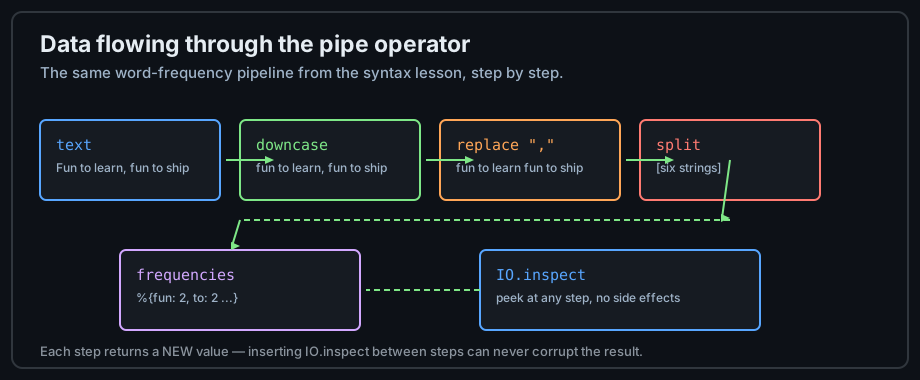
# Without pipes — read it inside-out, and count parentheses.
IO.inspect(Enum.frequencies(String.split(String.replace(String.downcase(s), ","))))

# With pipes — the same computation, in evaluation order.
s
|> String.downcase()
|> String.replace(",", "")
|> String.split()
|> Enum.frequencies()
|> IO.inspect()
One rule keeps pipes readable: the piped function should make sense with the data as its first
argument — which is the Elixir standard-library convention. When a function needs the data last,
use a capture: |> Enum.reduce(&sum/2) or an anonymous function.
Operators You Will Use Daily
| Operator | Meaning | Note |
|---|---|---|
= | match (not assign!) | See Pattern Matching |
|> | pipe result as first arg | the workhorse |
++ / -- | list concat / difference | O(n) on the left side — prepend with [h | t] instead |
<> | binary/string concat | prefer IO data for many joins |
and/or | boolean (require true/false) | &&/|| accept any truthy value |
in | membership | :ok in [:ok, :error] |
^ | pin — reuse an existing binding | crucial in matches |
Sigils, an Introduction
Sigils are prefixed literals that build common values without ceremony. The letter picks the
transformation, and the delimiters are your choice; a lowercase sigil allows interpolation
(#{...}), uppercase does not.
~s(a "quoted" string)   # ~s: string with double quotes inside, no escaping
~w(red green blue)      # ~w: word list  => ["red", "green", "blue"]
~w(1 2 3)a              # trailing letter picks the type: `a` for atoms
~D 2026-09-17           # ~D: Date struct
~U 2026-09-17T08:30:00Z # ~U: UTC DateTime struct
~r/\d+/                 # ~r: regular expression
Documentation as Code
Elixir treats docs as a first-class artifact: @moduledoc and @doc strings
are compiled into the module and surfaced by h in iex, by editors, and by
ExDoc when
you publish to Hex.
The ## Examples section doubles as executable doctests.
Style and the Formatter
The community style is mechanical, not argued about: two-space indent, snake_case
functions, Module names in PascalCase, atoms and module attributes for
constants, and no unused variables (prefix with _ to mark intent).
mix format enforces the layout — run it in CI so reviews stay about logic.
Practice
- Save the
greet.exsexample, run it, then add abye/1function with a doctest and run it throughiexwithh Greet.bye. - Rewrite one nested expression from an earlier lesson as a pipeline; note which version is easier to modify.
- Use three different sigils (
~w,~D,~r) and print each result withIO.inspect/1.
Next: Data & Immutability