
HTML Performance and Loading
Fast pages feel better, rank better, and convert better — and people on low-end devices and poor networks benefit most, which makes performance an accessibility concern too. The HTML author controls the critical rendering path; frameworks and servers only reshape what markup already decided.
Why performance matters
The user experience budget
Users perceive sub-second loads as instant and abandon multi-second loads in large numbers. The budget is unforgiving: at typical mobile bandwidth, every 100 KB costs a tenth of a second — a few unoptimized images can spend the whole budget before rendering starts.
Core Web Vitals
Google's Core Web Vitals quantify the experience: LCP (when the main content appears), CLS (how much the layout jumps), and INP (how fast interactions respond). Each has markup-level causes and markup-level fixes — this chapter covers the first two directly.
Performance is structural, not cosmetic
Minifiers trim the last 10%; markup decisions shape the first 90%. Which resources load, whether they block, and whether slots are reserved — those are the levers, and they are all in the HTML.
The critical rendering path
What blocks the first paint
The browser cannot paint without the HTML and its stylesheets; everything else — most JavaScript, below-the-fold images — can wait. Resources that must arrive before painting are critical; the goal of loading strategy is to keep that set small:
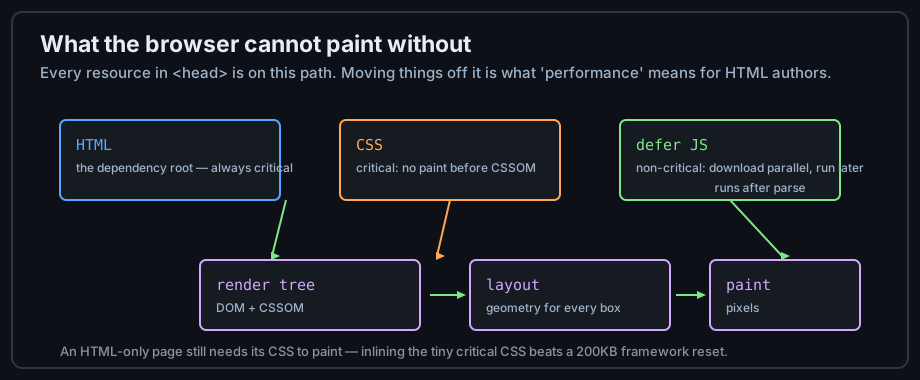
Figure 1 — HTML and CSS are critical; deferred JavaScript waits.
defer and async on scripts
Both attributes download without blocking the parser. defer runs the script after parsing, in document order — the right choice for almost every app script; async runs as soon as it arrives, in no guaranteed order — right for independent analytics:
<script src="/assets/js/app.js" defer></script>    <!-- ordered, after parse -->
<script src="https://cdn.example.com/analytics.js" async></script>
CSS is critical too
A blocking stylesheet in the head delays first paint — necessary, because unstyled rendering flashes. The strategy: small critical CSS (inline the few rules above the fold if needed), async-load the rest, and never ship framework resets the page does not use.
Resource hints
The hint vocabulary
Hints live in the head and tell the browser what to start early: preload for something this page definitely needs soon, prefetch for the next navigation, preconnect to warm DNS+TLS to a third-party origin:
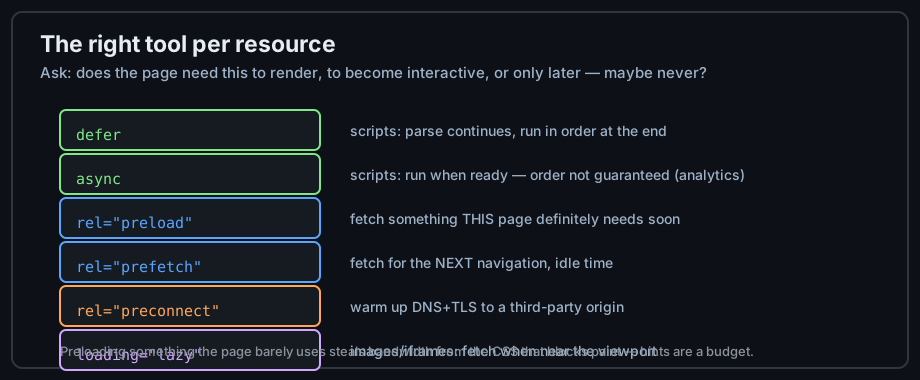
Figure 2 — Each hint answers a different "when?" about a resource.
Hints in practice
<head>
  <!-- fonts are discovered late (after CSS) — preload them -->
  <link rel="preload" href="/fonts/inter.woff2" as="font" type="font/woff2" crossorigin>
  <!-- the user will likely navigate to the next lesson: -->
  <link rel="prefetch" href="/roadmap/html/apis.html">
  <!-- third-party origins pay DNS+TLS on first use: -->
  <link rel="preconnect" href="https://fonts.gstatic.com" crossorigin>
</head>
Lazy loading images and frames
loading="lazy" defers offscreen media until it nears the viewport — the single highest-value attribute for image-heavy pages. Keep it off above-the-fold content:
<img src="photo-13.jpg" alt="Thirteenth garden bed"
     width="320" height="240" loading="lazy">
The image budget
Right size, right format
Resize to the largest rendered width, serve WebP/AVIF with fallbacks, and let srcset pick per device (chapter 5). A page's total image weight under 1 MB is a sane default target; Lighthouse's "properly size images" audit names the offenders.
<img src="photo-800.jpg"
     srcset="photo-400.jpg 400w, photo-800.jpg 800w"
     sizes="(max-width: 600px) 100vw, 50vw"
     alt="A ladybug on a leaf" width="800" height="600" loading="lazy">
Reserve the slots
width and height on every image prevent layout shift when loading completes — the CLS half of the vitals pair. This is a two-attribute fix with no downside.
Measure, then improve
Lighthouse under throttled mobile conditions, then the Network tab sorted by transfer size. Fix one bottleneck at a time and re-measure — the loop from chapter 13 applies per page and per release.
Common mistakes
Render-blocking everything
Five stylesheets, three framework scripts in the head without defer — the page waits for all of them. Move non-critical scripts to defer, merge or trim CSS, and let the Network tab's waterfall show what the page waits for.
Preloading the wrong things
Preload competes for the same bandwidth as critical CSS; preloading six images delays the paint they were meant to accelerate. Preload the discovered-late essentials (fonts), nothing more.
Lazy-loading above the fold
The hero image is the LCP element — lazily loading it makes the page measurably slower by its own scorecard. Lazy-load below the fold; prioritize above it.
Practice
Exercises
- Run Lighthouse on one of your pages with mobile throttling; write down the top three opportunities.
- Add
deferto every script that does not need to run early and compare the waterfalls. - Preload the page's web font; re-measure LCP before and after.
- Set width/height and
loading="lazy"on all below-fold images; watch CLS drop to ~0. - Convert one image to AVIF and WebP, serve with
<picture>, and compare transfer sizes.
Demo lab
16_loading_hints.html in the Lab Examples page shows every hint in context — view the source, then preview it with the Network tab open.