
HTML Security and Embedding
Static pages feel risk-free and are not: every external script, iframe, and even every target="_blank" link is a trust decision. The fixes here are one-liners once known and invisible liabilities otherwise.
The security surface
Four risks every page inherits
Tab-nabbing, mixed content, malicious embeds, and referrer leakage need no backend to matter — they are property of the markup. Each has a one-attribute fix:
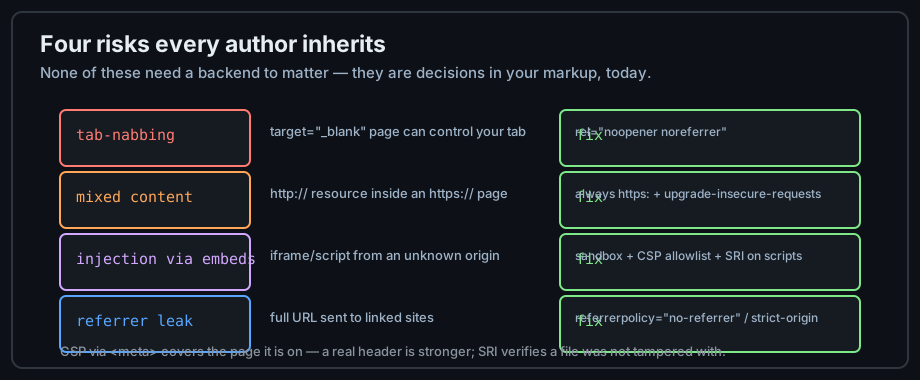
Figure 1 — Four doors, four one-line fixes.
The origin model
The browser's sandbox walls are drawn between origins (scheme + host + port). Content from another origin renders inside your page but cannot read its DOM — unless something in your markup opens a door. Understanding "same-origin" is the foundation for everything else in this chapter.
How static pages get owned
The common static-site attack is not breaking in — it's being trusted too much: a compromised CDN script, an iframe that navigates you away, a link handing out your users' URLs. All three close with markup hygiene.
Links and tab-nabbing
The opener leak
A page opened with target="_blank" can access window.opener and redirect your tab — "tab-nabbing". The fix travels with every external link:
<!-- the safe external link pattern -->
<a href="https://example.com" target="_blank" rel="noopener noreferrer nofollow">
  Example site (opens in a new tab)
</a>
noopener severs the opener reference; noreferrer also hides the referring URL; nofollow tells crawlers the link is not an endorsement. Modern browsers imply noopener for target="_blank", but older ones do not — the attribute costs nothing and closes the gap everywhere.
Controlling the referrer
Browsers send your full URL as the Referer header — leaking internal paths to linked sites. Set a page-wide policy in the head, or per-link where it matters:
<meta name="referrer" content="strict-origin-when-cross-origin">
<a href="https://partner.example" referrerpolicy="no-referrer">Partner</a>
Links you should not write
javascript: URLs execute code from markup — never use them; use a button. Autoplaying third-party iframes, popups, and interstitials are user-hostile and increasingly blocked; build for opt-in engagement.
Embedding safely: iframes
The sandbox attribute
sandbox strips an iframe's powers by default — no scripts, no forms, no popups — and re-grants them token by token. Start strict and add only what the embed needs:
<!-- a widget that needs scripts but not same-origin access -->
<iframe src="https://widget.example.com" sandbox="allow-scripts"></iframe>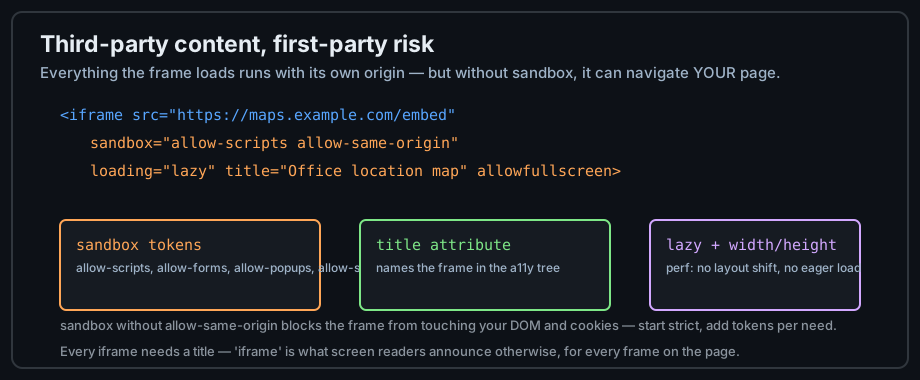
Figure 2 — sandbox, title, and lazy loading govern an embed.
The allow-scripts + allow-same-origin trap
Granting both tokens to your own origin lets the frame remove its own sandbox — the restriction evaporates. Third-party embeds keep their own origin, so the pair is survivable there; never point a sandboxed iframe at your own site with both.
iframe hygiene
Three habits: a title for the accessibility tree, width/height to prevent layout shift, and loading="lazy" for offscreen frames. Prefer static embed URLs over uncontrolled redirects, and audit third-party embeds periodically — they are code you do not control running in your users' browsers.
External resources, CSP and SRI
Content Security Policy
CSP is an allowlist for where scripts, styles, and frames may come from. Meta-tag CSP covers a single page; the header form is stronger. For static sites it is a meaningful safety net against injected scripts:
<meta http-equiv="Content-Security-Policy"
      content="script-src 'self' https://cdn.jsdelivr.net; object-src 'none'">
Subresource integrity: SRI
When loading a library from a CDN, the integrity attribute pins its cryptographic hash — the browser refuses a tampered file. crossorigin enables the check:
<script src="https://cdn.jsdelivr.net/npm/library@1.2.3/lib.min.js"
        integrity="sha384-oqVuAfXRKap7fdgcCY5uykM6+R9GqQ8K/uxy9rx7HNQlGYl1kPzQho1wx4JwY8wC"
        crossorigin="anonymous"></script>
Mixed content
An http:// resource inside an https:// page is blocked or compromising — browsers escalate passive content and hard-block active scripts. Audit with the console ("mixed content" warnings) and pin every resource to https:.
The special case: HTML email
The 2005 dialect
Email clients sanitize aggressively — Gmail strips scripts and most CSS; Outlook renders with Word's engine. Email HTML is a dialect: table layout, inline styles, no scripts, no forms:
<!-- the accepted email skeleton -->
<table role="presentation" width="600" cellpadding="0" cellspacing="0">
  <tr><td style="font-family: Arial, sans-serif; padding: 16px;">
    Hello from an email that renders everywhere.
  </td></tr>
</table>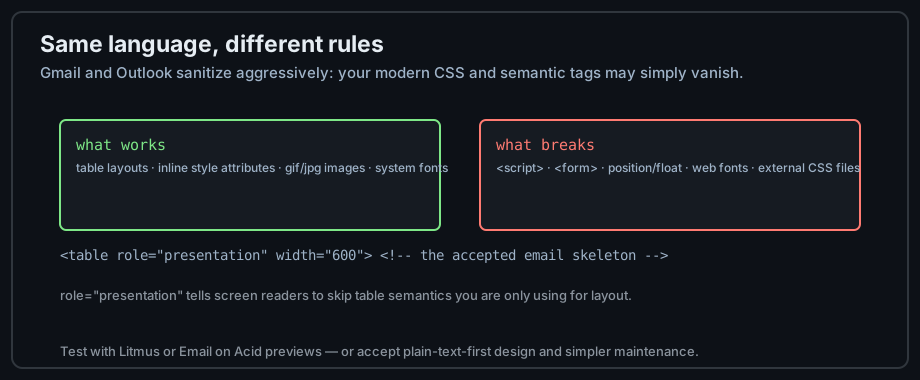
Figure 3 — Email HTML: same language, stricter client, older rules.
Why it matters
Millions of developers meet "HTML must work everywhere" first through email. The dialect teaches humility about sanitizers, and role="presentation" teaches the difference between table data and table layout — both lessons transfer back to the web.
Testing email rendering
Preview tools (Litmus, Email on Acid) screenshot one message across dozens of clients. Or ship plain-text-first designs that degrade gracefully — a defensible engineering trade-off.
Common mistakes
Bare target="_blank"
Every external link needs rel="noopener noreferrer"; the new-tab pattern is incomplete without it. Fix globally once, then copy the pattern forever.
Unsandboxed embeds
A third-party iframe without sandbox is a script injection waiting for the vendor to have a bad day. Sandbox it, title it, size it, lazy-load it — four attributes between you and someone else's incident.
Trusting CDN scripts blindly
A CDN account compromise becomes your site's compromise. Pin with SRI, allowlist with CSP, self-host critical scripts — the layered defenses are each one line.
Practice
Exercises
- Audit a past page: every
target="_blank"gets itsrel; every iframe gets sandbox, title, size, and lazy loading. - Add a CSP meta that allows only self and your CDN; reload and read every violation the console reports.
- Add SRI to a CDN script, then tamper the hash and observe the browser's refusal.
- Build a one-table HTML email and preview it in Gmail, Outlook, and Apple Mail — list what breaks.
Demo lab
15_embed_iframe.html in the Lab Examples page shows a fully-armed sandboxed embed — view the source, then preview it.