
Semantic HTML and Landmarks
Div-based pages can look identical in a browser while meaning nothing underneath. Semantics is the difference between markup that describes your intent and markup that only records the result — and it costs almost nothing once the habit forms.
Why semantics matter
Meaning for machines
Search engines rank pages by their structure: a real <h1> outweighs a styled <div>, an <article> is a candidate for rich results, and a <time> element is parseable in a way "posted yesterday" never will be. Machines cannot infer meaning from pixels.
Meaning for people using assistive technology
Semantic elements become landmarks — named regions a screen-reader user can jump between, like chapters in a book. A page of divs is one long undifferentiated stream; the same page with landmarks is navigable in seconds.
Meaning for future you
Semantic markup documents itself. <nav><ul><li><a> says "menu" to every developer who reads it; twelve nested divs require reverse-engineering. Six months from now, the reader of your code is you.
Landmark regions
The five regions
Five elements name the standard regions of a page. Each maps to an implicit ARIA landmark role — no attributes required:
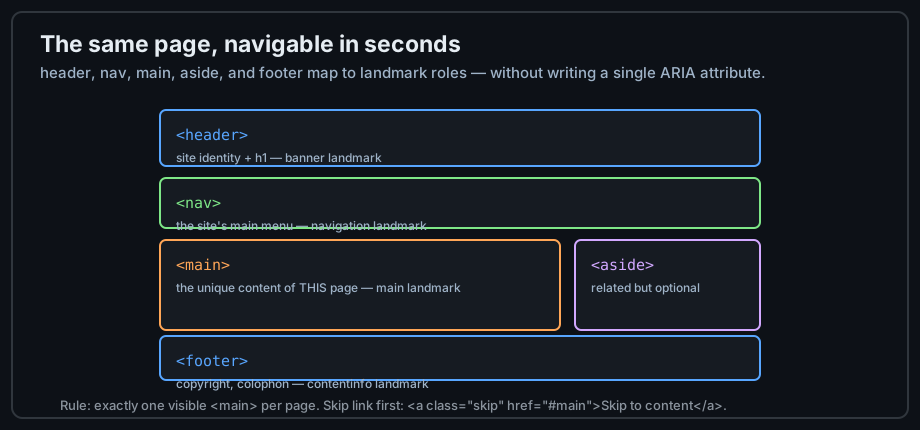
Figure 1 — Landmarks: the page's regions, named.
The rules of thumb
Exactly one visible <main> per page. <nav> for major navigation groups only — not every list of links. <header> and <footer> are scoped: inside a section or article they belong to that piece, and only the page-level ones become banner/contentinfo landmarks.
The skip link
The first focusable element on most good pages jumps past the navigation straight to the content. It is just an anchor to the main landmark, visually hidden until focused:
<body>
  <a class="skip-link" href="#main-content">Skip to content</a>
  <header>...</header>
  <main id="main-content">...</main>
</body>
Sectioning content: article, section, div
article: self-contained
<article> is a complete, independent composition — a blog post, a product card, a comment, a review. The test: would it make sense syndicated on its own, with its own heading, in an RSS feed?
<article>
  <h2>A first blog post</h2>
  <p>...</p>
</article>
section: thematic grouping
<section> groups related content with a heading — the chapters of a page. A section without a heading is a smell: either the heading is missing or you wanted a div:
<section>
  <h2>Pricing</h2>
  <p>...</p>
</section>
The decision: article, section, or div?
Work down the questions: is it self-contained work? Then it's an article. Is it a thematic group with a heading? A section. Is the grouping purely for styling or scripting? A div — honestly and correctly:
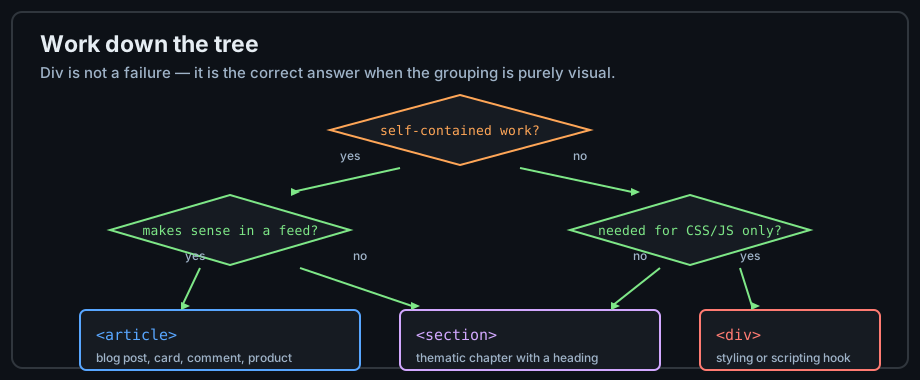
Figure 2 — article vs section vs div, as a decision tree.
A complete layout
The markup
Assembling the pieces — landmarks, sectioning, and the outline in one page:
<body>
<header>
<h1>My Site</h1>
<nav>
<ul>
<li><a href="/">Home</a></li>
<li><a href="/about">About</a></li>
</ul>
</nav>
</header>
<main>
<article>
<h2>Article title</h2>
<p>Article content...</p>
</article>
<aside>
<h2>Related</h2>
</aside>
</main>
<footer><p>© 2026 Sage-Code</p></footer>
</body>Scoped header and footer
The same elements work inside articles: an <article>'s <header> holds its heading and byline, its <footer> holds its tags and share links. The page-level footer remains the site's colophon — nesting is what scopes them.
The heading outline
Check the outline after building any layout: one <h1>, <h2> for each landmark's content, stepping down without gaps. Chrome's and Firefox's accessibility panes and free heading-map extensions render this outline visually.
Content-level semantic tags
figure, figcaption, and time
Beyond regions, semantics runs at content scale: <figure> + <figcaption> for referenced self-contained content, <time datetime="..."> for parseable dates (chapter 3 covers both in detail).
details and summary
<details> with a <summary> child is a native disclosure widget — collapsible without JavaScript, keyboard accessible, and honest about its behavior:
<details>
  <summary>What does semantic mean?</summary>
  <p>Elements chosen for meaning, not appearance.</p>
</details>
mark, small, ins, and del
Highlighting (<mark>), fine print (<small>), inserted (<ins>) and deleted (<del>) text each carry document-level meaning — edits, highlights, and caveats that survive copy-paste, unlike any styling.
Common mistakes
Div soup
Wrapping everything in <div> is the default failure mode. The fix is a reflex, not a rewrite: before typing <div>, name the content — if it has a name ("that's the menu", "that's a review"), a semantic element probably exists for it.
Multiple main elements
One visible <main> per page — it is the landmark for "start of the actual content", and duplicates break that contract. (A hidden <main> with the hidden attribute is legal during template prerendering; you will know if you are doing that.)
Semantic elements as mere style hooks
Choosing <section> because it happens to be unstyled in your CSS, or <article> for a flexbox child, inverts the logic. Style follows meaning: pick the element, then style it.
Practice
Exercises
- Rebuild a previous exercise page with full landmarks: skip link, header, nav (a real list), one main, footer.
- Mark up three different content blocks — a product card, a pricing section, a spacer div — using the decision tree.
- Inspect the landmarks of a major website with a screen reader or a landmarks browser extension; count the pages that get it wrong.
- Generate the heading outline of your page and fix any skipped level.
Demo lab
09_semantic_page.html in the Lab Examples page is a complete landmark layout — view the source, then preview it and tab through: the skip link appears first.