
Text, Headings and Inline Semantics
Choosing the right text element is the difference between a page that reads like a document and a page that reads like a pile of styled words. Every element here is cheap to write and pays out in accessibility, search ranking, and maintainability.
The heading scale
Six levels, one outline
HTML defines six heading levels, <h1> through <h6>. Together they form the page's outline — a table of contents that screen-reader users navigate directly and search engines weight heavily. <h1> states the subject of the page, <h2> names its major sections, <h3> subdivides a section:
<h1>Growing sage</h1>
  <h2>Soil</h2>
    <h3>Drainage requirements</h3>
    <h3>pH range</h3>
  <h2>Watering</h2>
    <h3>How often</h3>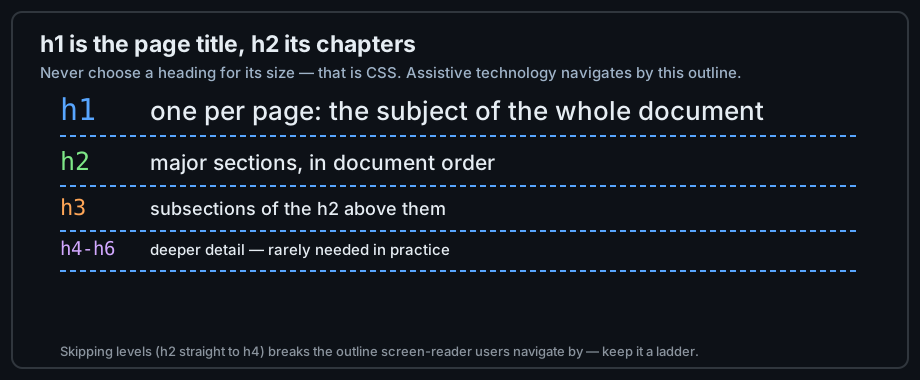
Figure 1 — Headings form a ladder; never skip a rung.
Position, not appearance
A heading level describes position in the outline, not font size. The default sizes are a browser suggestion you will override in CSS within a week. Choosing <h4> because it "looked right" is the classic beginner error — the outline then claims a subsection that does not exist.
One h1 per page
The outline works best with a single <h1> that names the page subject, followed by <h2> chapters in document order. Multiple <h1>s are legal but blur the outline; when you feel you need several, what you actually have is several <h2> sections — or several pages.
Paragraphs and document text
The paragraph element
<p> is the workhorse of prose. One idea per paragraph; the browser adds vertical spacing automatically. A <p> may not contain block elements — a list or a heading inside a paragraph is invalid and the parser will relocate it.
<p>Sage is a hardy Mediterranean herb. It tolerates poor soil and
drought, and it rewards neglect with flavor.</p>
Breaks and rules
<br> forces a line break within a paragraph — legitimate for addresses or poetry, wrong for "spacing" (that is CSS margin). <hr> is a thematic break between sections, not a decorative line; if you cannot say what topic ends at the rule, delete it.
<address>
  Sage-Code Laboratory<br>
  Cluj-Napoca, Romania
</address>
The everyday text-flow toolbox
Most pages need little more than this set: <h1>-<h6>, <p>, <br>, <hr>, and lists (chapter 4). Everything else in this chapter refines meaning inside that flow — learn the flow first, then the refinements.
Inline text semantics
Emphasis and importance
Inline tags change the meaning of words inside a sentence without breaking the flow. Two of them are routinely confused: <strong> marks importance (serious, urgent), <em> marks stress emphasis (the word you'd raise your voice on):
<p>You <strong>must</strong> validate before deploying,
and you should <em>always</em> preview the result.</p>
Neither is a styling instruction. Bold-instead-of-<b> and italic-instead-of-<i> lose the semantics; the visual difference is CSS's job.
Code and computer output
Technical writing leans on four inline elements: <code> for source, <kbd> for keys the user presses, <samp> for program output, and <var> for variables:
<p>Press <kbd>Ctrl</kbd>+<kbd>S</kbd>, run <code>npm run build</code>,
and expect <samp>Build complete</samp>.</p>
Screen readers announce these differently, and CSS can style them distinctly — meaning again, not looks.
Small print and corrections
<small> marks side comments and fine print; <s> marks content that is no longer accurate; <mark> highlights text relevant to the current context. Each carries a specific meaning — pick by meaning, then let CSS handle the look.
Quotations and references
Block quotes
<blockquote> quotes a whole passage from another source; its cite attribute records where it came from (the attribute is metadata — a visible attribution is your paragraph's job):
<blockquote cite="https://html.spec.whatwg.org/">
  <p>HTML is the foundation of the Web.</p>
</blockquote>
Inline quotes
<q> is the inline twin — a short quotation inside running text. The browser renders the quotation marks, so do not add your own:
<p>The spec calls HTML <q cite="https://html.spec.whatwg.org/">the foundation of the Web</q>.</p>Citations
<cite> names a creative work — a book, a spec, an article. Use it for titles, never for people's names:
<p>My favorite reference is <cite>HTML Living Standard</cite>.</p>Abbreviations and data
Abbreviations
<abbr> with a title attribute spells out an abbreviation on hover and for assistive technology. Declare it at first use:
<p><abbr title="HyperText Markup Language">HTML</abbr> is fun to write.</p>Machine-readable time
<time datetime="..."> attaches a standard format to human-readable dates — calendars and crawlers parse the attribute, people read the text:
<p>The course starts <time datetime="2026-10-01">October 1st</time>.</p>The generic containers: div and span
When no semantic element fits, <div> groups at the block level and <span> at the inline level. They are honest tools — meaning "grouping for styling or scripting" — and dishonest when used to fake headings or buttons:
<div class="highlight-box">      <!-- block group: fine -->
  <p>Sage grows well in pots<span class="footnote">*</span>.</p>
</div>
Chapter 9 gives you the full semantic palette to reach for first.
Common mistakes
Headings as decoration
The most common text-markup error: choosing a heading level for its size. The outline then promises structure that does not exist, and screen-reader users who navigate by headings land on false chapters. Fix the size in CSS; fix the level in the outline.
Visual tags for meaning
<b> and <i> still exist, and they still have narrow meanings (keywords, technical terms, taxonomic names). Using them because they render bold and italic — when you mean <strong> and <em> — throws away information the browser would otherwise expose.
Empty elements for spacing
<br><br> and empty paragraphs are layout hacks. Vertical rhythm belongs to CSS margins; a run of breaks in your source is a styling decision hiding in the structure, and it breaks the moment the design changes.
Practice
Exercises
- Write a short article with one
<h1>, three<h2>sections, and an<h3>inside two of them — then check the outline in a heading-map extension. - Mark up a paragraph containing a keyboard shortcut, a command, and a program message using the four computer-output elements.
- Add a blockquote with
cite, an inline<q>, and a<cite>— three different elements, three different meanings. - Use
<abbr>and<time>once each, and verify the tooltip and the datetime attribute in DevTools.
Demo lab
03_text_and_headings.html in the Lab Examples page shows every element from this chapter in one page — view the source, then preview it and hover the abbreviation.