
Control Flow and Logic
if picks a path, loops repeat one, switch routes a value. You
have already read these a hundred times in other people's code; here they become yours.
Branching: if / else
One condition, one path
The condition can be any expression — inside an if it converts to a boolean
(truthiness, lesson 05):
const score = 73;

if (score >= 90) {
  console.log("excellent");
} else if (score >= 60) {
  console.log("pass");     // this branch runs: FIRST match wins
} else {
  console.log("retry");
}
If you get this instead: the wrong branch — the chain is read top to bottom; the first true condition runs and the rest are skipped entirely.
Nesting costs clarity
// before: nested — read it twice to find the "happy path"
if (user) {
  if (user.isLoggedIn) {
    console.log("dashboard");
  }
}

// after — INSIDE a function: the guard reads first, logic stays flat
function showPage(user) {
  if (!user || !user.isLoggedIn) return;
  console.log("dashboard");
}
The shared vocabulary of conditions
Branching and loops both stand on comparisons and logic — >,
<=, ===, &&, ||, !.
These were lesson 05's subjects; the diagram there doubles as the map for conditions here.
switch
Routing one value against fixed cases
switch (theme) {
  case "dark":
    console.log("dark mode");
    break;                    // break EXITS — without it, execution falls through
  case "light":
    console.log("light mode");
    break;
  default:
    console.log("system default");
}
Two switch facts that bite: cases match with === (so the string
"1" does not match the number 1), and a missing
break silently continues into the next case. When grouping two cases on purpose,
write them adjacently and comment it.
Loops
The counted loop: for
The for loop's anatomy: initialize, test, run the body, update — repeat until the test fails.
for (let i = 1; i <= 3; i += 1) {
  console.log("round", i);
}
// You should see: round 1, round 2, round 3
The three slots are: initialize (once), test (before every round — the loop stops when it is false), update (after every round). A test that never becomes false is the infinite loop — the tab freezes; save often.
while and do…while
let attempts = 0;
while (attempts < 3) {     // test FIRST — the body may never run
  attempts += 1;
}

let answer;
do {
  // do…while runs AT LEAST ONCE, then re-tests — "ask until valid"
  answer = confirm("Continue?");
} while (answer === false);
for…of versus for…in
const colors = ["red", "green", "blue"];

for (const color of colors) {  // of = the VALUES — arrays, strings
  console.log(color);
}

for (const index in colors) {  // in = the KEYS — for objects, not arrays
  console.log(index);          // "0", "1", "2" — strings, plus surprises
}
If you get this instead: 0, 1, 2 where
you wanted colors — you used in. The habit: for...of for arrays;
for...in only for plain objects.
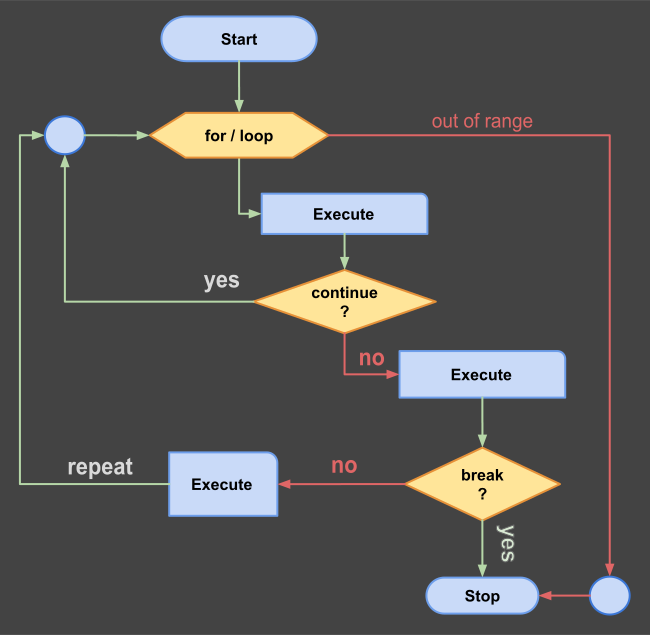
break, continue and labels
Skip one, exit all
for (let i = 1; i <= 5; i += 1) {
  if (i === 3) continue;  // skip THIS round only
  if (i === 5) break;     // exit the loop entirely
  console.log(i);         // 1, 2, 4
}
Nested loops sometimes need to exit both levels: a labeled break —
outer: for (...) { break outer; } — does that. Rare, but the only clean tool for
it.
Practice: build a menu
The task
Preview foundations/12_control_flow.html: type different numbers, press each
button, and predict before clicking. Then add a fourth button that prints the sum of
all numbers from 1 to the input using a for loop.
The checklist
- You can say which branch runs in an if/else-if chain and why (first match wins).
- You know what a missing
breakdoes and that cases match strictly. - You reach for
for...ofwith arrays, neverfor...in. - You can predict what
continueandbreakeach skip.