
The Event Loop and the Concurrency Model
Concurrency versus parallelism
Concurrency: multiple tasks are in flight — a fetch waits for the network while a click handler runs. Parallelism: two computations run at the same instant on different cores. JavaScript is concurrent by default and parallel only when you add workers (lesson 22). One thread, one call stack — and two queues of work waiting for that stack to empty.
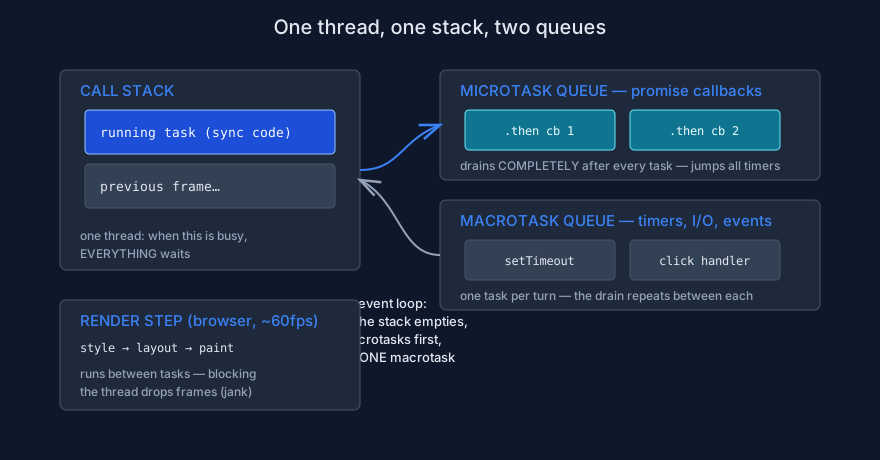
The event loop drains microtasks completely after every task, then runs one macrotask — and the browser renders between turns.
The two queues
Microtasks jump ahead of timers
console.log("1: script start");            // synchronous — the current task
setTimeout(() => console.log("4: timer"), 0);   // MACROtask: queued for a later turn
Promise.resolve().then(() => console.log("3: microtask")); // MICROtask: queued for the drain
console.log("2: script end");              // still the same task

// Expected output:
// 1: script start
// 2: script end
// 3: microtask    ← microtasks drain BEFORE any timer fires
// 4: timer        ← even with a 0 ms delay
Rules, in order: (1) the current synchronous task runs to completion; (2) the microtask queue drains completely — including microtasks queued by microtasks; (3) one macrotask runs (timers, I/O callbacks, event handlers); (4) repeat.
Starvation: one blocking loop freezes everything
const start = Date.now();
setTimeout(() => console.log(`fired ${Date.now() - start}ms late`), 100);

while (Date.now() - start < 300) {} // blocks the ONLY thread for 300ms

// Expected output:
// fired 302ms late — the timer could not run until the loop finished
This is the real cost of synchronous work on the main thread: not slowness, but a frozen
page — clicks queue, animations stall, nothing responds. Demo
async/27_event_loop_lab.js measures it.
Rendering and loop lag
The browser renders between tasks — when it can
The style → layout → paint pipeline from lesson 16 runs between event-loop turns. If tasks queue faster than they finish, renders are skipped and the page drops frames — jank. You can measure the lag directly:
// Browser context: measure how late a 0ms timer actually fires.
let last = performance.now();
setInterval(() => {
  const now = performance.now();
  const expected = 100;             // we asked for 100ms
  const lag = now - last - expected;
  console.log(`loop lag: ${lag.toFixed(1)}ms — high values mean a busy thread`);
  last = now;
}, 100);
Steady lag above a few milliseconds under idle conditions is a signal: something is blocking the thread. Lesson 23 builds the scheduling habits that fix it.
Practice: predict before you run
The task
Run async/27_event_loop_lab.js with node. For each block, write the
expected order first, including which queue puts each line there. Then modify Part 3:
wrap the timer's callback in await Promise.resolve() (make the callback
async) and predict how the order changes before running it.
The checklist
- You can state the four event-loop rules in order, from memory.
- You know microtasks drain completely — including microtasks queued by microtasks.
- You can explain jank as "tasks starving the render step", not as "slow code".
- You can name the one situation where concurrency becomes parallelism: workers.