
Deployment & Packaging
This lesson covers the four targets you will actually deploy to: a script on a colleague's laptop, a standalone executable built with a sysimage, a container image, and a cluster job. All four are built from the same two files — Project.toml and Manifest.toml — plus one script that the machine runs. Keeping that common core is what makes a release reproducible.
From Script to Application
The first deployment is always the hardest to see: an application is a project with a name, an entry point and an environment — not a folder of scripts somebody remembers how to start.
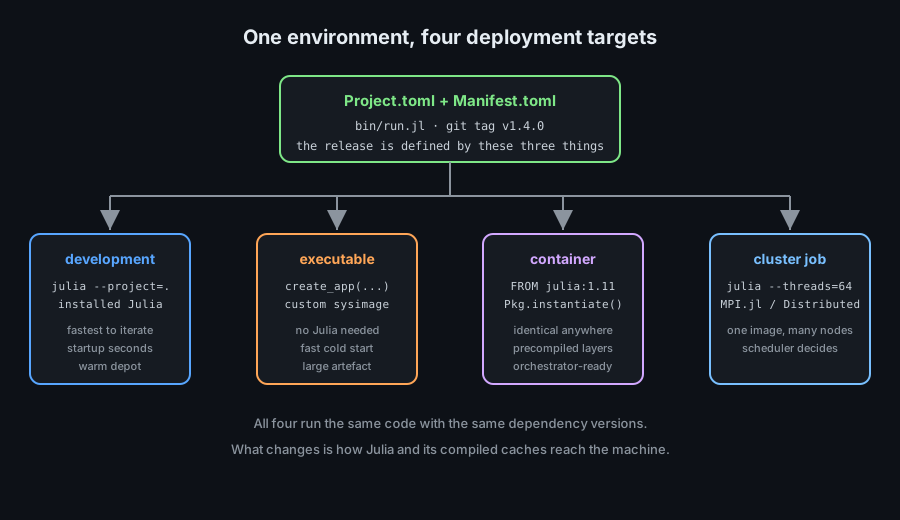
The first deployment is always the hardest to see: an application is a project with a name, an entry point and an environment — not a folder of scripts somebody remembers how to start.
Packages and Applications
The distinction decides whether other people can depend on your code and how you start it.
# APPLICATION: run by a person or a scheduler
#   project/
#     Project.toml        # [deps] only — no name, no uuid, no version
#     Manifest.toml       # COMMITTED: it is the build description
#     bin/run.jl          # the single entry point
#     src/                # code loaded with include(), not `using`
#     .env.example        # documents the variables that are required

# Start it the same way everywhere:
#   julia --project=. bin/run.jl --input data.csv

# PACKAGE: depended on by other code
#   MyPackage/
#     Project.toml        # name, uuid, version, [deps], [compat]
#     src/MyPackage.jl    # module MyPackage ... end
#     test/runtests.jl

# The two are not exclusive: an application may contain a package that
# other projects `using`, and that package is tested independently.

# What makes it an application in practice:
#   1. one documented entry point
#   2. no interactive input — everything comes from arguments or ENV
#   3. a committed manifest, so the same versions run everywhere
#   4. a version number reported by the program itself
Requirement 4 is the one teams forget: when a bug is reported, "which version is running?" must be answerable from the program, not from the deployment log.
Precompilation and Startup Time
Latency before the first line of your logic is the defining cost of a Julia deployment. It is measurable, and it is reducible.
# Measure, before optimising anything
#   time julia --project=. bin/run.jl --help

# 1. Precompile the environment at IMAGE BUILD time, not at run time
#    julia --project=. -e 'using Pkg; Pkg.precompile()'
#    With a warm depot the run then pays only for what was not cached.

# 2. Keep the system image warm in the container or on the host
#    JULIA_DEPOT_PATH=/opt/julia-depot

# 3. Compile workload paths at build time with PrecompileTools.jl
using PrecompileTools

@setup_workload begin
    # Anything created here is discarded; used only to make the calls below
    data = rand(10)
    @compile_workload begin
        # Real calls on realistic argument types: they get compiled now
        process(data)
        summarise(data)
    end
end

# 4. Reduce what loads at all
#    - avoid `using` a heavy package at the top level if one function needs it
#    - move optional integrations into package extensions

# What NOT to do: call precompile() on every service start. That is the
# cost you were trying to remove, paid by the first user instead.
@compile_workload is the highest-value twenty lines in a deployment: it moves the compilation of the paths your application actually uses from the first request to the image build, where nobody is waiting.
Command-Line Arguments
An application takes arguments and exits with a meaningful status code. Nothing else.
# bin/run.jl — a small but complete command-line application
using ArgParse

function parse_args(argv)
    s = ArgParseSettings(description = "Analyse a data file.", version = "1.4.0")
    @add_arg_table! s begin
        "input"
            help = "path to the input CSV"
            required = true
        "--output", "-o"
            help = "where to write the report"
            default = "report.json"
        "--seed"
            help = "random seed for reproducible sampling"
            arg_type = Int
            default = 20260912
        "--verbose", "-v"
            help = "print progress"
            action = :store_true
    end
    return parse_args(argv, s)
end

function main(argv)
    args = parse_args(argv)
    isfile(args["input"]) || (println(stderr, "error: no such file"); exit(2))

    try
        result = analyse(args["input"]; seed = args["seed"], verbose = args["verbose"])
        write(args["output"], result)
        exit(0)
    catch err
        println(stderr, "failed: ", err)
        exit(1)
    end
end

main(ARGS)

# EXIT CODES ARE AN INTERFACE
#   0 success  · 1 runtime failure  · 2 bad usage  · 3 dependency unavailable
# A scheduler, a CI job or a shell script reads that number, not your output.
Writing errors to stderr and results to stdout keeps the program composable: ./run | jq . works, and log collectors do not confuse a report with a warning.
Compiling and Sysimages
A sysimage is a serialised snapshot of a running Julia session: the standard library, your dependencies, and the compiled methods you chose to include. Starting from one skips most of the work a fresh process does.
PackageCompiler
PackageCompiler.jl builds two things: a custom system image, and a full application directory with an executable wrapper.
using PackageCompiler

# 1. A custom system image: faster startup, Julia still required
create_sysimage(
    [:MyPackage];
    sysimage_path = "MyPackage.so",           # .dylib on macOS, .dll on Windows
    precompile_execution_file = "test/runtests.jl",   # compile what the tests exercise
)

# Run with it — note the startup improvement immediately
#   julia --sysimage MyPackage.so --project=. bin/run.jl

# 2. A full application: a directory containing everything, plus a launcher
create_app(
    "app",                       # destination directory
    "bin/run.jl";                # the entry script
    app_name        = "myapp",
    precompile_execution_file = "precompile.jl",
    include_lazy_artifacts = true,
    force           = true,
)

# The result is a self-contained directory:
#   app/
#     bin/myapp               ← the executable to distribute
#     lib/julia/              ← the runtime and libraries it needs
#     share/julia/            ← the depot: packages and compiled caches

# Build time is minutes, not seconds. That is why it belongs in CI:
#   - run: julia --project=. -e 'using PackageCompiler; create_app("app", "bin/run.jl")'
The build is slow and the artefact is large — both are normal. The trade is deliberate: compilation moves from every start on every machine to once per release.
Custom Sysimages and Their Limits
A sysimage is a snapshot with rules. Knowing the rules prevents the two failures people hit: invalidated caches and version-bound artefacts.
# WHAT A SYSIMAGE CANNOT DO — the four hard limits
#   1. It is bound to the exact Julia version that built it.
#      A patch release of Julia invalidates it: rebuild, do not reuse.
#   2. It is platform-specific: CPU architecture, operating system, libc.
#      Build on the target platform (or in the target container).
#   3. Packages that use heavy compile-time work or global state can be
#      fragile inside a sysimage — test the artefact, not just the source.
#   4. `--sysimage` replaces the default image; anything the image does not
#      contain still compiles at run time. Warm the paths you care about.

# Keeping a build honest:
#   - the sysimage is a BUILD PRODUCT: never commit it, always rebuild it
#   - pin the Julia version in CI so the artefact matches the runner
#   - verify with a smoke test after building:
#       ./app/bin/myapp --version
#       ./app/bin/myapp --input test/fixtures/small.csv

# The size trade-off in numbers (typical)
#   plain Julia + package:   ~250 MB on disk, warm start 1–3 s
#   custom sysimage:         +100–400 MB,     warm start 0.2–0.6 s
#   create_app directory:    ~700 MB–1.5 GB,  cold start 0.2 s, no Julia needed
The rule to internalise is the first one: a sysimage is a build artefact tied to an exact toolchain. Treating it as a portable file across Julia versions is the most common cause of "it worked in CI and crashed in production".
When Compiling Is Worth It
Compilation solves one problem — startup latency — and costs build time, artefact size and platform specificity. Decide with numbers, not feelings.
| Situation | Reach for | Why |
|---|---|---|
| Long-running server, started rarely | Precompile + warm depot | Startup cost is amortised to nothing |
| Short-lived CLI run thousands of times | create_app or sysimage | Startup is most of the total runtime |
| Batch job submitted to a scheduler | Container + precompiled depot | Reproducibility matters more than a second |
| Library used by another program | Plain package | The host process controls startup |
| Frequently changing code | Nothing — iterate | A 5-minute build per edit kills the loop |
Measure first with time julia --project=. bin/run.jl --help. If that number is small relative to the work the tool does, compilation buys you nothing and costs you a build pipeline.
Containers
A container solves the deployment problem Julia is most sensitive to: the toolchain, the depot and the compiled caches must match the machine.
A Dockerfile for Julia
Structure the image so dependencies change rarely and code changes often — that keeps the expensive layer cached.
# Dockerfile
# ---- layer 1: the runtime, pinned to an exact version ----
FROM julia:1.11.5-bookworm AS base

# ---- layer 2: dependencies — changes only when the manifest changes ----
WORKDIR /app
COPY Project.toml Manifest.toml ./
RUN julia --project=. -e 'using Pkg; Pkg.instantiate(); Pkg.precompile()'

# ---- layer 3: the code — changes on every commit ----
COPY src/ src/
COPY bin/ bin/
RUN julia --project=. -e 'using Pkg; Pkg.precompile()'

# ---- layer 4: runtime settings ----
ENV JULIA_DEPOT_PATH=/app/.julia \
    JULIA_NUM_THREADS=4 \
    JULIA_PROJECT=/app

# Run as a non-root user — a container is not a security boundary by itself
RUN useradd --create-home appuser && chown -R appuser /app/.julia
USER appuser

ENTRYPOINT ["julia", "--project=/app", "/app/bin/run.jl"]

# Build and run:
#   docker build -t myapp:1.4.0 .
#   docker run --rm -e DATABASE_URL=... myapp:1.4.0 --input /data/in.csv
The COPY Project.toml Manifest.toml line before the source is the single most important detail: it means editing a source file does not re-download or re-precompile every dependency.
The Depot Inside the Image
Where the depot lives decides whether precompilation survives between builds and runs.
# The depot holds packages, registries and compiled caches.
#   default:  ~/.julia
#   in an image: set it explicitly so it is owned by the container user

ENV JULIA_DEPOT_PATH=/app/.julia

# What bites people in containers:
#   1. Compiling at RUN time every start
#      → precompile during `docker build`, never in the entrypoint
#   2. Running as root, then switching users
#      → the depot stays root-owned and unwritable; chown it (as above)
#   3. Mounting a volume over the depot
#      → it hides the precompiled cache and every start recompiles
#   4. Forgetting the manifest in the image
#      → `Pkg.instantiate()` resolves differently on each build
#   5. Huge images from a full depot
#      → `Pkg.gc()` after precompiling, or build a sysimage and keep only it

# A minimal, precompiled, reproducible image has exactly these contents:
#   /app/Project.toml
#   /app/Manifest.toml
#   /app/src/...
#   /app/bin/run.jl
#   /app/.julia/    (packages + compiled caches for this Julia version)

# Verify reproducibility locally before pushing:
#   docker run --rm myapp:1.4.0 --version
#   docker run --rm myapp:1.4.0 --input test/fixtures/small.csv
Item 3 is the subtle one: mounting a host directory over JULIA_DEPOT_PATH looks like a convenient cache and behaves like an amnesia device. Mount data, never the depot.
Data, Volumes and Resource Limits
Containers are ephemeral; data is not. The boundary between the two must be explicit.
# Mounts: inputs read-only, outputs writable, never the depot
#   docker run --rm \
#     -v /host/data:/data:ro \
#     -v /host/results:/results \
#     --memory=8g --cpus=4 \
#     myapp:1.4.0 --input /data/in.csv --output /results/out.json

# Inside the application, treat the two directories differently
input  = get(ENV, "INPUT_DIR", "/data")
output = get(ENV, "OUTPUT_DIR", "/results")

isdir(input)  || error("input directory not mounted")
mkpath(output)                     # safe to create: it is our side of the boundary

# A temp directory that is actually writable and cleaned up
mktempdir() do dir
    scratch = joinpath(dir, "scratch.bin")
    # heavy intermediate work goes here, and disappears with the block
end

# RESOURCE LIMITS THAT MATTER FOR JULIA
#   --memory      : the GC will not save you from an unbounded allocation
#   --cpus        : match JULIA_NUM_THREADS to what the container may use;
#                   over-subscribing threads makes everything slower
#   --pids-limit  : a runaway task spawner hits a wall instead of the host

# Where results live decides what survives:
#   container filesystem → gone when the container stops
#   mounted volume       → survives, and can be inspected after a failure
Packaging and Releases
A release is a numbered, reproducible artefact. Everything below is in service of that sentence.
Relocatable Environments
An environment is relocatable when copying its folder to another machine with the same OS and Julia version produces a working setup.
# A relocatable environment is a directory containing:
#   project/Project.toml
#   project/Manifest.toml
#   project/.julia/        ← the depot, self-contained

# Build it once, ship it anywhere compatible:
JULIA_DEPOT_PATH=/build/depot julia --project=/build/project -e 'using Pkg; Pkg.instantiate(); Pkg.precompile()'

# On the target machine:
#   export JULIA_DEPOT_PATH=/opt/release/.julia
#   export JULIA_PROJECT=/opt/release
#   julia --project=/opt/release bin/run.jl --input data.csv

# WHAT BREAKS RELOCATABILITY
#   absolute paths recorded in the manifest (a `develop` entry, typically)
#   artefacts downloaded for a different platform
#   a compiled cache built by a different Julia version
#   a package that hard-codes a path at `__init__` time

# Verify before shipping — on a CLEAN machine or container:
#   julia --project=. -e 'using Pkg; Pkg.test()'
#   JULIA_DEPOT_PATH=/nonexistent julia --project=. bin/run.jl --help

# The second command is the real test: if the tool runs with an empty
# depot, everything it needs is inside the release.
The empty-depot test is worth adopting as a release gate. It catches, in ten seconds, the entire class of "works here because my depot has it" failures.
Versioning and Release Contents
Semantic versioning from the package chapter applies unchanged — what changes is what travels with the number.
# A release consists of exactly these things:
#   1. a git tag:            v1.4.0
#   2. the environment:      Project.toml + Manifest.toml
#   3. the entry point:      bin/run.jl
#   4. a changelog entry:    what changed, and whether it breaks callers
#   5. build artefacts:      the sysimage or application directory, if any

# Jam the version into the program so it can report itself
module MyApp
const VERSION = v"1.4.0"
end

# bin/run.jl
if "--version" in ARGS
    println("myapp ", MyApp.VERSION)
    exit(0)
end

# In CI, tag only what passed on a clean checkout:
#   julia --project=. -e 'using Pkg; Pkg.test()'
#   docker build -t myapp:1.4.0 .
#   docker run --rm myapp:1.4.0 --version
#   git tag -a v1.4.0 -m "release 1.4.0"
#   git push --follow-tags

# WRITING THE CHANGELOG
#   MAJOR: behaviour callers depend on has changed
#   MINOR: new capability, existing usage still works
#   PATCH: bug fix, same interface
# If a CLI flag is renamed, that is a MAJOR change whether or not the
# function signatures changed.
The rule that is easy to forget: a command-line interface is a public API. Renaming a flag breaks scripts and schedulers, and that is a breaking change by any honest reading of semantic versioning.
Distribution Channels
How the artefact reaches the machine determines how quickly a rollback is possible.
| Channel | Best for | Rollback cost |
|---|---|---|
Git checkout + Pkg.instantiate() | Development, internal tools | Check out the previous tag |
| Container registry tag | Services, scheduled jobs | Deploy the previous tag |
Application directory (create_app) | Workstations, air-gapped machines | Swap the directory |
| Registered package | Libraries used by other code | Resolve to the previous version |
| Artifact attached to a release | Binary tools with no toolchain | Download the previous file |
For anything that runs on a schedule, prefer an immutable container tag: myapp:1.4.0 never changes, while myapp:latest changes without warning and makes a rollback impossible to describe.
Operating a Deployment
Deployment does not end at the first successful run. What follows is the part that decides whether the second run is boring or an incident.
Monitoring and Health
Four signals cover almost every failure: did it start, how long does it take, how much does it use, and did the last run succeed.
using Logging, Dates

# 1. A startup line that says what is running and with which environment
@info "starting" app = "myapp" version = "1.4.0" julia = VERSION threads = Threads.nthreads()

# 2. Duration and outcome of the work, as structured fields
function run_with_metrics(f, label)
    t0 = time_ns()
    result = try
        f()
    catch err
        @error "task failed" task = label err = err
        rethrow()
    end
    elapsed = (time_ns() - t0) / 1e9
    @info "task finished" task = label seconds = round(elapsed, digits = 2)
    return result
end

# 3. Memory as part of the normal report
using Base: gc_live_bytes
@info "memory" live_mb = round(gc_live_bytes() / 2^20, digits = 1)

# 4. A heartbeat file the scheduler can check (batch jobs, not services)
touch(joinpath(get(ENV, "OUTPUT_DIR", "."), "heartbeat"))

# WHAT TO ALERT ON — in order of usefulness
#   the job did not finish within its window
#   the exit code is non-zero
#   the row count of the output changed by more than expected
#   peak memory grew past the container limit
# NOT: any log line containing the word "error" — too noisy to act on
The last two lines are the whole point of monitoring: alert on things a human can act on, not on the presence of a word. A row-count check is a better detector of silent corruption than any exception.
Upgrades and Rollback
An upgrade is a deployment with a known previous state. That state is the only reason rollback is possible.
# UPGRADE PROCEDURE, in order
#   1. read the changelog for MAJOR changes in your direct dependencies
#   2. update inside [compat] bounds:  Pkg.update()
#   3. run the full test suite:        Pkg.test()
#   4. run the smoke test of the RELEASE ARTEFACT, not the source
#   5. deploy to one instance or one node first
#   6. watch the four signals above for one full cycle
#   7. deploy to the rest

# ROLLBACK PROCEDURE — the reason to keep the previous artefact
#   container:   docker run myapp:1.3.2       (the previous immutable tag)
#   sysimage:    keep the previous .so alongside the new one
#   environment: check out the previous tag and instantiate

# Record which versions ran, with the results
using TOML
open("run-meta.toml", "w") do io
    TOML.print(io, Dict(
        "app_version" => "1.4.0",
        "julia"       => string(VERSION),
        "started"     => string(now()),
        "manifest"    => "Manifest.toml",
    ))
end

# The rule that makes rollback fast: never deploy a release you cannot
# restore with one command. If restoring takes three steps, it will take
# an hour during an incident.
Common Pitfalls
These are the failures that produce "works on my machine" reports from an operations team.
| Pitfall | Consequence | Fix |
|---|---|---|
| Manifest not committed | Different versions on every build | Commit it for applications; pin for packages |
| Precompiling at start-up | Users pay the compilation cost | Precompile at image build time |
| Depot mounted over the cache | Recompiles on every run | Mount data, never JULIA_DEPOT_PATH |
| Sysimage reused across Julia versions | Crashes or silent invalidation | Rebuild the image with each Julia upgrade |
| Thread count above the CPU limit | Contention slows everything down | Match JULIA_NUM_THREADS to the container limit |
develop paths in the manifest | The environment is not relocatable | Run Pkg.free before tagging |
| No version reported by the artefact | Cannot tell what is running | --version in every application |
| Secrets baked into the image | Credentials in a registry | Environment variables or a secret manager |
| No previous artefact kept | Rollback becomes a rebuild | Keep the last two immutable tags |
Nine rows, one theme: a deployment is reproducible only if every input to it is written down and every output of it is kept.
@compile_workload, and reach for PackageCompiler.create_sysimage or create_app only when startup dominates the run. Build containers so dependencies form an early layer and code a late one, set JULIA_DEPOT_PATH inside the image and never mount over it, and match JULIA_NUM_THREADS to the CPU limit. Ship relocatable environments containing their own depot and verify with the empty-depot test, tag releases with the environment, entry point and changelog, and prefer immutable container tags over latest. Finally, monitor start-up, duration, memory and exit codes, alert on outcomes rather than keywords, and always keep the previous artefact so that a rollback is one command.
Next, see the programs this deployment knowledge serves: Lab Examples gathers the single-file examples from the whole track.