
Interop
ccall, shares memory with Fortran, runs Python and R inside the same process, and exchanges files with anything that reads Arrow or CSV. Each boundary has a price — a type mapping, a copy, or a crash if you break the rules — so the skill is choosing the crossing and keeping it narrow.
This lesson works from the lowest level up. You start with ccall and the pointer rules that keep it safe, then move to package bridges for C++ and Python, then to other runtimes, and finally to the file formats and subprocesses that turn interop into a data contract. The last chapter collects the failure modes: garbage collection, error propagation, and binary dependencies.
Interop Basics
Interop starts with one question: does the other code run in your process, or beside it? Inside means shared memory and no copying, but also shared crashes; beside it means clean isolation and a serialisation cost.
Why Interop, and What It Costs
You reach for interop for one of three reasons: a library exists only in another language, a legacy system must be called, or a data format is defined elsewhere. Each reason implies a different kind of boundary and a different strategy.
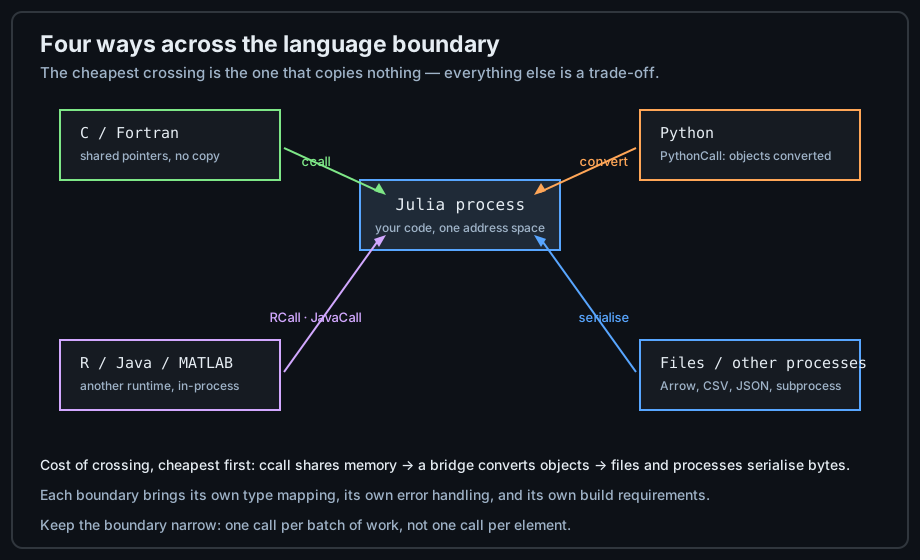
# The four kinds of crossing, cheapest first
#   1. ccall to C/Fortran         same process, same memory, no conversion
#   2. a package bridge (C++)     same process, a wrapper layer, some conversion
#   3. an in-process runtime      Python, R, JVM: objects converted or proxied
#   4. files / subprocesses       full serialisation, but total isolation

# Reasons to cross: a library that only exists elsewhere
#   ccall(:cblas_dgemm, ...)                     → BLAS/LAPACK in C
#   pyimport("sklearn").linear_model             → a Python model
#   R"lm(y ~ x)"                                 → an R statistical model

# Cost of crossing, expressed as work you must do:
#   - map the types on both sides
#   - decide who owns the memory and who frees it
#   - propagate errors instead of losing them
#   - reproduce the environment on every machine

# The rule that saves the most time:
#   cross the boundary ONCE per batch, not once per element.
Before writing any binding, check whether a Julia package already wraps the library. The ecosystem ships wrappers for most numerical C libraries, and a maintained wrapper saves you the whole chapter that follows.
Mapping Types Across a Boundary
Every boundary has a type table. On the C side, ccall expects types that match the ABI exactly, which is why fixed-width types appear everywhere in interop code.
# The C-facing types are fixed-width on purpose
#   C int       → Int32        (Cint)
#   C long      → Int64        (Clong)
#   C double    → Float64      (Cdouble)
#   C float     → Float32      (Cfloat)
#   char *      → Cstring / Ptr{UInt8}
#   void *      → Ptr{Cvoid} / Any (for the opaque-pointer idiom)

# Use the aliases: they follow the platform
sizeof(Cint)                          # 4
sizeof(Clong)                         # 8 on 64-bit Linux, 4 on 64-bit Windows
Cchar                                 # Int8

# A struct shared with C must have the same layout
struct PointC
    x::Cdouble
    y::Cdouble
end
isbitstype(PointC)                    # true — plain memory, no pointers to Julia objects

# Arrays are pointers plus a length on the C side
v = [1.0, 2.0, 3.0]
p = pointer(v)                        # Ptr{Float64} into the array's memory
unsafe_load(p, 2)                     # 2.0 — element 2, C-style index

# Julia strings are NUL-terminated internally, so Cstring works for free
s = "hello"
GC.@preserve s unsafe_load(pointer(s), 1)   # 'h': the string is pinned for the call
Two mistakes account for most interop bugs: using a Julia type whose size differs from the C declaration (Int is not always 32-bit), and letting the garbage collector move or free memory while C still holds a pointer to it.
Keeping the Boundary Narrow
Calls across a language boundary cost far more than ordinary calls, so the right design is a thin bridge: one crossing that receives a batch and returns a batch, with all the looping on one side.
# BAD: one foreign call per element
function slow_dot(a, b)
    s = 0.0
    for i in eachindex(a)
        s += c_get(i, a, b)           # thousands of boundary crossings
    end
    s
end

# GOOD: one foreign call for the whole batch
function fast_dot(a, b)
    c_dot(pointer(a), pointer(b), length(a))   # one crossing, the loop is in C
end

# The same principle for Python: send the array, not the elements
# BAD:  [pyfunc(x) for x in v]
# GOOD: pyfunc(pyconvert(Any, v))      # one crossing, NumPy loops inside

# And for files: write once, read once, not in a streaming trickle
# BAD:  1000 small files, one record each
# GOOD: one Arrow table with 1000 rows
Measure the boundary like any other performance question: time the same work with one crossing and with many. The difference is usually large enough to dictate the design of the whole integration.
Calling C and Fortran
ccall is the lowest level of interop and needs no wrapper package: you name the library, the function, and the argument types, and Julia generates a direct call. Everything else in this lesson builds on the same idea.
ccall: Calling a C Function
A ccall has three parts: the library and function symbol, the return type, and a tuple of argument types. The argument values follow, and they must match the declared types exactly.
# Simplest form: a function from the C standard library
ccall(:clock, Clong, ())              # returns clock ticks

# Name the library explicitly when it is not in the current process
#   ccall((:cblas_dgemm, "libblas"), Cvoid, (...), ...)

# A real signature: double sqrt(double)
x = ccall(:sqrt, Cdouble, (Cdouble,), 2.0)
x                                     # 1.4142135623730951

# Multiple arguments, with a pointer and a length
#   double my_sum(const double *v, int n)
function c_sum(v)
    n = length(v)
    ccall(:my_sum, Cdouble, (Ptr{Cdouble}, Cint), pointer(v), n)
end

# Strings cross as Cstring; the call copies nothing
ccall(:strlen, Csize_t, (Cstring,), "hello")     # 5

# A returned string must be freed where it was allocated, so copy it out
#   const char *greeting(void)
greet() = unsafe_string(ccall(:greeting, Cstring, ()))

# Structs by value are supported when the layout matches
#   PointC make_point(double x, double y)
pt = ccall(:make_point, PointC, (Cdouble, Cdouble), 3.0, 4.0)
pt.x                                  # 3.0

# Always keep the pointer alive across the call
function safe_call(v)
    GC.@preserve v ccall(:my_sum, Cdouble, (Ptr{Cdouble}, Cint), pointer(v), length(v))
end
The three parts must match the C declaration exactly — a wrong argument type is not something Julia can catch, it is undefined behaviour inside the called function. When a call crashes with no Julia stack trace, the signature is the first thing to check.
Pointers, GC.@preserve, and Strings
Julia's garbage collector may move or free an object at any point where the runtime can run. A pointer handed to C is not itself a reference, so the object behind it must be pinned for the duration of the call.
# WRONG: the array may be collected while C still holds the pointer
function unsafe_read(v)
    p = pointer(v)
    return ccall(:read_first, Cdouble, (Ptr{Cdouble},), p)
    # v is unreachable here, and p is not a reference the collector understands
end

# RIGHT: preserve for exactly as long as the pointer is in use
function safe_read(v)
    GC.@preserve v begin
        p = pointer(v)
        ccall(:read_first, Cdouble, (Ptr{Cdouble},), p)
    end
end

# Preserve several objects at once
function two_buffers(a, b)
    GC.@preserve a b ccall(:combine, Cvoid,
                           (Ptr{Cdouble}, Ptr{Cdouble}), pointer(a), pointer(b))
end

# unsafe_wrap: view foreign memory as a Julia array (no copy)
function wrap_foreign(n)
    p = ccall(:alloc_buffer, Ptr{Cdouble}, (Cint,), n)
    GC.@preserve p begin
        arr = unsafe_wrap(Array, p, n; own = false)   # own = false: C frees it
        sum(arr)
    end
end

# Copying is the safe default when the lifetime is unclear
function copy_from_c(n)
    p = ccall(:alloc_buffer, Ptr{Cdouble}, (Cint,), n)
    unsafe_wrap(Array, p, n; own = true)              # Julia now owns the memory
end

# Strings: convert once, and keep the converted value alive in a variable
name = Cstring("hello")
unsafe_string(name)                   # "hello" — a fresh Julia String
Use GC.@preserve around every call that receives a raw pointer into Julia memory, and prefer copying into a Julia-owned array when the foreign code keeps the pointer after returning.
Wrapping a Library
Hand-writing ccall lines for a large library does not scale, so Julia offers automation at two levels: bindings generated from C headers, and C++ wrappers that expose classes as Julia types.
# @ccall is the macro form: types are declared inline with the arguments
@ccall strlen("hello"::Cstring)::Csize_t          # 5
@ccall sqrt(2.0::Cdouble)::Cdouble                # 1.4142135623730951

# For a C library, Clang.jl generates bindings from the headers, so a
# 5 000-line header becomes a module of matching ccall definitions.

# For a C++ library, CxxWrap.jl compiles a small C++ wrapper that exposes
# the classes as Julia types — the recommended route for C++.
#   # on the C++ side:  JLCXX_MODULE define_julia_module(...)
#   using CxxWrap
#   @wrapmodule(() -> "libmycpp")
#   @initcxx

# For Fortran: symbols are mangled with a trailing underscore, everything is
# passed by reference, and arrays are column-major like Julia's
#   subroutine dscal(n, a, x, incx)       → ccall(:dscal_, ...)
function fortran_scale!(x, k)
    n = Ref(Cint(length(x)))          # by-reference scalars need a Ref
    kk = Ref(Cdouble(k))
    ccall((:dscal_, "libmylib"), Cvoid,
          (Ref{Cint}, Ref{Cdouble}, Ptr{Cdouble}, Ref{Cint}), n, kk, x, n)
    x
end

# A binding to a C++ object needs a finaliser, since Julia has no destructor
struct Handle
    ptr::Ptr{Cvoid}
    function Handle(p::Ptr{Cvoid})
        h = new(p)
        finalizer(h) do obj
            ccall((:destroy_handle, "libmycpp"), Cvoid, (Ptr{Cvoid},), obj.ptr)
        end
        h
    end
end

# Binary dependencies are managed, not downloaded by hand
#   - BinaryBuilder.jl builds the library once, for every platform
#   - JLL packages (libfoo_jll) download and load the right artifact
using Libdl
dlopen("libm")                        # load a system library by name
Prefer a JLL artifact over shipping your own binaries: it gives reproducible versions, correct platform selection, and no build step on the user's machine. The project file then records a library version like any other dependency.
Calling Python
Python is the most common interop target in practice, because so much scientific code is written there. Julia embeds a Python interpreter inside its own process, which makes the boundary fast but not free.
PythonCall and PyCall
Two packages provide Python interop: the older PyCall, which converts aggressively, and PythonCall, which keeps objects as wrapped proxies and converts only on request. New code should start with PythonCall.
using PythonCall

# Import a module and call into it
np = pyimport("numpy")
np.array([1, 2, 3])                   # a Python object, wrapped not converted

# Access attributes and items with Julia syntax
sk = pyimport("sklearn.linear_model")
sk.__name__                           # "sklearn.linear_model"
np.pi                                 # 3.141592653589793

# Call a Python function: arguments are converted as needed
pyfunc = pyimport("builtins").sum
pyfunc([1, 2, 3])                     # 6

# Convert explicitly at the boundary
arr = pyconvert(Vector{Float64}, np.array([1.0, 2.0, 3.0]))
arr                                   # [1.0, 2.0, 3.0] — a real Julia array

# pyconvert the other way, so NumPy receives an array, not a wrapped object
np.sum(pyconvert(Any, [1.0, 2.0, 3.0]))          # 6.0

# The environment is a project dependency, pinned in the project file
#   Pkg.add("PythonCall")
#   ENV["JULIA_CONDAPKG_BACKEND"] = "MicroMamba"   # reproducible Python
The important difference from converting everything is ownership: a wrapped Python object is a live proxy, so mutations are visible on both sides and the conversion cost is paid only where you ask for it. That makes PythonCall both faster and more predictable.
Exchanging Arrays and DataFrames
The expensive part of Python interop is usually not the call but the data. Zero-copy paths exist for arrays and tables, and using them turns a slow integration into a fast one.
using PythonCall

# A Julia array reaches NumPy as a shared buffer: no copy
v = rand(Float64, 1_000_000)
np = pyimport("numpy")
pyv = pyconvert(Any, v)               # shares memory with v (dtype matches)
np.mean(pyv)                          # NumPy computes on the same bytes

# The other direction copies — be deliberate about when and how often
pyarr = np.arange(1_000_000)
jl = pyconvert(Vector{Int64}, pyarr)

# For tables, Arrow is the efficient bridge (both sides understand it)
using Arrow
Arrow.write("data.arrow", (a = [1, 2, 3], b = ["x", "y", "z"]))

# DataFrames convert column-wise; keep the column types concrete
using DataFrames
df = DataFrame(a = [1, 2, 3], b = ["x", "y", "z"])
pyconvert(Any, df)                    # to Python (pandas)
pyconvert(DataFrame, pyimport("pandas").read_csv("data.csv"))

# The habit: convert once at the boundary, then work in exactly one language
function compute_mean(v)
    np = pyimport("numpy")
    pyconvert(Float64, np.mean(pyconvert(Any, v)))
end
Convert once and then stay in one language for the whole computation. An integration that alternates between Julia and Python per element pays the boundary cost thousands of times for no benefit.
Python Interop Performance
The speed of a Python bridge depends on three things: how often you cross, how much data you hand over, and whether NumPy or the interpreter does the looping. All three are under your control.
# 1. Crossing count: batch the work
# BAD
pyfunc = pyimport("math").sqrt
[pyfunc(x) for x in 1:10_000]         # 10 000 interpreter crossings

# GOOD: let NumPy run the loop in C
np = pyimport("numpy")
np.sqrt(np.arange(1.0, 10_001.0))     # one crossing

# 2. Data volume: pass arrays, not elements
np.sum(pyconvert(Any, rand(1_000_000)))       # one large transfer

# 3. GIL: Python code holds the Global Interpreter Lock, so Python work in
#    threads does not run in parallel. Julia threads stay parallel; the
#    Python part does not. Keep heavy Python work in one task, or use
#    separate Python processes.

# Measure the boundary itself
using BenchmarkTools
@btime pyconvert(Any, $([1.0, 2.0, 3.0]))          # conversion cost per call
@btime $(np).sum(pyconvert(Any, $(rand(1000))))    # call plus conversion

# Rule of thumb: a Python call should carry at least milliseconds of work,
# or the interpreter overhead dominates everything.
The Global Interpreter Lock is the second hidden cost: Python code does not run in parallel merely because Julia has threads. Keep the Python part coarse and self-contained, and parallelise the Julia side around it.
Other Runtimes, Both Directions
The same embedding technique used for Python works for R, Java, and MATLAB, and the reverse is possible too: other languages can call into Julia. Both directions are useful when a team owns code in more than one language.
RCall
RCall embeds R in the Julia process, so R functions and even R formulas are available directly. It is the pragmatic choice when a statistical method exists only in an R package.
using RCall

# Evaluate R code: the R"" string macro returns a reference to the result
R"c(1, 2, 3)"
R"mean(c(1, 2, 3))"                   # 2.0

# Assign a Julia variable into R's namespace with a prefix
x = [1.0, 2.0, 3.0]
@rput x                               # now R has x
R"summary(x)"

# Bring R values back into Julia
y = rcopy(R"t.test(x)")               # convert an R object to Julia
y.p_value

# Fit a model in R and read the coefficients in Julia
R"df <- data.frame(y = c(1,2,3,4), x = c(1,2,3,4))"
fit = R"lm(y ~ x, data = df)"
rcopy(R"coef($fit)")                  # [0.0, 1.0]

# The R environment is a dependency too: pin it in the project
#   ENV["R_HOME"] = "/usr/lib/R"
R interop has the same shape as Python interop: a proxy object, an explicit copy, and a boundary worth crossing rarely and with prepared data. The formula interface is the real payoff — R"lm(y ~ x)" is syntax no Julia function call can imitate.
Java, MATLAB, and Other Runtimes
Every runtime with an embedding API has a Julia package in the same pattern: start the runtime once, get proxies for its objects, convert at the boundary. Learning one teaches the others.
# JavaCall: the JVM runs inside the Julia process
using JavaCall
JavaCall.init()                       # start the JVM (once, at start-up)
jl = @jimport java.lang.System
jl.currentTimeMillis()                # a Java long, wrapped

# The JVM is started with the classpath you need
#   JavaCall.init(["-Xmx2g", "-Djava.class.path=build/libs/app.jar"])

# MATLAB.jl: drives MATLAB as a shared engine
#   using MATLAB
#   mat"x = linspace(0, 1, 100); y = sin(2*pi*x);"
#   y = mat"y"                        # bring the variable back

# Fortran and C have no runtime to embed: they are ccall, already covered.

# The reverse direction: other languages calling Julia
#   - juliacall (Python): pip install juliacall;  from juliacall import Main as jl
#   - R: JuliaCall
#   - C/C++: embed libjulia and call jl_eval_string
#   - anything: run julia as a subprocess and exchange files or JSON

# A Python script using Julia through juliacall
#   from juliacall import Main as jl
#   jl.seval("using Statistics")
#   jl.seval("mean")(jl.seval("[1, 2, 3]"))     # 2.0

# The pattern in every case: one long-lived runtime, many cheap calls
# through it, conversions at the edges.
Pick the direction that keeps the polyglot boundary in one place: either Julia drives the others, or another language drives Julia. Alternating control between runtimes in the middle of a computation is where maintainability goes to die.
Calling Julia from Elsewhere
Making Julia callable is a packaging problem rather than a binding problem: the target environment must get a Julia runtime, and the call must not pay start-up latency on every invocation.
# Option 1: juliacall / JuliaCall — a shared library with an embedded runtime
#   Python:  pip install juliacall
#   from juliacall import Main as jl
#   jl.eval("1 + 1")
#   The Julia runtime starts once, then calls are cheap.

# Option 2: a compiled shared library with PackageCompiler
using PackageCompiler
create_lib("MyLib.jl", "build/libmylib")      # libmylib.so / .dll / .dylib

# Option 3: build a standalone app with a baked system image
create_app("MyApp.jl", "build/MyApp")
#   the app in build/MyApp/bin starts without Julia's compilation delay

# Option 4: a subprocess with a data contract — the most portable
#   julia --project script.jl --input data.arrow --output result.json
#   No runtime embedding, no version coupling: the contract is the files.

# Whichever you choose, keep the Julia side a library:
#   - a package with a clean API, not a script with globals
#   - no interactive prompts, no calls to exit()
#   - results returned as values, errors raised as exceptions
using Pkg
Pkg.activate(".")                     # the environment travels with the code
For a mixed team, the subprocess-with-a-data-contract option is usually the most durable: it decouples release cycles, needs no build of the host, and the file format documents the interface for everyone.
Portable Data Bridges
A file format is an interface contract that no runtime can break. When two systems must cooperate but must not depend on each other's process, the file is the boundary — and choosing it well removes an entire class of integration bugs.
Files as an Interface
The format decides what can cross: types, column names, nulls, and compression. Arrow and Parquet preserve a table schema across every language with a reader, which is why they have become the default for data exchange.
| Format | Crosses as | Best for |
|---|---|---|
| CSV | Text, no types | Small hand-checked files, interchange with legacy tools |
| JSON | Nested objects | Configuration and API payloads, not bulk data |
| Arrow / Feather | Typed tables, zero-copy reads | Large tables between Julia, Python, R, and SQL engines |
| Parquet | Typed, compressed, columnar | Archival datasets and query engines |
| HDF5 / NetCDF | Typed arrays with metadata | Scientific arrays, simulation output |
| Serialization | Arbitrary Julia values | Checkpoints and caches — Julia only |
using Arrow, CSV, DataFrames, JSON3

# Arrow: typed, fast, and readable by Python, R, and SQL engines
df = DataFrame(id = 1:3, value = [1.5, 2.5, 3.5])
Arrow.write("table.arrow", df)
Arrow.Table("table.arrow")            # reads lazily: columns on demand

# Parquet: compressed and columnar, for long-term storage
#   using Parquet2
#   Parquet2.writefile("table.parquet", df)

# CSV: universal but untyped — always pass the schema explicitly
CSV.write("table.csv", df)
CSV.read("table.csv", DataFrame; types = Dict(:id => Int64, :value => Float64))

# JSON: for API payloads, not for bulk data
JSON3.write(Dict("n" => 3, "items" => [1, 2, 3]))
JSON3.read("""{"n": 3, "items": [1, 2, 3]}""")

# HDF5 for arrays with metadata
#   using HDF5
#   h5open("sim.h5", "w") do f; write(f, "data", rand(100)); end
Write the schema down and assert it on read: an untyped CSV that silently becomes a String column is the most common data-contract failure, and it costs an afternoon to find downstream.
Serialization and Checkpoints
Julia's own serialisation format preserves almost any value — structs, closures, module references — which makes it perfect for caches and checkpoints and unsuitable for cross-language exchange.
using Serialization

# Serialize anything Julia can represent, including custom structs
data = (model = [1.0, 2.0], meta = Dict(:epochs => 10))
serialize("checkpoint.jls", data)
deserialize("checkpoint.jls")         # the same value back

# Fast: it writes the in-memory representation directly
using BenchmarkTools
@btime serialize("tmp.jls", $data)
@btime Arrow.write("tmp.arrow", $(DataFrame(model = [1.0, 2.0])))

# The warnings that matter
#   - the format is tied to the Julia version and package versions
#   - a closure captures its module: deserialising elsewhere fails confusingly
#   - it is NOT a safe way to read untrusted input (it can construct anything)

# Checkpoint long computations at natural boundaries
function long_run(n)
    for i in 1:n
        result = step(i)
        i % 100 == 0 && serialize("ckpt_$i.jls", (i = i, result = result))
    end
end

# For cross-language caching, write a typed file instead:
#   Arrow for tables, HDF5 for arrays, JSON for small structures.
Use serialisation inside one program or one project, and a documented format at every other boundary. "It worked on my machine, but the cache fails elsewhere" is almost always a serialisation assumption.
Processes and Pipelines as Interop
run and open start another program with pipes attached, which is the most portable boundary of all: any language that can read stdin and write stdout can participate.
# Run a program and capture its output
out = read(`python3 --version`, String)
strip(out)                            # "Python 3.11.x"

# A pipeline of processes, with Julia in the middle
result = read(pipeline(`echo "1 2 3"`, `tr ' ' '\n'`, `sort -r`), String)
split(strip(result), '\n')            # ["3", "2", "1"]

# Pass data in, read data out, without a temporary file
open(`python3 -c "import sys; print(sys.stdin.read().upper())"`, "r+") do io
    write(io, "hello")
    close(io)                         # required before reading the result
    read(io, String)                  # "HELLO\n"
end

# The concat form writes several things in sequence
run(pipeline(`cat`, stdin = IOBuffer("data")))

# Exit codes and errors
proc = run(ignorestatus(`false`))     # do not throw on a non-zero exit
proc.exitcode                         # 1

# Running Julia itself as a worker is the same mechanism
run(`julia --project -e "println(1 + 1)"`)
The subprocess boundary gives up nothing in correctness and gains isolation: a crash in the other program does not take your session down, and the interface is a text or file contract that anyone can read and test.
Interop Pitfalls
Three families of bug account for nearly every interop failure: memory that was freed too early, errors that never came back, and environments that cannot be reproduced. Each has a discipline that keeps it manageable.
GC Safety and Use-After-Free
Julia's collector knows nothing about pointers held by foreign code. Every pointer that outlives a single call must be preserved, copied, or allocated on the foreign side.
# SYMPTOM: works in tests, crashes or corrupts data later.
# CAUSE: C kept a pointer to memory that Julia collected.

# Rule 1: preserve for the duration of the call
function call_with(v)
    GC.@preserve v ccall(:consume, Cvoid, (Ptr{Cdouble}, Cint), pointer(v), length(v))
end

# Rule 2: copy when the foreign side stores the pointer
function store_with(v)
    p = ccall(:malloc_copy, Ptr{Cdouble}, (Ptr{Cdouble}, Cint), pointer(v), length(v))
    GC.@preserve p unsafe_wrap(Array, p, length(v))   # or keep p inside a Julia object
end

# Rule 3: allocate on the foreign side when the foreign side frees
function foreign_buffer(n)
    p = ccall(:alloc, Ptr{Cdouble}, (Cint,), n)
    # ownership stays with C: wrap with own = false and never free it in Julia
    unsafe_wrap(Array, p, n; own = false)
end

# Rule 4: a finaliser for objects whose lifetime spans calls
mutable struct Wrapper
    ptr::Ptr{Cvoid}
    function Wrapper(p)
        w = new(p)
        finalizer(_ -> ccall(:release, Cvoid, (Ptr{Cvoid},), p), w)
        w
    end
end

# How to test it: call the GC repeatedly while the foreign code is active
function stress_test(v)
    GC.@preserve v begin
        for _ in 1:100
            ccall(:consume, Cvoid, (Ptr{Cdouble}, Cint), pointer(v), length(v))
            GC.gc()                   # force collections during the calls
        end
    end
end
The stress test above is the practical check: forcing collections during calls turns an intermittent corruption into a reproducible failure. If a binding fails under GC.gc() pressure, it has a lifetime bug.
Error Propagation and Long Jumps
A foreign function signals failure its own way: a return code, an errno, or an exception it throws internally. Julia must translate that into a Julia exception deliberately, or the failure disappears.
# C tends to return a status code: check it, do not ignore it
function checked_call(n)
    status = ccall(:do_work, Cint, (Cint,), n)
    status == 0 || throw(ErrorException("do_work failed with status $status"))
    nothing
end

# errno carries the reason; read it immediately after the failing call
function with_errno()
    r = ccall(:libc_open, Cint, (Cstring, Cint), "missing.txt", 0)
    r < 0 && throw(SystemError("open", Libc.errno()))
    r
end

# A C++ exception crossing into Julia is undefined behaviour: the wrapper
# must catch it and return a code or a message
#   // in the C++ wrapper:
#   try { ... } catch (const std::exception &e) { return strdup(e.what()); }

# Python exceptions arrive as Julia exceptions through the bridge
using PythonCall
try
    pyimport("builtins").int("not a number")
catch e
    e isa PythonError                # keep the original type visible
end

# A subprocess failure is a ProcessFailedException you can catch
try
    run(`false`)
catch e
    e isa ProcessFailedException
    e.procs
end

# The discipline: every boundary function either returns a value or throws.
# Never return a sentinel that a caller might mistake for data.
Write the failure path for every foreign call you add, and test it by making the call fail on purpose. Error handling that has never been executed is not error handling.
Binary Dependencies and Reproducibility
Interop code depends on things outside Julia: shared libraries, interpreters, and their versions. Recording them in the project — rather than in a README — is what makes the integration reproducible on another machine.
# Everything reproducible lives in two files
#   Project.toml   → direct dependencies
#   Manifest.toml  → the exact resolved graph; COMMIT THIS for applications

# Add dependencies normally: JLL packages are just packages
using Pkg
Pkg.add("PythonCall")                 # manages a private Python when asked
Pkg.add("arrow_jll")                  # a library built by BinaryBuilder
Pkg.add("CUDA")                       # pulls the CUDA runtime artifacts

# Pin a version when an integration is known to work with it
Pkg.pin("PythonCall")

# The system dependencies must be declared too
#   - the Python packages your code imports
#   - the R packages your code calls
#   - system libraries that have no JLL artifact

# Verify the environment as part of the build
Pkg.instantiate()                     # resolve and install exactly as recorded
Pkg.status()                          # what is actually present

# Containers make the whole set explicit
#   FROM julia:1.11
#   RUN julia --project=. -e 'using Pkg; Pkg.instantiate()'
#   CMD ["julia", "--project=.", "app.jl"]

# The test that matters: run the integration on a clean machine
# (or in CI with an empty depot) and see whether it still works.
An integration is reproducible when a colleague can run one command on a clean machine and get the same result. Until then, the environment is part of the bug report.
ccall shares memory with C and Fortran and copies nothing, a bridge such as CxxWrap or PythonCall runs another runtime in-process and converts on demand, and files or subprocesses serialise everything but decouple the two sides completely. Match the ABI exactly (Cint, Clong, Cdouble), pin Julia memory with GC.@preserve for every raw pointer, and give foreign objects a finaliser. Cross the boundary once per batch, convert once, and translate every failure mode into a Julia exception. Keep the environment in Project.toml plus Manifest.toml, and test the integration on a clean machine.
That completes the advanced phase of the track: metaprogramming, performance, parallelism, scale-out, and the boundaries to other languages. Phase 5 begins with libraries and project organisation — see the Julia roadmap for the full sequence.