Introduction to Julia
This first lesson answers three questions before you install anything: why Julia exists, where it is genuinely the right tool, and when a language like Go is the better choice. Later lessons assume you have decided Julia is worth learning; this one helps you decide.
What Is Julia
History & Design Goals
The four founders were numerical analysts who spent their careers writing MATLAB or Python for the thinking part of their work and C or Fortran for the part that had to be fast. The two halves never composed well: you could not call your C kernels from a high-level abstraction without paying for it, and you could not make the high-level code fast without rewriting it. In 2009 they published a design manifesto describing the language they wished existed.
The goals were deliberately simultaneous, because relaxing any one of them produces a language that already exists:
- Speed. Code should run within a small factor of C. Not "fast for a scripting language" — actually fast.
- Dynamism. You should be able to write a function without declaring types, and run it immediately.
- Generality. The language should not be tied to matrices or statistics; it should be a real general-purpose language.
- Composability. Packages written by strangers should compose without glue code or type-conversion layers.
Julia reached version 1.0 in August 2018 — the point at which the language promised backward compatibility. It has been on a regular minor-release cadence since, with a long-term-support line alongside the current release.
Julia Today
Two things matter when you start learning: which version to install, and which packages are considered stable. The 1.x line keeps the language stable, so tutorial code written for 1.0 still runs. The first number is the compatibility promise; the second moves.
julia> VERSION
v1.11.4

julia> Sys.WORD_SIZE        # 64 on all modern platforms
64

julia> Sys.CPU_THREADS      # how many threads this machine has
16
Why Julia
Most languages pick a point on a spectrum between "fast to write" and "fast to run". Python, R, and MATLAB are fast to write and slow to run; C, C++, and Rust are the reverse. Julia's claim is that the spectrum is an artifact of how those languages are implemented, not a law of nature.
Performance Through Types, Not Annotations
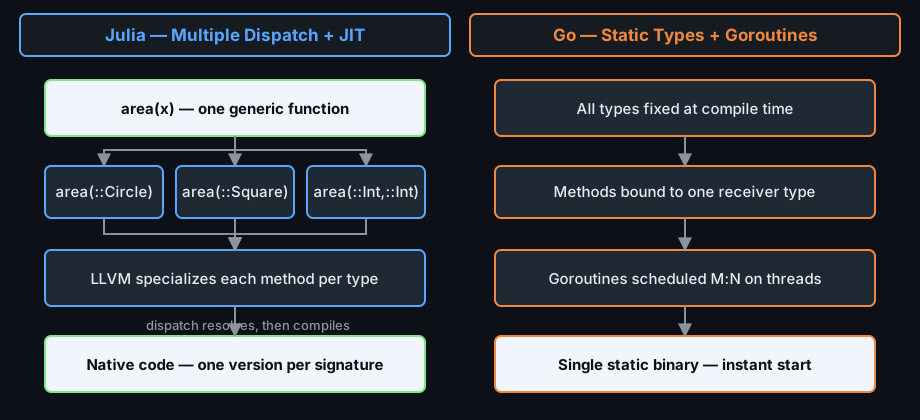
Julia is compiled, but it is compiled just in time, and the trigger is the concrete types that actually reach a function. The first time you call a function with a given combination of argument types, Julia specializes that function for those types and emits native code. Every later call with the same types reuses the compiled version.
The practical effect is that you write untyped code and still get typed performance. The function below declares no types at all, yet runs as fast as the equivalent C loop:
# No type annotations — the compiler specializes on first call.
function sum_squares(n)
    total = 0
    for i in 1:n
        total += i * i
    end
    return total
end

sum_squares(1000)      # compiles the n::Int64 specialization here
sum_squares(10^6)      # reuses it — no recompilation, no interpreter
This is what makes the next section possible. If your high-level code is already fast, there is no reason to leave it for a lower-level language.
The Two-Language Problem
The "two-language problem" is the industry habit of writing the same algorithm twice: once in a productive language to discover what the algorithm should be, and again in a fast language to make it usable. The rewrite costs time, and — worse — the two versions drift apart. A bug fixed in the C version is often not fixed in the Python prototype, and vice versa.
Julia collapses the two into one. Because the productive and the fast version are the same source, you can start by writing the obvious loop, measure it, and then optimize it in place without changing languages. You keep one implementation, one test suite, and one place where bugs live.
Julia vs Go
Go and Julia both compile to native code, both are garbage-collected, both ship a package manager and testing tools, and both were designed by people frustrated with C++. Beyond that they are opposites. Go was built by systems engineers to make large concurrent server programs easy to maintain. Julia was built by numerical analysts to make mathematical code fast and generic. Choosing between them is choosing which problem you have.
Paradigm & Typing
Go is statically typed and deliberately simple. Types are written down, the type system is small enough to fit in your head, and generics arrived only recently and in a restricted form. The language values one obvious way to do things.
Julia is dynamically typed with an optional, deeply integrated type system. You may annotate types for performance and dispatch, or leave them out entirely. Its central abstraction is multiple dispatch: a function is a family of methods, and which method runs is decided by the runtime types of all arguments. Go has no equivalent — in Go, methods belong to a single receiver type.
# One generic function, three methods, all named `area`.
area(r::Circle)              = pi * r.radius^2
area(w::Int, h::Int)         = w * h          # rectangle from two sides
area(s::Square)              = s.side^2

area(Circle(2.0))            # dispatches to the first method
area(3, 4)                   # dispatches to the second
In Go you would write three differently named functions, or satisfiable interfaces, or a switch on a type tag. Julia's version extends without touching existing code.
Performance & Concurrency
Both languages are fast, but they are fast in different regimes. Go produces small, statically linked binaries that start instantly and are excellent at I/O-bound work. Julia has a just-in-time compiler, so the very first call to a function pays a compilation cost; after that, tight numeric loops typically match C.
| Aspect | Julia | Go |
|---|---|---|
| Typing | Dynamic, optional annotations | Static, mandatory |
| Dispatch | Multiple dispatch on all arguments | Single-receiver methods, interfaces |
| Compilation | JIT per type signature (LLVM) | Ahead-of-time, fast to start |
| Concurrency | Tasks, threads, @spawn, distributed workers | Goroutines and channels as the core model |
| Numerics | Native, first-class: 1//3, 2im, matrices | Third-party libraries, no built-in vector math |
| Startup | Milliseconds to seconds (compile) | Instant |
| Sweet spot | Simulation, data, modeling, HPC | APIs, servers, CLI tools, infrastructure |