
Modules & Packages
Project.toml, a version, and a name other people can install. Everything you have written so far lived in Main — this lesson gives your code a proper address.
Namespacing is what makes large programs possible: two packages may each define Solution or parse without conflict, and a reader can tell from a single qualified name where a definition comes from. This lesson starts with the module block and the three ways to reach names across a boundary, then turns modules into installable packages with environments, file layout, and precompilation. It ends with the structural decisions that keep a growing application navigable, and the pitfalls that appear when two modules export the same name.
Defining a Module
A module is declared with the module keyword and closed with end. Everything between those two tokens lives inside the namespace, including types, functions, constants, and nested modules.
The module Block
Definitions inside a module are invisible outside it unless you export them or qualify the name. The module block also runs once, in order, when the module is loaded — which makes it the natural place for constants and configuration.
module Geometry

export area, perimeter

const PI2 = 3.141592653589793      # a module constant

struct Circle
    radius::Float64
end

area(c::Circle) = PI2 * c.radius^2
perimeter(c::Circle) = 2 * PI2 * c.radius

helper(x) = x * 2                  # not exported: visible as Geometry.helper

end

# Names are qualified from outside
Geometry.area(Geometry.Circle(2.0))      # 12.566370614359172
Geometry.perimeter(Geometry.Circle(2.0)) # 12.566370614359172
Geometry.PI2                             # 3.141592653589793
Geometry.helper(3)                       # 6 — reachable by qualification only

# A module is a value, so it can be inspected like any other
typeof(Geometry)                         # Module
names(Geometry)                          # exported names first, then the rest
names(Geometry, all = true)              # includes helper and PI2
isdefined(Geometry, :helper)             # true
Two habits pay off immediately: keep the exports at the top of the file so the public surface is obvious, and qualify names whenever you are unsure. A qualified call never breaks because another module exports the same identifier.
Nested Modules and Submodules
Modules nest, which lets a package group related functionality — MyApp.Geometry beside MyApp.Reporting. A submodule sees its parent's names only through qualification or an explicit using, which keeps dependencies visible.
module MyApp

module Geometry
    export area
    struct Square; side::Float64; end
    area(s::Square) = s.side^2
end

module Reporting
    using ..Geometry              # a sibling of the parent: note the leading dots
    export describe
    describe(s::Geometry.Square) = "square with area $(area(s))"
end

export describe                   # re-export the public entry point
end

using .MyApp                      # the dot means "inside the current scope"

describe(Geometry.Square(3.0))    # "square with area 9.0"
MyApp.Geometry.area(Geometry.Square(2.0))   # 4.0 — the qualified path still works
Relative paths matter when nesting: . means the current module, .. the parent, and each extra dot goes one level further up. Absolute package names are written with no leading dot.
Main, Core, and Base
Three modules are always available and worth knowing by name. Core is the smallest language layer, Base is the standard library you have been using all along, and Main is the module your scripts and REPL input run in.
| Module | Contains | Notes |
|---|---|---|
Core | The type system, typeof, getfield, eval | Always in scope without importing |
Base | +, arrays, strings, map, sum | Imported into every module automatically |
Main | Whatever you type or run at top level | The default module for scripts and the REPL |
InteractiveUtils | @which, @code_warntype, versioninfo | Available in the REPL, not in packages |
# Base is implicitly available inside every module
module UsesBase
    double(x) = 2x                 # 2x is Base.:* — no import needed
end

UsesBase.double(3)                 # 6

# Main holds top-level definitions
x = 42
Main.x                             # 42 — the same binding
parentmodule(UsesBase)             # Main — where the module was defined

# Fully qualified names work for anything
Core.Int === Int                   # true
Base.sum([1, 2, 3])                # 6

# The rest of the standard library is opt-in
using Statistics                   # not imported automatically
mean([1, 2, 3])                    # 2.0
That last point is a design decision rather than an accident: only Base is implicit, so a package declares every other dependency it uses. Chapter 4 shows where those declarations live.
Namespaces and Visibility
Every module is a namespace: the same short name may exist in several modules without conflict, and a qualified name resolves any ambiguity at a glance. Visibility is the second half of the story — what a module chooses to expose.
Qualified Names
A qualified name is a path from a module to a definition, written with dots. It is the only form that is always correct, which makes it the right choice in library code and in scripts that using several packages.
module A
    value() = "A"
end

module B
    value() = "B"          # the same short name, a different binding
end

A.value()                  # "A"
B.value()                  # "B"

# Qualification resolves a collision without renaming anything
using .A
using .B
# value()                  # would be an error: two candidates for an unqualified call
A.value()                  # "A" — always unambiguous

# Qualified paths work for types, functions, and constants alike
A.value isa Function       # true
parentmodule(A.value)      # A

# The path can be built from a string when the name is data
getproperty(A, :value)()   # "A"
getfield(A, :value)()      # "A" — bypasses any getproperty layer
Inside a module, a qualified name referring to itself is legal and sometimes useful for clarity: writing Geometry.area(c) inside Geometry documents that the call resolves locally.
Exporting
export marks names for the using mechanism. It does not create a namespace, hide anything, or change the definition — it only declares which names travel with a using statement.
module Units
    export meters, kilometres          # the public surface

    meters(x) = "$(x) m"
    kilometres(x) = "$(x) km"
    hidden_scale = 1000                # internal, not exported
end

using .Units

meters(5)                  # "5 m" — exported, so the short name works
kilometres(2)              # "2 km"
hidden_scale               # ERROR: UndefVarError — not exported, not in scope
Units.hidden_scale         # 1000 — qualified access still works

# Listing the public surface is part of inspecting a package
names(Units)               # (:Units, :kilometres, :meters)

# export is order-independent: names may be exported before they are defined
module Forward
    export later
    later() = "defined after the export"
end

using .Forward
later()                    # "defined after the export"
Export sparingly. Every exported name is a promise about your API and a possible collision in a caller's namespace; the convention in mature packages is to export the handful of names a user calls directly.
What "Private" Means in Julia
Julia has no private keyword. An unexported name is conventionally private — reachable by qualification, not documented, and subject to change without notice. Some packages make the distinction explicit with an underscore prefix.
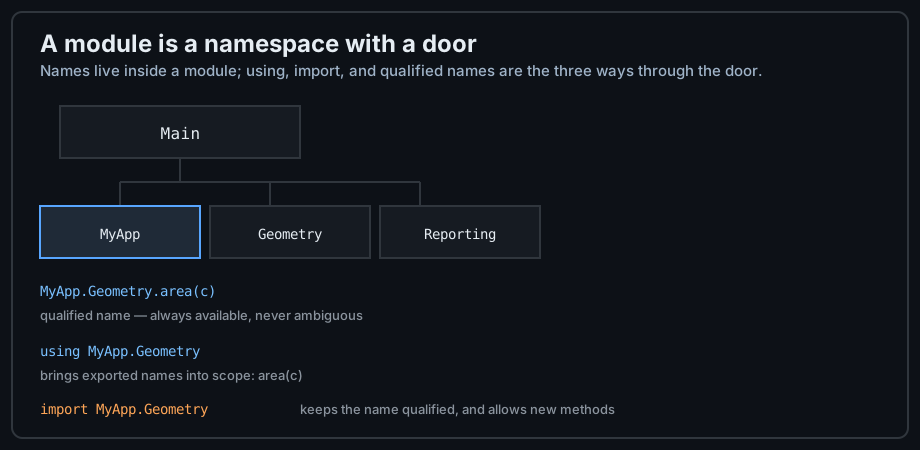
using, and import are the three doors into a module.module Cache
export lookup
lookup(key) = get(_store, key, nothing)
_store = Dict{String, Any}() # underscore marks an internal
_reset!() = empty!(_store) # internal helper, still reachable
end
using .Cache
lookup("a") # nothing
Cache._reset!() # works — nothing is enforced, only signalled
Cache._store["a"] = 1
lookup("a") # 1
Treat the underscore as a contract between you and your users: internals may be inspected during debugging, but depending on them in another package is the same mistake as depending on another language's private API.
using, import, and include
Three keywords bring outer names into a module, and confusing them is the most common source of "my method redefined itself" errors. The difference is which names enter your namespace and whether you may add methods to them.
using Brings Names In
using makes exported names available unqualified. It is the form for consumers: short call sites, no risk of accidentally redefining a function you meant to call.
module Colours
    export RED, GREEN
    const RED = "\e[31m"
    const GREEN = "\e[32m"
end

using .Colours

RED                          # "\e[31m" — available by its short name
length(RED)                  # 5

# using a package also makes the package name itself available
using Statistics
mean([1, 2, 3])              # 2.0 — exported
Statistics.mean([1, 2, 3])   # 2.0 — qualified, also fine

# Several modules can be listed in one statement
using Statistics, Printf

# and a chosen subset can be brought in explicitly
using Statistics: median, std, var
median([1, 2, 3])            # 2.0
using never lets you add methods to the imported names. If you try, Julia defines a new local function instead — usually not what you meant, and a source of silent bugs.
import for Extension and Qualification
import keeps names qualified and grants the right to extend them. That combination is exactly what you need for adding methods to a function from another package, as the methods lesson showed with Base.show.
module Extends
    import Base: show                 # import to add a method
    struct Temperature; celsius::Float64; end
    show(io::IO, t::Temperature) = print(io, t.celsius, "°C")
end

Extends.Temperature(21.5)            # prints as 21.5°C — our method ran

module Qualified
    import Statistics                # import to keep the name qualified
    average(xs) = Statistics.mean(xs)
end

Qualified.average([1, 2, 3])         # 2.0

# import of a single name makes it available unqualified, and extendable
module ImportsOne
    import Statistics: mean
    struct Sample; values::Vector{Float64}; end
    mean(s::Sample) = Statistics.mean(s.values)    # a method for OUR own type
end

ImportsOne.mean(ImportsOne.Sample([1.0, 2.0, 3.0]))   # 2.0
Statistics.mean                       # the same generic function, one more method
Notice the last block: the method was added to Statistics.mean, not to a local copy. That is the difference that matters — and it is also how type piracy becomes possible, so own one of the argument types.
Choosing Between Them
| You want to | Use | Result |
|---|---|---|
| Call exported functions with short names | using M | Exported names unqualified; no extension |
| Bring in a few specific names | using M: a, b | Only a and b in scope |
| Add a method to a foreign function | import M: f | f unqualified and extendable |
| Keep everything qualified | import M | Only M in scope; use M.f |
| Run another file inside this module | include("file.jl") | Code becomes part of the current module |
# include is textual: the file's contents become part of the current module
module Assembled
    include("part_a.jl")            # both files define names in Assembled
    include("part_b.jl")
end

# Project structure is usually expressed with includes, not submodules:
# src/MyPackage.jl contains include("types.jl"), include("solvers.jl"), ...

# Each included file sees the module's names without any import
# part_a.jl can call a function defined in part_b.jl as long as the call
# happens at run time, after both files have been included.
The distinction to remember: using and import cross a namespace boundary, while include does not — it copies code into the module you are already in, which is why it takes a file path rather than a module name.
From Module to Package
A package is a module with metadata: a name, a UUID, a version, and a list of dependencies. That metadata is what lets Pkg install the code on another machine and reproduce the exact same environment.
Project Layout
The layout is fixed by convention, and the conventions exist so that tools can find your code without configuration. A package lives in its own directory, and the entry file is named after the package.
# A minimal package on disk
#
# MyPackage/
# ├── Project.toml          name, uuid, version, dependencies
# ├── Manifest.toml         exact resolved versions (generated, usually ignored)
# ├── src/
# │   ├── MyPackage.jl      the entry point: defines the module
# │   ├── types.jl          included from the entry point
# │   └── solvers.jl
# └── test/
#     └── runtests.jl       the test entry point

# Project.toml contents
#
# name = "MyPackage"
# uuid = "1a2b3c4d-5e6f-7a8b-9c0d-1e2f3a4b5c6d"
# authors = ["Elucian Moise"]
# version = "0.1.0"
#
# [deps]
# Statistics = "10745b16-79ce-11e8-11f9-7d13ad32a3b2"
#
# [compat]
# julia = "1.10"

# src/MyPackage.jl — the entry point
module MyPackage

using Statistics                 # declared in [deps] above

export describe

include("types.jl")
include("solvers.jl")

describe(x) = "MyPackage value: $x"

end
Two files do the metadata work: Project.toml is yours and lists direct dependencies, while Manifest.toml is generated and records the full resolved dependency tree. Commit both for applications, and usually only Project.toml for libraries.
The Pkg Workflow
Pkg is Julia's package manager, and it is a normal Julia module: everything the REPL's ] mode does can be done from code with Pkg.add, Pkg.status, and friends.
# Create a new package skeleton
using Pkg
Pkg.generate("MyPackage")        # creates directory, Project.toml, src/MyPackage.jl

# Activate this project as the current environment
Pkg.activate(".")
# or in the REPL: press ] then type  activate .

# Add a dependency — it is recorded in Project.toml automatically
Pkg.add("Statistics")
Pkg.add(name = "CSV", version = "0.10")

# Inspect and maintain
Pkg.status()                     # direct dependencies
Pkg.status(; mode = PKGMODE_MANIFEST)   # the full tree
Pkg.update()                     # upgrade within the compatibility bounds
Pkg.rm("Statistics")             # remove a dependency

# Develop a package you are editing locally
Pkg.develop(path = "../OtherPackage")
Pkg.test("MyPackage")            # run test/runtests.jl in the package environment
Pkg.activate is the command worth internalising: with an active project, every add and develop affects that project only, so two applications on one machine can use different versions of the same package.
Environments and Reproducibility
An environment is a project plus its resolved manifest. Activating one changes which versions of which packages your using statements find — which is how scientific work stays reproducible a year later.
# A typical workflow for a project with a fixed dependency set
Pkg.activate(".")                     # use ./Project.toml
Pkg.instantiate()                     # install exactly what the manifest records
Pkg.status()

# A named shared environment for tools you use everywhere
Pkg.activate("tools")
Pkg.add(["BenchmarkTools", "ProfileView"])

# Back to the default environment
Pkg.activate()

# The load path decides which environments are searched, in order
Base.load_path()                      # the active project, then the standard libraries

# Pin an exact version when a dependency must not move
Pkg.pin("CSV")

# Import from a file that is not a package, using a local path
include("scripts/local_helpers.jl")   # still the simplest way to reuse local code
When a colleague cannot reproduce your results, the first question is which environment they activated. Pkg.instantiate() plus a committed Manifest.toml is the answer that ends the discussion.
Structuring an Application
With the mechanics in place, the remaining decisions are structural: how to split files, when to create a submodule, and how to keep load order and compilation predictable as the code grows.
Files, includes, and Submodules
Use include for files that belong to the same module, and a submodule only when a group of definitions deserves its own namespace. Most packages are a single module split across files by topic.
# src/Shapes.jl — one module, several files, split by topic
module Shapes

export Circle, Square, area, describe

include("types.jl")       # struct definitions
include("areas.jl")       # geometry
include("reporting.jl")   # formatting helpers

end

# src/types.jl
#
# struct Circle; radius::Float64; end
# struct Square; side::Float64; end

# src/areas.jl
#
# area(c::Circle) = 3.141592653589793 * c.radius^2
# area(s::Square) = s.side^2

# src/reporting.jl
#
# describe(s::Circle) = "circle of radius $(s.radius)"
# describe(s::Square) = "square of side $(s.side)"

using .Shapes
describe(Circle(2.0))     # "circle of radius 2.0"
area(Square(3.0))         # 9.0
The practical rule: one concept per file, and the entry file lists the includes in dependency order. A reader who opens src/Shapes.jl should be able to see the whole package at a glance.
Load Order and Precompilation
A file is executed top to bottom when it is included, so definitions used inside other definitions must exist by the time the call happens — not necessarily by the time the definition is parsed. Precompilation then caches the compiled module for speed on later runs.
# Order matters for values used at definition time
const DEFAULT_TOLERANCE = 1e-9        # define the constant first

function converges(x; tol = DEFAULT_TOLERANCE)   # then use it as a default
    abs(x) < tol
end

converges(0.0)                        # true

# Order within a module: types, then functions that name those types
# Cross-file calls are fine as long as they happen at run time
# (a function body is not executed when the function is defined).

# Precompilation runs the top level of the module once and caches the result
# A side effect in that top level — like writing a file — runs at build time.
module Cached
    const STARTED_AT = time()          # runs once, during precompilation
    now_age() = time() - STARTED_AT
end

# __precompile__ controls it explicitly
#
# __precompile__(true)                 # default for packages
Precompilation is why a package's top level must be pure: file writes, network calls, and random seeds at module scope run when the package is built, not when the user starts work. Put side effects inside functions.
Designing the Public Surface
An API is the set of names you export plus the docstrings that explain them. Everything else is implementation, and the interface rules from the previous lesson apply at this level too: document what must be true, and test that it is.
"""
    area(shape) -> Float64

Return the area of `shape`. Supported shapes are `Circle` and `Square`.

# Examples
```julia-repl
julia> area(Square(3.0))
9.0
```
"""
area(s::Square) = s.side^2

"""
    describe(shape) -> String

Return a short human-readable description of `shape`.
"""
describe(s::Square) = "square of side $(s.side)"

# The docstring is attached to the method and readable at runtime
@doc area
DocString     # typeof(@doc area) — a documentation object

# Help in the REPL
# ?area
Document the exported names, and keep the docstring next to the method it describes. The ? help mode, generated documentation, and your editor all read the same strings, so one effort serves three consumers.
Common Pitfalls
Module problems are almost always about names and load order. Three cases cover most of what you will meet in practice.
Export Collisions
Two packages that export the same name are fine until you using both and call it unqualified. Julia reports the ambiguity instead of picking one, and the fix is to qualify — or to import only the names you need.
using Statistics                  # exports mean, median, std
# using SomeOtherStats            # also exports mean

# Unqualified use of a doubly-provided name is an error, not a coin toss
mean([1, 2, 3])                   # fine while only one module exports mean

# Two ways out
import Statistics: mean           # import a single name explicitly
Statistics.mean([1, 2, 3])        # or stay qualified

# Julia warns as soon as two usings collide
# WARNING: both SomeOtherStats and Statistics export "mean";
#          uses of it in module Main must be qualified

# Advice for libraries: export few names, and prefer distinctive ones
export compute_norm, norm_squared      # clear and unlikely to collide
The using/import rule from Chapter 3 is the cure here: in code that pulls in several packages, import the specific names you need and qualify the rest.
Redefining a Module
Re-running a module block in an interactive session replaces the module wholesale. Knowing this prevents hours of confusion while developing.
| Situation | What happens | Fix |
|---|---|---|
| Edit a method inside a module in the REPL | The method is added, or replaces one with the same signature | Nothing — that is normal method replacement |
Re-run the whole module block | A fresh module replaces the old one; old references are orphaned | Re-run the code that used it, or use Revise |
| Change a field's type in a struct | Error: the type already exists with a different layout | Restart Julia, or use a fresh module name while experimenting |
| Edit a file inside a package | The change is invisible until the package reloads | using Revise before using MyPackage |
module Scratch
    f(x) = x + 1
end

Scratch.f(1)              # 2

# Re-defining the module creates a new module object
old = Scratch
module Scratch
    f(x) = x + 2          # a fresh module, not an edit of the old one
end

Scratch.f(1)              # 3
old.f(1)                  # 2 — the old module object is untouched

# For iterative work on a package, Revise reloads the changed definitions
# using Revise
# using MyPackage           # edits are picked up without restarting Julia
For real development use Revise: it reloads changed method definitions without restarting, which turns a slow edit-run cycle into an instant one.
Load Order and Circular Dependencies
Include order and module dependencies both run in one direction. A cycle — A needs B and B needs A — cannot be fixed by reordering includes, so it must be broken by moving the shared definitions into a third module.
# A circular dependency that cannot work
#
# module A
#     using ..B                # needs B at load time
#     f(x::B.T) = x.v
# end
#
# module B
#     using ..A                # needs A at load time — a cycle
#     struct T; v::Int; end
# end

# Broken: the shared type moves to a module that depends on neither
module Shared
    struct T; v::Int; end
end

module A2
    using ..Shared
    f(x::T) = x.v            # depends on Shared only
end

module B2
    using ..Shared
    make(v) = T(v)           # depends on Shared only
end

A2.f(B2.make(7))             # 7 — no cycle, no ordering problem
An UndefVarError at load time almost always means the same thing: a name is used before it is defined, because of include order or a cycle. Move the shared piece out, or defer the reference into a function body, where it resolves at call time instead of at load time.
module block; names cross the boundary by qualification, by using (exported names, no extension), or by import (qualified or extendable). Base is implicit and every other dependency is declared. A package adds Project.toml, a UUID, a version, and a src/<Name>.jl entry point that includes the rest of the files, while Pkg environments make the dependency set reproducible. Structure for readability — one concept per file, submodules only when a namespace is deserved — export sparingly, document the public surface, and keep module top levels free of side effects so precompilation stays predictable.
Your code now has an address, a version, and a public surface. Next: Exceptions shows how to signal failure across those boundaries — and how to recover without leaving state half-written.