
Testing & Debugging
Test module with assertion macros and nested test sets, coverage measurement, Logging for structured diagnostics, and an interactive debugger that stops at the exact line that lied.
Two programs are involved in this lesson: the one you are writing and the one that checks it. Both need the same care. A test that always passes is noise, a test that depends on machine state is a future failure, and a stack trace read correctly saves more time than any print statement. Everything here is standard library — no dependency to add, nothing to justify in a [compat] block.
The Testing Workflow
Julia's testing story starts from a convention, not a framework: a package has a test/ folder, that folder has a runtests.jl, and one command runs it. Everything else is built on that.
Why Tests Come First
A test is a claim about behaviour that a machine can check. Writing the claim before the implementation changes what you build: the interface gets decided while it is still cheap to change.
# test/runtests.jl — written BEFORE the implementation exists
using Test

@testset "Running statistics" begin
    # the behaviour we want, stated as facts
    @test mean_of([1.0, 2.0, 3.0]) == 2.0
    @test mean_of([5.0]) == 5.0

    # the edge case we are most likely to get wrong
    @test_throws ArgumentError mean_of(Float64[])    # empty input must not divide by zero
end

# Then implement until the suite is green. The tests stay afterwards and
# become the specification the next person reads.
The value is not the green tick — it is that the suite records decisions. Six months later, "why does empty input throw instead of returning NaN?" is answered by the test, not by the commit history.
The Test Package
Test is a standard-library package: nothing to install, one line to load. Its two workhorses are the @test macro and the @testset block that groups tests.
using Test            # always available, ships with Julia

# @test evaluates an expression and records pass/fail
@test 1 + 1 == 2
@test "julia" == lowercase("JULIA")
@test isapprox(0.1 + 0.2, 0.3; atol = 1e-12)     # floats: compare with a tolerance

# @test_throws: the call must fail, with the right exception type
@test_throws DomainError sqrt(-1.0)

# @test_throws with a block, when the exception must also be inspected
@test_throws "dimension" DimensionMismatch([1, 2] * [1 2; 3 4])

# @test_broken: a KNOWN failure — it passes while it stays broken,
# and starts reporting a failure the day somebody fixes it
@test_broken parse(Int, "12abc") == 12

# @test_skip: not run, but counted — use for platform-specific gaps
@test_skip Sys.iswindows() == false
@test_broken deserves a comment, because teams misuse it as a place to hide bugs. Its semantics are deliberate: it inverts the check, so an unexpected fix is reported loudly. Use it for a documented, linked, known defect — never for something you have not diagnosed.
Running Tests
The same command runs locally and in CI, which is the point of having a convention at all.
using Pkg

# The canonical entry point: it activates test/Project.toml (or the
# [extras]/[targets] test environment) and runs test/runtests.jl
Pkg.test()

# From a shell, without entering the REPL
#   julia --project=. -e 'using Pkg; Pkg.test()'
#   julia --project=. -e 'using Pkg; Pkg.test("MyPackage")'

# In the REPL, the short form
#   ] test

# Running a test file directly (fast, used while developing)
#   julia --project=. test/runtests.jl

# Run one test set at a time while iterating — this is the tight loop
#   julia --project=. -e 'include("test/runtests.jl")'
Assertions and Test Sets
@test is a single check. @testset turns a collection of checks into a named, counted, nestable report — and the shape of that report is what tells you where the failure lives.
Writing Assertions That Fail Usefully
A failing test should tell you three things: which claim broke, what was expected, and what actually happened. The macro records the expression text for you; your job is to compare the right things.
using Test

# GOOD: compares values, and a failure prints both sides
@test length(unique([1, 2, 2, 3])) == 3

# BAD: compares a Boolean with itself — the failure message says "false == true"
@test issorted([3, 1, 2])

# GOOD: state the property you actually mean
@test !issorted([3, 1, 2])
@test issorted(sort([3, 1, 2]))

# Floats: never compare with ==, always with a tolerance
@test isapprox(sin(pi / 6), 0.5; atol = 1e-12)
@test isapprox(1e6 + 1e-6, 1e6; rtol = 1e-9)      # relative tolerance for big numbers

# Collections: compare with the right predicate
@test Set([1, 2, 3]) == Set([3, 2, 1])             # order does not matter
@test [1, 2, 3] == [1, 2, 3]                       # order DOES matter for arrays

# A failing test inside a loop reports the iteration values
for n in (0, 1, 2, 3)
    @test n ≥ 0
end
The first rule is the most valuable: a good assertion fails with a message a person can act on. If the failure output does not make the bug obvious, the test is not finished.
Test Sets
A test set is a named group of assertions that reports its own counts. Nested test sets produce a tree, and the tree is the diagnostic.
using Test

@testset "Statistics" verbose = true begin

    @testset "mean" begin
        @test mean_of([1.0, 2.0, 3.0]) ≈ 2.0
        @test mean_of([0.0]) == 0.0

        @testset "empty input" begin
            @test_throws ArgumentError mean_of(Float64[])
        end
    end

    @testset "variance" begin
        @test variance_of([1.0, 1.0, 1.0]) == 0.0
        @test variance_of([1.0, 3.0]) ≈ 2.0
    end
end

# Output shape (the diagnostic you want):
#   Test Summary:      | Pass  Total
#   Statistics         |    5      5
#     mean             |    3      3
#       empty input    |    1      1
#     variance         |    2      2

# Testsets are also environments: a variable defined inside one
# is not visible outside it, which keeps tests independent.
Nesting is worth the two extra lines every time. When the suite runs in CI and one test fails, the summary tells you the module, the function, and the case — without reading a stack trace at all.
Approximate, Exception and Custom Tests
Some properties need more than an equality check. Julia gives you dedicated macros for the cases that come up constantly — approximate equality, expected errors, and warnings.
using Test

@testset "Dedicated assertions" begin

    # Approximate numeric equality
    @test 0.1 + 0.2 ≈ 0.3 atol = 1e-12

    # An exception of a specific type
    @test_throws DomainError sqrt(-1.0)

    # An exception whose message matches
    @test_throws "cannot be negative" area(-5.0)

    # A warning should be emitted (and captured, not printed)
    @test_logs (:warn, "value clipped to zero") clip(-1.0)

    # Several log records in order
    @test_logs (:info, "start") (:info, "done") run_job()

    # Deterministic comparison of whole objects
    @test repr(Point(1, 2)) == "Point(1.0, 2.0)"

    # A test that must be true within a time budget (rarely worth it)
    @test (@elapsed sum(1:10_000)) < 0.5
end

# Writing your own assertion, when a pattern repeats:
macro test_positive(expr)
    quote
        v = $(esc(expr))
        @test v > 0
    end
end
Organizing a Test Suite
A single runtests.jl is fine until it is two hundred lines long. Then the question stops being "how do I test this?" and becomes "where does this test belong?".
One File per Module
The convention that scales is one test file per source file, included from runtests.jl. The suite then mirrors the code, and a change points at exactly one test file to open.
# test/runtests.jl — the index, and nothing else
using Test

@testset "MyPackage" begin
    include("test_statistics.jl")
    include("test_parsing.jl")
    include("test_io.jl")
end

# test/test_statistics.jl — the file for src/statistics.jl
using MyPackage
using Test

@testset "statistics" begin
    @testset "mean" begin
        @test mean_of([1.0, 2.0, 3.0]) ≈ 2.0
    end
    @testset "variance" begin
        @test variance_of([1.0, 3.0]) ≈ 2.0
    end
end

# Why `include` instead of `using` a test module:
#   include is relative to the file that calls it, so `test/` moves as a unit.
# A test file may also be run alone while iterating:
#   julia --project=. -e 'using Pkg; Pkg.activate("."); include("test/test_statistics.jl")'
Two conventions inside the file are worth adopting early: give each test set the name of the thing it tests, and keep the assertions in the same order as the branches in the source. Both make a failure report read like a map of the code.
Fixtures and Temporary Data
Tests that touch the filesystem must not touch your filesystem. Julia gives you a temporary directory that is removed for you, and it is the right place for every file a test creates.
using Test
using MyPackage

@testset "file round trip" begin
    # mktempdir creates a fresh directory and deletes it when the block exits
    mktempdir() do dir
        path = joinpath(dir, "data.csv")
        write_records(path, [(1, "a"), (2, "b")])
        @test isfile(path)                       # the write happened
        @test read_records(path) == [(1, "a"), (2, "b")]
    end
end

# Setup and teardown shared by many tests: a `do` block, not global state
function with_database(f)
    mktempdir() do dir
        db = open_database(joinpath(dir, "test.db"))
        try
            f(db)                    # run all the tests here
        finally
            close(db)                # runs even when a test throws
        end
    end
end

@testset "queries" begin
    with_database() do db
        @test insert!(db, "x") == 1
        @test count(db) == 1
    end
end
The finally is the important detail: a test that throws must not leave a database open for the next test set. Fixtures that clean up reliably are what make a suite runnable twice in a row.
Deterministic and Random Tests
A test that passes on Tuesday and fails on Thursday teaches nothing. Randomness in tests must be either seeded or bounded.
using Test
using Random

@testset "randomised behaviour" begin

    # 1. Seed the RNG so the same values appear on every run
    rng = MersenneTwister(42)
    data = randn(rng, 100)
    @test length(data) == 100

    # 2. Or test the PROPERTY, and let the values be arbitrary
    for _ in 1:100
        x = randn(rng)
        @test clamp01(exp(-abs(x))) in 0.0:1.0     # the invariant holds for any x
    end

    # 3. Never assert exact output of an unseeded computation
    #    @test mean(randn(100)) ≈ 0.0    # flaky: sometimes it is 0.3
end

# Time and locale are the other two hidden inputs
#   Dates.now()      → pass the timestamp in as an argument instead
#   string(1.5)      → locale-dependent in some languages; Julia is stable, but
#                      be explicit with string(1.5; base = 10) when it matters
The general rule: a test may depend on the system clock, the locale, the platform, or the network only if the test says so explicitly — a @test_skip, a guarded if, or a tagged test set. Otherwise it is a future outage waiting for a Tuesday.
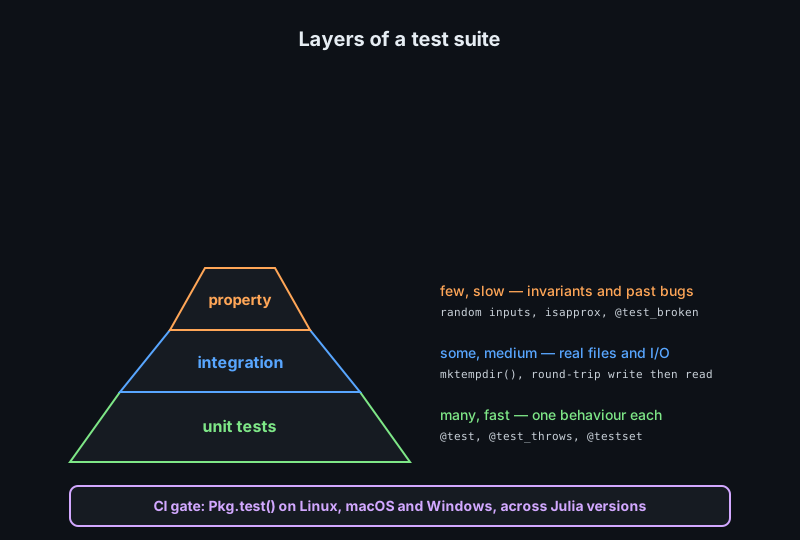
Property, Regression and Performance Testing
Beyond "does this call return the right value?" there are three kinds of test that catch the bugs unit tests miss: properties, past defects, and speed.
Property-Based Testing
A property test states a rule that must hold for every input, then lets a generator supply the inputs. The bug found this way is usually an input you would never have typed by hand.
using Test

# The property: sorting does not change what is in the collection.
@testset "sort is a permutation" begin
    for n in (0, 1, 2, 5, 20)
        v = randn(n)
        s = sort(v)
        @test length(s) == length(v)          # nothing lost
        @test issorted(s)                     # the point of sorting
        @test Set(s) == Set(v)                # nothing invented
    end
end

# Properties that catch real bugs in numeric code
@testset "numeric invariants" begin
    for _ in 1:500
        x = 10 * randn()
        @test mean_std([x, x, x]) == (x, 0.0)     # identical values → zero spread
    end
end

# A reusable generator makes properties easy to read
randint(rng, lo, hi) = rand(rng, lo:hi)

@testset "encode/decode round trip" begin
    rng = MersenneTwister(7)
    for _ in 1:200
        n = randint(rng, -10_000, 10_000)
        @test decode(encode(n)) == n              # the round-trip property
    end
end
Round trips, invariants, and identities (like decode∘encode == identity) are the three property shapes worth writing for almost any data structure. They are cheap to write because they need no expected values at all.
Regression Tests
Every bug that reaches production costs more than the test that would have caught it. The rule in practice: when you fix a defect, the fix is a test and a line of code — in that order.
using Test

@testset "regressions" begin
    # Issue #142: negative inputs returned a signed zero
    @test isnan(safe_log(-1.0)) == false
    @test safe_log(-1.0) == 0.0
    # The comment names the issue, so the test is traceable to the report.

    # Issue #151: timezone-less timestamps drifted by an hour in DST weeks
    @test days_between(Date(2026, 3, 28), Date(2026, 3, 30)) == 2

    # Bug in 0.3.1: parse dropped the last field when the line had no newline
    @test parse_row("1,2,3") == (1, 2, 3)

    # A fix that must not regress: keep the old behaviour visible
    @test_throws ArgumentError parse_row("")
end

# Write the test BEFORE the fix and watch it fail.
# A regression test that was never seen failing proves nothing.
The last sentence is the whole method. Reproducing the bug in a test first proves you understood the cause; the fix then turns the test green and keeps it green forever.
Performance Tests
Performance is a behaviour, and it can be tested — but only with statistics, never with a stopwatch. Julia's BenchmarkTools is the tool, and @allocated is the cheap early warning.
using Test

@testset "performance contract" begin
    # Allocation is a STABLE, machine-independent property: assert it.
    f(x) = x .* 2
    @test @allocated(f(ones(1000))) < 100   # a few bytes, not kilobytes

    # Type stability is also stable — assert the inferred return type.
    @test Base.return_types(f, (Vector{Float64},)) == [Vector{Float64}]

    # Timing needs many samples and a margin, so never assert a raw duration.
    # BenchmarkTools reports a range; use the lower bound with slack.
end

# Run performance checks outside the correctness suite:
#   julia --project=. benchmark/benchmarks.jl
# and compare against a recorded baseline in CI:
#   using BenchmarkTools, BenchmarkCI
#   BenchmarkCI.judge()   # fails the job on a real regression
Debugging in Julia
When a test fails, the work changes from checking to investigating. Julia gives you three levels of that: read the exception, print and log, or stop the program and inspect it live.
Reading a Stack Trace
A Julia error message has three parts: the exception type with its message, the stack trace, and — the part most people skip — the argument values Julia prints next to each frame.
# Typical output:
#   ERROR: DomainError with -1.0:
#   sqrt was called with a negative real argument but will only return a
#   complex result if called with a complex argument. Try sqrt(Complex(x)).
#   Stacktrace:
#    [1] throw_domain_error(...) at ./math.jl:158
#    [2] sqrt(x::Float64) at ./math.jl:172
#    [3] my_norm(a::Vector{Float64}) at ./stats.jl:24     <-- YOUR LINE
#    [4] top-level scope at ./REPL[3]:1

# Reading rules:
#   1. The exception TYPE tells you the class of bug:
#        DomainError        → an input outside the function's domain
#        MethodError        → no method matched the declared argument types
#        UndefVarError      → a name is used before it is bound (often a typo)
#        BoundsError        → an index outside 1:length
#        TypeError          → a value does not satisfy the declared field type
#   2. Find the FIRST frame in YOUR file. Frames above it are library code.
#   3. Read the argument types shown: `a::Vector{Float64}` is the input
#      that produced the failure.

# Getting a fuller trace from a script:
#   julia --project=. --startup-file=no script.jl
#   and wrap suspicious calls in try/catch to print the backtrace:
try
    my_norm(Float64[])
catch err
    bt = catch_backtrace()
    showerror(stdout, err, bt)     # the exception AND the trace, controlled
end
Most Julia errors are diagnosed by step 1 alone. MethodError in particular is nearly always a type problem: the function exists, but not for the argument types you passed — often because a value is Any where a concrete type was expected.
The Interactive Debugger
Debugger.jl breaks inside a running program, shows you the local variables, and lets you step line by line. It is the difference between guessing and knowing.
# Install once (it is not in the standard library)
#   ] add Debugger

using Debugger

# 1. Enter the debugger at a function call
@enter my_norm([1.0, -2.0, 3.0])

# Once inside, the usual commands are available:
#   n            next line (step over calls)
#   s            step into the call on this line
#   c            continue to the next breakpoint or to the end
#   q            quit the debugger
#   bt           print the backtrace
#   `x`          backtick: evaluate `x` in the current frame
#   ?name        inspect a variable and its type

# 2. Break at a source location, then run
breakpoint("stats.jl", 24)
@run my_norm(data)

# 3. Stop on any exception, wherever it happens
@run begin
    data = load()
    my_norm(data)
end

# Faster, lower-level alternative: `julia --compile=min -O0` keeps frames
# readable, and @code_warntype shows the INFERRED types at a call site:
@code_warntype my_norm(Float64[])
@enter and @code_warntype answer different questions, and both are worth knowing. The debugger answers "what is the value here?"; @code_warntype answers "why is this slow?" — it shows the inferred types, which is where type-instability bugs live.
Logging and Printf Debugging
Print statements are fine; unstructured print statements are not. Logging is in the standard library and gives every message a level and a source module, so output can be filtered instead of deleted later.
using Logging

# The four standard levels, in increasing severity
@debug "cache miss" key            # hidden unless enabled
@info  "loaded records" n = length(data)
@warn  "value clipped" v = x
@error "query failed" err = e

# Enable debug output when you need it
#   julia --project=. -e 'using Logging; Logging.with_logger(Logging.ConsoleLogger(stderr, Logging.Debug)) do ... end end'

# Structured fields are the point: `n = length(data)` becomes a key/value
# pair that a log collector can index, unlike a concatenated string.

# Capture log output in a test instead of printing it
using Test
@test_logs (:warn, "value clipped") clip(-1.0)

# Redirect logs to a file for a long run
open("run.log", "w") do io
    with_logger(ConsoleLogger(io, Logging.Info)) do
        run_job()
    end
end

# @assert: for invariants that indicate a PROGRAMMING error, not a user one.
# Cancelled with --check-bounds=no and similar in a release build.
@assert length(data) > 0 "load() returned an empty dataset"
The distinction to keep: @assert is for conditions that must never be false if the code is correct — it documents an internal invariant and may be compiled away. Logging is for conditions that are legitimate but worth recording, and it stays in production.
Coverage and Discipline
Coverage tells you which lines ran, not which behaviour was checked. Read it as a map of untested code, never as a score.
Measuring Coverage
Coverage comes from the same CI action used for tests, and it costs one extra step.
# Locally: run tests with coverage recording enabled
#   julia --project=. --code-coverage=user -e 'using Pkg; Pkg.test()'

# This writes .cov files next to every source file that ran.
# Turn them into a readable report with Coverage.jl:
using Coverage

coverage = process_folder("src")           # parse the .cov files
covered, total = get_summary(coverage)
println("coverage: ", round(100 * covered / total, digits = 1), "%")

# Per-file detail: the lines that never ran
for fc in coverage
    missed = count(l -> l.count == 0, fc.covered)
    missed > 0 && println(fc.filename, ": ", missed, " uncovered lines")
end

# LCOV output for CI services
LCOV.writefile(joinpath(dirname(@__DIR__), "lcov.info"), coverage)

# In the standard workflow:
#   - uses: julia-actions/julia-processcoverage@v1
#   - uses: codecov/codecov-action@v4
The useful question is never "what percentage are we at?" but "which branches never execute?". A single uncovered catch block is often worth more attention than twenty uncovered one-line accessors.
What Not to Test
Testing effort is finite, and a suite that tries to cover everything becomes slow, brittle, and ignored. Deliberate omissions keep it useful.
| Skip | Why |
|---|---|
| Third-party library internals | They have their own tests; test only your use of them |
| Trivial getters and setters | A @test that restates x.field catches nothing |
| Generated boilerplate | Test the generator's output once, not every expansion |
Exact repr of whole structs | Fails on harmless formatting changes; compare fields instead |
| Private functions reachable through public ones | Cover behaviour at the boundary, not internals |
| Print output formatting | Assert on the data, not on the characters of the table |
The hidden cost of the opposite approach is a suite that fails for reasons unrelated to your change. Every test that asserts something the library owns is a test that will break on an upgrade you did not make.
Common Pitfalls
These are the failure modes that turn a green suite into a false alibi.
| Pitfall | Consequence | Fix |
|---|---|---|
| Asserting on wall-clock time | Flaky on loaded CI runners | Assert allocations, or benchmark separately |
| Unseeded randomness | Intermittent failures nobody can reproduce | Seed the RNG, or assert a property |
| Tests that write into the repo | Dirty working copy, order-dependent failures | mktempdir() do ... end |
@test_broken as a todo list | Bugs frozen in place, permanently "expected" | Link an issue, or delete the test |
Comparing floats with == | Fails on the last bit of the mantissa | isapprox with atol or rtol |
| One giant test set | The first failure hides every later one | Nest one test set per function |
| Tests that need the network | Fail offline and inside sandboxes | Serve local fixtures, or skip explicitly |
Every entry on the list is a flaky test waiting to happen, and a flaky test is worse than no test: it trains the team to ignore red builds, which is exactly when a real failure slips through.
Test standard library gives you @test, @testset, @test_throws, @test_logs and @test_broken; Pkg.test() runs test/runtests.jl in an environment identical to CI's. Nest test sets so failures report a path, keep one test file per source file, use mktempdir for anything on disk, and make randomness deterministic. Add property tests for invariants, a regression test for every fixed bug, and allocation or inference checks for performance. Debug with the exception type first, Debugger.jl when you need values, and structured Logging when you need a trail. Read coverage as a list of unexecuted branches, not as a score.
Next, meet the parts of the ecosystem this testing discipline protects: Data Science with DataFrames, CSV and plotting.