
Arrays, Slices & Dynamic Arrays
We will take them in the order that makes sense rather than the order they are usually taught: a fixed array first, then the slice — the window — and finally the dynamic array that can change size while your program runs.
Fixed Arrays
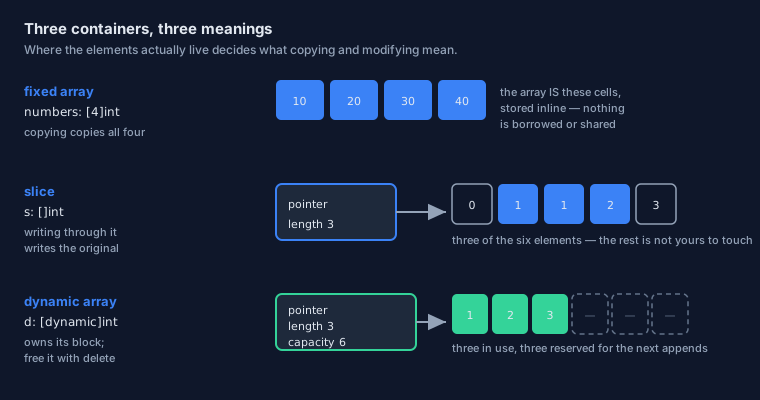
A fixed array is the simplest container: a known number of elements stored one after another, with the length written into the type itself.
Declaring an Array
The type [N]T means "an array of N elements of type T", and N must be known while compiling:
// Declaration and literal, side by side.
scores: [5]int                        // five ints, all zero
dice   := [5]int{10, 20, 30, 40, 50}  // five ints, filled in

fmt.println(len(dice))     // 5 — part of the type, known at compile time
fmt.println(dice[0])       // 10
fmt.println(dice[4])       // 50
The follow-on fact matters more than it looks: the length is part of the type. A [5]int and a [6]int are not the same type and cannot be swapped for one another, and len is a compile-time constant rather than something you look up at runtime.
The other half of the story is that the elements live inside the array — no pointer, no separate allocation, no indirection. Copying the array copies all five numbers. That is why Odin calls arrays values, and it is exactly the property that slices exist to relax.
Inferred Length with ?
Writing the count by hand is a chance to get it wrong. Put ? in the brackets and the compiler counts the elements for you:
// `?` asks the compiler to count the elements.
small := [?]int{1, 2, 3, 4, 5}

fmt.println(len(small))    // 5
Indexing and Bounds Checking
Indexing uses square brackets and starts at zero, so dice[0] is the first element. Reading past the end is one of the oldest bugs in programming, so Odin checks:
values := [3]int{7, 8, 9}

fmt.println(values[2])     // 9 — the last valid index

// values[3]   // ERROR: index out of range.
A constant index is checked while compiling; a computed index is checked as the program runs. Both checks are on by default, and both can be turned off for a block once you have proven the bounds yourself:
// A deliberate promise: "these indices are known to be safe".
#no_bounds_check {
    total := values[0] + values[1] + values[2]
    fmt.println(total)     // 24
}
#bounds_check switches them back on inside a block when you only wanted the outer scope unchecked.
Designated Initialisers
Elements can be filled by index, and by ranges of indices — which is how you write tables that would otherwise be a wall of repeated values:
favourite_animals := [?]string{
    0     = "Raven",     // by index
    1     = "Zebra",
    3..=5 = "Frog",      // by inclusive range: 3, 4 and 5
    6..<8 = "Cat",       // by exclusive range: 6 and 7
}

fmt.println(favourite_animals[0])     // Raven
fmt.println(favourite_animals[4])     // Frog
fmt.println(len(favourite_animals))   // 8 — inferred from the highest index
The length was inferred from the highest index you used, and any slot you did not name keeps its zero value — exactly as the types lesson promised. That combination is what makes these tables pleasant to read: the shape of the data is visible, and the gaps are deliberate rather than accidental.
Array Programming
Fixed arrays support arithmetic on the whole array at once, element by element. This is a small feature with a large payoff, and it is where Odin's graphics and mathematics code gets its clean look.
Element by Element
The familiar operators work on arrays directly, and comparisons work the same way:
Vector3 :: [3]f32

a := Vector3{1, 4, 9}
b := Vector3{2, 4, 8}

c := a + b      // {3, 8, 17}  — added element by element
d := a * b      // {2, 16, 72} — multiplied element by element
e := c != d     // true        — compared element by element

fmt.println(c)
There is no loop in the source, and yet the work happens for every element. The compiler is free to turn that into the vector instructions your processor actually has.
Swizzles and Components
Swizzling reorders — and can repeat — the components of a small array, using the same idea graphics programmers have used in shader languages for decades:
a := [3]f32{10, 20, 30}

b := swizzle(a, 2, 1, 0)     // [30, 20, 10]  — reversed
c := swizzle(a, 0, 0)        // [10, 10]      — repeated, and shorter

fmt.println(b)
fmt.println(c)
Arrays of up to four elements also answer to the component names x y z w and r g b a directly, so a three-component vector can be read the way a mathematician writes it:
Vector3 :: distinct [3]f32

v := Vector3{1, 2, 3}

fmt.println(v.x + v.y + v.z)   // 6
Put those three ideas together — a distinct array type, array arithmetic, and swizzle fields — and you have vector mathematics without a special vector type in the language. That is the "orthogonality" principle doing real work.
Slices
Now the container you will use most, and the one with the biggest conceptual step: a slice does not hold data at all.
A View, Not a Copy
A slice describes a section of someone else's data. Internally it is just two things: where the data starts, and how many elements.
numbers := [6]int{0, 1, 1, 2, 3, 5}

// A slice of the array: indices 1 up to, but not including, 4.
s: []int = numbers[1:4]

fmt.println(s)        // [1, 1, 2]
fmt.println(len(s))   // 3 — the slice's own length, not the array's
The type []int — square brackets with nothing inside — is "a slice of int", and the missing number is the point: a slice's length is a runtime fact, not part of its type.
Making a Slice
The notation is a low and a high bound separated by a colon, and there are shorthands for the common cases:
a: [6]int

// Four ways to describe the whole array:
a[0:6]
a[:6]        // from the start
a[0:]        // to the end
a[:]         // everything

// A chunk, said two ways: by bounds, and by offset then length.
a[2:5]       // indices 2, 3, 4
a[2:][:3]    // the same three elements, described differently
Two practical notes. A slice is a half-open range — the low bound is included, the high bound is not — which is the same rule you learned for ..<, so there is only one convention in the language to remember. And an array is not a slice: writing a[:] is how you hand an array to something that expects a slice.
Reference Behaviour — the Important Bit
Writing through a slice writes the underlying data. That is not a quirk to work around; it is what a window means:
numbers := [6]int{0, 1, 1, 2, 3, 5}

s := numbers[1:4]      // a VIEW of numbers

s[0] = 99              // write through the slice...

fmt.println(numbers)   // [0, 99, 1, 2, 3, 5] — ...and the array changed
fmt.println(s)         // [99, 1, 2]
This is the fact to take away from the whole lesson. Passing a slice to a procedure hands over that same window rather than a copy — which is why slices are the normal way to pass collections around, and why structs (which copy) and slices (which do not) feel so different in practice.
A slice literal looks like an array literal without a length. The compiler creates an array behind the scenes and gives you a slice over it:
dice := []int{1, 6, 3}

fmt.println(len(dice))   // 3
Two Slices, One Memory
Two slices taken from the same array are two views of one block of memory. A change made through one is visible through the other:
numbers := [6]int{0, 1, 1, 2, 3, 5}

head := numbers[:3]     // [0, 1, 1]
tail := numbers[3:]     // [2, 3, 5]

head[0] = 100           // one array, so both views see it
fmt.println(numbers)    // [100, 1, 1, 2, 3, 5]
That is a feature — no copying, effortless sharing — and a hazard, because a change made through one name quietly appears through the other. The habit that keeps you safe is knowing which array a slice came from. In Phase 4 we will exploit this sharing on purpose.
Dynamic Arrays
The third container is the one that can grow. Its length changes while the program runs, which means its memory must come from somewhere — and in Odin you decide where.
Growing at Runtime
The type is [dynamic]T. A brand-new one is empty and owns nothing until it needs space:
// An empty dynamic array — no allocation has happened yet.
queue: [dynamic]int

// Or reserve room up front: make(type, length, capacity).
notes := make([dynamic]int, 0, 8)
defer delete(notes)                   // always pair make with delete

fmt.println(len(notes), cap(notes))   // 0 8
Two numbers describe it, and the difference is worth holding on to. len is how many elements are in use; cap is how many fit before the buffer has to grow. A dynamic array also remembers which allocator produced it, which is how the matching delete knows where to return the memory.
append, and the Allocator
Adding elements uses the built-in append. Watch the ampersand — it is there for a reason:
queue: [dynamic]int

// One element, several at once, or a whole slice spread out.
append(&queue, 10)
append(&queue, 20, 30)

more := []int{40, 50}
append(&queue, ..more[:])

fmt.println(queue[:])   // [10, 20, 30, 40, 50]
Why the &? Because appending may have to grow the buffer: allocate a larger block, copy the existing elements across, and store the new pointer and length inside the dynamic array. Passing the address is how those changes travel back to you — the by-pointer parameter from the procedures lesson, doing real work in ordinary code.
That is also why growth is not free. Each time the capacity runs out, the old elements are copied to a bigger block. The cost is spread out rather than paid on every append (the capacity grows in steps, not by one), and if you already know the final size, reserving it up front with make removes the copying altogether.
Removing Elements
Removing has two flavours, and Odin makes you choose between them deliberately:
queue := make([dynamic]int, 0, 8)
defer delete(queue)

append(&queue, 1, 2, 3, 4, 5)
fmt.println(queue[:])         // [1, 2, 3, 4, 5]

pop(&queue)                   // [1, 2, 3, 4] — take the last element off
ordered_remove(&queue, 0)     // [2, 3, 4]    — the rest keep their order
unordered_remove(&queue, 0)   // [4, 3]       — faster: the last element moves in
ordered_remove copies every element after the gap, so the sequence stays intact. unordered_remove drops the last element into the gap instead — a constant-time operation, but it shuffles the order. When the order of your elements is meaningless (a bag of particles, a set of pending jobs) the unordered version is dramatically cheaper; when it means something, pay for the ordered one.
To empty an array without giving the memory back, use clear: the length drops to zero and the capacity stays, so the next few appends cost nothing.
clear(&queue)                          // [] — length 0, capacity kept

fmt.println(len(queue), cap(queue))    // 0 8
delete, and Why It Matters
Odin has no garbage collector. Memory you allocate is memory you must give back, and defer is how you make sure that happens on every exit path:
read_config :: proc() {
    buffer := make([dynamic]u8, 0, 1024)
    defer delete(buffer)      // scheduled here, runs however we leave

    append(&buffer, 0x4F, 0x64)

    // ... work with the buffer, including any early returns ...
}   // delete runs at this point, no matter which path we took
The make / defer delete pair is worth memorising as an idiom. Writing the cleanup on the line after the allocation — rather than at the end of the procedure — means it cannot be forgotten when a new early return is added six months later.
One clarification, to prevent needless worry: not everything needs deleting. A slice that points at an array you did not allocate needs no cleanup, and a slice literal's hidden array looks after itself. Free what you allocated; leave the rest alone.
Handy Helpers
A handful of built-in procedures appear whenever you work with collections. Most of them you have met already in this lesson; here they are in one place.
len, cap, and Friends
len asks how many elements there are, and it works on nearly everything. Where the size is part of the type, the answer is a compile-time constant:
dice := [5]int{2, 4, 6, 8, 10}
fmt.println(len(dice))            // 5 — known while compiling

ring := dice[1:4]
fmt.println(len(ring))            // 3 — a runtime fact

bag := make([dynamic]int, 0, 16)
fmt.println(len(bag), cap(bag))   // 0 16
| Built-in | What it does | Works on |
|---|---|---|
len | How many elements | Arrays, slices, dynamic arrays, maps, and strings |
cap | How much room is reserved | Dynamic arrays |
make | Allocate with a length and a capacity | Slices, dynamic arrays, maps |
append | Add one element, several, or a spread slice | Dynamic arrays |
pop | Remove and return the last element | Dynamic arrays |
ordered_remove, unordered_remove | Remove at an index — order kept, or sacrificed for speed | Dynamic arrays |
clear | Length to zero, capacity kept | Dynamic arrays |
delete | Give allocated memory back | Dynamic arrays and slices you allocated |
The core:slice Package
Beyond the built-ins, the standard library provides operations that walk or rearrange a slice. Sorting is the one you will reach for first:
import "core:slice"

s := []int{1, 6, 3, 5, 7, 3, 0}

slice.sort(s[:])          // sorts in place
fmt.println(s)            // [0, 1, 3, 3, 5, 6, 7]
Notice what "in place" means here. The sort rearranged the memory your slice points at — no copy was made, and any other view of the same data now sees the new order. That is the slice behaviour from earlier in the lesson, doing something useful rather than surprising.
Choosing a Container
Three containers, three jobs. The question to ask is not "which is fastest?" but "what relationship do I want with the data?"
Which One, When
| If you need… | Reach for | Because |
|---|---|---|
| A fixed number of values, known while compiling | [N]T | Stored inline, no allocation, copied with the value |
| To hand a lot of data to a procedure cheaply | []T | A window: no copying, and changes are visible to the caller |
| A section of an array you already have | arr[low:high] | One convention, half-open bounds |
| Something that grows while the program runs | [dynamic]T | Allocator-backed; append grows it for you |
| To look values up by key rather than by position | map[K]V | The subject of the next lesson |
Where This Goes Next
One container remains, and it is the one you reach for when you look things up by name rather than by position: the map. The next lesson covers it — and then revisits bit sets as the smallest and cheapest set type of all.
The Page in One Breath
[N]Tis a fixed array: the length is part of the type, elements live inline, and copying copies all of them.[?]Tlets the compiler count the elements, and designated initialisers fill by index or by range.- Array access is bounds-checked by default;
#no_bounds_checktrades the check for speed inside one block. - Fixed arrays do arithmetic element by element, and small ones answer to
swizzleand tox y z w/r g b a. []Tis a slice: a pointer plus a length — a view of data owned elsewhere, so writing through it changes the original.[dynamic]Tcan grow:make,append(with&),pop,ordered_remove/unordered_remove,clear,delete.- There is no garbage collector: pair
makewithdefer delete, and free only what you allocated.
core:slice, then print the whole array — and explain to yourself why the array changed. If that explanation comes easily, this lesson has landed.
Continue with Maps & bit_set Sets →