
Maps & bit_set Sets
The second half of the lesson returns to bit_set — not as a set of flags this time, but as a genuine set type, and the cheapest one Odin has.
Maps
A map stores values under keys. Where an array's index is a position you count, a map's key is something you know: a name, an identifier, a word.
Looking Things Up by Name
The contrast is easiest to see with a concrete question. Suppose you have heights, and you want the height of one particular person. With an array, the index is meaningless — you would have to remember that Ada is at position one:
// The index says nothing about who is where.
heights := [3]int{170, 165, 180}
fmt.println(heights[1])      // 165 — whose height is that?

// A map removes the guessing: the key IS the person.
tall := make(map[string]int)
tall["ada"] = 170
tall["bill"] = 165
tall["cyra"] = 180

fmt.println(tall["bill"])    // 165 — and the code says who
That is the whole idea. A map is worth its cost the moment your identity for a thing is not its position.
Making a Map
The type is written map[K]V — keys of type K, values of type V. Like a dynamic array, a map must be made before it can hold anything, and it must be deleted when you are finished with it:
// Keys are strings, values are integers.
ages := make(map[string]int)
defer delete(ages)             // a map owns memory, so it must be freed

fmt.println(len(ages))         // 0 — empty, and ready
Why the make? Because a map has to acquire somewhere to put its entries. A map declared without make is empty and cannot be written to; reading from one is safe and simply finds nothing.
Setting and Getting
Writing into a map uses the same square brackets as an array, and reading uses them the same way:
ages := make(map[string]int)
defer delete(ages)

// Writing.
ages["ada"]  = 36
ages["bill"] = 44

// Reading.
fmt.println(ages["ada"])     // 36

// A key that is NOT present gives the ZERO value — not an error.
fmt.println(ages["grace"])   // 0
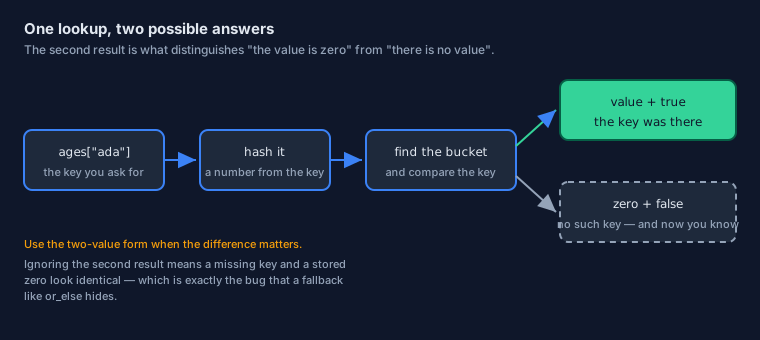
That last line is both a convenience and a trap. A missing key does not fail; it hands you the zero value for the value type. So a 0 from ages["grace"] is indistinguishable from a stored age of zero — which matters the moment zero is a meaningful value in your data.
The Two-Value Lookup
When the difference matters, ask for it. A lookup can produce two values: the value, and whether the key was there at all.
// The lookup produces the value AND whether the key was present.
if age, ok := ages["grace"]; ok {
    fmt.println("grace is", age)
} else {
    fmt.println("grace is not in the map")
}
You have met this shape twice already — in the if initialiser and in procedure results. It is the same idea a third time: an operation that can fail reports the failure as a value rather than by throwing you out of the code.
The or_else Shorthand
Very often you do not care whether the key was present — you simply want a usable value. or_else says that in one line:
// "The stored value if there is one, otherwise this default."
age := ages["grace"] or_else 0

fmt.println(age)          // 0 — the fallback, since grace is not in the map
Choose between the two forms deliberately. Use or_else when absent and zero mean the same thing to your program; use the two-value form when the difference matters, because a fallback is exactly what hides that difference.
Keys, Values, and a Counting Idiom
Keys must be a comparable type — strings and integers cover most uses — and values can be anything at all. Put those together and you get an idiom you will use constantly:
words := []string{"spam", "eggs", "spam"}

tally := make(map[string]int)
defer delete(tally)

// An absent key reads as zero, so counting is a single line.
for word in words {
    tally[word] = tally[word] + 1
}

for word, count in tally {        // KEY first, then the value
    fmt.printfln("%s: %d", word, count)
}
Two loops, two shapes: the first walks a slice and hands over values, the second walks the map and hands over the key first — exactly as the loops lesson described. And the counting line works because the missing-key rule, reading zero, is precisely what a counter wants on its first sight of a word.
Map Order Is Not Yours to Assume
One warning, repeated here because it bites people: the order in which a map yields its entries is unspecified. They arrive in whatever order the hash table happens to be in, and that can change as the map grows. When a predictable order matters, gather the keys, sort them, then present:
import "core:slice"

keys := make([dynamic]string, 0, len(tally))
defer delete(keys)

for word, _ in tally {           // take both, keep the key, discard the value
    append(&keys, word)
}

slice.sort(keys[:])

for word in keys {
    fmt.printfln("%s: %d", word, tally[word])
}
A handful of extra lines buys a great deal of predictability, and this gather-sort-present recipe is worth recognising when you meet it in other people's code.
Maps and Lifetime
Maps follow the ownership rules from the previous lesson, with one addition:
makeacquires memory anddeletereleases it — writedefer delete(m)immediately after themake, so no exit path can leak it.- A map is a reference, like a slice: handing it to a procedure hands over the same entries, not a copy.
- Keys and values are stored in the map's own memory, so a large value type makes for a large map.
// The map is a reference, so the caller sees the new entry.
add_age :: proc(db: map[string]int, name: string, age: int) {
    db[name] = age           // writes into the caller's map
}

main :: proc() {
    ages := make(map[string]int)
    defer delete(ages)

    add_age(ages, "ada", 36)
    fmt.println(ages["ada"])     // 36
}
bit_set as a Set
The other half of this lesson returns to a type you met while modelling data: bit_set. Last time it held flags; this time, look at it as what it really is — a set.
Flags You Already Met
Recall the permissions from the structs lesson. Written out again, with the two operations you will use most:
Permission  :: enum { Read, Write, Execute }
Permissions :: bit_set[Permission]

readable: Permissions = { .Read, .Write }

// Membership: is this member in the set? One test, no allocation.
fmt.println(.Read in readable)        // true
fmt.println(.Execute in readable)     // false

// Union: this set, plus another member.
all := readable + { .Execute }
fmt.println(all)                      // Permissions{Read, Write, Execute}
Seen as a data structure, that is a set: no order, no duplicates, and membership in constant time. And because a bit set is stored entirely inside the value — no pointer, no heap block — it never needs a make or a delete. That makes it the cheapest collection in the language by a wide margin.
Two more operations are worth knowing, because they turn the set into something you can walk like any other collection. card tells you how many members are in it, and a plain for loop visits them:
readable: Permissions = { .Read, .Write }

fmt.println(card(readable))       // 2 — how many members are set

// A set can be iterated: each step gives you one member.
for p in readable {
    fmt.println(p)                // Read, then Write
}
That last loop is the bridge between the two halves of this lesson: a set can be walked member by member, and the standard library uses exactly that to turn a set into a slice of its members when a plain list is what you need.
Union, and the Rest
Two bit sets of the same type combine with the same +, because a set literal is already a set:
read_write: Permissions = { .Read, .Write }
write_exec: Permissions = { .Write, .Execute }

// Union: everything that is in either set. Duplicates collapse by nature —
// a member is either present or not, so there is no "twice".
everything := read_write + write_exec

fmt.println(everything)     // Permissions{Read, Write, Execute}
& and &~ — because underneath, a bit set is a bit pattern. The data-oriented lesson closes that loop: it shows the bits a set is stored in, and what the bitwise operators do to them, so the mapping is something you have seen rather than something you memorise.
bit_set, or a Map?
Both can answer "is this thing in the collection?", and choosing between them is a design question about your data:
| Question | bit_set | map[K]V |
|---|---|---|
| How many possible members? | Small and fixed — it must fit in a machine word or two | Any number, growing as needed |
| What can be a member? | One of a known set, usually an enum | Any comparable value |
| Memory | Inline in the value; nothing to free | Allocated; needs make and delete |
| Membership test | A few machine instructions | Hash the key, then compare |
| Carries data per member? | No — only present or absent | Yes, that is the whole point |
The rule of thumb: if the members are named options from an enum and you only need to know "in or out", a bit set is both simpler and faster. If you need to associate data with each key, or the keys could be anything at all, you want a map.
Where This Goes Next
That completes Phase 3. You can now build your own procedures, describe your own data, and hold as many of anything as you need. Phase 4 turns to the subject Odin has the strongest opinions about — memory and the layout of data — and it is where the language starts to reward you for choosing carefully.
The Page in One Breath
- A map stores values under keys:
map[K]V, created withmakeand released withdelete. - Reading a key that is not there gives the zero value, so a lookup can also produce a second result saying whether the key was present.
or_elsesupplies a fallback when absent and zero mean the same thing to you.- Counting occurrences is a one-liner, because an absent key reads as zero.
- Map iteration order is not guaranteed — gather the keys, sort them, then present.
- A map is a reference: handing it to a procedure hands over the same entries.
bit_setis a set: no allocation, membership within, union with+, and nothing to free.- Choose a bit set for a small fixed set of options; choose a map when the keys could be anything or you need data stored per key.
bit_set could not have done this job — it records only presence, never a count.
Continue with Pointers & Memory Addressing — the beginning of Phase 4 →