
Operators & Expressions
There are more operators in this lesson than you need on day one. The right way to read it is to skim the tables, study the sections that surprise you, and keep the page bookmarked — operators are reference material more than they are a story.
What an Operator Actually Does
An operator is a symbol that takes one or two values and produces a new value from them. That is the whole idea; the variety comes from how many values it takes and what it produces.
Expressions Produce Values
You met this vocabulary in Phase 1, and it is worth one sentence of revision: an expression produces a value, a statement does something with it. Operators are how small expressions become larger ones.
a := 7
b := 3

// `a + b` is an expression — it produces 10.
// The whole line is a statement: it declares `sum` and stores that value.
sum := a + b

fmt.println(sum)   // 10
Because operators produce values, you can nest them as deeply as you like. That is powerful and, past a certain depth, unreadable — which is why the last section of this page is about parentheses.
Unary, Binary, and Compound
Operators come in three shapes, and knowing the names helps when you read error messages and documentation:
- Unary operators take one value:
!ready(not),-x(negate),&value(take its address, which you will meet with pointers). - Binary operators take two values:
a + b,a > b,a & b. - Compound assignment operators combine an operation with a store:
total += 5.
ready := true

negative := -7         // unary minus
flipped := !ready      // unary not — flips true to false
total := a * b         // binary: multiply two values

total += 5             // compound: the same as total = total + 5
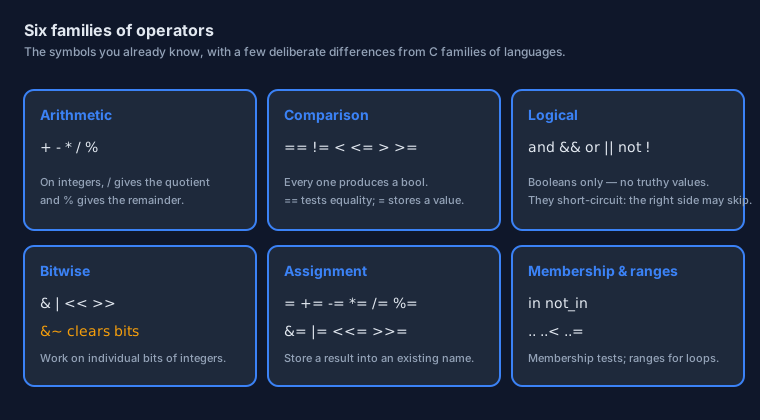
Arithmetic
Arithmetic in Odin looks exactly like arithmetic everywhere else — with one detail that trips up newcomers who have only used languages with a single number type.
The Familiar Five
Five operators cover almost everything you will compute:
sum       := 7 + 3   // 10
difference:= 7 - 3   // 4
product   := 7 * 3   // 21
quotient  := 7 / 3   // 2   — not 2.333: see below
remainder := 7 % 3   // 1
Integer Division and the Remainder
When both sides are integers, / performs integer division: the fractional part is discarded, not rounded. The % operator gives you what was discarded. Together they are the standard way to split things into rows, buckets, or fixed-size groups.
total_items := 17
per_row := 5

// How many complete rows fit, and what is left over?
rows := total_items / per_row          // 3 — full rows only
leftover := total_items % per_row      // 2 — the items that did not fit

fmt.printfln("%d rows and %d left over", rows, leftover)
// 3 rows and 2 left over
Change either side to a float and the behaviour changes with it: 7.0 / 2.0 is 3.5, because floating-point division keeps the fraction. This is not an Odin quirk — it is how every language with two number kinds behaves — but it is worth a deliberate experiment in your editor, because it explains a great many "why is my average wrong?" moments in every language you will ever use.
When Numbers Overflow
Every integer type has a largest value it can hold. Go past it and the number "wraps around" — unless someone is checking. Odin's default build mode checks integer arithmetic at runtime, so crossing the limit stops the program with a clear message instead of quietly computing nonsense.
small: u8 = 250

// small += 10   // 260 does not fit in a byte: the default build reports it.
fmt.println(max(u8))   // 255 — the largest value a u8 can hold
Being told at the moment of the overflow is a great deal friendlier than discovering six months later that a total went negative.
Comparison
Comparisons answer questions about values, and in Odin every answer is a proper bool that you can store, pass around, and combine.
The Six Comparisons
a := 7
b := 3

fmt.println(a == b)   // false — are they equal?
fmt.println(a != b)   // true  — are they different?
fmt.println(a <  b)   // false — is a less than b?
fmt.println(a <= b)   // false — is a less than or equal to b?
fmt.println(a >  b)   // true  — is a greater than b?
fmt.println(a >= b)   // true  — is a greater than or equal to b?
There is one classic typo to get out of your system on day one. Two symbols mean two very different things:
count := 0
count = 10    // =  STORES: count is now 10
count == 10   // == ASKS: is count equal to 10?
Comparing Floats Honestly
Floating-point numbers cannot represent most decimal fractions exactly, so two values that look identical may differ in the last bit. That means 0.1 + 0.2 == 0.3 can be false — in Odin, in C, in Python, everywhere.
import "core:math"

a := 0.1 + 0.2
b := 0.3

// a == b is not reliable here: the two values are extremely close,
// not identical. The professional move is to compare with a tolerance.
close_enough := math.abs(a - b) < 1e-9

fmt.println(close_enough)   // true
fmt.printfln("%.17f", a)    // 0.30000000000000004
Choose the tolerance to match your problem: 1e-9 is strict, 1e-6 is comfortable for measurements, and for money you should not use floating point at all — use integers of the smallest unit instead.
Logical Operators
Logical operators combine booleans into bigger conditions. There are three of them, and they are the ones you will type most often after arithmetic.
and, or, not
ready := true
warm  := true

// &&  "and" — true only when BOTH sides are true
// ||  "or"  — true when AT LEAST ONE side is true
// !   "not" — flips a boolean
can_go  := ready && warm   // true
can_wait:= ready || warm   // true
blocked := !ready          // false
Because Odin has no truthy values, these operators only accept booleans. That sounds pedantic until you debug a language where an empty string, the number zero, and a missing value are all quietly "false" in some places and "true" in others.
Short-Circuit Evaluation
Here is a subtlety worth understanding properly, because it changes how you write safe code. && stops evaluating as soon as it knows the answer is false, and || stops as soon as it knows the answer is true. The right-hand side may never run.
That is exactly what you want when the second test is only valid if the first one passed:
queue := make([dynamic]int, 0, 4)   // an empty, allocator-backed array
defer delete(queue)

// Two conditions, in a deliberate order:
//   1. is there anything in the queue at all?
//   2. only then, look at the first item.
if len(queue) > 0 && queue[0] == 7 {
    fmt.println("the first item is 7")
}
Swap those two conditions round and the program would try to read element zero of an empty collection. Odin's bounds checking would catch it — but the whole point of short-circuiting is that you never get that far. Ordering a guard before the thing it guards is a habit worth forming now.
Bitwise Operators
This is the family most beginners skip, and it is the one that pays off most in systems programming. An integer is not just a number — it is a row of switches, and bitwise operators let you flip them one at a time.
Thinking in Bits
A u8 is eight switches. We usually write the value in binary when we care about the individual bits, using 0b and underscores to group them:
// Name each bit, and the names become a small, self-documenting vocabulary.
SSH   :: 0b0000_0001
HTTP  :: 0b0000_0010
HTTPS :: 0b0000_0100

// Turning two switches on at once:
enabled: u8 = SSH | HTTP      // 0b0000_0011

fmt.println(enabled)          // 3
This pattern — a set of yes/no options packed into one small integer — is everywhere: file permissions, network flags, GPU state, protocol headers. It is also exactly what Odin's dedicated bit_set type formalises, and we will meet that in the composition lessons.
AND, OR, and Clearing Bits
Three operations cover nearly every need: keep bits, turn bits on, and turn bits off.
enabled: u8 = SSH | HTTP              // 0b0000_0011

// & KEEPS bits: the result keeps only what both sides share.
has_ssh := (enabled & SSH) != 0       // true — is that bit set?

// | TURNS BITS ON.
enabled |= HTTPS                      // 0b0000_0111

// &~ TURNS BITS OFF. Read it as "AND with the complement of".
enabled &~= HTTP                      // 0b0000_0101 — HTTP is now off
&~ means "AND with the complement of" — it clears the bits you name, and it is an operator you will use constantly in Odin code. The complement itself is written ~x, as it is in C, and the standard library uses it for exactly the arithmetic you would expect: INT8_MIN :: ~INT8_MAX, because flipping every bit of 127 gives −128.
Shifts
Shifting moves every bit sideways. Left by one step doubles the value; right by one step halves it (rounding down). Shifts are how you build large constants without counting digits, and how you address individual bits inside a word.
one := u8(1)

fmt.println(one << 3)      // 8  — 0b0000_1000: left three times is times eight
fmt.println(one >> 0)      // 1  — shifting by nothing changes nothing

// Build a 64-bit constant with one bit far up the word.
bit_40 :: u64(1) << 40

fmt.println(bit_40)        // 1099511627776
Both operands must be integers; the shift count can be an ordinary integer variable, which is how you write code that walks through the bits of a value in a loop.
Assignment Operators
You met = in Phase 1: it stores a new value into a name that already exists. Odin also has a short form for every operation that reads a value, changes it, and writes it back.
Compound Assignment
score += 10 is the compact spelling of score = score + 10. Each arithmetic and bitwise operator has one:
score := 0

score += 10   // 10
score -= 3    // 7
score *= 2    // 14
score /= 7    // 2
score %= 2    // 0

// The bitwise forms exist too, which is how flags are updated in practice.
flags: u8 = 0b0000_0001
flags |= 0b0000_0100    // turn a bit on
flags &~= 0b0000_0001   // turn a bit off
Compound assignment is not just brevity. It also states the intent precisely: the name is read, modified, and stored back, and nothing else happens in between. When you see the short form, that is exactly what you can assume.
There Is No ++
Odin has no increment or decrement operators. Where other languages write i++, Odin writes i += 1. This is not an oversight — it is the same "one way to write something" principle you met on the first page.
i := 0
i += 1     // count up
i -= 1     // count down
The reason is worth knowing, because it explains a lot about Odin's taste. In C-like languages, i++ can appear inside a larger expression, where whether it changes the value before or after it is used depends on nothing you can see in the line. Banning it removes an entire category of puzzle. You lose a keystroke; you gain a language where the value of an expression never depends on invisible ordering.
Membership and Ranges
Two small operators round out the collection. One asks a question, the other describes a boundary.
in and not_in
The in operator asks whether a value is present somewhere: a value in an array or slice, a key in a map, a member in a set. Its partner not_in answers the opposite question.
// A bit set is a natural fit for membership tests — a taste of a type
// you will meet properly in the composition lessons.
Permission  :: enum { Read, Write, Execute }
Permissions :: bit_set[Permission]

perms: Permissions = { .Read, .Write }

fmt.println(.Read in perms)          // true
fmt.println(.Execute in perms)       // false
fmt.println(.Execute not_in perms)   // true
Read out loud, .Read in perms is almost an English sentence, which is the whole point: membership questions are common, and they deserve an operator rather than a helper function.
The Range Operators
A range describes a run of values between two bounds. Odin writes two forms, and the difference between them is only whether the upper bound is included:
// 0..<5   →  0, 1, 2, 3, 4      (excludes the upper bound)
// 0..=4   →  0, 1, 2, 3, 4      (includes the upper bound)

for i in 0..<5 {
    fmt.println(i)   // 0 1 2 3 4
}
Both forms are useful, and choosing between them is a matter of which one reads better in your particular problem. Ranges appear again in the loop lesson, in array initialisers, and in switch cases.
Do not confuse the range operators with .. on its own, which means something entirely different: spread this collection into the argument list.
first:  [dynamic]int
second: [dynamic]int

append(&first, 1, 2, 3)

// `..` spreads the slice: the call receives three values, not one array.
append(&second, ..first[:])

fmt.println(second[:])   // [1, 2, 3]
Precedence and Readability
When several operators share a line, which one runs first? Odin follows the rules you learned in school arithmetic, which means you can usually trust your instincts — but not always, and the exceptions are worth one minute of attention.
The Order of Operations
From tightest to loosest: multiplication, division and remainder bind before addition and subtraction; arithmetic binds before comparison; comparison binds before the logical operators. The classic trap is a missing pair of parentheses in an average:
a, b := 10, 4

average := (a + b) / 2    // 7  — add first, then divide
guess   := a + b / 2      // 12 — divide first, then add

// Comparisons happen before the logical operators, so this reads naturally:
ok := a > 5 && b < 10       // (a > 5) && (b < 10)  → true
The second line is legal and completely correct Odin — and it is almost never what the author meant. That is the whole danger of precedence: it silently does the technically right thing rather than the thing you intended.
Parentheses Are Free
Parentheses cost nothing at runtime; the compiler resolves them long before your program runs. So use them liberally:
- When in doubt, add them. A reader should not have to remember a precedence table to follow your work.
- To group a mixed condition. If a line contains both
&&and||, group each side explicitly. - Better still, name the parts. A boolean with a name documents itself in a way no parentheses can.
age := 21
tickets := 2

// Instead of one long unreadable condition:
is_adult   := age >= 18
has_ticket := tickets > 0
can_enter  := is_adult && has_ticket

fmt.println(can_enter)   // true
The three-line version is longer and better in every way that matters: it names the concepts, it can be inspected in a debugger one piece at a time, and the final line reads like the rule it implements.
Where This Goes Next
You now have values and the operators that act on them. The next lesson puts them to work: making decisions, which is where a program stops being a calculator and starts being a program.
The Page in One Breath
- Arithmetic is familiar, but integer division discards the fraction — pair
/with%to split things into rows and leftovers. - Every comparison produces a
bool;==asks,=stores. Never compare floats for exact equality. &&,||, and!work on booleans only, and they short-circuit — put the guard first.- Bitwise operators treat an integer as a row of switches:
&keeps bits,|turns them on,&~turns them off,<<and>>move them. - Compound assignment (
+=,|=,&~=) reads, changes, and stores in one visible step. There is no++. inandnot_intest membership;..<and..=build ranges; bare..spreads a collection into arguments.- Precedence follows school arithmetic — and parentheses are free, so use them, or name the parts instead.
|, test it with &, turn it off with &~, and print the value in binary with the %b format verb to watch the bits change.
Continue with Control Flow: if, when & switch →