
Packages & Collections
It is the last lesson of Phase 5, and it answers a question you may have been carrying since the setup lesson: when you typed odin run ., what exactly did you build?
Packages
Odin's model of code organisation is small enough to state in one sentence — and the standard library's own beginner example states it: packages are just folders.
A Package Is a Folder
The quoted explanation, from Odin's beginner example:
This imports the `fmt` package from the core collection. You find the core
collection in `<odin>/core`, where `<odin>` is the folder where you installed
Odin. `fmt` is just a subfolder of `core`. Again, packages are just folders!
That is the whole mechanism. A folder holds .odin files; those files are one package; and the folder's path is how the package is found. There is no build file listing sources, no project manifest, and no registration step.
It also explains the command you have been typing all along. From the same example:
When you ran `odin run .`, then all the `.odin` files in this folder were
compiled into a single package.
The . meant "this folder", and the compiler treated every .odin file in it as one package. That is why the setup lesson described Odin as thinking in directory-based packages, and why odin run file.odin -file needed a special flag to mean "just this one file".
The package Line
Every file begins by naming its package, and the beginner example is unusually explicit about the rules:
This is the package name. All files in a package must use the same package
name. The package name must be unique project-wide (no other imported package
may use the same name).
Two rules, and the second is the one that surprises people. The name is project-wide unique, so two packages can never both be called utils — and that is deliberate, because it removes the awkward import-renaming that other ecosystems need when names collide.
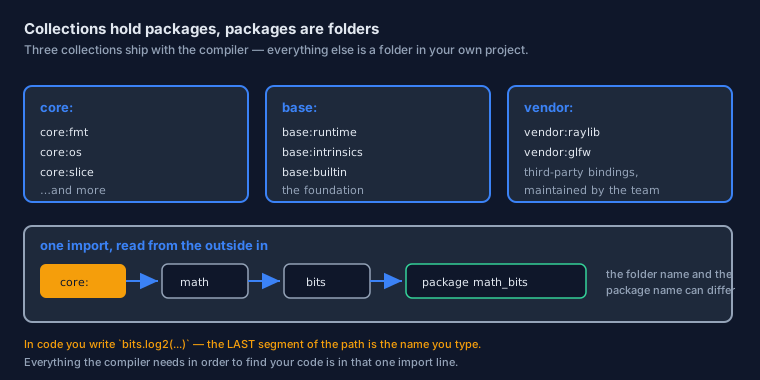
One freedom is worth knowing as well: the package name need not match the folder name. The standard library proves it — core:math/bits is a folder called bits, and its files declare package math_bits. What you write in the package line is the package's identity; the folder is simply how the compiler finds it.
Several Files, One Package
Files in the same folder are the same package, and they see each other's declarations with no import at all. Odin's beginner example relies on exactly that — its main procedure calls procedures that live in five other files — and says why it works:
This runs another procedure called `variables`. But there is no such procedure
in this file! Where is it? All files within this folder are part of the same
package. So this procedure can be in any of the `.odin` files in this folder.
Imports are therefore for other packages only. Inside one folder there is no ceremony — no header files, no forward declarations, no import lines between the files — just one shared namespace, which is what makes a folder-sized project feel like a single document.
The one ordering rule from the setup lesson still stands: each file declares its package first, and its imports after.
Collections
An import must say where the package lives. Odin answers with collections: named folders that the compiler already knows about.
core, base, and vendor
Three collections ship with the compiler, and you have used all of them:
| Prefix | What lives there | Examples you have used |
|---|---|---|
core: | The standard library — the everyday packages | core:fmt, core:strings, core:os, core:slice, core:time, core:math |
base: | The language's own foundation: runtime, builtins, intrinsics | base:runtime, base:intrinsics, base:builtin |
vendor: | Bindings maintained by the Odin team for third-party libraries | vendor:raylib |
The beginner example gives the clearest way to hold this in mind: core:fmt means "the fmt folder inside the core collection", and the core collection is the core folder wherever you installed Odin. There is nothing more magical to it than that — which is precisely the point.
Importing
Paths nest, and you have already met several shapes of them:
import "core:fmt"            // one package from a collection
import "core:math/big"       // a package nested inside another
import "core:unicode/utf8"   // and deeper still
import "base:intrinsics"     // from the foundation
import "vendor:raylib"       // a third-party binding
The name you use afterwards is the last segment of the path — which is why code says fmt.println(...), big.…, utf8.…, intrinsics.…, and raylib.….
It is worth noticing that this name comes from the path rather than from the package line. The folder core:math/bits is used as bits. in code, even though its files declare package math_bits. The path is what the compiler needs; the last segment is what you type.
Aliases
When a name is long, you can bind a shorter one at the import. The examples repository does exactly that for raylib, whose real name is a mouthful:
// Quoted from an example: import the package under a shorter name.
import rl "vendor:raylib"

// ... and use the short name everywhere afterwards.
rl.InitWindow(800, 200, "text field")
defer rl.CloseWindow()
Notice the shape: the alias comes before the path, with no := and no as. Two words, and the meaning is obvious from context.
Use aliases for genuinely long names and leave everything else alone. An alias that is not clearly shorter than the original is simply one more translation step for whoever reads the code next — and since the package name is already chosen to be unique and short, most imports need nothing added.
Public and Private
Odin has no public, private, or protected keywords — and the way it handles visibility is the opposite of what most languages teach.
Everything Is Visible, Until You Say Otherwise
Every declaration in a package is visible to any package that imports it: procedures, types, constants, all of them. There is no keyword to type and no default-private rule to memorise.
That is a deliberate trade. Most declarations in a package exist to be used by somebody, so the common case needs no ceremony at all — and protection remains available, at two different scales, for the cases that genuinely need it.
It also fits the thread that runs through this track. Odin prefers a small number of things you must know to a large number of rules you must remember, and "visible unless marked" is one rule instead of several.
@(private) and #+private
The first form hides a single declaration. Quoted from core:os, where a conversion helper stays inside the package:
// One declaration, hidden from every other package.
@(private)
error_to_io_error :: proc(ferr: Error) -> io.Error {
    // ...
}
The second form hides an entire file, and it is how the standard library keeps its platform implementations out of the public surface. Quoted from core:os's Linux pipe file:
#+private
package os

import "core:sys/linux"
Read the second one carefully, because it shows the intent. That file implements part of os for Linux and offers nothing new to the outside world — so the whole file is marked private, and the package's public face stays exactly as documented.
The judgement to apply is the same one you would apply anywhere: would a caller want this? If the answer is no, mark it, and the compiler will stop anyone outside the package from reaching it — including your future self, who will otherwise be tempted.
Organising a Project
Because a folder is a package, project structure in Odin is a folder tree and nothing else.
A Folder Layout That Works
my_project/
├── main.odin          package main      — the entry point
├── game.odin          package main      — same folder, same package
├── maths/
│   └── vector.odin    package vector    — its own package
└── io/
    └── files.odin     package files
Two files sitting side by side are one package, so main.odin can call anything in game.odin without an import. The subfolders are separate packages, and you reach them by path — a subfolder of your project is simply an import without a collection prefix:
import "maths"            // the folder next to this file
import "maths/vector"     // a package nested inside it
The entry point is the procedure named main, in whichever package you build. The folder holding it is conventionally called main too, but the package name is your choice — Odin's own beginner example calls it basics and runs it perfectly well with odin run ..
No Package Manager
Odin ships no package manager, and there is nothing to install before you begin: the standard library arrives with the compiler, third-party bindings come in the vendor: collection, and anything else is a folder you place in your project and import by path.
The practical consequence is worth internalising, because it is unusual these days. A project's dependencies are visible in the file tree. Open the folder and you can see everything the program is built from — no lock file to read, no manifest to interpret, and no resolved dependency tree that exists only in a tool's cache.
Using What You Import
Two small habits complete the picture.
Qualified Names
An import brings the package's name into scope, and everything inside it is reached through that name. Here is a real sequence from the examples repository:
import "core:strings"

builder := strings.builder_make()
defer strings.builder_destroy(&builder)

strings.write_string(&builder, "Edit me!")
text := strings.to_string(builder)
Notice what is absent: no unqualified names, no "bring these symbols into my scope" form, and no doubt about where builder_make came from. The package name is part of every call — which is precisely why Odin's packages are named briefly, and why an alias is the remedy when a name is long.
Unused Imports and the _ Idiom
Odin will not let an import sit unused: if you import a package, you refer to it. Occasionally a package is needed for its side effects rather than for its names, and then the discard from the loops lesson does the job. Quoted from the standard library, which imports three foundation packages and then accounts for each one:
import "base:intrinsics"

// Needed for side effects rather than by name, so discarded explicitly.
_ :: intrinsics
It reads oddly the first time — and then it clicks, because it is the same _ you met in q, _ := divmod(17, 5): "this exists, and I am deliberately not using it by name". The language asks for everything to be accounted for, and the discard is how you answer.
Where This Goes Next
Phase 5 is complete: failure is explicit, one procedure serves many types, the build answers questions, and code has a home. Phase 6 turns outward — calling C libraries, using threads, and testing what you have written.
The Page in One Breath
- A package is a folder. Every file names its package, and package names are unique project-wide.
- Files in one folder share a scope, so they need no imports between them. Imports are for other packages.
- Three collections ship with the compiler:
core:for the standard library,base:for the foundation,vendor:for third-party bindings. - The name you type afterwards is the last segment of the import path — not the name in the
packageline. - An alias is written before the path:
import rl "vendor:raylib". - Everything is visible by default;
@(private)hides one declaration and#+privatehides a whole file. - There is no package manager, and dependencies are visible in the file tree.
- Names are qualified at every call site, and an unused import is accounted for with
_ :: package.
@(private), and run it with odin run .. You will have used every idea on this page, and the folder tree will explain itself.
Continue with Foreign Interface (C Interop) — the beginning of Phase 6 →