
Statements, Expressions & Comments
:, =, and :: actually mean.
Read this page the way you would read a guide to a foreign alphabet. You are not expected to memorise everything at once; the point is to stop being surprised. By the end, reading Odin source should feel like reading your own handwriting.
The Shape of an Odin File
Odin files are remarkably uniform. Open any five files from any project, and you will find the same sections in the same order. That predictability is a gift to a reader, so let us learn it first.
Anatomy of a File
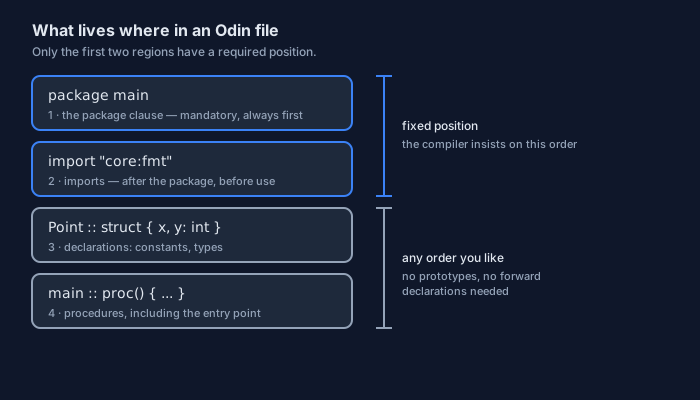
Here is a complete, if tiny, Odin program with its parts numbered. Everything in this lesson will refer back to it:
// 1. The package clause is mandatory and comes first.
package main

// 2. Imports come after the package, before anything that needs them.
import "core:fmt"

// 3. Declarations can appear in any order you like.
VERSION :: "1.0"                 // a constant (:: means "declare this name")
Point :: struct { x, y: int }    // a type

// 4. A procedure named `main` is the entry point of a program.
main :: proc() {
    fmt.println("Hellope!")
}
Two details are worth noticing straight away:
- Order matters only for the package and the imports. Declarations never need to appear before they are used — there are no prototypes and no forward declarations in Odin.
- Nothing is indented except inside braces. The file's structure is visible from the left margin, which is why Odin code is easy to skim.
Whitespace and Line Endings
Odin is not whitespace-sensitive, so indentation carries no meaning to the compiler — it exists purely for humans. Two consequences follow:
- A statement ends at the end of the line. Braces
{ }mark blocks, exactly as you would expect. - You may indent with spaces or tabs as you prefer; the official formatter will normalise it for you, so this argument never needs to happen in code review.
Because indentation is free, blank lines become a tool. Use them to separate ideas: one blank line between steps of a procedure, two before a new logical section. Future-you will thank present-you.
Comments — Notes for Humans
The compiler throws comments away; the reader does not. In a language that cares as much about readability as Odin does, comments are part of the craft, not decoration.
Line Comments
Two slashes // comment out everything to the end of the line. There are two natural places to put them: on their own line above the code they describe, or at the end of a line for a short clarification.
// Explain the IDEA of the block below, not the mechanics of the syntax.
tax_rate := 0.19     // a trailing comment explains this one specific value

// A trailing comment is best for short facts:
// what a magic number means, or a unit, or a reminder about an edge case.
price := 120.0       // price in euros, before tax
Block Comments
For a longer note, wrap it in /* and */. The comment can span as many lines as you like:
/*
    Block comments are useful for a paragraph of explanation:
    why this algorithm was chosen, what it assumes about its input,
    or a link to the document that describes the protocol.
*/
You will sometimes see a block of code wrapped in a block comment to disable it temporarily. That is fine while experimenting, but do not leave it in a finished program — a version control system remembers deleted code far better than a comment does, and dead code misleads readers.
What Makes a Good Comment
Three habits separate helpful comments from noise:
- Explain why, not what.
count += 1 // increment counttells the reader nothing.count += 1 // the protocol counts the final terminatortells them something they could not guess. - Comment the surprises. The important places to annotate are the ones a careful reader would not expect: a workaround, a limit imposed by a device, a deliberate copy.
- Keep them honest. A comment that contradicts the code is worse than no comment. When you change a line, change the note above it in the same edit.
Names and Naming Style
You will spend a surprising amount of your career typing names. Odin keeps the rules short, and the community keeps the spelling consistent — which is much more valuable than it sounds.
What a Name May Look Like
A name may begin with a letter or an underscore and continue with letters, digits, or underscores. Names are case-sensitive, so count, Count, and COUNT are three different things. Odin handles UTF-8 throughout, but idiomatic Odin code sticks to ASCII names.
count, total_count, _count2: int   // all legal names

// `_` on its own is the DISCARD — a placeholder meaning "I do not want this".
// You will meet it whenever a procedure returns more values than you need.
The Conventions You Will See
The compiler does not enforce a spelling style, but Odin code in the wild is remarkably consistent. Learn these three and you will read other people's code more easily:
| Kind of name | Convention | Example |
|---|---|---|
| Variables and procedures | snake_case | parse_age, total_count |
| Types and records | Capitalised words joined by underscores | File_Info |
| Short mathematical types | Capitalised words, no underscores | Vector2, Matrix4 |
| Compile-time constants | SCREAMING_SNAKE_CASE | ODIN_OS, ODIN_ARCH |
Following the same style costs nothing and buys you a great deal: your code looks like the library code you are already reading, and reviewers spend their attention on your logic instead of your spelling.
Three Symbols That Define Odin
If you remember one thing from this whole lesson, remember this. Nearly every beginner confusion in Odin comes from mixing up a small family of symbols that look similar and mean very different things.
| Symbol | Read it as | Used for |
|---|---|---|
: | "has type" | Declaring a name together with its type |
:= | "is" (and the type is obvious) | Declaring a name and inferring its type from the value |
= | "gets the new value" | Assigning to a name that already exists |
:: | "is declared as" | Constants, types, and procedures — things fixed at compile time |
The Colon and the Double Colon
A single : introduces a type: "this name has this type". You do not have to give a value, because Odin initialises everything to zero for you. A double :: declares a compile-time entity — a constant, a type, or a procedure — and that entity can never be reassigned afterwards.
// `:` — declare a name and its type. No value yet: Odin zeroes it for you.
count: int        // count is 0
ratio: f64        // ratio is 0.0
name: string      // name is ""

// `::` — declare something fixed at compile time.
MAX_RETRIES :: 5                // a constant value
Point :: struct { x, y: int }   // a type
main :: proc() { }              // a procedure
The Walrus — :=
The symbol := is not really one symbol: it is : and = written together, meaning "declare this name and infer the type from the value". It is the form you will type most often in everyday code.
// The type comes from the literal on the right.
count := 10        // an int, because integer literals default to int
ratio := 1.5       // an f64, because decimal literals default to f64
name  := "Odin"    // a string

// This is exactly the same as writing the type yourself:
count2: int = 10   // same result, more typing
count := 10 and then count := 20 in the same block is an error, not an overwrite. That single rule prevents a whole family of bugs — the compiler refuses to let you accidentally shadow your own variable a few lines later.
The Single Equals — =
A single = assigns to something that already exists. The type is already settled, so the new value must fit it:
count = 11              // fine: 11 is an int, and count is an int
name  = "Odin language" // fine: still a string

// count = "eleven"     // ERROR: a string is not an int.
// name  := "again"     // ERROR: name already exists in this scope.

// Assignment can set several names at once, which is handy for swaps:
x, y := 1, 2
y, x = x, y             // now x is 2 and y is 1 — no temporary variable needed
That last example is worth pausing on. The right-hand side is evaluated first, then the values are stored, so the swap needs no intermediate variable — a small convenience you will use more often than you expect.
Statements, Expressions, and Semicolons
Two words appear constantly in programming books, and they are worth pinning down once.
What an Expression Is
An expression produces a value. A statement does something with it. The difference sounds academic until you try to put one where the other belongs:
2 + 3            // an expression: it produces the value 5
count := 2 + 3   // a statement: it declares a name and stores a value

// The right-hand side of a statement is where expressions live.
// A statement on its own, such as `2 + 3` as a whole line, is useless
// — the value is produced and then dropped.
As you go through this track you will meet constructs such as switch that can produce a value, which lets you write some very tidy code. We will keep that for its own lesson; here we only need the vocabulary.
Semicolons Are Optional
In Odin a statement ends at the end of the line. Semicolons are still legal, which means you can put two statements on one line — but idiomatic Odin almost never does:
a := 1; b := 2   // legal, but rare: two statements squeezed onto one line

// The form you will see in every Odin codebase:
a := 1
b := 2
How does the parser know when a line is finished? If the expression is complete, the newline ends the statement. If it is obviously unfinished — an open bracket, a trailing comma, an operator waiting for its right-hand side — the parser simply continues on the next line. That is why a long argument list can be broken across several lines without any special marker.
Literals You Will Type Every Day
A literal is a value written directly in the source. Three families of them will fill your code, so they deserve a proper introduction.
Number Literals
Odin's number literals are conventional, with one friendly extra: underscores are allowed anywhere inside a number and are simply ignored. They exist so that large values stay readable at a glance.
population := 1_000_000     // underscores are ignored — they help your eyes only
mask       := 0xFF          // hexadecimal
mode       := 0o755         // octal — file permissions read naturally this way
flags      := 0b1010_1100   // binary, grouped into nibbles

speed := 1.0e9              // a decimal point makes it a floating-point literal
tiny  := 0.000_001          // underscores work in floats too
An integer literal with no suffix has the default type int, and a decimal literal defaults to f64, the usual 64-bit floating-point type. You will rarely have to think about this, because := infers it for you — but it explains why count := 10 gives you an int and not some other integer type.
Strings and Raw Strings
Strings use double quotes, and escape sequences such as \n inside them work exactly as you would expect. Odin's raw strings use back ticks instead, and inside them nothing is special — which makes them perfect for Windows paths and regular expressions:
greeting := "Hello, Odin!"          // an ordinary string
lines    := "first\nsecond"         // \n is a real newline

// Raw string: no escapes at all. What you see is exactly the bytes.
windows_path := `C:\Windows\notepad.exe`

// len() tells you the length of a string.
// If the string is known at compile time, the length is a compile-time constant too.
fmt.println(len(greeting))          // 12
Runes and Characters
Single quotes produce a rune: a single Unicode code point. A string, by contrast, is a sequence of UTF-8 bytes — a distinction that matters as soon as you handle text that is not plain English.
letter  := 'A'      // a rune
newline := '\n'     // a rune whose value is the newline character
emoji   := '\u2764' // a rune written with a Unicode escape

// Rule of thumb while you learn:
//   'x'  → one code point (rune)
//   "x"  → text (string)
A First Look at Operators
We will study operators properly in their own lesson. For now, meet the ones you will use before then, so that nothing on the next pages looks unfamiliar.
Arithmetic and Comparison
Arithmetic and comparisons behave the way you expect, with two details worth noting: dividing two integers truncates, and the remainder operator % gives you the rest.
sum        := 7 + 3              // 10
difference := 7 - 3              // 4
product    := 7 * 3              // 21
quotient   := 7 / 3              // 2  — integer division truncates
remainder  := 7 % 3              // 1

is_equal   := 7 == 3             // false
in_range   := 7 > 3 && 7 < 10    // true — the && operator needs BOTH to hold
not_hot    := !in_range          // false — ! negates a boolean

step := 1
step += 1                        // compound assignment: same as step = step + 1
++ and no --. Odin deliberately leaves out the increment and decrement operators that C-derived languages have. Write step += 1 and the intent is unmistakable in every direction. It is a small example of the language's taste: one clear way, always.
Precedence Without Surprises
Odin follows the precedence you already know from arithmetic: multiplication and division before addition and subtraction, comparisons after arithmetic, and the logical operators last. When there is any doubt at all, add parentheses — they are free, and they settle the question for every future reader:
a, b := 10, 4

average := (a + b) / 2   // add first, then divide  → 7
guess   := a + b / 2     // divide first, then add  → 12

// The second line is legal, and that is the trap. If you have to think about
// which rule applies, write the parentheses and move on with your day.
Where This Goes Next
You now know how Odin looks. That is a real milestone: from here on, every lesson is about meaning rather than spelling, because the vocabulary of the language is already familiar.
The Page in One Breath
- A file is
package, thenimport, then declarations in any order you like. - Comments are
//for a line and/* */for a paragraph — and they should explain why. - Names are case-sensitive
snake_casefor variables and procedures, and::names a compile-time entity. :says "has type",:=declares and infers,=assigns,::declares a constant, type, or procedure.- Statements end at the end of the line; semicolons are optional and rarely used.
- Numbers, strings, raw strings, and runes are the literals you will type most.
odin run . a few times. Five minutes of typing is worth an hour of reading.
Continue with Data Types & Values →