
Testing Strategy
See Software Testing in the CSE fundamentals track for the plain definitions of "error" and "bug" this page assumes.
Test Management
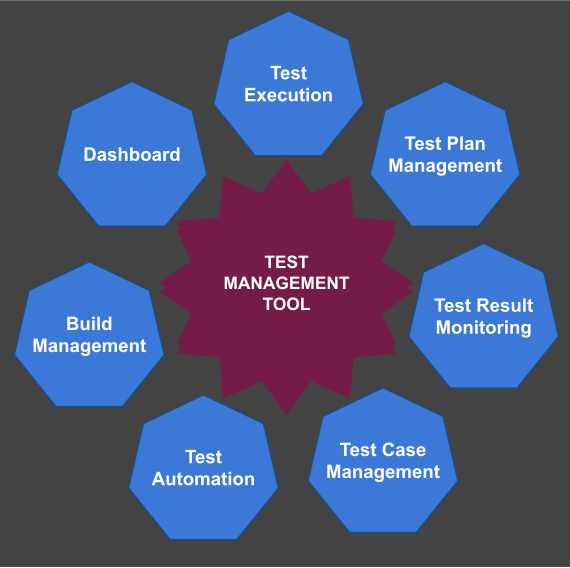
A test management tool organizes your tests — some support only manual test runs; others (like Jenkins) automate the whole suite. Starting a test manually doesn't make it "manual testing" if the test case itself runs unattended once triggered.
Testing Paradigms
Manual testing is the simplest and most direct method — and the most expensive. It's reliable with good testers; some teams have people who do nothing but test, while Agile teams often have developers test their own work. Manual testing is usually guided by a written test plan.
Automatic testing is less common but far more efficient. A scheduling tool runs jobs at regular intervals; each job represents one or more test cases, driven by a known input or initial state. Once the actions run, the result is evaluated automatically — an unexpected result means a defect was found.
Positive and Negative Tests
A test plan should cover both kinds of case. A positive test feeds the system good data and expects a good result. A negative test feeds it bad data and expects the system to detect the problem gracefully — reporting the error and continuing — rather than crashing. If the system doesn't catch the bad input, that itself is a bug.
Unit Testing
A unit test case is a piece of code that verifies another piece of code behaves as expected. Getting there quickly needs a test framework for your language — JUnit for Java, for example.
A unit test is defined by a known input and an expected output, prepared before the test runs: the input exercises a precondition, the expected output verifies a post-condition.
Every feature needs at least two unit tests — one positive, one negative. If a feature has sub-features, each sub-feature needs the same pair.
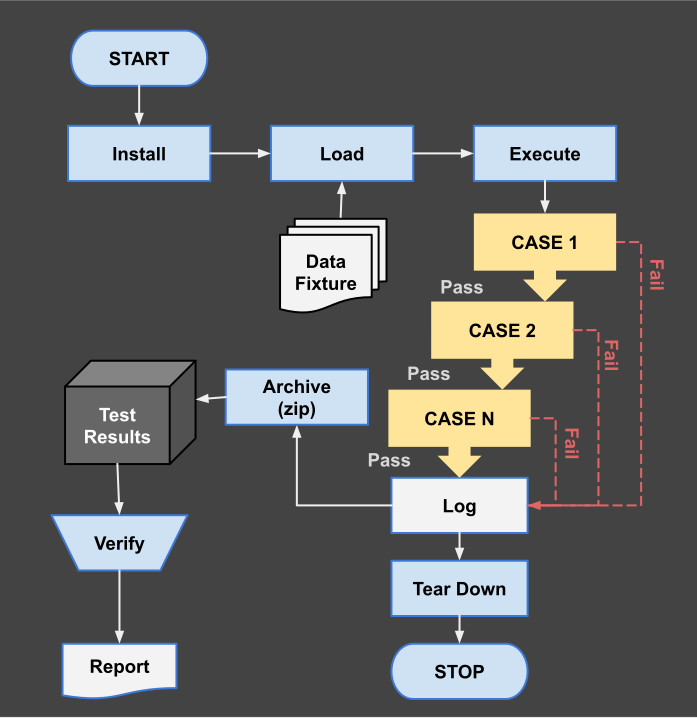
Whether a failing unit test should stop the whole run depends on how critical the feature is: report and continue for a non-critical feature, stop immediately for a critical one, to shorten the feedback loop.
End-to-End Testing
Individual components are usually tested in isolation, but they also need to work together. A larger test suite that simulates a full workflow start to finish — also called an integration test — verifies there's no communication problem between components.
Functional Testing
Functional testing focuses on the application's actual behavior: does the user interface do the right thing for every user action? This is harder to automate than unit testing, and often still needs a human in the loop.
Testing well takes real skill — different skill than writing the feature in the first place. Here's the anatomy of a test project:
Functional Test / Components
Data Fixture
A fixture is the initial state or dataset a test needs before it can run — for example, a database backed up before the test starts. You run the test cases, keep the logs, and leave that database available for developers to inspect. Next run, you create a fresh database from the same fixture and diff the two.
Test Case
A predefined sequence of actions performed against the system — a workflow, or "use-case" — is what a test case actually tests: one specific way the system is meant to be used.
Test Scripts
A test script is an ordered sequence of test cases, run once or repeatedly, with a name and description — so every developer and tester can refer to the same set of use-cases by name.
Test Suite
Multiple test scripts, run in a particular order, form a test suite. A good suite aims to cover as many test cases as possible.
Test Coverage
If a program has 100 functions and a suite exercises all 100, that suite has 100% test coverage. Coverage silently drops whenever new functionality ships without matching tests — it has to be actively maintained, not just measured once.
Test Results
Every test run should record: the suite name or code, start and end time, whether it completed normally or crashed, and how many cases passed versus failed.
Test Logs
Without precise logs per use-case, tracing a failure back to its exact cause is nearly impossible. Record: how long each case took, which exact case failed, how severe the failure was (error, warning, fatal), and any other locating detail — program name, line number, and similar.
Saving Test Results
Save logs and results in an organized system, sometimes for a month or longer. Historical results let you spot a recurring failure, and trace exactly when a bug first appeared and when it was fixed — a form of data mining over your own test history.
Continuous Integration
Continuous integration (CI) is automatic testing triggered the moment a developer's change lands — usually on a dedicated CI server, running one or more jobs per check-in. Jenkins is a common choice for organizing multiple test suites and scheduling these jobs, but there are many alternatives. See CI/CD Basics for how this fits into the larger delivery pipeline.
Dry Runs
Borrowed from car testing: start the engine and listen — if it sounds right and there's no smoke, you continue to the drive test. A software dry run starts the system with no data and no users connected (an empty database, say) and exercises a handful of relevant use-cases. The program should not crash simply because there's nothing to process yet.
Smoke Test
Named the same way — if you smell smoke, you stop. A smoke test is a fast dry run with a little real data (a record or two per table), run often as part of continuous integration precisely because it's cheap to run on every check-in.
Nightly Test
Run once a day, typically overnight when no one is committing — sometimes doubling as a stress test with a realistic data volume, to measure performance. The next day's results become the baseline for fixing whatever regressed.
Test-Driven Development
Test-driven development (TDD) is a short, repeated development cycle: write a failing automated test that defines the desired behavior, write the minimum code to pass it, then refactor that code to an acceptable standard.
Process
- Write a failing test that defines the desired behavior of the new feature.
- Run the test and confirm it fails — this proves the test itself works.
- Write the minimum code needed to pass the test — as simple as it can be.
- Run the test again and confirm it passes — this proves the code is correct.
- Refactor the code for readability and maintainability.
- Repeat steps 2–5 until every desired feature is implemented.
Advantages
- Improved code quality — writing testable code tends to be well-designed code, which helps prevent bugs and eases maintenance.
- Reduced risk — writing the test first gives you confidence the code works as intended before you add the next feature.
- Increased productivity — catching bugs immediately costs far less time than debugging them later.
- Improved communication — a test communicates intent to reviewers and testers directly, reducing misunderstandings.
Disadvantages
TDD has a real learning curve, and writing tests for every new feature takes time. It can also make some kinds of change to existing code more awkward, since the existing tests constrain the refactor.
Conclusion
TDD is a valuable practice once the trade-offs are understood — weigh the up-front cost against the debugging time it saves. It's often described as a form of extreme programming (XP), but plenty of teams that don't follow XP as a whole still use TDD; it's widely adopted across Agile teams specifically for the tight feedback loop it creates.