
Linear Programming
GOTO) moves execution somewhere else. In its purest form there is not even that, and the program has exactly one path through it.
This is the simplest possible paradigm. Without jumps, a linear program cannot make decisions or repeat a step, which is exactly why it fits where predictability matters more than expressiveness: data formats, configuration, legacy CNC machine control, and the punched patterns of knitting machines, where any repetition was built into the hardware rather than the program.
Real linear languages add jumps and labels. That gives them decisions and loops, but only through unstructured control flow, which is the origin of "spaghetti code". BASIC jumps to line numbers, assembly jumps to labels, Bash runs commands in order, and COBOL falls from paragraph to paragraph.
XML: A Linear, Data-Oriented Language
XML (Extensible Markup Language) is the clearest example of a linear, data-oriented language still in everyday use. It is not Turing complete — you cannot write a program in plain XML that solves an arbitrary computation, because it has no branching and no loops of its own. It describes data, not behavior. (XML-based scripting languages, such as Apache Ant's build files, add a separate execution engine on top of XML data — the engine does the branching, not the XML.)
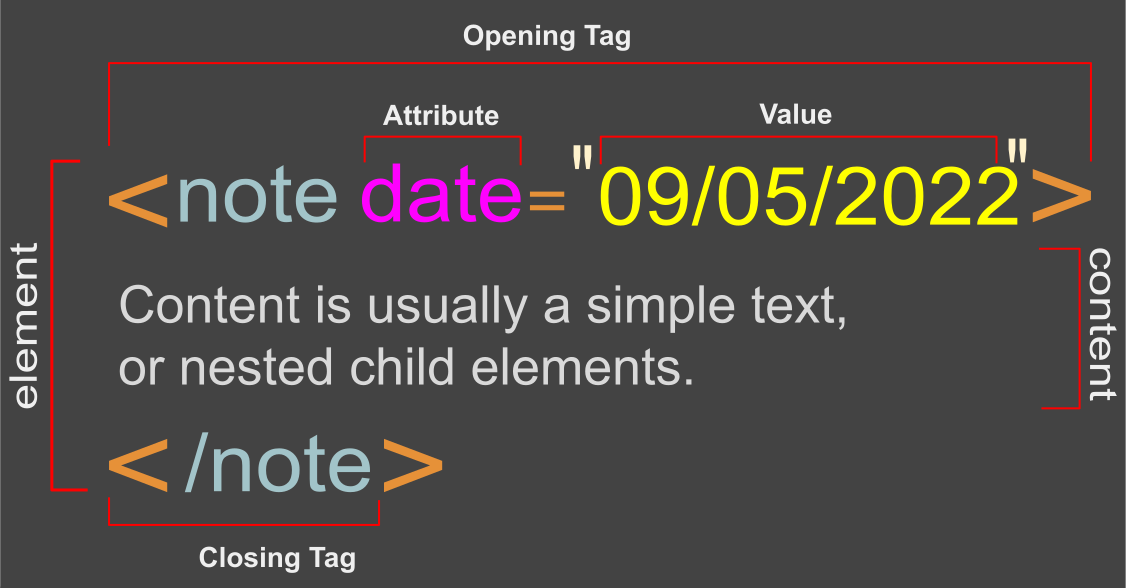
XML Element Anatomy
Example:
<!-- secret message XML example -->
<note>
   <to>John</to>
   <from>Marica</from>
   <heading category="secret">Secret Message</heading>
   <body>Please let's meet in the balcony.</body>
</note>
Structure
The core idea behind XML is markup: two angle brackets enclosing a tag, like <tag>. Unlike a general-purpose language, XML has no predefined keywords — any organization or developer can define tag names for their own domain. That is why it is called "extensible": it is continuously extended by whoever uses it, rather than fixed by a language spec.
Elements
An XML document is hierarchical. In the example above, the first line is a comment (ignored by any parser). <to> opens an element; </to> closes it. Between the two, you store the element's content.
Content
An element's content can be plain text or other elements. Elements can sit side by side as siblings, or nest inside one another to any depth. In the example, <to> is a child of <note>, which is the root element — the one element that contains every other element in the document.
Attributes
Attributes are listed after the element name and before the closing >. In the example, category="secret" is an attribute named category with the value secret. Values are always in double quotes. An element can have no attributes, one, or several. An attribute with no value is a boolean attribute: present means true, absent means false by default.
Representative Languages
Each language below is linear at heart. Read them in this order to see the paradigm from the machine level to the business level.
| Language | Why study it |
|---|---|
| BASIC | Line numbers, GOTO and GOSUB: the classic linear style, easy to read and easy to tangle. |
| Assembly | One instruction per line, labels and jumps: linear control exactly as the processor sees it. |
| Bash | Commands run top to bottom and pipelines chain them: linear thinking for automation. |
| COBOL | Divisions and paragraphs that read like prose: sequential business logic with exact decimals. |
Where Linear Thinking Still Fits
Almost no general-purpose language today is purely linear — even the earliest ones added at least a GOTO. But the linear mindset (one instruction leads directly to the next, nothing loops back) is still exactly the right model for configuration files, data interchange formats, and any format meant to be read top to bottom by a human as easily as by a machine. Once you group decisions and repeated steps into nested blocks instead of jumping, you have left linear programming and entered structured programming — the next paradigm in this roadmap.