
Ruby Decision
Ternary operator
Question mark "?" can be used in expressions to select one alternative depending on result of a Boolean expression. This is useful to create smarter expressions, for example let’s simulate absolute function using ternary expression.
Example:
#ask input for a number
print "enter +/- number:"
a = gets.chomp.to_i

#ternary operator in expression
b = a < 0 ? -a: +a
puts "b = #{b}"
Note: We have used method: gets to read user input and method: to_i to convert a string into integer. We have not yet reach conversion operations. But this is a good moment to learn more about it.
Practice: Run the ternary example locally twice, once with a positive number and once with a negative number, then explain why both results are non-negative.
Conditional
The "conditional" is a "logical expression" that you use to make a decision. Conditionals are used to enable execution of one or more statements when a condition is true or disable execution when false.
The conditional can be created using two alternate keywords: "if" or "unless". Alternative keyword "unless" is equivalent with "if" and negative condition. You can negate a condition using the complementary operators or negation: For example: if !(a > b) is equivalent to: unless (a >= b)
Conditional execution:
In Ruby you can apply conditional to any statement as a suffix. This may look a bit strange at beginning for developers of Python or C. Let’s investigate an example and you will grasp this idea quickly:
# using conditionals

print "enter number in range (1..9):"
a = gets.to_i

# conditional execution: unless
puts "incorrect" unless (1..9).include?(a)

# conditional execution: if
puts "correct"   if (a >= 1) && (a <= 9)
puts "too large" if (a > 9)
puts "too small" if (a < 1)
Practice: Run the conditional example locally three times and test the cases 0, 5, and 10 to verify every output branch.
- run it once, enter: 0
- run it again, enter: 5
- run it again, enter: 10
Conditional expression:
You can use "if" keyword to produce one value depending on a specific condition. This technique is an alternative to "ternary" operator "?". It may be redundant but it is more readable and fun to use:
# enter a number
print "number:"
b = gets.chomp.to_i

# calculate fraction
a = if b != 0 then 1.0/b else 0 end

if a > 0
   puts "1/#{b} = #{a}"
else
   puts "error"
end
Note: As you can see in above example "if" keyword is used in two ways. First time it is used as expression, second time is used as statement. Also, keyword "then" is optional.
Branches
Imagine a river, it can split in branches and then it can merge back again into main stream. This is how you should picture your program. Like a river that flow downstream. This is called "logical flow" or "control flow". We can control creation of branches using conditionals.
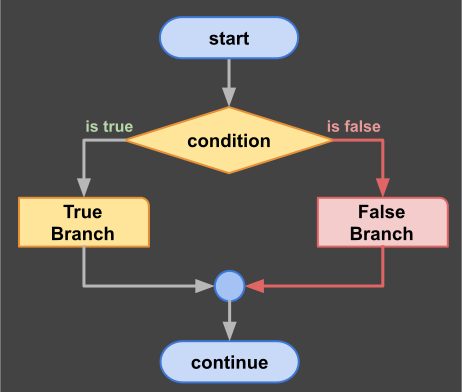
decision diagram
Example:
# using branches

print "enter one letter in range ('A'..'Z'):"
c = gets.chomp

# branch using if
if ('A'..'Z') === c then
  puts "correct: #{c}"
else
  puts "incorrect #{c}"
end
Practice: Run the branch example locally three times and test a digit, a lowercase letter, and an uppercase letter.
- run and enter a digit: 5
- run and enter a lowercase letter: x
- run and enter one uppercase letter: L
Ladder
You can create multiple branch selection statement using "elsif" keyword. In other languages this keyword is "elif" or "else if". We use ladder to analyze multiple conditions and avoid using nested if statements.
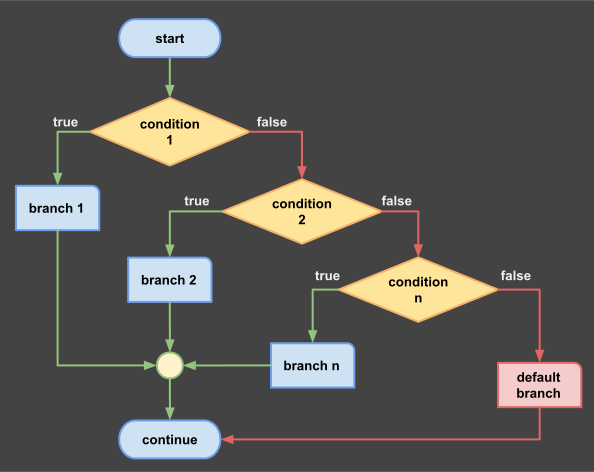
ladder diagram
Example
# multi-branch decision ladder
print "enter any character:"
c = gets.chomp[0]

if ('A'..'Z') === c then
   puts "uppercase letter"
elsif ('a'..'z') === c then
   puts "lowercase letter"
elsif ('0'..'9') === c then
   puts "digit"
else
   puts "special character"
end
Practice: Run the ladder example locally four times and test a digit, an uppercase character, a lowercase character, and an invalid multi-character input.
- enter a digit: 4
- enter a uppercase character: G
- enter a lowercase character: p
- try to make an error: enter ?46
Have fun already? If you have questions, contact us on Discord!
Selection
Remember in Ruby you can do one thing in many ways? You can replace "ladder" with "selection" statement. In other languages this statement is called "switch" but Ruby is using "case" instead.
This statement is called "selection" because it enables execution of one specific branch depending on a condition or value. It is more flexible than "switch" and in my opinion more useful.
Example 1:Conditional selector:
# input a character
print "enter any character:"
c = gets.chomp[0]

# multi-branch selection
case
  when ('A'..'Z') === c then
    puts "uppercase letter"
  when ('a'..'z') === c then
    puts "lowercase letter"
  when ('0'..'9') === c then
    puts "digit"
  else
    puts "special character"
end
Example 2:Value selector.
# input score from keyboard
print "enter your score (0..100):"
score = gets.chomp.to_i

# detect your qualification level
result = case score
   when 0..50   then "Novice"
   when 51..70  then "Beginner"
   when 71..80  then "Advanced"
   when 81..90  then "Proficient"
   when 91..100 then "Expert"
   else "Invalid Score"
end

puts result
Practice: Copy both selection examples into local files and compare how Ruby uses case for condition-style selection versus value-style selection.
Example 3: Switch simulation.
# Ask for a number and analyze
print "enter a number (0..9):"
n = gets.chomp.to_i

# Instead of switch use case
case n
  when 0
    puts ("n is zero;")
  when 1, 4, 9
    puts ("n is a perfect square;")
  when 2, 3, 5, 7
    puts ("n is a prime number;")
    puts ("n is also an even number;") if n == 2
  when 6, 8
    puts ("n is an even number;")
  else
    puts ("Only single-digit please.")
end
Practice: Run the case-based switch example locally twice, first with 4 and then with 2, so you can observe how multiple branches model special cases.
- first time enter number: 4
- second time enter number: 2
Note: There is no break required like in other languages. Also there is no fall through. Do your best to use a combination of selectors and conditionals to resolve special cases like in example the "2" case.