
Classes & Structs
This lesson builds both kinds of type, shows what copying really does to your data, and ends with the checklist engineers use when they must choose one.
Structs & Value Semantics
A struct gathers related stored properties into one named type. Because it is a value type, Swift treats every assignment as a copy of the whole value. That single rule is why structs are safe to hand around a program: no distant code can change your data behind your back.
Defining a Struct
A struct declares stored properties, and the compiler writes the memberwise initializer for you. Computed properties are derived on access and hold no storage of their own.
// A struct groups related data into one value type.
struct Size {
    var width: Double          // stored property — part of the value itself
    var height: Double

    // No initializer is written here on purpose: the compiler synthesises the
    // memberwise one, so Size(width: 10, height: 4) already works.
    var area: Double {         // computed property — recalculated on every access
        width * height         // single expression: implicit return
    }
}

var a = Size(width: 10, height: 4)
var b = a                      // b receives a *copy* of the entire value
b.width = 99                   // changing b cannot reach a
print(a.width)                 // 10.0 — a is untouched
print(b.area)                  // 396.0
Copy on Assignment
A copy is taken at three moments: when you assign the value to another variable, when you pass it as a function argument, and when you return it from a function. Nothing is shared, so nothing can leak between the copies.
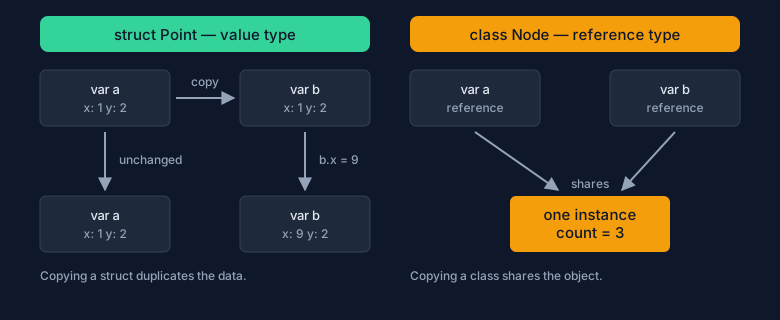
Figure 1 — the same assignment produces two independent values with a struct, but two names for one object with a class.
struct Player {
    var name: String
    var score: Int
}

// This function receives its own copy of `player`, so the caller keeps its data.
func rewarded(_ player: Player) -> Player {
    var updated = player        // local copy — the argument itself is immutable
    updated.score += 100
    return updated              // returning a value copies it out again
}

let original = Player(name: "Ada", score: 10)
let winner = rewarded(original)
print(original.score)           // 10  — a copy was passed in
print(winner.score)             // 110

// Collections are structs too, which is why this next test surprises newcomers.
var first = [1, 2, 3]
var second = first              // independent copy of the array
second.append(4)
print(first.count)              // 3 — `first` never saw the append
Copying is not as expensive as it sounds. For arrays, dictionaries, strings, and sets, Swift stores the elements in a shared buffer and duplicates them only when one copy is mutated. This optimisation is called copy-on-write: value semantics you can observe, sharing you cannot.
Mutating Methods
A method that assigns to a stored property is changing self. For a value type that means the method must be allowed to write a brand-new value back into the variable, so Swift demands the mutating keyword. Native types such as Array follow exactly the same rule: append is a mutating method.
struct Counter {
    var value = 0

    // Without `mutating` the compiler rejects the assignment to `value`:
    // methods on a struct work on a copy, so the change would be lost.
    mutating func increment(by step: Int = 1) {
        value += step
    }

    // Read-only methods stay non-mutating and are safe to call on constants.
    func description() -> String {
        "count = \(value)"
    }
}

var counter = Counter()
counter.increment()             // mutating call on a variable: fine
counter.increment(by: 4)
print(counter.description())    // count = 5

let frozen = Counter(value: 7)
// frozen.increment()           // error: cannot use mutating member on immutable value
print(frozen.description())     // count = 7 — reading a constant is always allowed
Classes & Reference Semantics
A class is a reference type. The variable holds a reference to an instance that lives in the heap, and copying the variable copies only that reference. Assignment therefore never duplicates your data — which is efficient, and exactly why classes demand care.
Defining a Class
A class declares stored properties, one or more initializers, and methods. Because methods act on the shared instance, they change state without any mutating keyword. Classes also gain two features structs do not have: inheritance and deinitializers.
// A class is a reference type: the name holds a reference to one instance.
class BankAccount {
    let owner: String           // still per-instance data, just never reassigned
    var balance: Double

    // Classes get no memberwise initializer, so you write the designated one.
    init(owner: String, balance: Double = 0) {
        self.owner = owner      // `self` separates the property from the parameter
        self.balance = balance
    }

    // No `mutating` here: the method edits the shared instance directly.
    func deposit(_ amount: Double) {
        guard amount > 0 else { return }   // refuse nonsense instead of corrupting state
        balance += amount
    }

    deinit {
        print("account closed")  // runs when the last reference is released
    }
}

let account = BankAccount(owner: "Ada", balance: 10)
account.deposit(5)              // allowed: `let` freezes the name, not the object
print(account.balance)          // 15.0
// account = BankAccount(owner: "Bob")   // error: the `let` name cannot be reassigned
That last comment is the trap that catches everyone once. With a class, let means "you may not point this name at another object". It does not make the object immutable; the object is still open for mutation by any reference that reaches it.
Shared Instances
Copying a class reference means sharing. Design with that in mind: sharing is a feature when several parts of a program must observe the same state, and a defect when one part changes state another part assumed was private.
let primary = BankAccount(owner: "Ada", balance: 100)
let alias = primary             // copies the reference, not the account
alias.deposit(50)
print(primary.balance)          // 150.0 — both names see one object

// Passing a class instance to a function shares it with that function.
func applyFee(_ account: BankAccount) {
    account.balance -= 2        // the caller's object changes, no `inout` needed
}
applyFee(primary)
print(primary.balance)          // 148.0

// Compare with the struct from the previous chapter: there the same call pattern
// left the caller untouched. Here there is only one object to change.
Notice how applyFee looks harmless: nothing in the signature says the argument will be modified. For value types the signature is honest by default; for reference types you must inspect the body, or design the method to avoid side effects.
Identity vs Equality
With reference types there are two different questions. Identity asks "is this the same object?" and is written with the triple-equals operator ===. Equality asks "do these two values represent the same thing?" and is written with the double-equals operator == — available only when the type conforms to Equatable.
final class Token {
    let value: Int
    init(value: Int) { self.value = value }
}

let first = Token(value: 42)
let second = Token(value: 42)   // same contents, different object
let alias = first               // same object, second name

print(first === second)         // false — two distinct instances
print(first === alias)          // true  — one instance reachable twice

// `==` is not free for classes: it exists only when the type conforms to Equatable.
// Without that conformance, `first == second` is a compile error, not `false`.
Inheritance
Inheritance is exclusive to classes: a struct or an enum cannot inherit from anything. Swift allows exactly one superclass per class, and everything about the feature is designed around the initializer chain, which is the part beginners get wrong first.
Subclassing & Overriding
A subclass names its superclass after a colon. Any method it intends to replace must be marked override; the keyword is compulsory and the compiler checks the signature for you, so a typo becomes an error instead of a silently ignored method.
class Shape {
    let name: String
    init(name: String) { self.name = name }

    func area() -> Double { 0 }        // sensible default: a shape of no area

    func describe() -> String {        // a template method that calls the part above
        "\(name) with area \(area())"
    }
}

class Circle: Shape {
    let radius: Double

    init(radius: Double) {
        self.radius = radius           // 1. own stored properties first
        super.init(name: "circle")     // 2. then the superclass initializer
    }

    // `override` is required. Deleting it is an error, not a fallback.
    override func area() -> Double {
        3.14159 * radius * radius
    }
}

let c = Circle(radius: 2)
print(c.describe())                    // circle with area 12.56636

// Dynamic dispatch means the overriding version runs even when the caller
// only knows about the superclass type.
let shapes: [Shape] = [Shape(name: "point"), c]
print(shapes.map { $0.area() })        // [0.0, 12.56636]
The last example is the point of the whole mechanism: describe() was written once, in the superclass, yet it calls the area() implementation of whichever subclass is actually running.
Initializers & super
Swift initialisation runs in two phases. Phase one gives every stored property a value, from the subclass up to the superclass. Phase two runs only after the whole chain is complete, which is why you may not call instance methods or use self freely before then.
class Temperature {
    var celsius: Double
    init(celsius: Double) { self.celsius = celsius }   // designated initializer

    // A convenience initializer must delegate to another initializer in the same
    // class with `self.init` — it may not touch properties directly.
    convenience init(fahrenheit: Double) {
        self.init(celsius: (fahrenheit - 32) * 5 / 9)
    }
}

class LoggedTemperature: Temperature {
    let label: String

    init(celsius: Double, label: String) {
        self.label = label                 // phase 1: every own property set
        super.init(celsius: celsius)       // phase 1: superclass completed
        // Phase 2 begins here — calling methods is now legal.
        print("created \(self.label) at \(self.celsius)C")
    }
}

let t = LoggedTemperature(celsius: 21, label: "room")
print(t.celsius)                           // 21.0
Sealing a Class
Inheritance is a promise that the class is designed to be extended. When it is not, say so: final tells the reader that the class will not be subclassed, blocks accidental inheritance in other modules, and lets the compiler replace dynamic dispatch with a direct call.
class Base {
    static func kind() -> String { "base kind" }         // type-level, cannot be overridden
    class func category() -> String { "base category" }  // type-level, can be overridden
    final func identifier() -> String { "fixed" }        // sealed on this class
}

final class Leaf: Base {
    override class func category() -> String { "leaf category" }

    // override static func kind() -> String { "x" }   // error: `static` cannot be overridden
}

// class Sub: Leaf { }   // error: inheritance from a final class

print(Leaf.category())   // leaf category — the subclass version runs
print(Leaf.kind())       // base kind — inherited as-is, overridable never
Use static when a type-level method must stay put, and class when subclasses are expected to replace it. Expecting no subclasses? Mark the class final; if the need appears later, removing one keyword is cheap, while debugging an unintended override is not.
Choosing Between Them
Default to a struct. That is not a style preference; it is what Swift's own standard library does for strings, arrays, dictionaries, optionals, dates, and even errors. Reach for a class only when you need one of the capabilities that a value type cannot express.
Struct or Class?
| Aspect | struct | class |
|---|---|---|
| Semantics | Value: copied on assignment, argument passing, and return. | Reference: one instance reached by many names. |
| Identity | None — two equal values are interchangeable. | Yes — === compares object identity. |
| Inheritance | Not supported; share behaviour with protocols instead. | One superclass, with override and super. |
| Deinitializer | Not available — a value simply goes away. | deinit runs when the last reference is released. |
| Changing state | Methods need mutating; let freezes the value. |
Any method may mutate; let freezes only the name. |
| Sharing across tasks | Copies make sharing safe by default. | Shared mutable state needs coordination (Phase 4). |
| Reach for it when | You model data: geometry, configuration, parsed documents. | You need identity, shared mutable state, inheritance, or Objective-C interop. |
Common Pitfalls
A struct is only as independent as its properties. When a value type stores a reference type, copying the struct copies the reference, and both copies keep pointing at the same object. This is the single most surprising behaviour in the chapter.
final class Box {
    var value = 0
}

struct Holder {
    var box = Box()             // a *reference* stored inside a value type
}

var a = Holder()
var b = a                       // copies the struct — not the Box it contains
b.box.value = 99
print(a.box.value)              // 99 — both structs share one Box instance

// To restore true value semantics you must copy the object as well.
struct SafeHolder {
    var box = Box()

    init() {}
    init(box: Box) { self.box = Box(); self.box.value = box.value }  // explicit deep copy
}
A mutation needs a variable, not just a temporary. Subscripting into an array gives you a mutable place, but the result of a function call is a temporary value that disappears immediately — the compiler rejects mutating it.
struct Item {
    var count = 0
    mutating func bump() { count += 1 }
}

var items = [Item(), Item()]
items[0].bump()                 // fine: a subscript is a mutable access path
print(items[0].count)           // 1

func firstItem() -> Item { items[0] }
// firstItem().bump()           // error: cannot mutate the returned temporary
var copy = firstItem()          // make a variable first…
copy.bump()                     // …then mutate the copy
print(items[0].count)           // 1 — the array was never touched
== is not ===. For a class, == only compiles when the type conforms to Equatable; otherwise you meant identity. Reach for === when the question is "the same object?", and declare Equatable when the question is "the same content?".
Practice: take the Counter and BankAccount types from this lesson and write one function for each of the two questions — "does this object change the caller's state?" Run both from a single main and predict the output before you execute.
You now know the two families of types in Swift and the rule that separates them: values are copied, references are shared. Next, Enumerations shows the third kind of custom type — one that models a fixed set of alternatives, with data attached to individual cases.