
Declaration Files: Typing the Untyped World
Sooner or later the checker reports Could not find a declaration file for module 'left-pad'. The type checker only knows about code that declares its types — and enormous amounts of JavaScript does not. Declaration files (.d.ts) are the bridge: type descriptions that travel with, or alongside, code that has none. This lesson covers reading them, consuming them, and writing your own.
module.js; the checker reads module.d.ts. The two never meet — the declaration only has to be kept true, and TypeScript merges them into one view.Where types come from
Before writing declarations, know the four sources the checker consults, in order of preference. Most "missing types" problems are solved by picking the right source, not by writing syntax.
The four sources of types
- The package itself ships types. Its
package.jsonhas a"types"field pointing at a.d.ts. Modern packages ( Vue, Zod, most new libraries) do this. Nothing to do. - DefinitelyTyped (
@types/…). A community monorepo of declaration packages for untyped JS libraries.npm install --save-dev @types/lodashand the checker finds it automatically. This is what the error message suggests. - Your own declaration files. For private packages, vendored files, or globals — the rest of this lesson.
- Checking the JS directly. With
checkJs/JSDoc (covered in the migration lesson) the checker infers types from the JavaScript itself. A last resort for dependencies, a first-class workflow for your own JS.
What we learn: npm i -D @types/… is the reflex for public packages, but it is source #2, not #1 — prefer packages that ship their own types when choosing between dependencies. The types field's presence is a signal of how seriously a package takes TypeScript.
Reading and writing declaration files
A .d.ts file contains declarations with no implementations — all the shape, none of the behavior. You have already read hundreds without noticing: they are what IntelliSense shows for Array.prototype.
Anatomy of a .d.ts file
Purpose of the example: write a declaration for a fictional untyped module so both sides of the bridge (Figure 1) are visible at once.
// types/analytics.d.ts — describes a JS module that has no types

// `declare` means: this thing exists at runtime, don't emit anything for it.
// A .d.ts file is ALL declarations — writing function bodies here is an error.
export interface AnalyticsClient {
  track(event: string, payload?: Record<string, unknown>): void;
  flush(): Promise<void>;
}

export function createClient(apiKey: string): AnalyticsClient;

export default createClient;
// src/order.ts — consuming the untyped module as if it were typed
import createClient from "analytics";
const client = createClient("key-123"); // inferred: AnalyticsClient
client.track("order_placed", { total: 42 });
client.track(123); // ✗ error: Argument of type 'number' is not assignable
// to parameter of type 'string' — the declaration worksWhat you should see: full checking on an untyped package. Without the declaration, the same import produced either an error (under strict rules) or an implicit any that silently disabled checking. What we learn: a declaration file is a contract with the real JS behavior — if the .d.ts lies (says track takes a string when the JS crashes on numbers), the checker repeats that lie with total confidence.
Ambient declarations and the global scope
Scripts loaded by a <script> tag, or globals injected by a build tool, exist outside the module system. declare at the top level of a non-module file describes them:
Purpose of the example: teach the compiler about globals it cannot see from the imports.
// types/globals.d.ts — must be a script (no top-level import/export)
// to describe the true global scope:

declare const SAGE_CONFIG: {
  apiBase: string;
  version: string;
};

declare function trackEvent(name: string, detail?: unknown): void;

// Describe an existing untyped module so imports resolve:
declare module "legacy-widget" {
  export function mount(el: HTMLElement, opts?: { theme?: "dark" | "light" }): void;
}
// src/app.ts — the globals are now checked, not assumed
const base = SAGE_CONFIG.apiBase; // string — no error, no any
trackEvent("app_ready");
// trackEvent("app_ready", 42, "extra"); // ✗ error: too many argumentsWhat you should see: completion and checking for names that come from nowhere in your own source tree. Keep these files in a dedicated types/ folder included by tsconfig. What we learn: ambient declarations are how typed code coexists with script-tag legacy — the alternative is every developer re-assuming the global's shape from memory.
Declaration merging: extending what exists
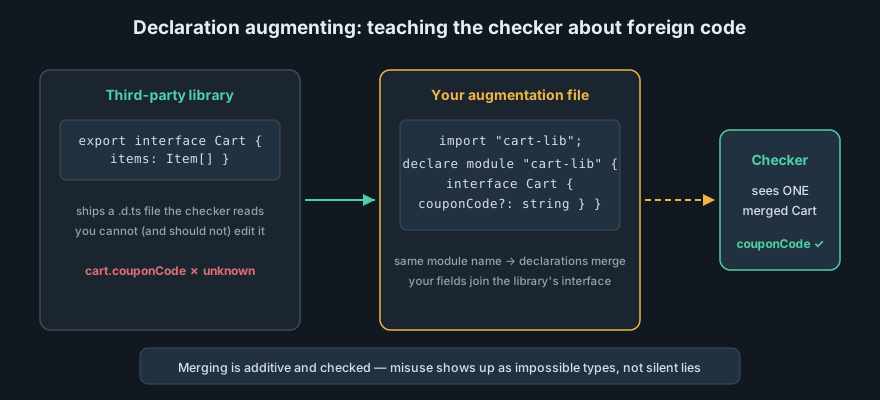
When two declarations for the same name are in scope, TypeScript merges them. Interfaces merge their members; namespaces merge their exports. This is how the language lets you extend types you do not own — including globals.
Augmenting a module's public contract
Purpose of the example: add a missing field to a dependency's exported type — without editing node_modules.
// types/express.d.ts — module augmentation
import "express";

declare module "express-serve-static-core" {
  interface Request {
    // your auth middleware attaches this to every request:
    userId?: string;
  }
}

// src/middleware.ts — the augmentation is visible everywhere:
export function auth(req: Request, res: Response, next: NextFunction): void {
  req.userId = extractUser(req);       // typed access…
  if (req.userid) { }                  // ✗ error: did you mean 'userId'?
  next();
}
What you should see: req.userId autocompletes and checks, while the typo req.userid errors — impossible to achieve safely with (req as any).userId. What we learn: augmentation is the professional answer to "the library's types don't know about our middleware". It is scoped, reviewable, and merges into the real contract instead of replacing it with any.
Merging rules — and when not to use them
Three facts govern merging: interfaces with the same name in the same scope merge their members (duplicate function members become overloads; duplicate data members with different types are an error); namespaces merge with namespaces, classes, and interfaces; type aliases do not merge — two same-named aliases are a hard error. That last rule is usually what you want: augmentation is for extending shared contracts, and the restriction of merging to interfaces is why the handbook recommends interface for public API surfaces and type for most everything else.
Generating and publishing declarations
When you ship a package, consumers deserve the same bridge in reverse: emit your own .d.ts files so npm i your-package is fully typed.
Emit declarations with tsc
Purpose of the example: the minimal publish-ready config for a library.
{
  "compilerOptions": {
    "declaration": true,          // emit a .d.ts beside every .ts
    "emitDeclarationOnly": true,  // types only — a bundler (esbuild) emits the JS
    "outDir": "dist",
    "strict": true
  }
}
What you should see: after npx tsc, dist/ contains pairs like client.js + client.d.ts, and package.json gains "types": "dist/client.d.ts". What we learn: declaration emit is the checker reading your source and writing the contract out — which is also why isolatedDeclarations exists for fast pipelines: it guarantees the declarations can be generated without full type inference.
Wire the package entry points
Emitting files is not enough — Node and bundlers must find the declarations. Modern packages point at them through the exports map, with types listed first so tools resolve the contract before the implementation:
Purpose of the example: a publishable package.json fragment for a dual-consumption library (import and require).
{
  "name": "my-lib",
  "exports": {
    ".": {
      "types": "./dist/index.d.ts",   // resolved first — the contract
      "import": "./dist/index.js",    // ESM consumers
      "require": "./dist/index.cjs"   // CommonJS consumers
    }
  }
}
What you should see: a consumer running tsc --noEmit against your package resolves types through the exports map with zero configuration on their side. If they instead see "Could not find a declaration file", the types condition is missing or points at a file that was never emitted. What we learn: shipping types is a packaging problem as much as a compiler one — the contract travels through package.json, and a broken map silently degrades your library back to untyped JavaScript.
Practice: type an untyped module yourself
Write the declaration from behavior
Take a small untyped package you use (or a util file from an old JS project). Write a .d.ts for its three most-used functions, including one that accepts an options object. What you should see: reading the JS source to extract the contract — which parameter is optional, what is mutated, what throws — is the real work; the syntax is trivial. What we learn: declarations encode decisions about truth, which is why the DefinitelyTyped project has millions of lines reviewed by humans.
Break your own contract
Deliberately make your declaration lie: declare a function as returning number when the JS returns a string. What you should see: the consumer compiles cleanly and then misbehaves at runtime — the checker amplified your lie. This is the cost-benefit picture in one exercise: declarations move trust forward to the contract, so keeping them accurate is everyone's job.
Next, the modules lesson covers how the files themselves are organized, resolved, and shipped.