
TypeScript Modules: Organizing and Shipping Typed Code
You already know ES modules — TypeScript keeps that syntax and adds a layer of questions JavaScript never asks: which imports are types, what happens to them after erasure, and how does the checker find the file an import refers to? This lesson answers those, then applies the answers to the architecture problem they were built for: keeping large codebases' boundaries honest.
The type side of imports and exports
Every import carries two kinds of payload: values (which exist at runtime) and types (which do not). Since the compiler erases types, it needs to know which is which — otherwise an import of a pure type can survive into emitted JavaScript and crash the runtime.
export type and import type
Purpose of the example: make the value/type distinction explicit, so the emitted JavaScript never imports what does not exist.
// billing/pricing.ts
export interface PriceRule {          // a TYPE — vanishes at runtime
  id: string;
  apply(total: number): number;
}

export const VAT_RATE = 0.2;          // a VALUE — survives at runtime

// billing/invoice.ts
import { VAT_RATE } from "./pricing";
import type { PriceRule } from "./pricing";   // explicit: type-only import

const rule: PriceRule = {             // the type is usable…
  id: "vat",
  apply: (total) => total * (1 + VAT_RATE),
};
// `import { VAT_RATE, type PriceRule }` — inline form — also works per-specifier
What you should see: both forms compile to the same runtime import of VAT_RATE only; PriceRule appears nowhere in the emitted JavaScript. What we learn: import type documents intent in both directions — the reader knows the name carries no runtime weight, and the bundler knows it can drop the import even when its single-pass analysis cannot see how the name is used.
verbatimModuleSyntax: making erasure honest
Historically the compiler guessed: an import it deemed type-only was dropped at emit, sometimes wrongly (the famous isolatedModules pitfall that made single-file transpilers emit broken code). verbatimModuleSyntax ends the guessing:
{
  "compilerOptions": {
    "module": "ESNext",
    "moduleResolution": "Bundler",
    "verbatimModuleSyntax": true   // emit imports EXACTLY as written
  }
}
What you should see: with the flag on, import { PriceRule } from "./pricing" without the type keyword is an error ("'PriceRule' is a type and must be imported using a type-only import") — because the emit would keep an import the runtime cannot resolve. What we learn: this flag aligns the compiler with reality: bundlers and Node strip types per-file without seeing the whole program, so the source itself must say what is a type. It also matches Node's native type stripping, which demands the type keyword for the same reason (see the setup lesson).
How resolution finds what you import
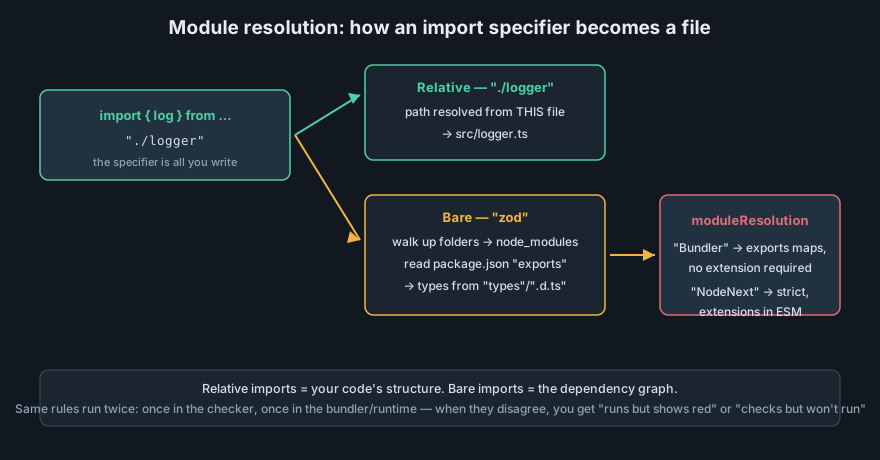
moduleResolution selects the strategy and must match what your bundler or runtime actually does.When the checker reads import … from "./pricing", it must map that specifier to a file — using rules chosen by moduleResolution. Getting this wrong is the classic "works in my editor, fails in the build" bug.
Resolution modes and relative imports
Purpose of the example: see which resolution mode your project needs and what each changes.
// Relative import — always the right tool for code you own:
import { createInvoice } from "./invoice";       // sibling file
import { logger } from "../shared/logger.js";    // Node-style: extension may
                                                 // be REQUIRED depending on mode

// Extension rules differ by mode:
//  • moduleResolution "Bundler"  — extensions optional, package.json "exports"
//    honored, allows importing bare directories (Vite/esbuild behavior)
//  • moduleResolution "NodeNext" — matches real Node ESM: extensions REQUIRED
//    in relative imports (./invoice.js for ./invoice.ts)
What you should see: the same file can check cleanly under "Bundler" and fail under "NodeNext" with "Relative import paths need explicit file extensions" — the rules, not your code, changed. What we learn: pick moduleResolution to match what actually runs your code, and prefer relative imports with explicit intent for anything inside the repo.
"zod") resolve through package metadata; relative specifiers ("./invoice") resolve through your tree and tsconfig aliases. The checker, the bundler, and the runtime each implement these rules — misalignment between them is the root of most module bugs.Path aliases — and why they are config, not syntax
Large repos use aliases to import across features without brittle ../../.. chains:
{
  "compilerOptions": {
    "baseUrl": ".",
    "paths": {
      "@billing/*": ["src/features/billing/*"]
    }
  }
}
import { createInvoice } from "@billing/invoice"; // checker-resolved aliasWhat you should see: clean checking — and, if you run Node natively, a runtime crash: Node does not read tsconfig and cannot expand @billing. Bundlers (Vite) need the alias configured twice, once for the checker and once in their own config. What we learn: aliases are a checker-level fiction that every other tool must be taught separately. Modern repos either mirror them in the bundler config or use package.json imports (#billing/*), which all real tools understand.
Module boundaries as architecture
The type system turns module design from convention into something checkable. The pattern below — feature slices with a single public entry file — is the standard shape for React and Node codebases alike.
Feature slices and the barrel contract
Purpose of the example: enforce a public API per feature so internal refactors stay local.
src/
  features/
    billing/
      pricing.ts        # implementation detail
      invoice.ts        # implementation detail
      index.ts          # THE public contract of the feature
    auth/ …
// src/features/billing/index.ts — the only file other features import
export { createInvoice } from "./invoice";
export type { Invoice, PriceRule } from "./pricing"; // types in the API too
// src/features/reporting/monthly.ts
import { createInvoice } from "../billing"; // ✓ through the barrel
// import { createInvoice } from "../billing/invoice"; // ✗ style-enforced deep importWhat you should see: renaming or reorganizing files inside billing/ touches only its index.ts; no other feature notices. What we learn: the barrel file is a module's public interface, the same idea as an interface on a class — and export type keeps type-only API surface out of the runtime bundle.
Dependency direction you can check
The rule "domain code must not depend on UI code" is usually a lint rule — but the module structure makes it checkable in the cheapest possible way: if billing/domain.ts imports nothing from ui/, the emitted dependency graph proves it. Circular imports, the other classic hazard, are where import type earns its keep a second time: type-only cycles are harmless (both sides are erased), value cycles are bugs. When the checker reports a cycle, first check whether one side can become import type.
Practice: build and break a module boundary
Extract a feature with a barrel
Take any small project and split off one feature directory with an index.ts exporting exactly three names (two values, one type), enabling verbatimModuleSyntax first. What you should see: the flag forces export type on the type re-export immediately — the compiler teaching your contract. What we learn: a public API is a decision, and the module system gives you the syntax to enforce it.
Diagnose a resolution failure
Write an import with a deliberately wrong specifier (./Invoice vs ./invoice) and read the error under "Bundler" resolution. What you should see: TS2307 with a list of candidates the checker tried. On case-sensitive Linux CI the same mistake is a runtime crash instead — which is why forceConsistentCasingInFileNames is on in every professional config. What we learn: resolution errors are environment mismatches, and the compiler is your only chance to catch them before deployment.
Modules define the skeleton; the decorators lesson adds the metaprogramming layer that frameworks build on.