
Core Types and Narrowing
if statements imply. Master this chapter and the advanced material later becomes arithmetic.Why narrowing is the core skill
A JavaScript variable has no type; a JavaScript value has one, and it can differ every time a function runs. That is the root cause of the most common runtime bug in the language: undefined is not a function and cannot read property of undefined. TypeScript's answer is a division of labor — types describe the set of possible shapes, and narrowing lets the checker track which member of that set is live at each line.
The problem: values change shape at runtime
Purpose of the example: show a plain-JavaScript function that works in tests and fails in production, because nothing recorded the possible shapes of its input.
// plain JS — what is the problem here?
function formatId(id) {
  // Sometimes the backend sends a number, sometimes a string.
  return id.trim();          // 💥 TypeError when id is a number
}

formatId("u-100");  // works
formatId(100);      // works in code review, crashes at runtime
What you should see: nothing warns you — the failure is discovered by users. The function's contract in JavaScript is implicit and unwritten: it means "anything with .trim", but nothing enforces it.
The solution: unions plus narrowing
TypeScript solves this with two cooperating features. A union type honestly documents the set of possible shapes; a type guard (typeof here) lets the checker refine the union inside each branch.
Purpose of the example: turn the crash above into a compile-time conversation.
// The union documents reality: callers may send either shape.
type Id = string | number;

function formatId(id: Id): string {
  if (typeof id === "number") {
    // Inside this block, `id` IS a number: .toFixed exists, .trim does not.
    return `id-${id.toFixed(0)}`;
  }
  // After the check, `id` IS a string: .trim exists, .toFixed does not.
  return id.trim();
}

formatId("u-100"); // OK
formatId(100);     // OK — both shapes are part of the contract
formatId(true);    // ✖ compile error: boolean is not string | number
What you should see: the editor autocompletes id.toFixed in the first branch and only id.trim in the second. Passing a boolean is flagged before you save.
What we learn: a union is not "loose typing" — it is a precise description of variability, and narrowing is how you (and the checker) navigate it. This pattern replaces thousands of defensive runtime checks.
Primitives, unions, and literals
Before narrowing strategies, make sure the vocabulary is exact. These three constructs cover most annotations you will write in application code.
Annotating primitives
Purpose of the example: the five primitives you will annotate daily — and the two that interact with strict mode in a special way.
let username: string = "maya";
let score: number = 42;        // JS has one number type (no int/float split)
let isActive: boolean = true;
let nothingHere: null = null;
let notFetchedYet: undefined = undefined;

// With strictNullChecks (on by default via `strict`):
let name2: string = "maya";
name2 = null;   // ✖ compile error: null is not a string
// A nullable value must say so in the type:
let nickname: string | null = null;   // honest about "may be absent"
What you should see: the last assignment errors. That error is the feature: strictNullChecks turns JavaScript's billion-dollar mistake into a visible, fixable type error at the exact line where absence could sneak in.
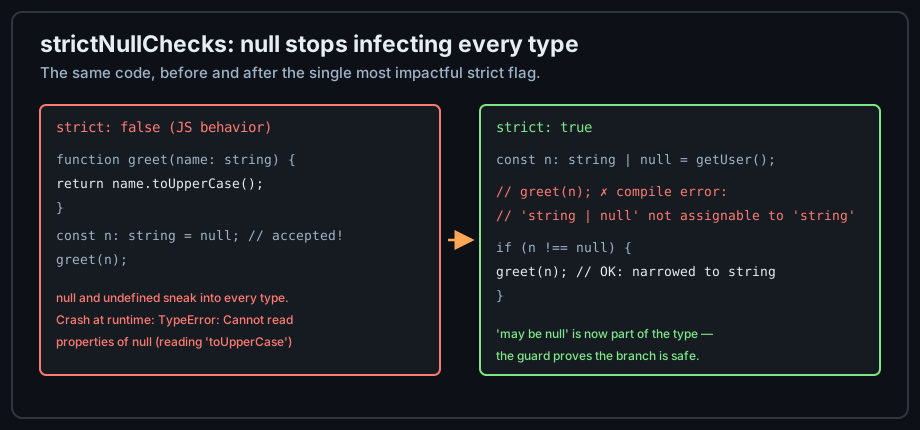
string | null forces a check; after the check, the checker narrows the type so the rest of the code can treat the value as plain string. The check is not boilerplate — it is the price of provable safety.Literal types: closed vocabularies
A literal type is a type with exactly one value. Combined with unions, it models every "stringly typed" API field in JavaScript — but with autocomplete and exhaustiveness.
Purpose of the example: replace magic strings with a closed set the checker enforces.
// Without TS, this value could be any string — typos included.
type Status = "idle" | "loading" | "success" | "error";

let state: Status = "idle";
state = "loding";   // ✖ compile error: typo caught instantly
state = "loading";  // OK
What you should see: the typo is underlined in the editor before you even save. This is why modern TypeScript prefers literal unions over enums: zero runtime cost (fully erased), same closed-vocabulary guarantee.
Narrowing strategies, from basic to discriminated
Narrowing is not one technique but a family. Learning them in order of strength pays off for the rest of the track.
typeof narrowing
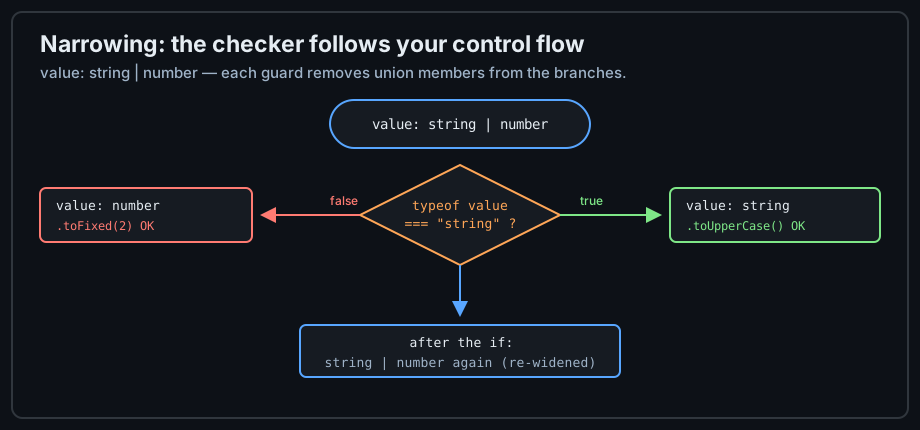
The workhorse for primitive unions. typeof value === "number" inside a branch makes value a number; returning or throwing in a branch narrows the code that follows. TypeScript also understands === comparisons, in checks for object properties, and Array.isArray.
Discriminated unions: the professional pattern
For object shapes, typeof is not enough. The strongest narrowing tool is a discriminated union: every member carries a literal tag property, and one check on the tag narrows everything.
Purpose of the example: model an API call result honestly, so the compiler forces callers to handle failure.
// Two shapes, distinguished by the literal `ok` tag.
type ApiSuccess = { ok: true; data: string[] };
type ApiFailure = { ok: false; error: string };
type ApiResult = ApiSuccess | ApiFailure;

function render(result: ApiResult): string {
  if (result.ok) {
    // TS knows: this is ApiSuccess. `.data` exists, `.error` does not.
    return result.data.join(", ");
  }
  // TS knows: this is ApiFailure. `.error` exists here — no null check needed.
  return `Error: ${result.error}`;
}
What you should see: inside the if, the editor offers result.data but not result.error; in the else path, vice versa. Accessing the wrong member is a compile error.
What we learn: the tag property (ok: true vs ok: false) is what makes narrowing reliable — a single check collapses the whole shape, not just one field. This exact pattern powers Redux reducers, fetch wrappers, and result types across the ecosystem. A related tool is the type predicate (value is Foo) for custom guards the checker cannot infer, like isEmail(value): value is Email.
unknown, any, and readonly discipline
unknown vs any at boundaries
Purpose of the example: show how one any silently disables every guarantee in this lesson — and why unknown is the professional default at program boundaries.
function parse(json: string) {
  const data: any = JSON.parse(json);
  // No error — `any` accepts anything and checks nothing:
  return data.nmae.toUpperCase();  // typo ships to production 💥
}

// The fix: `unknown` — accepts anything TOO, but refuses to be USED
// until narrowed:
function parseSafe(json: string): string {
  const data: unknown = JSON.parse(json);
  // return data.nmae.toUpperCase();  // ✖ compile error: data is unknown
  if (typeof data === "object" && data !== null && "name" in data) {
    return String((data as { name: unknown }).name).toUpperCase();
  }
  return "";
}
What you should see: the any version compiles and crashes at runtime; the unknown version refuses to compile until you validate. Rule of thumb: any is for migrations you have not finished; unknown is for data you do not control (APIs, JSON.parse, localStorage, event.target). For structured input, replace the cast with a runtime validator — covered in the errors lesson.
readonly and as const
Purpose of the example: make immutability visible to the checker, so accidental mutation becomes a compile error instead of a debugging session.
// `as const` makes every member a literal AND the whole array readonly.
const ROLES = ["admin", "editor", "viewer"] as const;
type Role = (typeof ROLES)[number];   // "admin" | "editor" | "viewer"
ROLES.push("owner");                  // ✖ compile error: readonly array

// `Readonly` protects object properties:
type Config = Readonly<{ apiUrl: string }>;
const config: Config = { apiUrl: "/api" };
// config.apiUrl = "/other";          // ✖ compile error
What you should see: mutation attempts flagged immediately, and Role staying a precise union instead of widening to string[]. Note the two-way trick: as const creates the data, typeof extracts its type — the pattern behind most "single source of truth" constant modules.
Common mistakes (and their fixes)
The same handful of mistakes accounts for most "TypeScript didn't save me" stories. They split into two groups: mistakes at the boundary (where untyped data enters) and mistakes in modeling (how the type describes the domain).
Boundary mistakes: any and casts
| Mistake | Symptom | Fix |
|---|---|---|
Casting instead of narrowing (value as string) | Runtime crash the compiler "approved" | Use a real guard; cast only when you genuinely know more than the checker, with a comment justifying it |
any at API boundaries | Typo bugs survive to production | unknown + narrowing, or a validator |
Modeling mistakes: unions and nullability
| Mistake | Symptom | Fix |
|---|---|---|
| Wide unions without a narrowing plan | Endless optional checks everywhere | Discriminated unions with a literal tag |
| Nullable fields rendered without checks | Cannot read properties of undefined in UI | | null in the type forces the check the render path needs |
Practice: a typed state machine
Exercise: profile page state
Model a profile page as a discriminated union — idle, loading, success (with the profile), error (with a message) — and write a render(state) function that handles every case. What you should see: removing any case from the renderer is a compile error once you add a default-free switch or an exhaustive-check helper; adding a new state (try retrying) forces the compiler to point at every place that must adapt. That forcing function — the type system as a checklist that maintains itself — is the single biggest workflow change TypeScript delivers to a JavaScript developer.
Checkpoint
You can now: read a union as a set of possible shapes; choose between any and unknown; and write discriminated unions with exhaustive handling. The next lesson zooms out to the rule that decides which values are allowed where — structural typing.