
Build System
build.zig) that the compiler runs. Build steps form a graph — compile, test, run, install — and every step is declared in ordinary Zig code with full type checking.
From Scaffold to Program
zig init creates a working project with a library, an executable, and a test — instantly green. It is the fastest path to seeing the whole pipeline in motion.
zig init
mkdir hello && cd hello
zig init          # generates build.zig, build.zig.zon, src/
zig build run     # compiles and runs the sample executable
zig build test    # runs the sample unit tests
Project Layout
hello/
├── build.zig        # the build script — a Zig source file
├── build.zig.zon    # package metadata and dependencies
├── src/
│   ├── main.zig     # executable entry
│   └── root.zig     # library exports
└── .zig-cache/      # compiler cache — ephemeral, never commit
Anatomy of build.zig
The core of any build.zig is the build function. It receives a Build handle, reads options, creates artifacts, and wires steps. The code below is for Zig 0.15; older releases used a slightly different module API.
Adding an Executable
const std = @import("std");

pub fn build(b: *std.Build) void {
    const target = b.standardTargetOptions(.{});   // --target flag
    const optimize = b.standardOptimizeOption(.{}); // -Doptimize flag

    const exe = b.addExecutable(.{
        .name = "hello",
        .root_module = b.createModule(.{
            .root_source_file = b.path("src/main.zig"),
            .target = target,
            .optimize = optimize,
        }),
    });
    b.installArtifact(exe); // makes the binary appear in zig-out/bin

    const run_cmd = b.addRunArtifact(exe);
    if (b.args) |args| run_cmd.addArgs(args);
    const run_step = b.step("run", "Run the app");
    run_step.dependOn(&run_cmd.step);
}
Steps and Dependencies
Every artifact exposes steps (compile, run, test), and steps declare dependencies with dependOn. The example wires a run step after the compile step — the graph runs in order, and caching skips untouched parts.
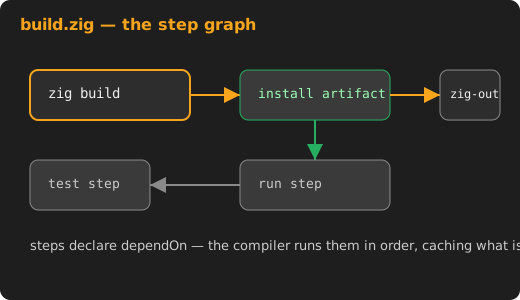
Figure 1 — steps form a dependency graph: test feeds run, install feeds release.
The Workflow
Three commands cover development; all three read the same build.zig, so the paths stay consistent.
Command Reference
| Command | Effect |
|---|---|
zig build | Compile all installable artifacts into zig-out/ |
zig build run | Build, then execute the run step |
zig build test | Build and execute every test step |
zig build run -- args | Pass arguments to the running program |
Build Options
Options arrive as flags: -Doptimize=ReleaseSafe picks a mode, -Dtarget=x86_64-windows cross-compiles. --help on any build prints the options your build.zig declared — self-documenting builds are the norm.
Modules and Packages
Larger projects split code into modules and dependencies. build.zig.zon declares the package identity and its external dependencies with hashes; zig fetch --save pins them.
build.zig.zon
.{
    .name = .hello,
    .version = "0.1.0",
    .minimum_zig_version = "0.15.0",
    .dependencies = .{},
}
Fetching Dependencies
zig fetch --save https://github.com/foo/bar/archive/refs/tags/v1.0.0.tar.gz
# adds the dependency with its hash to build.zig.zon
Common Pitfalls
Trusting the Cache Directory
.zig-cache and zig-out/ are regenerated. Never commit them, and never ship files from cache — install via the declared steps so dependencies are explicit.
Wrong Root Module Path
A wrong root_source_file path surfaces as a confusing import error. Point it at the file with the pub fn main you intend to run, and keep one module per artifact for clarity.
Next: C Interop — importing the C ecosystem.