
Eve Control Flow
General Pattern
Most control statements have a block structure with data scope, specific keyword pairs for declaration region, execution region start and end of block. We diverge from classic begin...end or {}, to create a more verbose and relevant syntax.
[label:] <control_type>
    ** Declarations & local scope initializations
<transition_keyword>
    ** Executable statements
[optional clauses]
<terminator>
Statements that represent a note, or a jump point require label. Statements that do not represent a jump point have optional label. We use a label only if we need to be specific about the control statement closing it or jumping back to it or refer it.
Sequential job
A job is a labeled block of statements in a process. It has no error handlers: write the job so that it does not fail. If it fails anyway, the error is handled at process level, in the recover region, which can run the job again, continue after it, or abort the process.
Syntax pattern
A job usually has a label and belong to a process. It starts with label: job and ends with done label;. If a job do not have label, it can't be referred. If code fail, we do not know what job has failed and we can't handle the error properly:
** job description or notes
[job_name:] job
  ** local declarations
  ...
do
  ** job statements
  ...
  stop if condition; ** leave the job without error
  ...
  raise "message" if condition; ** fail the job: go to recover
  ...
done [job_name];
Notes:
- Jobs are used only in a process (driver or aspect), at the top level. Jobs can't be nested; functions and methods do not have jobs.
- The label is mandatory, and the closing
done label;must repeat it. There is no implicit job name and nodone job. - A job passes when it reaches
doneorstop. It fails when an error is raised inside it, including errors from the methods it calls. The job status is recorded automatically:"none"for a job that was never executed,"pass"or"fail". - The status belongs to the process, in the map
jobs:jobs["name"].status,jobs["name"].errorandjobs["name"].line. The recover region reads$error.job(a string) to know which job failed. - Nothing is reported automatically. The process reads the job states and writes its own report in the
finalizeregion. - When a job fails, the process jumps to its recover region: see Recover from exception.
Conditional If
Keyword "if" establish a conditional statement. Also it can be used in expressions. A conditional statement can be a simple statement or a block statement. You can also use "if" after a simple statement or before a block statement.
Code pattern
This is syntax for a simple statement with conditional execution. It enable or prevent a statement to be executed.
# conditioned statement
statement if boolean_variable;
statement if boolean_expression;
Example
Next examples show how we can use conditional to print something when expression is fulfilled.
# conditional print
print "a is even" if (a % 2 == 0);

print "a is odd"  if (a % 2 <> 0);
Note: The "if" is restricted for some statements. It can't be used after expect or done. A loop ends early with break if condition;. We will explain syntax for each block statement.
Decision block
In next pattern we use "if/else" keywords to create a decision branch/fork.
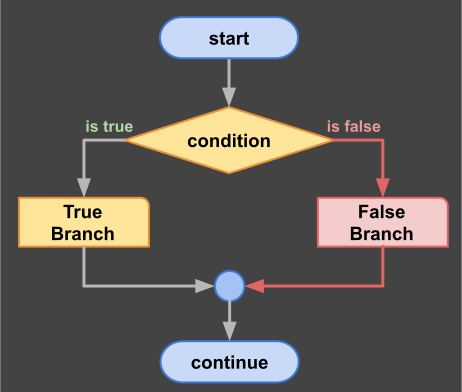
decision diagram
# dual path decision
if expression do
  ** true branch
  ...
else
  ** false branch
  ...
done; ** you can't use if after done
Notes:
- The if block does not have a name;
- The if block does not open a scope: a variable created in a branch belongs to the parent scope;
- The if block is closed with "done;";
- The else branch is optional;
Ladder
A ladder is a conditional multi-path selector based on exclusive conditions. Only one branch is executed. If no condition is satisfied the alternative branch is executed. Alternative branch is optional.
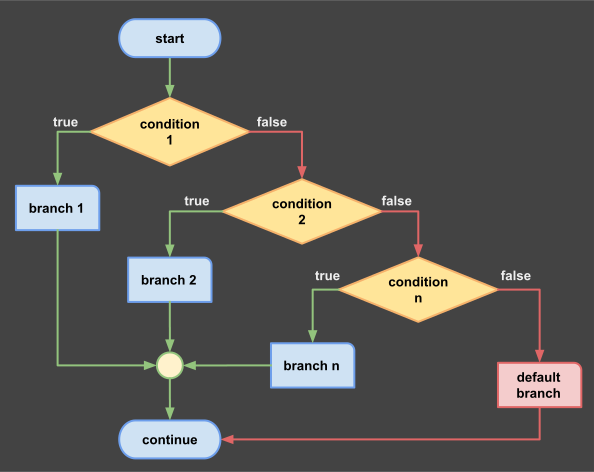
decision ladder
Example:
#selection ladder
if condition_1 do
  ** first branch
  ...
else if condition_2 do
  ** second branch
  ...
else if condition_3 do
  ** third branch
  ...
[else]
  ** alternative branch
  ...
done; ** you can't use if after done
Notes: Previous pattern show a complex situation having several conditions in cascade. Cases should be exclusive and most probable case should be evaluated first. Last block, after else is optional. Like the if block, the ladder does not open a scope.
Match Selector
This is a multi-path selector similar to switch also named: jump table. It has two variants: "all" or "one". That is an optional keyword. If used, "all" will evaluate all "when" branches it may be matching multiple cases. If "one" is used (this is the default), only first case that has a matching value will be executed and the rest are ignored, even if a second match exist. The second match should not be present though and is probably a mistake!
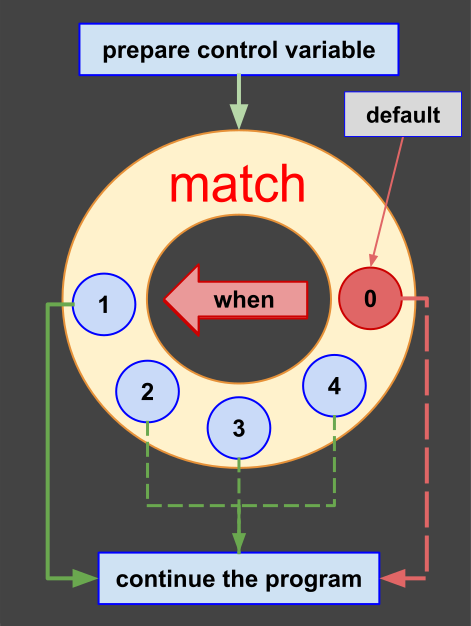
Match Diagram
Pattern:
# Define a selector variable
class Type = {V1, V2, V3, V4} <: Ordinal;
...
process main is
  new s := V1;

  ** create match selector
  match s [one | all]
    ** declare locals
    ...
  when V1 do
    ** first path
    ...
  when (V2, V3) do
    ** second path
    ...
  when other do
    ** no other path matched: V4 found
    ...
  done; ** you can't use if after done
  ** whatever path was taken, the next statement runs after the match
  ...
return;
Notes:
- options: all or one are exclusive (one) is the default;
- the default block (last) is
when other: it is executed only if nowhenmatched; - there is no
thenclause: write the statements afterdone;, in the scope of the process or job; they run for any path, includingother; - a
whencan test a value, several values or a range; - match statement can have a label. A labeled match closes with
done label;, otherwise withdone;; - match statement has a local scope (before the first when).
Example with ranges:
#match with ranges
process main is
  new n := 7;
  match n
    when (1..5) do
      print "low";
    when (6..10) do
      print "high";
    when other do
      print "out of range";
  done;
return;
The compiler will generate a warning message if not all cases are covered when you do not create the default block. It may be an error but not necessarily. Is better to have information to prevent wrong doing.
While Loop
Execute a block of code as long as one condition is true. When the condition become false the repetitive block ends. If the condition is false the first time, only the "else" block is executed. If the condition was true at least once, the else block is not executed. The statements after done; run every time the loop ends, also after a break. A loop that must run at least once, or that runs until break, is the Repeat Loop.
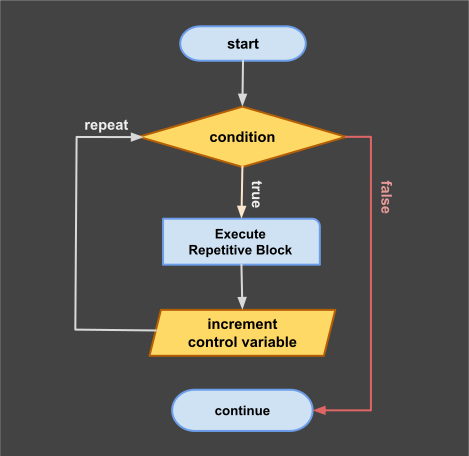
while loop
Syntax:
#conditional loop
[label:] loop
  ** declare control variables (optional header)
  ...
while condition do
  ** go back to the condition: skip the rest of the cycle
  skip if condition;
  ...
  ** early interruption
  break if condition;
  ...
else
  ** alternative path
  ...
done [label]; ** you can't use "if" here
** the next statement runs every time the loop ends, also after break
Example:
# Visit the members of a list using an unlabeled loop
primary aspect while_demo is
  ** create a shared list
  set letters = ("a","b","c","d","e");
  process main is
    ** i is declared in the process: it is visible after the loop
    new i = 1 :Integer;
    while i <= letters.length() do
      ** e is created again at every iteration
      new e = letters[i] :String;
      let i += 1;
      if e >= "c" do
        write e;
        write "," if i <= letters.length();
      done;
    else
      panic; ** the list is empty
    done;
    ** flush the write buffer
    print;
    print ("iterations", i - 1, separator: " ");
  return;
end while_demo;
Output:
c,d,e
iterations 5
Notes:
- The
loopheader is optional. It holds the label and the declarations of the loop. These variables live in the loop scope, survive all iterations and are available in the body and inelse, not afterdone. Without a header, the loop body has no private scope: it uses the parent scope; - The
dokeyword starts the executable region. A variable created there withnewis created on the stack at every iteration. Declare in the header what must survive the cycles, and in the process what must be read after the loop; skip [label] [if condition];ends the current cycle early and goes back to the condition. It works in every loop: see Repeat Loop and For Loop;- Some other languages use {break & continue}, we use {break & skip};
while True dois accepted without a warning and itselseblock never runs, but a loop without a condition is writtenloop do … repeat;(Repeat Loop);- A
whileloop is closed withdone:done label;for a labeled loop,done;otherwise; - There is no
thenclause: the statements afterdone;run when the loop ends, also afterbreak.stopis used only for jobs andbreakonly for loops.
Repeat Loop
The repeat loop tests its condition at the end, so its body runs at least once. It starts with loop, may declare variables in its header, runs the body after do, and ends with repeat. repeat while condition; starts another cycle while the condition is true. A bare repeat; always starts another cycle: the loop ends only with break. This is the infinite loop of Eve.
Syntax:
#loop tested at the end
[label:] loop
  ** declare control variables (optional header)
  ...
do
  ...
  ** go to the test at the end: the condition is still verified
  skip if condition;
  ...
  ** early interruption
  break if condition;
  ...
repeat [label] [while condition];
Example:
#test at the end
process main is
  new n = 0 :Integer;
  loop do
    let n += 1;
    write n;
    write "," if n < 3;
  repeat while n < 3;
  print;
return;
Output:
1,2,3
A skip in a repeat loop goes to the test at the end. The condition is verified after every cycle, also a skipped one:
#skip the even numbers
process main is
  loop
    new i = 0 :Integer;
  do
    let i += 1;
    skip if i % 2 == 0;
    write i;
    write "," if i < 5;
  repeat while i < 6;
  print;
return;
Output:
1,3,5
A loop without a condition ends with break:
#loop until break
process main is
  new line = "" :String;
  loop do
    read(@line, "command:");
    break if line == "quit";
    skip if line == "";
    print ("you said", line, separator: " ");
  repeat;
return;
Notes:
repeatcloses the loop. It is not a statement inside the body;- The body always runs once, so a repeat loop has no
else. It has nothenclause, as no loop has one: the code afterrepeatruns when the loop ends; - The header variables live in the loop scope, survive all the cycles and are visible in the condition after
repeat while; skipgoes to the test at the end, so the condition is verified also after a skipped cycle. With a barerepeat;,skipstarts the next cycle;breakleaves the loop at once, without the test.
For Loop
This statement use one control variables to visit elements in a collection or domain. First use-case of this is to iterate over a range of numbers. In Eve the range is represented as (min..max).
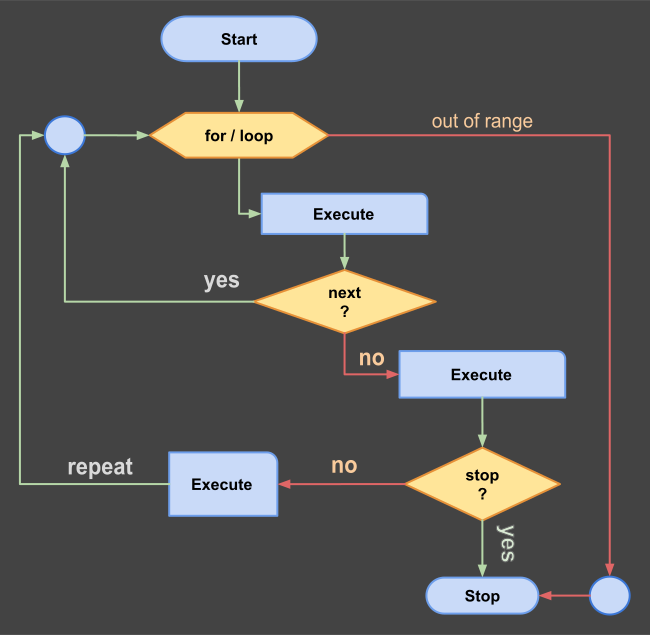
for ... loop
Pattern:
#for loop syntax
[label:] for var in (min..max) do
    ** block statements;
    ...
    ** go to the next element
    skip if condition;
    ...
    ** early interruption
    break if condition;
done [label]; ** you can't use "if" here
** what happens after the loop
Notes:
- Control variable is auto-incremented at end of each iteration;
- Control variable is declared in the
loopheader. If the loop has no header, theforstatement creates an implicit scope for it; if the header exists,foruses that scope and creates none; skip [label] [if condition];ends the current cycle and advances the control variable to the next element. It is thecontinueof other languages;- Variables created by
newin thedoregion are created again at every cycle. Declare in the header what must survive, for example a counter; - Control variable is local to the loop: it is not available after
done; breakleaves the loop (or the outer loop, when a label is used) and the statements afterdone;are still executed;- Inside a loop that is inside a job,
stopends the job andbreakends only the loop.
Example:
Range iteration using step ratio 2:
#example of range iteration
for i in (1..10)(2) do
    ** write only odd numbers
    write i;
    write ',' if (i < 9);
done;

print;
Output:
1,3,5,7,9
Same loop without a header: the for statement creates the scope of i, which ends at done:
#anonymous scope
for i in (1..5) do
    write i;
    write "," if (i < 5);
done;
print;
Output:
1,2,3,4,5
Skip an element: skip ends the cycle and the control variable takes the next value:
#skip an element
for i in (1..6) do
    skip if i % 3 == 0;
    write i;
    write "," if i < 5;
done;
print;
Output:
1,2,4,5
Block summary
| Block | Opener | Middle keywords | Closer | Label |
|---|---|---|---|---|
| job | name: job | do | done name; | mandatory |
| if | if c do | else if c do else | done; | no |
| match | [label:] match s | when v do when other do | done [label]; | optional |
| while | [label:] loop | while c do skip [if c] break [if c] else | done [label]; | optional |
| repeat | [label:] loop | do skip [if c] break [if c] | repeat [label] [while c]; | optional |
| for | [label:] loop | for x in r do skip [if c] break [if c] | done [label]; | optional |
| parallel | [name:] parallel | do | done [name]; | optional |
Closers: blocks end with done, except the repeat loop, which ends with repeat [label] [while c];. A block that has a label ends with done label;; a block without a label ends with done;. There is no done if, done while, done loop or done job, and if cannot follow done. Eve is not regular for its own sake: subprograms end with return, classes and modules with end, and a loop tested at the end with repeat.
Interruptions: skip ends the current cycle of a loop and goes to its continuation point (the next element of a for, the condition of a while, the test of a repeat), break leaves a loop, stop ends a job without error.
Read next: Strings