
HTML Validation and Submission
Validation written in attributes is declarative, consistent across browsers, localized into every browser language, and keyboard accessible. Rebuild it in JavaScript and you must re-implement all four qualities by hand. HTML validation is also only the first line of defense: the server always re-checks (chapter 15 explains why it must).
The rule set
required and length rules
required blocks submission until the field has a value; minlength and maxlength bound text length. Together they cover most simple fields:
<label for="user">Username</label>
<input id="user" name="user" required minlength="3" maxlength="20">
Numeric bounds: min, max, step
Number-like inputs take range rules. The browser blocks out-of-range values at submit and the spinner respects step:
<input name="guests" type="number" min="1" max="8" step="1">
<input name="starts" type="date" min="2026-10-01" max="2026-10-31">
pattern: regular expressions for the rest
When no built-in rule fits, pattern applies a regular expression to the value. Always pair it with a title explaining the expected format — the browser surfaces that text in its error bubble:
<!-- letters and spaces only, 2-40 chars -->
<input name="city" pattern="[A-Za-z\\s'-]{2,40}"
       title="City name: letters, spaces and hyphens">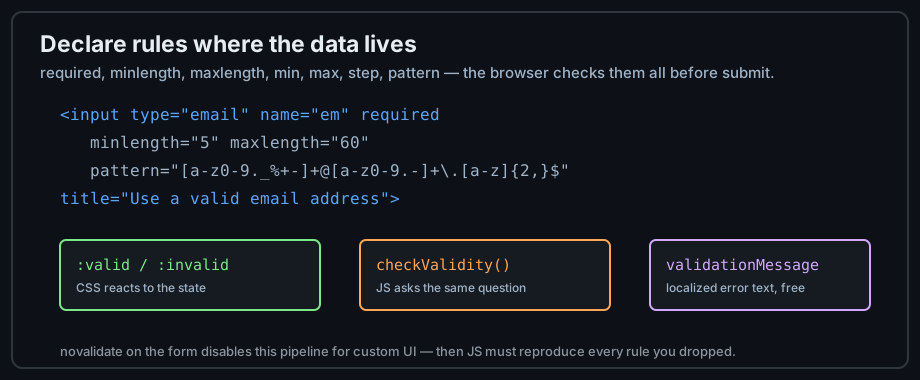
Figure 1 — Declare rules on the input; the browser enforces them.
Error states and feedback
CSS reacts: :valid and :invalid
Validation state is styleable with :valid, :invalid, and — better — :user-invalid, which only matches after the user has interacted, avoiding the "form is red before I typed" effect:
input:user-invalid { border-color: #ff7b72; }   /* after user input */
input:valid       { border-color: #7ee787; }
Error messages
The browser's default error bubbles are localized and honest, but generic. Accessible forms pair each field with an error region — aria-describedby links the message, and the message text says how to fix the problem, not just that it is wrong:
<label for="em">Email</label>
<input id="em" name="em" type="email" required aria-describedby="em-error">
<p id="em-error" class="field-error">Enter your email in the form name@example.com</p>
The JavaScript API
Every validating control exposes validity (a state object), checkValidity() (a boolean question), and validationMessage (the localized explanation). Custom checks integrate by calling setCustomValidity():
// only for rules HTML cannot express (e.g. cross-field checks)
form.addEventListener('submit', (event) => {
  const start = form.elements.starts.valueAsDate;
  const end = form.elements.ends.valueAsDate;
  const field = form.elements.ends;
  // setCustomValidity('') clears any previous custom error
  field.setCustomValidity(end > start ? '' : 'End date must be after the start date');
});
The submit flow
What happens, in order
Submit is a pipeline, and every stage can stop it: the event fires, constraints are checked, values are encoded, the request leaves, and the server answers. Knowing the stages tells you where your code belongs:
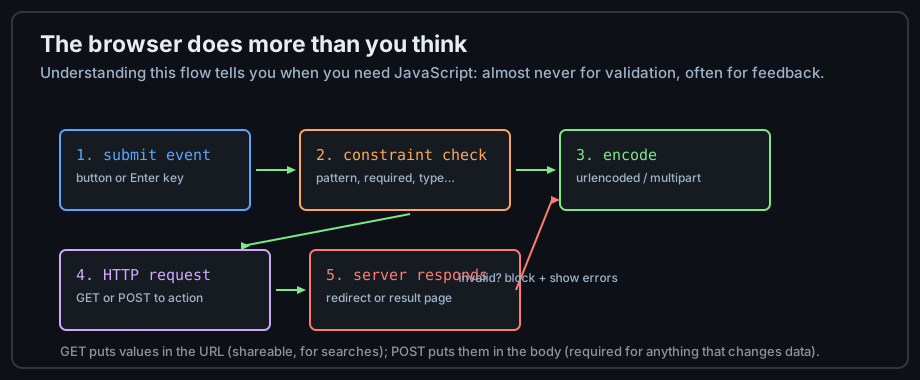
Figure 2 — The browser validates and encodes before any network request.
GET versus POST, decided
Use GET when submission is a query — the result page should be bookmarkable and shareable, and nothing changed server-side. Use POST when submission changes something — an order, an account, a comment. This one rule settles most method choices; its security dimension arrives in chapter 15.
Interrupting submit with JavaScript
Calling event.preventDefault() in a submit handler cancels the navigation — the foundation of AJAX forms that fetch instead of navigating. The accessible pattern is progressive enhancement: the plain form works without JavaScript, and the script upgrades it:
form.addEventListener('submit', async (event) => {
  event.preventDefault();                     // stop the page navigation
  if (!form.checkValidity()) return form.reportValidity();
  const response = await fetch(form.action, { method: 'POST', body: new FormData(form) });
  status.textContent = response.ok ? 'Sent!' : 'Try again.';
});
Common mistakes
novalidate without a replacement
novalidate on the form disables the whole pipeline — legitimate when you render custom error UI, but then your JavaScript must reproduce every rule you dropped. Auditors find abandoned novalidate forms constantly; remove it unless the custom UI exists.
pattern as a trap
Over-strict patterns lock out real users — names with apostrophes, international phone formats, hyphenated addresses. Validate the minimum that must be true, not the maximum you can imagine; format policing belongs to the server, where a rejected user can be helped rather than trapped.
Ignoring server validation
Client validation is user experience; server validation is security. Any rule that matters — authorization, price, quantity — is enforced where the user cannot reach it. State this early and it becomes reflex.
Practice
Exercises
- Add
required,minlength, andpatternto a form and try to submit bad values — read every error bubble. - Style
:user-invalidand verify the field only reddens after you have touched it. - Write a cross-field check (two dates in order) with
setCustomValidity. - Submit the same form as GET and as POST and compare the request in the Network tab.
- Disable JavaScript (DevTools) and confirm the form still validates and submits — that is progressive enhancement.
Demo lab
08_validated_form.html in the Lab Examples page demonstrates the full rule set with visible error slots — view the source, then preview it and try to break it.