
HTML Metadata, SEO and Social
<head> for different signals. This chapter organizes that metadata into three layers and shows how each one is consumed.
Metadata is your page's press release to machines. Get it right and the page earns honest search snippets, correct language handling, and rich link previews; get it wrong and platforms improvise from arbitrary text. Everything here is static, portable markup — no backend required.
The three layers
Layer 1: making the page work
The functional set: encoding, viewport, title, description, canonical URL, favicon. These affect the page's own behavior in a browser — how it renders, scales, identifies itself, and points at its own canonical address:
<meta charset="utf-8">
<meta name="viewport" content="width=device-width, initial-scale=1.0">
<title>Metadata, SEO and Social - Sage-Code</title>
<meta name="description" content="How machines read your page's head.">
<link rel="canonical" href="https://sagecode.org/roadmap/html/metadata-seo.html">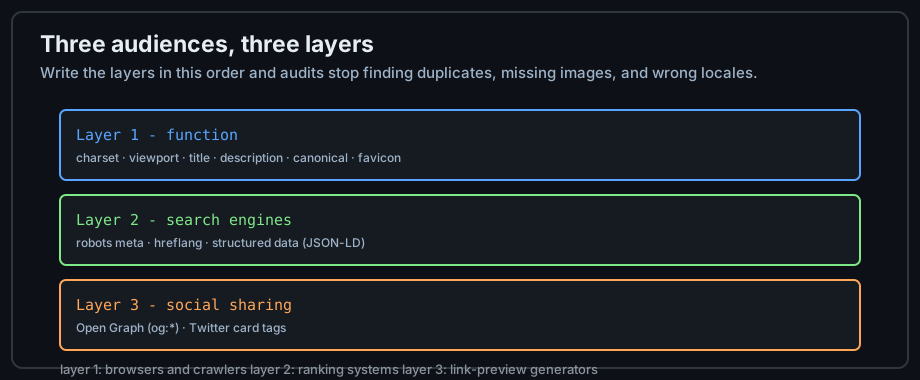
Figure 1 — Three audiences read three layers of head metadata.
Layer 2: search engines
robots controls indexing per page (noindex, nofollow), hreflang points at translations, and JSON-LD structured data describes what the page is. Layer 2 never contradicts layer 1 — conflicting signals make crawlers guess.
Layer 3: social sharing
Open Graph tags (created by Facebook, adopted everywhere) and Twitter card tags control how a shared URL renders as a card. They are the only reason one link preview looks curated and another looks broken.
The functional set in detail
title and description
<title> is the tab text, the bookmark label, and a top ranking signal — unique per page, front-loaded with the subject. meta description does not affect ranking but often is the snippet Google shows; write it as a one-sentence pitch:
<!-- unique per page, subject first -->
<title>HTML Forms and Controls - Sage-Code</title>
<meta name="description"
      content="The form element, input types, labels, and buttons — with accessibility built in.">
canonical: one page, many addresses
Query parameters, trailing slashes, and www/non-www variants give one page several URLs — which splits ranking signals. rel="canonical" declares the official address:
<link rel="canonical" href="https://sagecode.org/roadmap/html/metadata-seo.html">viewport and charset, revisited
Both were introduced in chapter 2; here is their metadata role. The viewport meta is how a page claims mobile-readiness — without it, phones render a zoomed-out desktop layout. The charset declaration protects every non-ASCII character on the page, and must appear within the first 1024 bytes.
Open Graph and social cards
The og: tags
Four properties generate the standard card: og:title, og:description, og:image, og:url. The image wants an absolute URL and roughly 1200x630 pixels — logos and relative paths produce broken previews:
<meta property="og:title" content="HTML Roadmap">
<meta property="og:description" content="Semantic HTML, forms, accessibility — beginner to expert.">
<meta property="og:image" content="https://sagecode.org/images/SageCode.jpg">
<meta property="og:url" content="https://sagecode.org/roadmap/html/">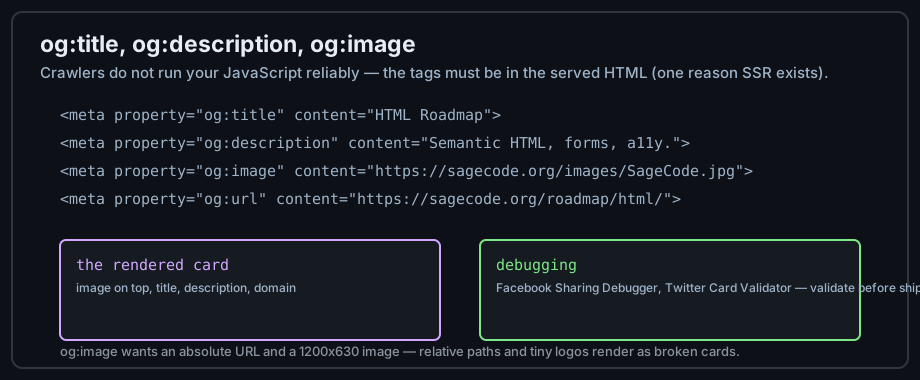
Figure 2 — Your og: markup is the preview a social platform renders.
Twitter card tags
Twitter/X reads its own twitter:card family but falls back to Open Graph for the content. Set twitter:card to summary_large_image or summary and let the og: tags carry the rest.
Debugging previews
Both platforms ship debuggers (Facebook Sharing Debugger, LinkedIn Post Inspector) that fetch the URL live and show the rendered card plus cached values. Validate before shipping — a bad og:image is invisible until someone shares the link.
Structured data with JSON-LD
The script that describes meaning
JSON-LD is a <script type="application/ld+json"> block describing the page in schema.org vocabulary: Course, Article, FAQPage, BreadcrumbList. Search engines parse it directly for rich results:
<script type="application/ld+json">
{
  "@context": "https://schema.org",
  "@type": "Course",
  "name": "HTML5 Tutorial",
  "description": "Semantic HTML, forms, accessibility, performance.",
  "provider": { "@type": "Organization", "name": "Sage-Code Laboratory" }
}
</script>
Rules for structured data
It must be valid JSON — a trailing comma silently disables the whole block. It describes content that must exist visibly on the page (structured data claiming invisible content is spam). Validate with the Rich Results Test before deploying.
What it cannot do
Structured data is not a ranking hack; it qualifies pages for rich presentation and removes ambiguity. The ranking signals remain content quality, structure (chapter 9), and performance (chapter 14).
Common mistakes
Duplicate titles and descriptions
Templating gone wrong: every page ships the same title, so search engines see a site of identical documents. Title and description are per-page assets — generate them from the page subject, and audit with a crawler tool.
Relative og:image
Social crawlers fetch your page without a browser and do not resolve relative paths — an og:image without the full absolute URL silently renders no image at all.
meta keywords
The keywords meta has been ignored by every major engine since 2009 and is used by spammers' generators. It is harmless but noise; effort belongs in title, description, and content.
Practice
Exercises
- Write complete layer-1 metadata for three pages of a mini site — unique titles, descriptions, canonicals.
- Add og: tags with a correctly sized image and validate the card in the Facebook Sharing Debugger.
- Add JSON-LD of type
ArticleorCourseto one page; validate it with the Rich Results Test. - Inspect the head of five major sites: count how many are missing canonical, viewport, or description.
Demo lab
11_social_metadata.html in the Lab Examples page carries the full three-layer head — view the source, then preview it and share the local URL to see what crawlers see.