
Running JavaScript: Your First Program
What JavaScript is
A program is a list of instructions
A computer does exactly what it is told: in order, immediately, and literally. A program is a text file full of such instructions, called code. Programming is the craft of writing instructions precise enough that a machine can follow them — and JavaScript is one of the languages you can write them in. The engine executes your code top to bottom, one instruction at a time. That single fact explains most beginner surprises: if line 3 needs something from line 5, line 3 runs first and fails.
Here is a complete JavaScript program. Read it, then read the output beneath it:
console.log("First instruction");
console.log("Second instruction");
console.log(2 + 3); // the engine computes 5 first, then prints it
You should see (in order, one line each):
First instruction
Second instruction
5
If you get this instead: nothing at all — check that you actually ran the code (next section), and that the console is showing all levels (no filter is hiding it).
The three languages of a web page
A web page is built from three cooperating languages. HTML says what is on the page (a heading, a button, an image). CSS says how it looks (colors, spacing, layout). JavaScript says what it does: react when the button is clicked, fetch new data, change the text. A useful mental model: HTML is the skeleton, CSS is the clothing, JavaScript is the muscles. A page without JavaScript is still a document; JavaScript is what makes it respond.
This division matters for how you study: this track teaches the JavaScript language and how it drives a page. The HTML roadmap and the CSS roadmap cover the other two, and only their basics are assumed here.
Where JavaScript runs
JavaScript always runs inside a host that provides the actual abilities — the language itself can neither draw a button nor read a file. The two hosts you will meet are the browser and Node.js. Both run the same language; they differ in what they hand your code to work with.
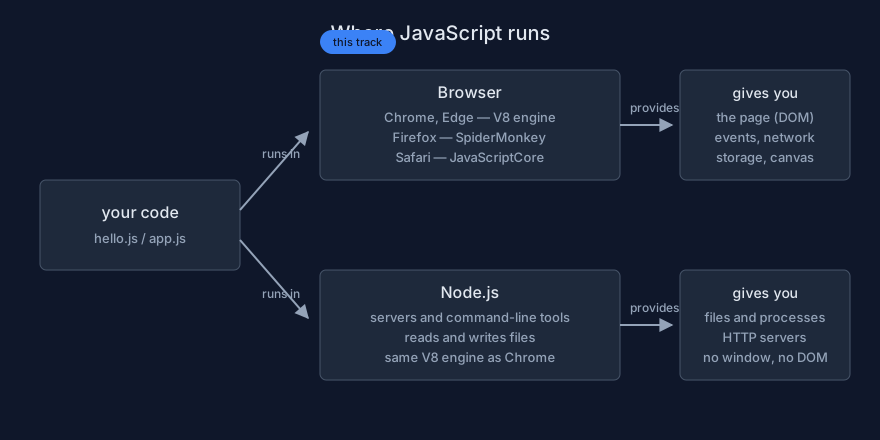
One language, two hosts. The browser gives your code a page to control; Node gives it files and servers.
Your fastest first run: the browser console
Open DevTools
Every browser hides a workshop for developers, called DevTools. Open any page
(this one will do) and press F12, or Ctrl+Shift+I, or right-click
anywhere and choose Inspect. Click the Console tab. The console is a
live command line for JavaScript: everything you type here runs immediately, against the
current page. Nothing you do here can break the real page — a reload wipes it.
Your first statement
Type this exactly and press Enter:
console.log("Hello, world!");
Breaking it down, word by word: console is a built-in object the host gives you —
a control panel for output. log is one of its abilities (a function attached to an
object is called a method). The parentheses (...) hand the text to
that method, and the quotes make it a text value (a string). The
semicolon ends the statement. The text appears below your line. That is it — you ran JavaScript.
You should see:
Hello, world!
undefined
The undefined is the console being honest: your statement produced no value, and
the console echoes whatever the line returns. Harmless, and explained in lesson 08.
The console does arithmetic — and something surprising
The console evaluates whatever you type and shows the result. Predict each line before pressing Enter:
2 + 3        // numbers add normally
"2" + "3"    // quotes make these TEXT, not numbers
"2" + 3      // mixing text and a number — predict first!
You should see:
5
"23"
"23"
If you expected 5 from the last two: that is the + operator
preferring text when it sees a string — your first taste of type coercion, covered
properly in lesson 05. Nothing is broken; the language has rules you are learning to predict.
Make an error on purpose
Now type this — deliberately broken:
console.log("oopsYou should see something like:
Uncaught SyntaxError: missing ) after argument list
Read it as a sentence, not a scolding: SyntaxError is the category (your text is not
valid JavaScript), and missing ) after argument list is the specific complaint. Fix the
line (add the )), press Enter, and it runs. Errors are normal — professionals read
dozens per day. Lesson 01's last section makes reading them a habit.
Your first file, run with Node
From typing to saving
Console code evaporates when you close the tab. A program lives in a file
whose name ends in .js. Create a folder for your studies (for example
js-lab), open it in a plain text editor —
VS Code
is the common free choice — and save this as hello.js:
// hello.js — my first JavaScript file.
console.log("Hello from a file!");
console.log(2 + 3);
Lines starting with // are comments: notes for humans, ignored by
the engine. Use them to say why the code exists, not what it obviously does.
Run it
You need a host again — the file alone does nothing. Two good options:
-
Node.js — the same engine Chrome uses, without the browser. Install it from
nodejs.org
(the Node roadmap has a full setup lesson). Then open a terminal in your folder
(in VS Code: menu Terminal → New Terminal) and run:
node hello.js - An HTML page — how real websites run JavaScript. That is the whole subject of the next lesson; if you prefer not to install anything yet, jump straight there.
You should see:
Hello from a file!
5
If you get node: command not found — the terminal cannot find Node;
either it is not installed or the terminal needs a restart after installing.
If you get Error: Cannot find module — you are in the wrong
folder; check where the file is with ls (or dir).
Errors are instructions, not failure
Anatomy of an error message
Type console.log(greeting) in the console (nothing called greeting
exists yet):
Uncaught ReferenceError: greeting is not defined
    at <anonymous>:1:13
Three pieces of information, in order: the category
(ReferenceError — you used a name the engine has never seen), the
message (greeting is not defined — the exact cause), and the
location (1:13 — line 1, column 13). Nothing is cryptic: it tells
you what went wrong and where. The habit that separates beginners who progress from those who
quit: read the first error before changing anything.
The three errors you will meet first
// 1. SyntaxError — the text is not valid JavaScript. The program does not even start.
console.log("hello'   // quote never closed

// 2. ReferenceError — a name the engine has never seen (usually a typo).
console.log(mesage); // did you mean "message"?

// 3. TypeError — the value cannot do what you asked of it.
const total = 5;
total(); // you cannot call a number like a function
You should see, respectively: SyntaxError: Invalid or unexpected
token, ReferenceError: mesage is not defined,
TypeError: total is not a function. Demo
foundations/03_errors_on_purpose.js runs all three safely and prints them.
How to learn JavaScript in this track
The study loop
Reading about code feels like learning, but the skill lives in your fingers and your predictions. For every example in this track, run the same loop:
- Read the section and the example.
- Type it by hand — never copy-paste. Your fingers learn the grammar; copy-pasting teaches nothing.
- Predict the output, out loud or in writing, before running.
- Run it and compare.
- Break it on purpose — change a value, remove a bracket — and read the error.
- Fix it and run again.
Ten minutes of this loop per example beats an hour of passive reading, because every wrong prediction is a gap in your mental model, found early and for free.
When you are stuck
- Cut the problem down to the smallest snippet that still fails — five lines, not fifty.
- Print the values at each step with
console.log; check types withtypeof. - Read the first error only; fix; re-run. Later errors are often echoes of the first.
- Look the construct up on MDN — the dictionary of JavaScript, with examples for every built-in.
A twenty-minute first session
- (3 min) Open the console on any page.
- (5 min) Log five values of different types; include one computation.
- (5 min) Cause one error of each of the three kinds; read each message; fix each one.
- (5 min) Save
hello.jsand run it with Node. - (2 min) Write down the one result that surprised you most.
Then continue to the next lesson, which puts JavaScript inside a real web page — the way every website you use runs it.
Practice: your first session
The task
Work through the first three demos from the
Lab Examples page:
foundations/01_hello_console.html (preview it, open the console),
foundations/02_first_file.js (run with node), and
foundations/03_errors_on_purpose.js.
The checklist
- You can open DevTools and run a statement in the console without instructions.
- You predicted every console output before pressing Enter — and investigated each miss.
- You can name the three error categories and what each one means.
- You can explain why the console prints
undefinedafter a plainconsole.logline.