
Composite Types
struct Point; x::Float64; y::Float64; end is not a convenience wrapper: it is a new type the compiler can specialise on, so code written for Point runs as if the fields were separate variables.
Until now every value in your programs came from the standard library. This lesson teaches you to define your own, and it follows the order in which real decisions are made: declare the shape, choose between immutable and mutable, protect the invariants with constructors, understand the field layout, and finally compose small types into larger ones. Because Julia has no class inheritance, composition is the main tool for modelling — so the lesson ends by showing exactly how composition replaces it, and where behaviour goes instead.
Defining a Struct
All composite types in Julia are declared with the struct keyword. The declaration names the type, lists its fields with their types, and is typically placed in a module of its own so the type and its methods travel together.
The struct Declaration
The declaration is data-first: no methods inside the body, no visibility keywords, one line per field. Field types are optional but strongly recommended — an untyped field is Any, which forces the compiler to give up on specialisation.
# A type with typed fields
struct Point
    x::Float64
    y::Float64
end

# Field types may be inferred away, but the type stays Fixed
struct Tag
    name          # defaults to ::Any — allowed, but slow and unchecked
end

# Several types with the same shape are different types
struct PointI
    x::Int
    y::Int
end

Point(1.0, 2.0)      # Point(1.0, 2.0)
PointI(1, 2)         # PointI(1, 2)
Point(1, 2)          # Point(1.0, 2.0) — Int converts to Float64
PointI(1.5, 2.5)     # ERROR: InexactError — Float64 does not fit in Int

# The declaration creates a type object you can query
Point                       # Point — the type itself
fieldnames(Point)           # (:x, :y)
fieldtypes(Point)           # (Float64, Float64)
Point isa DataType          # true
Point <: Any                # true — every type is a subtype of Any
The conversion rules in the middle of the example are worth noting: the implicit constructor converts when the conversion is exact and refuses when it loses information. That behaviour comes free with typed fields and is the first line of defence around your data.
Constructing Instances
Calling the type name as a function builds an instance. Julia writes a default constructor for you, one method per combination of field types, and stores the fields in the order you declared them. Because that constructor is a normal function, it participates in multiple dispatch like any other method.
p = Point(3.0, 4.0)

# Fields are read with dot notation
p.x                 # 3.0
p.y                 # 4.0

# The default constructor has one method per field-type combination
methods(Point)      # (::Type{Point})(x::Float64, y::Float64)

# Keyword-style construction is not automatic — see Chapter 3
Point(x = 3.0, y = 4.0)          # ERROR: MethodError

# Positional construction from values of another type works when exact
Point(3, 4)         # Point(3.0, 4.0)
That third line surprises most newcomers coming from languages where every type gets a keyword constructor. Julia gives you the positional one only, and Chapter 3 shows the two ways to add keyword construction when you want it.
Inspecting Instances
Because a composite type is just a type, the standard reflection functions work on instances too. When something is not behaving, printing typeof, fieldnames, and the fields themselves answers most questions immediately.
p = Point(3.0, 4.0)

typeof(p)                  # Point
propertynames(p)           # (:x, :y)
getfield(p, :x)            # 3.0 — the same value as p.x
p.z                        # ERROR: type Point has no field z

# Printing and showing differ
print(p)                   # Point(3.0, 4.0)  — via the default show method
show(p)                    # Point(3.0, 4.0)
dump(p)                    # a structural tree: Point / x: Float64 3.0 / y: Float64 4.0

# Field names are stable, so code can iterate over them
for name in fieldnames(Point)
    println(name, " = ", getfield(p, name))
end

# typeof is how you branch on a type at runtime
typeof(p) === Point        # true
isa(p, Point)              # true
hasfield answers the question safely when the field name is data rather than code: hasfield(Point, :z) is false instead of an error.
Immutable and Mutable
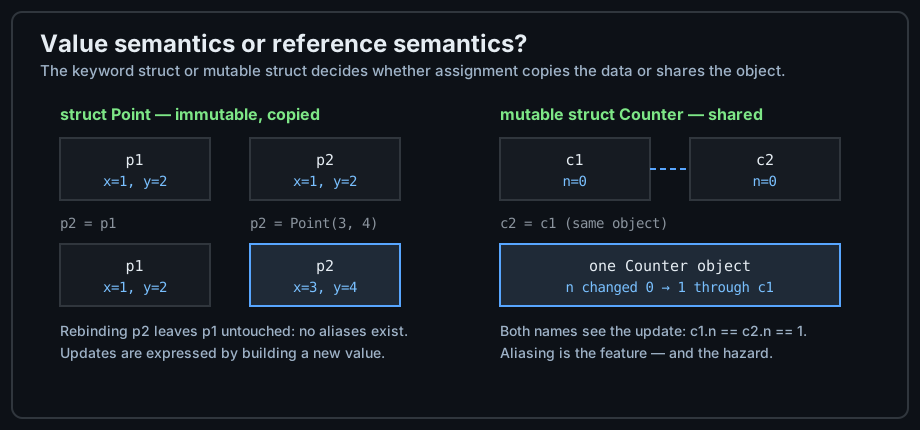
Julia's struct is immutable; mutable struct is the exception. That default is deliberate and the opposite of most object-oriented languages, where mutation is free and copying is expensive. The choice changes assignment semantics, hashing, and performance, so it deserves a chapter of its own.
Immutable by Default
You cannot assign to a field of an immutable struct, and you cannot rebind it later. To "change" a value you build another one, usually with the smallest number of fields replaced. In return, immutable values are cheap to copy, safe to share between tasks, and usable as dictionary keys.
struct Point
    x::Float64
    y::Float64
end

p = Point(1.0, 2.0)

p.x = 5.0                 # ERROR: setfield!: immutable struct of type Point cannot be changed

# "Updating" means building a new value from the old one
q = Point(p.x, 5.0)       # Point(1.0, 5.0)
p                         # Point(1.0, 2.0) — untouched

# A helper makes the intent readable
with_y(p, y) = Point(p.x, y)
with_y(p, 9.0)            # Point(1.0, 9.0)

# Immutable values are legal dictionary keys
lookup = Dict{Point, String}()
lookup[p] = "origin area"
lookup[Point(1.0, 2.0)]   # "origin area" — keys compare by value
Hashing by value is the reason the dictionary example works: two distinct Point objects with equal fields are the same key. Chapter 2's last section shows what changes for a mutable type.
mutable struct
Add the mutable keyword and the fields become assignable. The type itself is still a fixed layout — you cannot add or remove fields — but the values in it can change, and every variable that refers to the object sees the change.
mutable struct Counter
    n::Int
end

c = Counter(0)

c.n += 1                  # allowed: the field is assignable
c.n                       # 1

# Assignment shares the object — this is aliasing
d = c
d.n += 1
c.n                       # 2 — the same object was updated

# isequal asks about value, === asks about identity
c === d                   # true — the same object
c == d                    # true here, because the default compares fields

# An immutable field can hold a mutable value
struct Box
    items::Vector{Int}
end

b = Box([1, 2])
b.items[1] = 99           # allowed: b is immutable, the vector inside is not
b.items                   # [99, 2]
b = Box([3])              # ERROR: cannot rebind the field; build a new Box instead
That last block is the rule people get wrong most often: struct prevents reassigning the field, not mutating what the field points at. If you need a type nothing can change, the fields themselves must be immutable containers such as tuples.
Identity, Equality, and Hashing
Immutable and mutable structs answer the comparison and hashing questions differently. Knowing which default applies saves you from the classic "why is my mutable object missing from the set" bug.
| Question | struct (immutable) | mutable struct |
|---|---|---|
| Field assignment | Not allowed | Allowed |
| Assignment copies or shares? | Behaves as a value | Shares the object |
== default | Field-by-field | Field-by-field |
=== means | Field identity, effectively equal | The very same object |
hash default | By field values — usable as keys | By object identity — avoid as keys |
| Safe to share across tasks | Yes | Only with synchronisation |
struct P; x::Int; end
mutable struct M; x::Int; end

P(1) == P(1)          # true  — equal by fields
P(1) === P(1)         # true  — immutable values with equal fields are indistinguishable
M(1) == M(1)          # true  — the default == compares fields even for mutable types
M(1) === M(1)         # false — two distinct objects

# Hashing follows identity for mutable types, so sets and dicts behave differently
Set([P(1), P(1)])     # 1 element — the duplicates collapse by value
Set([M(1), M(1)])     # 2 elements — identity hashing keeps both objects

# If you define your own ==, define the matching hash too
Base.:(==)(a::M, b::M) = a.x == b.x
Base.hash(m::M, h::UInt) = hash(m.x, h)
Prefer immutable structs unless you genuinely need in-place updates — for example an accumulating buffer, a running counter, or a node in a graph you keep reconnecting. Everywhere else, immutability buys safety and lets the compiler optimise.
Constructors
A constructor is the gate through which every instance of your type must pass. Julia gives you a default gate, and two ways to install your own: an inner constructor inside the struct body, and outer constructors that are ordinary methods of the type.
Inner Constructors
An inner constructor is written inside the struct body. Its existence suppresses the automatic constructor, which is exactly what you want when instances must never exist in an invalid state — no negative radius, no empty identifier, no reversed range.
struct Interval
    lo::Float64
    hi::Float64

    # Parameterless form: take the user's arguments, normalise them, build the object
    function Interval(a, b)
        a, b = min(a, b), max(a, b)     # normalise first
        a == b && throw(ArgumentError("degenerate interval"))
        new(a, b)                       # new() is only available inside the struct
    end

    # A second, zero-argument method reusing the first
    Interval() = Interval(0.0, 1.0)
end

Interval(5.0, 1.0)      # Interval(1.0, 5.0) — order fixed by the constructor
Interval()              # Interval(0.0, 1.0)
Interval(2.0, 2.0)      # ERROR: ArgumentError: degenerate interval

# The automatic constructor is gone, so raw field order cannot bypass validation
Interval(lo = 1.0, hi = 5.0)   # ERROR: MethodError
new is the only way to create an instance from inside a constructor, and it takes the fields positionally. Because it is unavailable outside the struct body, no caller can skip your checks once an inner constructor exists.
Outer Constructors
An outer constructor is a method defined after the struct, with the type name on the left and no restriction to new. Use them for convenience conversions and named alternatives; they may not construct an object without calling something that eventually reaches new.
struct Point
    x::Float64
    y::Float64
end

# Accept integers by converting, then delegating to the default constructor
Point(x::Integer, y::Integer) = Point(Float64(x), Float64(y))

# A named alternative for a common case
Point() = Point(0.0, 0.0)
origin() = Point(0.0, 0.0)

# A constructor from another representation
function Point(polar::Tuple{Float64, Float64})
    r, θ = polar
    Point(r * cos(θ), r * sin(θ))
end

Point(1, 2)                       # Point(1.0, 2.0)
Point()                           # Point(0.0, 0.0)
Point((1.0, 0.0))                 # Point(1.0, 0.0)

# Keyword construction, which Julia does not generate automatically
Point(; x = 0.0, y = 0.0) = Point(x, y)
Point(y = 3.0)                    # Point(0.0, 3.0)
The last two lines are the answer to the earlier MethodError: keyword construction is a one-line outer constructor, or the macro Base.@kwdef in front of the struct, which generates it with defaults taken from the field declarations.
Enforcing Invariants
An invariant is a statement that must hold for every instance. Constructors are where you enforce it, and the payoff is that no other code in the program has to check again. The idiomatic shape is: validate in a function, return a typed value or nothing, and let the constructor stay total.
using Base: @kwdef

@kwdef struct User
    name::String
    age::Int = 0
end

# Validate before construction, keeping the constructor simple and total
function make_user(name, age)
    isempty(strip(name)) && return nothing
    age < 0 && return nothing
    User(strip(name), age)
end

make_user("Ada", 36)      # User("Ada", 36)
make_user("Ada", -1)      # nothing — rejected before an object existed

# For a hard rule, throw from the constructor instead of returning nothing
struct Email
    address::String
    function Email(address::AbstractString)
        occursin(r"^[^@\s]+@[^@\s]+$", address) || throw(ArgumentError("bad email: $address"))
        new(String(address))
    end
end

Email("ada@example.com")  # Email("ada@example.com")
Email("not-an-email")     # ERROR: ArgumentError

# @kwdef gives defaults, so a field may be omitted
User(name = "Grace")      # User("Grace", 0)
Choose the style by what the failure means: return nothing or a Result-like value when invalid input is expected, and throw when an invalid value is a bug in the calling code.
Fields and Layout
A struct is a fixed layout in memory: the fields sit next to each other in declaration order, and their declared types determine how many bytes each one takes. Field types therefore decide both what you may store and how fast the type behaves.
Concrete Fields versus Abstract Fields
Declare the most specific type that is always true. A concrete field type lets the compiler lay out the value inline; an abstract or Any field forces a pointer to a boxed value, and every read becomes a dynamic lookup.
# Concrete fields: layout fixed, values stored inline
struct Node
    value::Int
    next::Node              # recursive reference — legal, stored as a pointer
end

# Abstract fields: flexible, but every read is a dynamic dispatch
struct LooseBox
    contents::Any
end

# Abstractly typed fields behave like Any for performance
struct AbstractBox
    contents::Number         # Number is abstract: Real, Complex, Int, ...
end

LooseBox(42).contents        # 42 — works, but the compiler does not know the type
AbstractBox(3.5).contents    # 3.5

# Where flexibility is genuinely needed, a parametric field keeps the type concrete
struct TypedBox{T}
    contents::T
end

TypedBox(42)                 # TypedBox{Int64}(42) — T is known, layout is concrete
typeof(TypedBox(42))         # TypedBox{Int64}
typeof(TypedBox("hi"))       # TypedBox{String}

# The declared type is what the compiler sees
fieldtype(LooseBox, 1)       # Any  — dynamic dispatch on every field read
fieldtype(TypedBox{Int}, 1)  # Int64 — concrete, resolved at compile time
TypedBox{T} is a parametric type, covered properly on Parametric Types & Generics. The takeaway here is the rule of thumb: concrete fields by default, parametric fields when the type must vary, Any only at genuine boundaries such as a heterogeneous parser result.
getfield, fieldnames, and propertynames
p.x is syntax for getproperty(p, :x), which by default calls getfield. Overriding getproperty lets a type expose computed or renamed fields without changing its storage — a technique the standard library uses for things like lazy statistics.
struct Rect
    w::Float64
    h::Float64
end

r = Rect(3.0, 4.0)

r.w                       # 3.0 — sugar for getproperty(r, :w)
getproperty(r, :h)        # 4.0
getfield(r, :w)           # 3.0 — bypasses any getproperty override

fieldnames(Rect)          # (:w, :h)
propertynames(r)          # (:w, :h) — same here; may differ after an override
hasfield(Rect, :area)     # false

# Computed properties without extra storage
function Base.getproperty(r::Rect, name::Symbol)
    name === :area && return getfield(r, :w) * getfield(r, :h)
    name === :perimeter && return 2 * (getfield(r, :w) + getfield(r, :h))
    return getfield(r, name)          # always fall back for real fields
end

r.area                    # 12.0
r.perimeter               # 14.0
r.w                       # 3.0
propertynames(r)          # (:w, :h, :area, :perimeter) if you also override propertynames
Two rules keep an override safe: always call getfield (never r.w) inside it, or you recurse forever; and override propertynames as well, so tools such as the REPL, dump, and data libraries can discover the computed names.
Updating a Mutable Value
Mutable fields are assigned with =, which is sugar for setfield!. When you need to keep an immutable type but change one field, the idiomatic approach is a reconstruction helper — and the common case is already in the standard library as Base.@kwdef.
mutable struct Account
    owner::String
    balance::Float64
end

a = Account("Ada", 100.0)

a.balance += 25.0            # sugar for setfield!(a, :balance, 125.0)
a.balance                    # 125.0
setfield!(a, :owner, "Grace")
a.owner                      # "Grace"

# copy vs deepcopy: shallow duplicates fields, deep follows references
b = copy(a)                  # a new Account with the same field values
b === a                      # false
b.balance = 0.0
a.balance                    # 125.0 — independent objects

nested = [Account("Ada", 1.0)]
n1 = copy(nested)            # the VECTOR is new, the Account inside is shared
n2 = deepcopy(nested)        # everything is new, recursively

# Reconstructing an immutable value — the "with" pattern, with library support
struct Config
    host::String
    port::Int
    debug::Bool
end

Config("localhost", 8000, false)      # plain structs require every field

using Base: @kwdef
@kwdef struct Config2
    host::String = "localhost"
    port::Int = 8000
    debug::Bool = false
end

Config2()                             # Config2("localhost", 8000, false)
Config2(port = 9000)                  # change one field, keep the defaults
Config2(; debug = true)               # a keyword splat works the same way
copy is shallow by design; when your struct holds a vector, a dictionary, or another mutable struct, use deepcopy unless sharing is intentional. Chapter 6 shows why this matters.
Composition over Inheritance
Julia has no class inheritance: you cannot define Dog <: Animal for two concrete structs, and there is no super. Instead a type contains other types, and behaviour is attached later through methods. This is not a limitation to work around — it is why Julia code composes so well across packages.
Structs Inside Structs
Composition means a field whose type is another struct. The result is a type that owns its parts, with each part defined once and testable on its own. Nesting depth costs nothing at runtime: with concrete field types the whole structure is laid out contiguously.
struct Address
    street::String
    city::String
    country::String
end

struct Person
    name::String
    age::Int
    address::Address          # composition, not inheritance
end

a = Address("1 Main St", "Cluj", "RO")
p = Person("Ada", 36, a)

p.address.city                # "Cluj" — read through the chain
p.address.country             # "RO"

# Building nested values reads well with a small helper
home(street, city) = Address(street, city, "RO")
Person("Grace", 45, home("2 Oak Ave", "Cluj"))

# A summary function shows how naturally the parts combine
describe(p::Person) = "$(p.name) ($(p.age)) lives in $(p.address.city)"

# The same struct can be reused anywhere it fits
struct Company
    name::String
    hq::Address               # no duplication of fields
end

Company("Sage", a).hq.city    # "Cluj"
Notice that Address was written once and used in two unrelated types. That reuse is impossible to get this cheaply with inheritance, where both parents would have to share an ancestry.
Why There Is No Inheritance
Inheritance bundles two separate ideas: sharing data (subclassing fields) and sharing behaviour (overriding methods). Julia keeps composition for the first and multiple dispatch for the second. Abstract types then express classification without any data attached.
# Abstract types carry no fields — they are labels in a type hierarchy
abstract type Shape end
abstract type Polygon <: Shape end

# Concrete types declare their place in the taxonomy
struct Circle <: Shape
    radius::Float64
end

struct Square <: Polygon
    side::Float64
end

struct Triangle <: Polygon
    base::Float64
    height::Float64
end

# Subtyping is checked, but it never grants fields or methods
Circle <: Shape            # true — provided by the declaration
Circle <: Polygon          # false
Square <: Polygon          # true
fieldnames(Polygon)        # () — an abstract type has no fields at all

# Every concrete type is still a separate layout
subtypes(Shape)            # [Polygon, Circle] — direct subtypes only
subtypes(Polygon)          # [Square, Triangle]
supertype(Square)          # Polygon
So the model is two-dimensional: composition builds the data, and the abstract type tree classifies it. Which brings the natural question — where does behaviour live? In functions whose arguments are typed, added afterwards, in any package.
Where Behaviour Goes
A function with typed arguments is the method for those types. That single fact replaces override, virtual dispatch, and interface declarations all at once, and it lets you add behaviour to types you did not write.
area(c::Circle) = π * c.radius^2
area(s::Square) = s.side^2
area(t::Triangle) = t.base * t.height / 2

shapes = [Circle(1.0), Square(2.0), Triangle(3.0, 4.0)]

area.(shapes)              # [3.14159..., 4.0, 6.0] — dispatch per element
sum(area, shapes)          # 13.14159...

# A method typed on the abstract class covers every present and future subtype
describe(s::Shape) = "$(nameof(typeof(s))) with area $(round(area(s); digits = 2))"
describe.(shapes)

# Nothing stopped us from adding methods after the types were declared
area(Circle(2.0))          # 12.566370614359172

# And a function with no matching method gives a clear, early error
area("circle")             # ERROR: MethodError — no method for String
This is only half the picture: which method runs for a given call is multiple dispatch, the subject of the next lesson. Once you have it, every design question becomes concrete — put data in structs, put classification in abstract types, and put behaviour in methods.
Common Pitfalls
Four mistakes appear again and again in code written by people arriving from other languages. Each one has a mechanical fix, and each is cheaper to avoid than to debug.
An Immutable Struct with Mutable Contents
struct freezes the field bindings, not the objects they point at. A struct holding a vector is as mutable as that vector, which surprises anyone who assumed struct means "constant".
struct Basket
    items::Vector{String}
end

b = Basket(["apple"])

b.items = ["pear"]        # ERROR: cannot reassign the field
push!(b.items, "pear")    # allowed: the vector itself is mutated
b.items                   # ["apple", "pear"]

# A truly immutable container uses a tuple
struct FrozenBasket
    items::Tuple{Vararg{String}}   # a tuple cannot be changed
end

f = FrozenBasket(("apple",))
push!(f.items, "pear")    # ERROR: no method matching push!(::Tuple)
f.items = ("pear",)       # ERROR: cannot reassign the field either

# Changing the variable is legal; the value inside the old struct is untouched
f = FrozenBasket(("pear",))     # a brand-new value
If a caller must not see your internal vector change, hand out a copy (copy(b.items)) or store the data in a tuple. "Immutable" always refers to the value of the field, never to what that value contains.
Fields Typed Any or Abstract
An Any or abstractly typed field turns every read into a dynamic lookup and prevents optimisation across function boundaries. It is the most common cause of a struct-based program running far slower than its arithmetic suggests — and the fix is a type parameter.
| Symptom | Cause | Fix |
|---|---|---|
Fields typed Any | Missing annotations | Annotate, or use a type parameter |
Fields typed Number, Real, AbstractString | An abstract class used as a storage type | Parameterise: Box{T} |
Vector{Any} from [] | An empty literal with no element type | Annotate: Float64[] |
| Heavy allocation while reading fields | Values stored as boxed pointers | Concrete or parametric fields |
# Slow: the compiler cannot know what is inside
struct SlowBox
    value::Any
end

# Fast: the type is part of the struct type, so the layout is concrete
struct FastBox{T}
    value::T
end

slow = SlowBox(3.0)
fast = FastBox(3.0)

typeof(slow)               # SlowBox
typeof(fast)               # FastBox{Float64}

@code_warntype SlowBox(3.0).value   # reports ::Any — a type instability
@code_warntype FastBox(3.0).value   # reports ::Float64 — inferred
Reach for @code_warntype, or the type-instability hints in your editor, when a struct-heavy program feels slow: any Any in that report is a field that should be annotated or parameterised.
Accidental Sharing of Mutable Structs
Because mutable structs are shared on assignment, a function that modifies its argument modifies the caller's object. Sometimes that is exactly what you want — a buffer, an accumulator — and sometimes it is a bug. Decide deliberately, and signal the decision in the function name.
mutable struct Cart
    items::Vector{String}
end

# Mutating on purpose: the "!" in the name warns the caller
function add_item!(cart::Cart, item)
    push!(cart.items, item)
    cart
end

# Returning a new value instead: no "!" and no shared state
function with_item(cart::Cart, item)
    Cart(vcat(cart.items, [item]))
end

c = Cart(["bread"])
add_item!(c, "milk")
c.items                    # ["bread", "milk"] — the original changed

d = with_item(c, "eggs")
d.items                    # ["bread", "milk", "eggs"]
c.items                    # ["bread", "milk"] — untouched

# Inside a function that must not disturb its input, copy first
function report(cart::Cart)
    items = copy(cart.items)      # local safety net
    sort!(items)
    join(items, ", ")
end

report(Cart(["milk", "bread"]))   # "bread, milk"
Julia's naming convention is precise here: a function whose name ends in ! may mutate its arguments, and a function without it is expected to leave them alone. Following the convention turns sharing from a surprise into documentation.
The Missing Keyword Constructor
Point(x = 1.0) fails on a plain struct, and the error message names a method that does not exist. Two one-line fixes are available, and choosing between them is a style decision rather than a technical one.
struct Point
    x::Float64
    y::Float64
end

# Fix 1: write the keyword constructor yourself
Point(; x = 0.0, y = 0.0) = Point(x, y)
Point(x = 1.0)             # Point(1.0, 0.0)

# Fix 2 (preferred when several fields are optional): @kwdef
using Base: @kwdef
@kwdef struct Point3
    x::Float64 = 0.0
    y::Float64 = 0.0
    z::Float64 = 0.0
end

Point3(z = 5.0)            # Point3(0.0, 0.0, 5.0)

# Both forms coexist with an inner constructor: the inner one keeps the
# positional method, so keep your validation there.
Use @kwdef when most fields have sensible defaults, and a hand-written outer constructor when the keyword form needs extra logic or normalisation. Either way, readers of your type get the construction syntax they expect.
struct declares a type with typed, immutable fields; mutable struct makes fields assignable and instances shared. Constructors are the only gate: inner constructors own new and enforce invariants, outer constructors add convenience and keyword forms. Keep field types concrete or parametric — never Any — and remember that immutability covers the field binding, not what the field points at. With no inheritance available, you model data by composition and behaviour by methods.
You can now define your own types. Next: Methods & Multiple Dispatch shows how functions choose among those types, and why that choice sits at the centre of Julia's design.